




Skip to content
View in the app

A better way to browse. Learn more.

Unraid

A full-screen app on your home screen with push notifications, badges and more.

To install this app on iOS and iPadOS
  1. Tap the Share icon in Safari
  2. Scroll the menu and tap Add to Home Screen.
  3. Tap Add in the top-right corner.
To install this app on Android
  1. Tap the 3-dot menu (⋮) in the top-right corner of the browser.
  2. Tap Add to Home screen or Install app.
  3. Confirm by tapping Install.

mpeterson

Members
  • Joined

  • Last visited

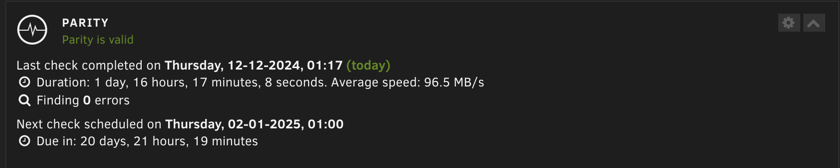
  1. The feared day has come where my parity check ended up with errors, or at least according to the push notification I got (`nibbler-parity-not-valid.png`) However when I look at the Dashboard or Main, the painted picture is different (`nibbler-parity-is-valid.png`) I'm very confused because end times are almost the same, but durations are very different and results too. Can someone help me figure out what's going on? Note: Uploading anonymized diagnostics (I also captured non anonymized diagnostics in case Limetech reps will need it) nibbler-diagnostics-20241211-2237-anon.zip

  2. I too share the pain of this and I agree that this is just a workaround. It would be nice to know the stance of the devs about this.

Account

Navigation

Search

Search

Configure browser push notifications

Chrome (Android)
  1. Tap the lock icon next to the address bar.
  2. Tap Permissions → Notifications.
  3. Adjust your preference.
Chrome (Desktop)
  1. Click the padlock icon in the address bar.
  2. Select Site settings.
  3. Find Notifications and adjust your preference.