





hermsnross
Members
-
Joined
-
Last visited
-
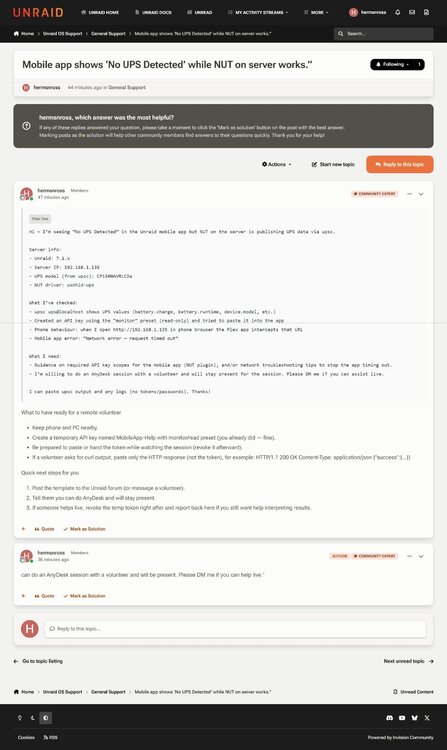
I currently have a Cyberpower LX1500GAVR UPS, (Per Unraid the devise is compatible to APC UPS daemon) can that be configured to run without the NUT driver, using the built-in UPS settings All I needed was what are the configuration settings in the UPS tab, and if I need to disable the current setting for the NUT driver to insure all is configured correctly to support the Cyberpower LX1500GAVR UPS, and also how to revert back to NUT if the devise is not supported. My thought is to turn NUT setting to "OFF". And then reply to Set to 'Yes' to enable apcupsd and start the daemon, set to 'No' to disable if current devise is not supported by apcupsd and stop the daemon to revert back to "NUT". Then turn NUT setting to "Yes " to revert back to "NUT" Please advise if there are more settings required????
-
UPS status on IOS Tower_NUTsettings.htmlTower_NUTsettings.htmlTower_NUTsettings.htmlapp showing No UPS Detected Tower_NUTsettings.mhtml Tower_Syslog.html
.thumb.png.026cb4cb0da51692b1db6d1fe8acc784.png)
.thumb.png.47eb5a810339acc43fb956bcfb16abff.png)
.thumb.png.2a22a7f001ca21bc376badcc92426246.png)
-
can do an AnyDesk session with a volunteer and will be present. Please DM me if you can help live.”
-
Hi — I’m seeing “No UPS Detected” in the Unraid mobile app but NUT on the server is publishing UPS data via upsc. Server info: - Unraid: 7.1.x - Server IP: 192.168.1.135 - UPS model (from upsc): CP1500AVRLCDa - NUT driver: usbhid-ups What I’ve checked: - upsc ups@localhost shows UPS values (battery.charge, battery.runtime, device.model, etc.) - Created an API key using the “monitor” preset (read-only) and tried to paste it into the app - Phone behaviour: when I open http://192.168.1.135 in phone browser the Plex app intercepts that URL - Mobile app error: “Network error — request timed out” What I need: - Guidance on required API key scopes for the mobile app (NUT plugin), and/or network troubleshooting tips to stop the app timing out. - I’m willing to do an AnyDesk session with a volunteer and will stay present for the session. Please DM me if you can assist live. I can paste upsc output and any logs (no tokens/passwords). Thanks! What to have ready for a remote volunteer Keep phone and PC nearby. Create a temporary API key named MobileApp-Help with monitor/read preset (you already did — fine). Be prepared to paste or hand the token while watching the session (revoke it afterward). If a volunteer asks for curl output, paste only the HTTP response (not the token), for example: HTTP/1.1 200 OK Content-Type: application/json {"success":{...}} Quick next steps for you Post the template to the Unraid forum (or message a volunteer). Tell them you can do AnyDesk and will stay present. If someone helps live, revoke the temp token right after and report back here if you still want help interpreting results.
-
Looking for a ESATA PCI adapter card that would work with a CentMate 10 port chassis supporting Unraid server chipset- (JMB585) currently using a 4 port PCI USB adapter card...when I try to get hard drive attributes, nothing appears. Error: Check power mode incomplete response, ATA output registers missing Please advise....
-
http://192.168.1.135/Dashboard
-
Thank for all your information and advice, the current configuration is working via USB and I will try the USB card adapter you recommended, and also update the memory to 32gb and see it that improves the processor performance. (SEE BELOW) https://www.amazon.com/gp/product/B00UK3X3L0/ref=ox_sc_act_title_2?smid=ATVPDKIKX0DER&psc=1 https://www.amazon.com/gp/product/B08X6TFJY5/ref=ox_sc_act_title_1?smid=A2L77EE7U53NWQ&th=1
-
This is the Cenmate chassis: https://www.amazon.com/dp/B0DD3FRQDS/ref=sspa_dk_hqp_detail_aax_0?sp_csd=d2lkZ2V0TmFtZT1zcF9ocXBfc2hhcmVk&th=1 This is this is the esata adapter: https://www.amazon.com/dp/B00952N2DQ?ref=ppx_yo2ov_dt_b_fed_asin_title&th=1 With both port pin configuration set for esata- which didn't work or didn't recognize card or esata adapter, since they only support LTS Kernels from 3.5 and up, with correct libraries, or unable to support Unraid/Linux server config. Looking for a comparable USB PCI adapter that would work with Unraid/Linux configuration.
-
This is the Centmate chassis: https://www.amazon.com/dp/B0DD3FRQDS/ref=sspa_dk_hqp_detail_aax_0?sp_csd=d2lkZ2V0TmFtZT1zcF9ocXBfc2hhcmVk&th=1 This is this is the esata adapter: https://www.amazon.com/dp/B00952N2DQ?ref=ppx_yo2ov_dt_b_fed_asin_title&th=1 Looking for a comparable USB PCI adapter that would work with Unraid
-
Please advise to a recommended esata or USB PCI card adapter which would support a Cenmate external hard drive chassis since the current Startech esata adapter doesn't work. Everything is currently working via Cenmate provided USP (cable) connection to a HP computer (AMD Ryzen 3 2200G with Radeon Vega Graphics @ 3500 MHz) running unRaid OS, but with the current configuration the processor is running very slow......please advise Herman Ross [email protected] 732-208-1490
-
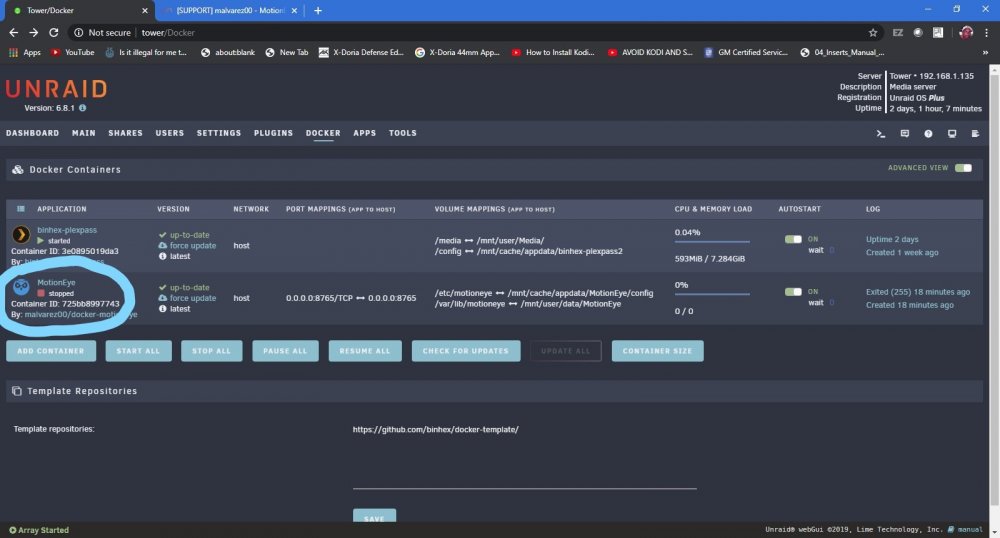
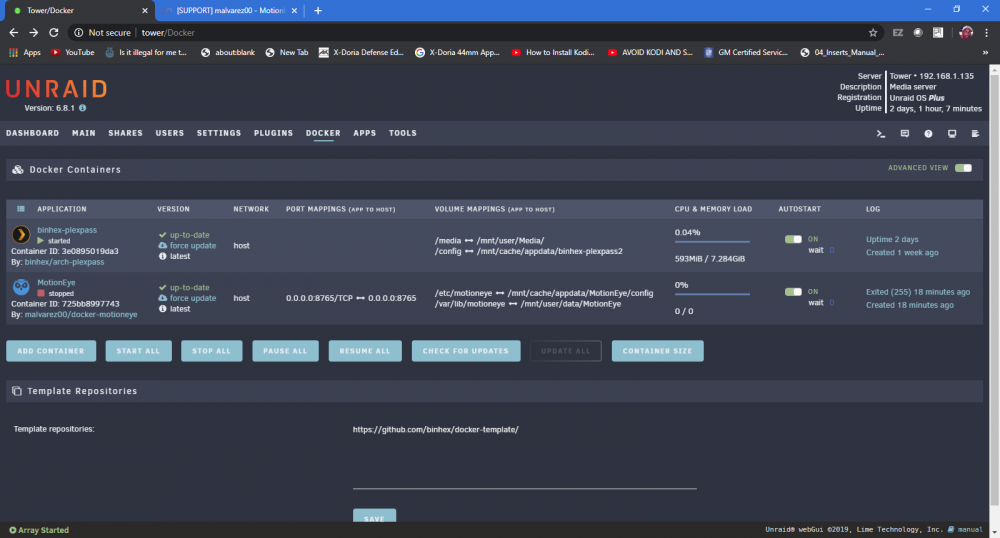
Why can't I start motioneye on my unraid device, it is fully installed but I can't start or run the application to configure my cameras.
-
see attached
-
Why can't I start motioneye on my unraid device, it is fully installed but I can't start or run the application to configure my cameras.
.png.e9599a389e97ca8c3bae32f80853cb66.png)
.png.25c6f4d9f32cc41e9509a2cb34ed3b55.png)
.png.959559d0d7de520852b09d57bfc7f659.png)


