





Johann
Members
-
Joined
-
Last visited
-
Wow, thanks for the quick fix! I didn't see the forums till now, and I'm glad everything is fixed! I can also confirm that it reports correctly for me now. My pools are also ZFS.
-
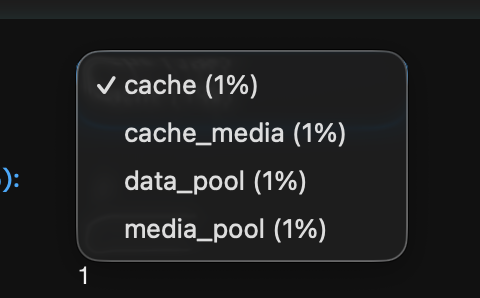
My cache drive utilization is at 87% but the plugin shows 1%. I see this for all my pools as well. I attached some screenshots. By the way I love the UI and its super easy to navigate!
-
Hi! I'm unsure what my issues is with my setup. I had it fine originally but accidentally ran a tailscale up command I meant for a different device on my unraid server so I reset the plugin. I think I originally ran with this command: tailscale up --accept-dns=false --advertise-exit-node --advertise-routes=10.0.1.0/24 However, after accepting the routes, it doesn't work on my other devices. I had to split the subnet for it to finally work from my other devices: tailscale up --accept-dns=false --advertise-exit-node --advertise-routes=10.0.1.0/25,10.0.1.128/25 Any idea why this is? It is the same case for my other subnets as well.
-
Here's the problems right now. Disk 2 is disabled. Disk 3 is rebuilt, but I'm uncertain whether or not the data is correct since there weren't writes to the disk for a while but other disks were reading. Parity 2 has dropped itself from the array and currently its "unassigned.
-
I have a precleared drive sitting in unassigned drives and I'm not sure if this is related, but on the precleared drives, running fdisk -l, I see this error "Partition 1 does not start on physical sector boundary". I saw this before on the drives I precleared.
-
I found this similar situation but didn't really identify the fix here: Looks like the rebuild thinks is continuing and reading from drives but its not writing to the rebuilding drive. I'll let it finish its course. I think the next step before doing anything would be to wait for its to finish "rebuilding" and running xfs_repair -v /dev/mdX on each disk in maintenance mode from https://docs.unraid.net/unraid-os/manual/storage-management/#xfs-and-reiserfs to verify everything all filesystems are working. Once confirmed all the filesystems are good to go, i think I would keep disk 2 disabled since the data should be intact on that drive but I'm not sure why it had read errors. But next step to rebuilding disk 3 on top of itself? The disk it is replacing is still in unassigned drives with data intact and untouched. What would be the best course of action here, I'm gonna wait for a response before I break everything...
-
Under attributes it says Smartctl open device/dev/sdi failed for parity 2 All user shares on the Array do say "SOME OR ALL FILES UNPROTECTED"
-
Biggest question is since one drive is rebuilding, one is disabled and one parity drive is having a few million read errors, is my data fine at the moment?
-
Wow i'm scared at the moment. I'm trying to replace my remaining 12TB with 18TB. I unassigned a 12TB and assigned a precleared 18TB, all fine no issues, rebuild starts. 4TB in I get a notification that disk 2 has read errors and is disabled, 2048 errors. Ok i'll let it rebuild and replace that drive maybe its dying after. I wake up today and parity 2 has 563,197,701 errors and increasing by the second?! What is going on I attached my diagnostics. I've never had issues with unraid till the last few weeks in the years Ive been using it! Current rebuild has 5 hrs left. Looks like syslog is full cause of "Mar 2 09:37:00 Toblerone kernel: md: disk29 read error, sector=30864609368" I just increased log size to get more info. The temp on parity 2 has a star idk why but its still marked as green, "normal operation"? toblerone-diagnostics-20240302-0932.zip
-
Hmm I will have to try that. I was looking at the diagnostics ive sent and it seems like I have always had this issue, but never really noticed it till trurl pointed it out. For some reason in the past, ive never seen it in the logs until recently.
-
I have tried switching PCIe slots and tried manually setting link speed to gen2. Still no go. However I did notice in the BIOS, the drives aren't showing up like they used to within the BIOS. I remember them showing up on the main bios page before.
-
Here are updated diagnostics: toblerone-diagnostics-20240225-1809.zip
-
I thought it might be the backplane of my 4U case wasn't getting enough power, so I took out some drives I was preclearing back to what it was before. The "Power-on or device reset occurred" error still persist. I know I recently switched HBAs from the 2008 to 9500, so I switched it back and switched back the cables and its still persisting. I'm really lost and don't know whats wrong.
-
Look like the drops do affect plex, I changed it to eth0 with a custom ip the other day and every 10min it caused the stream to cut and rebuffer even though the playback bar indicates it had already buffered like the next 10 minutes. I switched it back to host, and it's no longer an issue.
-
I don't think its overheating it gets pretty good airflow with the fans in the 4u case. I'll definitely have to try reseating it, I have to finish rebuilding an existing drive first tho only a few more hrs. Just looking to learn, where can I see that its having problems communicating with some disks?
