





jongregory75
Members
-
Joined
-
Last visited
Everything posted by jongregory75
-
I ran a new config, Fixed all the drive errors. Rebuilt parity. Lost about 15TB data but no clue what was lost. QB/Sonarr/Radarr will figure that out. I still have a 14TB, and 3 8 TB drives that the bios won't pick up. It's not a topic for this forum. I plugged them into my windows machine and it showed the directories that were currently on the 8TB drives. The 14TB drive doesn't respond at all.
-
I transitioned from a SM X10DRH-IT after a power surge left that MB dead. I've transitioned everything over to the new r730xd (with a big CyberPower battery/conditioner) but lost 3 drives in the process. Parity 1: no device - previously 14TB (2BG0-DM6F) Disk 8: no device - previously 10TB (JEKZ-3Z7Z) Disk 9: no device - previously 8TB ( Disk 11: unassigned - I think this was previously populated by a 14TB that's now in Disk 12 - 14TB (2BG7-HAJE) I'm very new to the new Dell iDRAC/bios but proficient with the settings. If I could get the Parity 1 rewritten, I don't care about disk 8&9. I'd like to at least be able to start the array and then deal with replacing lost data. How do I remove the Disk 11: unassigned error? This error came from building a JBOD and has just been lingering. tower-diagnostics-20241120-1248.zip
-
Update: It's got to be something with the card/firmware. Since there is a already an 8i card already working, I found a sff-8087 to 4 sata forward breakout cable that I could run through the back of the server and down into the JBOD. It barely reaches but I was able to plug in 2 of the 14TB WD whites. I used one of the sata breakout power cables. Plugged everything in, stopped the array, the drives populated in unassigned devices, I assigned them to the array pool, started the array and they are pre-clearing now. So at the end of the day, I wasted a lot of time trying to get the 9201-16e to work. I'll go on amazon and buy a little longer 8087 breakout and plug all 4 in. That'll give me an additional 36TB which should carry me for a couple years. I won't call this solved but oh well.
-
Should or shouldn't? I guess the question now becomes, "Why would only one drive show up?" The 9201-16e is recognized by the OS. A single drive populates but the other 3 don't. I can feel them spinning. More to figure out I guess.
-
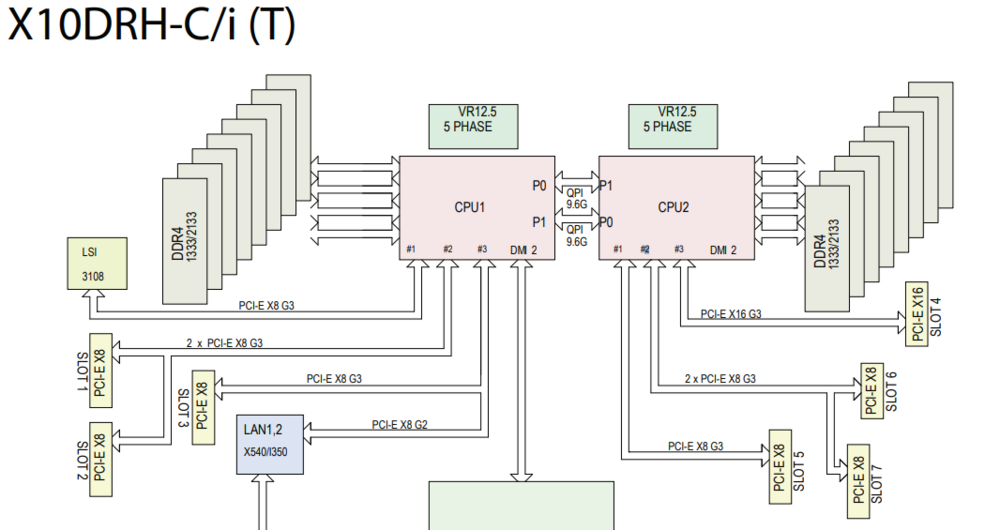
Update: I ran the following to erase both bios and firmware. sas2flsh -c 1 -o -e 6 Shutdown and restarted. Then ran P20 firmware and bios update. sas2flsh -c 1 -o -f 9201-16e.bin -b mptsas2.rom No errors Went back into the MB bios and changed bifurcation. According to the SM X10DRH-iT manual, PCI-E slot 6 & 7 are on CPU2 and on the same IOU so I set the CPU2a and CPU2c bifurcation to 8X8. Rebooted and got an 8TB red to populate. I plugged another 8TB red that I didn't remove the 3.3v pin and a 14TB white with 3.3v pin removed but neither of them populated. I think there is still something with bifurcation or possibly something else in the MB bios that is preventing the other drives from populating. I'll wait for formatting to finish and then see about my next steps. All 3 drives on the 9211-8i in slot 6 populate. Only 1 drive on the 9201-16e in slot 7 populate.
-
PCI bifurcation on the MB? I'll have to do some research to understand which BIOS bifurcation settings correspond to the specific PCIe slots on the board. It's an x10DRH-iT board. Working card is in slot 6. (x8) CPU2 NVidia card is inserted in slot 4 (x16) CPU2 Non-working card is in slot 2. (x8) CPU1 Here's the link to the MB on SuperMicro. https://www.supermicro.com/manuals/motherboard/C600/MNL-1628.pdf Should I run both cards on CPU2 along with the NVidia card?
-
I have power. Disks appear to be spinning. I've tried each of the 4 ports on the 9201-16e card. Running lspci the LSI9201-16e shows up as LSI SAS2116. PCI Address 03:00.0 Serial Attached SCSI controller: Broadcom / LSI SAS2116 PCI-Express Fusion-MPT SAS-2 Rev 02 - Should a 9201-16e be detected as SAS2116? PCI Address 81:00.0 RAID bus controller: Broadcom / LSI SAS2008 PCI-Express Fusion-MPT SAS-2 rev 03 - Working card.
-
Update 2: I removed the #3 pin on a WD 14TB white and a WD 8TB red. Rebooted. Still nothing. Am I missing something with the card? It's in IT mode and flashed to P20. Perhaps the cable is trash which seems really unlikely. Thoughts?
-
I'm using SFF-8088 to 29pin SFF-8482 with Molex from the PS. I've checked each drive and they are spinning. I just pulled all of the drives and I never covered/removed the 3.3v reset pins. It's been awhile but I thought that they wouldn't even spin without covering/removing pin 3 from shucked drives. The 2 14TB are WD whites from shucked EZStores. The 2 8TB are WD Reds. I'll test 1 of the 14TB by removing pin 3 and see if it comes up. This seemed to be the case in the past and I remember having to go through 5-6 drives to remove pin 3 entirely as I got tired of arts and crafts with painters tape trying to cover the pin.
-
I have a Supermicro X10DRH-iT and have filled out all available on-board storage ports. I've successfully added a 4 port internal storage expansion card, can't remember the model but it works and has 3 drives attached. I built a JBOD box, have all the cables correctly configured to 4 drives (2-8TB and 2-14TB). I added a 9201-16e to the server box, flashed to P20, bios, everything looks good through sas2flsh. The drives connected to the JBOD don't want to show up. Thoughts? Diagnostics are attached. tower-diagnostics-20240902-1957.zip
-
OS 6.12.10 I ran diagnostics which are attached. shareDisks.txt lists multiple storage drives where the appdata share exists. My settings for appdata are cache only with no secondary. When looking at Shares --> appdata --> location column, they're where they should be, in cache. What am I missing? tower-diagnostics-20240505-1508.zip
-
Steps: Stop array Remove devices from cache pool Unmount Remove Partitions Format (BTRFS) Mount Assign disks to cache pool Start array Still received the same failure. I erased the cache pool itself and created a new one. Assigned cache pool disks Started array Now its running ok What would have corrupted the cache pool itself? Last night I couldn't move files, delete, nothing was working.
-
I ended up clearing them, formatted btrfs, mounted but when I start the array, they say Unmountable: Unsupported or no file system. Diags attached. tower-diagnostics-20240223-0704.zip
-
in an attempt to just free up a few GB, I can't even delete /mnt/cache/data/trashcan Syslog continues to say anything on the cache pool is "Read-only file system". When I try running chmod anywhere on the cache pool it tells me its "read-only file system" Would the fact that I have mismatched cache pool drives? One is 500GB and one is 1TB.
-
So it's correctly set to none like you said. I've stopped the mover. Went to data share and manually started mover. secondary storage for appdata is set to none secondary storage for data is set to array but I'm seeing file: /mnt/cache/data/media/music/Luke Combs/Luke Combs - What You See Is What You Get [2019]/15. All Over Again.mp3 create_parent: /mnt/cache/data/media/music/Luke Combs/Luke Combs - What You See Is What You Get [2019] error: Read-only file system
-
Oh sorry, I did set is to none. Looked at the syslog and it was grinding away trying to move appdata. I miss-understood that for trying to skip app data. I should be trying to move /mnt/cache/data/media.
-
Meant /mnt/user/appdata/Plex-Media-Server
-
Scratch that, it's trying to move Plex metadata to disk8 but telling me "Read-only file system." Feb 22 20:09:40 Tower move: file: /mnt/disk8/appdata/Plex-Media-Server/Library/Application Support/Plex Media Server/Library/Application Support/Plex Media Server/Metadata/TV Shows/3/b65ba2804fa57d28ae7019fde0b9506857aabd7.bundle/Contents/_combined/posters/tv.plex.agents.series_72a5c9fda1932c1043859891f249a38b918dc4c7 So manually "chmod -R 777 to /mnt/disk8/appdata/Plex-Media-Server" ??
-
Just noticed that my /mnt/user/data share has Override Mover Tuning set to Yes. Should that be no? Ran mover manually and it's not executing.
-
Hmmm looks like cache is just full. Wonder why mover isn't working.
-
Plex wasn't working. Upgraded unassigned devices and OS, rebooted and can't get docker service to start. Something tells me my cache pool somehow went to SH!T. The server wasn't even being used to my knowledge. Thoughts? Diagnostics attached. Syslog displays: Feb 22 19:03:01 Tower avahi-daemon[14887]: Service "Tower" (/services/sftp-ssh.service) successfully established. Feb 22 19:03:05 Tower kernel: loop: Write error at byte offset 307298304, length 4096. Feb 22 19:03:05 Tower kernel: I/O error, dev loop2, sector 600192 op 0x1:(WRITE) flags 0x1800 phys_seg 4 prio class 2 Feb 22 19:03:05 Tower kernel: loop: Write error at byte offset 38862848, length 4096. Feb 22 19:03:05 Tower kernel: I/O error, dev loop2, sector 75904 op 0x1:(WRITE) flags 0x1800 phys_seg 4 prio class 2 Feb 22 19:03:05 Tower kernel: BTRFS error (device loop2): bdev /dev/loop2 errs: wr 248, rd 0, flush 0, corrupt 0, gen 0 Feb 22 19:03:05 Tower kernel: BTRFS error (device loop2): bdev /dev/loop2 errs: wr 249, rd 0, flush 0, corrupt 0, gen 0 Feb 22 19:03:05 Tower kernel: loop: Write error at byte offset 307429376, length 4096. Feb 22 19:03:05 Tower kernel: I/O error, dev loop2, sector 600448 op 0x1:(WRITE) flags 0x1800 phys_seg 4 prio class 2 Feb 22 19:03:05 Tower kernel: loop: Write error at byte offset 38993920, length 4096. Feb 22 19:03:05 Tower kernel: I/O error, dev loop2, sector 76160 op 0x1:(WRITE) flags 0x1800 phys_seg 4 prio class 2 Feb 22 19:03:05 Tower kernel: BTRFS error (device loop2): bdev /dev/loop2 errs: wr 250, rd 0, flush 0, corrupt 0, gen 0 Feb 22 19:03:05 Tower kernel: BTRFS error (device loop2): bdev /dev/loop2 errs: wr 251, rd 0, flush 0, corrupt 0, gen 0 Feb 22 19:03:05 Tower kernel: loop: Write error at byte offset 308150272, length 4096. Feb 22 19:03:05 Tower kernel: I/O error, dev loop2, sector 601856 op 0x1:(WRITE) flags 0x1800 phys_seg 23 prio class 2 Feb 22 19:03:05 Tower kernel: loop: Write error at byte offset 39714816, length 4096. Feb 22 19:03:05 Tower kernel: I/O error, dev loop2, sector 77568 op 0x1:(WRITE) flags 0x1800 phys_seg 23 prio class 2 Feb 22 19:03:05 Tower kernel: BTRFS error (device loop2): bdev /dev/loop2 errs: wr 252, rd 0, flush 0, corrupt 0, gen 0 Feb 22 19:03:05 Tower kernel: BTRFS error (device loop2): bdev /dev/loop2 errs: wr 253, rd 0, flush 0, corrupt 0, gen 0 Feb 22 19:03:05 Tower kernel: loop: Write error at byte offset 308101120, length 4096. Feb 22 19:03:05 Tower kernel: I/O error, dev loop2, sector 601760 op 0x1:(WRITE) flags 0x1800 phys_seg 2 prio class 2 Feb 22 19:03:05 Tower kernel: loop: Write error at byte offset 39665664, length 4096. Feb 22 19:03:05 Tower kernel: I/O error, dev loop2, sector 77472 op 0x1:(WRITE) flags 0x1800 phys_seg 2 prio class 2 Feb 22 19:03:05 Tower kernel: BTRFS error (device loop2): bdev /dev/loop2 errs: wr 254, rd 0, flush 0, corrupt 0, gen 0 Feb 22 19:03:05 Tower kernel: BTRFS error (device loop2): bdev /dev/loop2 errs: wr 255, rd 0, flush 0, corrupt 0, gen 0 Feb 22 19:03:05 Tower kernel: loop: Write error at byte offset 307937280, length 4096. Feb 22 19:03:05 Tower kernel: I/O error, dev loop2, sector 601440 op 0x1:(WRITE) flags 0x1800 phys_seg 2 prio class 2 Feb 22 19:03:05 Tower kernel: loop: Write error at byte offset 39501824, length 4096. Feb 22 19:03:05 Tower kernel: I/O error, dev loop2, sector 77152 op 0x1:(WRITE) flags 0x1800 phys_seg 2 prio class 2 Feb 22 19:03:05 Tower kernel: BTRFS error (device loop2): bdev /dev/loop2 errs: wr 256, rd 0, flush 0, corrupt 0, gen 0 Feb 22 19:03:05 Tower kernel: BTRFS error (device loop2): bdev /dev/loop2 errs: wr 257, rd 0, flush 0, corrupt 0, gen 0 Feb 22 19:03:05 Tower kernel: BTRFS: error (device loop2) in btrfs_commit_transaction:2494: errno=-5 IO failure (Error while writing out transaction) Feb 22 19:03:05 Tower kernel: BTRFS info (device loop2: state E): forced readonly Feb 22 19:03:05 Tower kernel: BTRFS warning (device loop2: state E): Skipping commit of aborted transaction. Feb 22 19:03:05 Tower kernel: BTRFS: error (device loop2: state EA) in cleanup_transaction:1992: errno=-5 IO failure tower-diagnostics-20240222-1931.zip
-
I've been slowly attempting to go through ibracorps documentation to install a variety of apps. It seems as I moved to the new unraid connect, things went sideways. I'm fairly sure my initial install setup had a ton of issues so I'm starting from scratch. Nuked the docker image to start fresh. Next is network setttings. What do I need to do here? Everything was working great until I got to traefik and then I can't even connect to unraid connect properly so there are problems with my network. tower-diagnostics-20230711-2231.zip
