





Lucid_Enemy
Members
-
Joined
-
Last visited
-
Things run okay for a week to a couple days, then go to login and everything crashes. SSH into it will allow connection hang after authentication and after a couple minutes of a hang can execute a reboot in command line. WebUI hangs everything on each page load. Docker is completely crashed and so is VMs. on reboot it states vfio-pci-errors had a issue. Attaching a Diag.zip but have to downgrade. Nothing has changed since update. Aside from one container. Memory is known working and memtest86 tested all 4 rounds and 12th gen intel was not effected by intels BS, No smart errors, known working GPU so not hardware lol tower-diagnostics-20250221_1509.zip
-
I am an idiot thank you for helping me narrow it down to the firewall. I learned today FreeBSD handles the bridge members thru the packet filter rather then the bridging interface went into tunable and changed net.link.bridge.pfil_member to 0 (off) and net.link.bridge.pfil_bridge (on) which changes the member iterfaces of the packet filter to the full on packet interface.
-
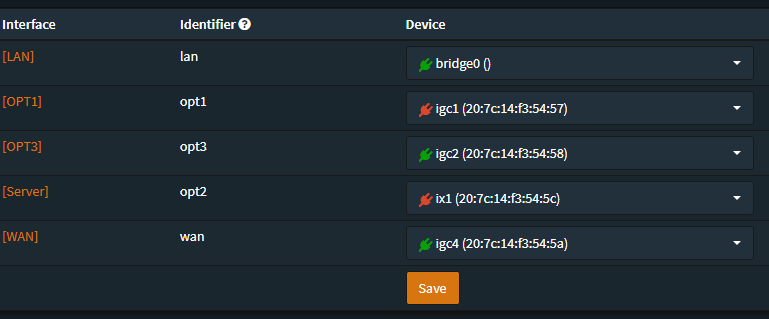
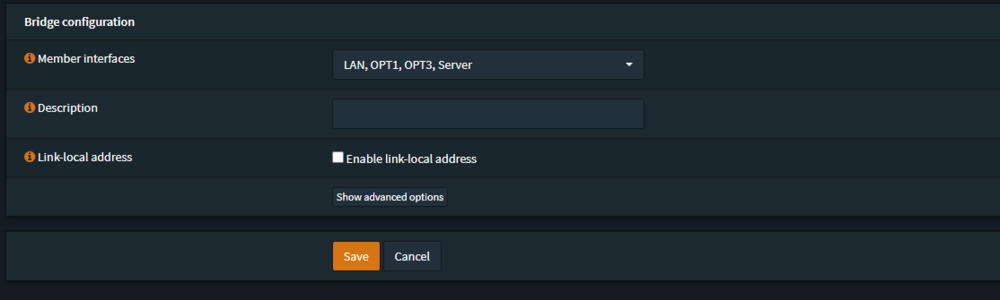
It still shows online when the 2.5G port was unplugged (this reset not anymore, but that's probably because bridging was disabled). The 10G port is straight out of my firewall's bridge as I don't have a 10G switch yet (ix1 bridged to igc1, and LAN is the bridge - showing a picture of that). I got as far as disabling bonding/bridging, put ConnectX-2 as eth0 with the 2.5G port unplugged, and the system came up (enabled EFI because I wanted to see if PCI bifurcation could help, but I can't enable it apparently). So, I wasn't able to set SSL to off and auto-start, but I figure that's just to speed things up for this diag, as I also tried with a ping. I did just reset network.cfg after running diagnostics from the shell. I'm also going to try to disable autotweaks TCP stuff as I saw a bunch of it doing things on boot. However, when I did a lot of the diag the other day, I did boot it into safe mode with no plugins to rule that out, and that didn't help. tower-diagnostics-20240517-2342.zip
-
I've been fighting this for a couple of days now, thinking it was a bad fiber cable. I just put in a ConnectX-2, then left the ethernet in, booted up, and it was in bond. I then unplugged the ethernet and lost WebUI access as well as all my Docker containers. The weird thing is that Unraid Connect shows it’s online and is able to poll Docker containers running, disk usage, and everything. This happens on reboots too—Unraid Connect shows it's offline, then when it boots, it goes online. I went into flash config, deleted the network config, and rebooted with the ethernet unplugged. It gets an IP address according to my DHCP logs. My firewall is OPNsense, and that interface shows only 2 errors, but the receive and transmit packet count goes up without the error count rising. The interfaces are in a bridge for my LAN VLAN (I even undid all VLANs to rule that out). I then replaced the fiber cable because, when I looked at the cable, I only saw one side light up (I know, bad idea—it was a quarter of a second, I'm fine). The new fiber cable is from a reputable brand (Tripp Lite). This is my first fiber setup, so I am out of ideas. I also set the listening interface to eth1, which is the ConnectX-2. I also reassigned eth0 to the card (all of this with ethernet plugged in). I can't get it running. I have attached my diagnostic logs. I am pretty sure these were made when the ethernet was also plugged in but can also do it from the console with only the ConnectX-2 if needed. Let me know, as I am tearing my hair out. tower-diagnostics-20240515-2038.zip
-
I have a server in a data center running UnRaid, I had set it up for a Hypervisor and docker. I just like unraid for managing this thing. Anyway I go to setup a VM and about an hour later I receive an email stating there was abuse coming from my server. Apparently It was using a different MAC address then what was allowed by my account. so my question is how do I I guess share the 1 interface I have for my guest VM's, I know the easiest response here would be to buy some IP addresses from them but im trying to learn how this works in a DC as well so i would like to figure out if it even is possible. Anyone have this type of issue?

