





blackbrizz
Members
-
Joined
-
Last visited
-
I kept on using plex 1.18.0.1846 but it seems to also be fixed with the latest plex 1.21.1.3830 and unraid 6.9 RC2
-
Is there a reason why Sweden has been removed as a supported PIA end point with port forwarding? Logs: 2020-08-22 11:43:46,581 DEBG 'start-script' stdout output: [warn] PIA endpoint 'sweden.privateinternetaccess.com' is not in the list of endpoints that support port forwarding, DL/UL speeds maybe slow [info] Please consider switching to one of the endpoints shown below 2020-08-22 11:43:46,582 DEBG 'start-script' stdout output: [info] List of PIA endpoints that support port forwarding:- 2020-08-22 11:43:46,582 DEBG 'start-script' stdout output: [info] ca-toronto.privateinternetaccess.com [info] ca-montreal.privateinternetaccess.com [info] ca-vancouver.privateinternetaccess.com [info] de-berlin.privateinternetaccess.com [info] de-frankfurt.privateinternetaccess.com [info] swiss.privateinternetaccess.com [info] france.privateinternetaccess.com [info] czech.privateinternetaccess.com [info] spain.privateinternetaccess.com [info] ro.privateinternetaccess.com [info] israel.privateinternetaccess.com [info] Attempting to get dynamically assigned port...
-
Yes I still have the issue. The drivers are located within the Plex docker, so you have to use its terminal and go to usr/lib/plexmediaserver/lib/dri/
-
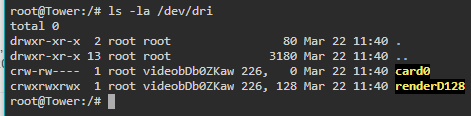
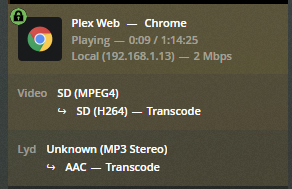
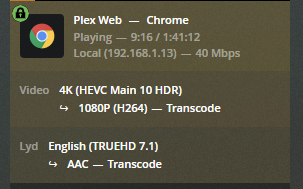
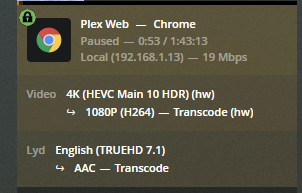
Hi, I have an issues with getting Hardware transcoding working with Plex versions higher than 1.18.0.1846-f62172e99. I have added the the following to my go file modprobe i915 chmod -R 777 /dev/dri and to my docker I have added this extra paramters: --device=/dev/dri From the Plex docker the igpu seems to be available but every time I start any type of transcoding it is not in hardware. If I add "intel_iommu=igfx_off" to syslinux.cfg then HW transcoding start working again but it is incredibly blockly and unwatchable. I have also tried deleting iHD_drv_video.so as recommended on the Plex forum, which resulting in Plex showing HW transcoding is active, but the video never starts playing. My system is based on an ASRock J5005-ITX which as a Gemini Lake CPU should support HEVC 10bit transcoding. For Plex I am using linuxserver's repo. Have anyone experience something similar or just have an idea how to fix it?
-
Hi, I have an issues with getting Hardware transcoding working with Plex versions higher than 1.18.0.1846-f62172e99. I have added the the following to my go file modprobe i915 chmod -R 777 /dev/dri and to my docker I have added this extra paramters: --device=/dev/dri From the Plex docker the igpu seems to be available but every time I start any type of transcoding it is not in hardware. If I add "intel_iommu=igfx_off" to syslinux.cfg then HW transcoding start working again but it is incredibly blockly and unwatchable. I have also tried deleting iHD_drv_video.so as recommended on the Plex forum, which resulting in Plex showing HW transcoding is active, but the video never starts playing. My system is based on an ASRock J5005-ITX which as a Gemini Lake CPU should support HEVC 10bit transcoding. For Plex I am using linuxserver's repo. Have anyone experience something similar or just have an idea how to fix it?
