



Skip to content
View in the app

A better way to browse. Learn more.

Unraid

A full-screen app on your home screen with push notifications, badges and more.

To install this app on iOS and iPadOS
  1. Tap the Share icon in Safari
  2. Scroll the menu and tap Add to Home Screen.
  3. Tap Add in the top-right corner.
To install this app on Android
  1. Tap the 3-dot menu (⋮) in the top-right corner of the browser.
  2. Tap Add to Home screen or Install app.
  3. Confirm by tapping Install.

XMGProjects

Members
  • Joined

  • Last visited

  1. I've managed to get the mobile app working by manual adding the server. Protocol: https Port: 443 Hostname: IP.HASH.myunraid.net Username: Your username Password: Your password
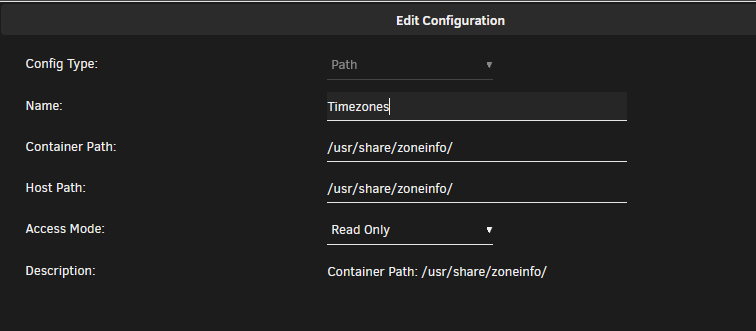
  2. First of all I would like to thank SpaceInvaderOne for his excellent videos!!! As far as the wrong time zone, mwells suggestion works but it is not persistent across reboots of the container. I have added the following path to the container. This seems to have fixed the problem with time. Also regarding the config file being erased across reboots I have placed the conf.json file with my changes inside the appdata/shinobi_pro folder. Thank you!

Account

Navigation

Search

Search

Configure browser push notifications

Chrome (Android)
  1. Tap the lock icon next to the address bar.
  2. Tap Permissions → Notifications.
  3. Adjust your preference.
Chrome (Desktop)
  1. Click the padlock icon in the address bar.
  2. Select Site settings.
  3. Find Notifications and adjust your preference.