





convergence
Members
-
Joined
-
Last visited
-
My issue may have been resolved by installing the AMD Vendor Reset plugin. I'm not certain yet because my machine has been running smoothly for the past month.
-
I have turned autostart back on today, but haven't properly tested it yet. The changes I've made were removing the custom VBIOS ROM and installing the AMD Vendor Reset plugin. My VM can now restart without rebooting the host machine and I'm optimistic that it will be able to autostart again.
-
I recovered from the BTRFS corruption by formatting both cache drives, adding them to the pool, and restoring my data from a backup. Everything was successfully recovered except the corrupted file. Only one docker container was affected, and I'm fairly sure the file got corrupted by a dirty shutdown due to power loss. I've kept the system running on unchanged hardware without any problems until early February 2023. Then -- one fateful morning -- I rebooted the machine and was notified of cache pool corruption shortly after. A scrub revealed that the same file had gotten corrupted as in 2022, albeit in an entirely different container that only had recoverable errors during the previous incident. Both containers (corrupted in '22 & '23) were running an Urbit image. The main difference was that I thought I had managed to do a clean reboot the second time. The similarity between the incidents allowed me to figure out that the default shutdown timeout settings were insufficient for my setup. I have now increased the relevant timeouts and haven't had problems since. I'm still not entirely confident that every shutdown will be clean from now on, and I hope to find the time to investigate what takes so long in my shutdown sequence. I also don't understand how docker containers getting killed would cause BTRFS corruption... I understand that a file on the container's volume might get corrupted, but not how different data could be written to the disks of the pool (and without updating the checksums).
-
good point! pierre-diagnostics-20230215-1601.zip
-
Similar issue here: since upgrading from v6.9 to v6.11 an issue is preventing shutdown and reboot. Stopping a Windows 10 VM results in webgui becoming unresponsive, but ssh connection to the server is still possible at that time. I haven't spotted anything in syslog that seems to be related to this issue. If I try to shutdown or reboot the system when webgui is still responsive, sshd gets killed relatively fast, but the machine keeps running until I cut the power. The same happens when I use the poweroff, powerdown, or reboot commands over ssh.
-
Thanks for linking this! I just ran into the same issue with an existing VM and this fixed it beautifully. My passthrough had worked for a couple of years without multifunction, although I've had occasional driver issues before. The VM started running into "code 43" after I upgraded Unraid from 6.9.2 to 6.11.5. I guess some part of KVM or VFIO has become more strict about the config now... (I kept backups of earlier XML configs for this VM and I was able to verify that I never needed multifunction on this video card passthrough in the past) [EDIT:] This adding multifunction to the VM config was likely not a fix for my issue. It worked once, after I had disabled autostart on the VM, to edit the config. After turning autostart back on, the VM wasn't able to initialize the video card properly and "code 43" returned. The XML hadn't changed, multifunction was still in there. I still had a custom VBIOS ROM specified, which may not be needed anymore. I removed it now, and will test autostart as I need to.
-
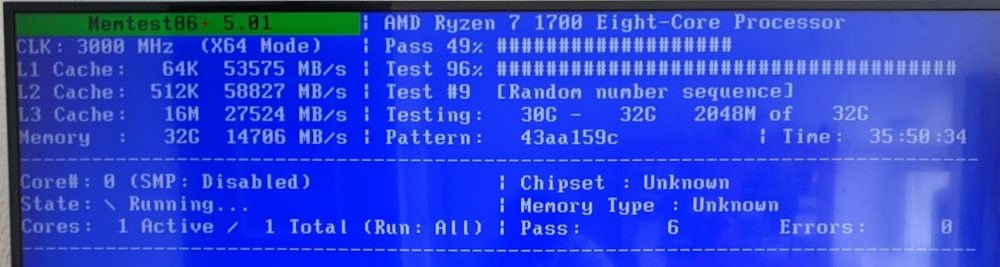
Ok, I ran 9 full passes. I'm pretty confident that my RAM is good. I let memtest run for 3 full passes. Tried to change the configuration to use SMP, which didn't work because I couldn't get memtest to recognize my usb keyboard. I let it run for another 6 full passes after that. No errors at all. After booting into Unraid again, I got a couple of different BTRFS errors: IO failure this time, all on device sdf1. I'm going to see if swapping the sata cable has any effect.
-
New issues, could be related: I'm thinking of the SATA controller and RAM as possible causes. More info (and updates to follow) in the new topic.
-
More bad luck with my machine: BTRFS reports corruption on both cache SSDs. ~# btrfs dev stats -c /mnt/cache [/dev/sdf1].write_io_errs 0 [/dev/sdf1].read_io_errs 0 [/dev/sdf1].flush_io_errs 0 [/dev/sdf1].corruption_errs 1043 [/dev/sdf1].generation_errs 0 [/dev/sdg1].write_io_errs 0 [/dev/sdg1].read_io_errs 0 [/dev/sdg1].flush_io_errs 0 [/dev/sdg1].corruption_errs 710 [/dev/sdg1].generation_errs 0 I do have a Ryzen CPU but the RAM is not overclocked afaik. I noticed these errors because my Windows VM crashed and the cache pool was mounted as read-only after a reboot. I would like to know what my recovery options are. In the first place I want to find out which files are affected. It is possible (perhaps likely) that my appdata backup includes errors from the cache pool. Identifying which files have known corruption may allow me to check the quality of my backup on the array. BTRFS scrub unfortunately aborts immediately without doing anything useful: ~# btrfs scrub start /mnt/cache scrub started on /mnt/cache, fsid 6b069b9c-0b3d-42b3-ab4c-3828d20b9396 (pid=14271) ~# btrfs scrub status /mnt/cache UUID: 6b069b9c-0b3d-42b3-ab4c-3828d20b9396 Scrub started: Wed May 11 21:51:54 2022 Status: aborted Duration: 0:00:00 Total to scrub: 274.67GiB Rate: 0.00B/s Error summary: no errors found The syslog does list an exit status of -30 for my scrubbing attempt via the webgui. In my ssh scrubbing attempts, however, the exit status of `btrfs scrub start` is 0. May 11 21:10:44 : /usr/local/emhttp/plugins/dynamix/scripts/btrfs_scrub 'start' '/mnt/cache' '-r' May 11 21:10:44 : BTRFS info (device sdf1): scrub: started on devid 1 May 11 21:10:44 : BTRFS info (device sdf1): scrub: not finished on devid 1 with status: -30 May 11 21:10:44 : BTRFS info (device sdf1): scrub: started on devid 2 May 11 21:10:44 : BTRFS info (device sdf1): scrub: not finished on devid 2 with status: -30 My next step is to run memtest after the parity check completes. I do not know how to proceed after that, other than purchase new RAM if it's bad. I had issues with both the array and cache on this machine a month ago, described here: I didn't do much to recover from these earlier errors. Most functionality could be restored after a reboot, and I updated the BIOS as advised. Unfortunately I didn't think of doing a btrfs scrub back then. It might have already uncovered some corruption. System/hardware: - motherboard: Gigabyte AX370-Gaming K5 - bios: American Megatrends Inc. Version F51d. Dated: 12/13/2021 - cpu: AMD Ryzen 7 1700 Eight-Core @ 2725 MHz - ram: 32 GiB DDR4 - parity: Toshiba 8 TB - data disks: 3x HGST 4 TB - cache: Samsung SSD 840 pro 256 GB + 860 evo 250 GB - Unraid version 6.9.2 - Radeon 5700XT used with IOMMU in the Windows VM Any advice would be much appreciated. pierre-diagnostics-20220511-2217.anon.zip
-
A couple of updates on how this went: updated bios to version f31 verified that Unraid still booted (array down though: the additional usb drive took me over the limit for my license) updated bios to f51d (and removed the usb drive) after boot looked mostly good: docker containers ran as normally but Windows VM wouldn't boot due to changed IOMMU groups After this I struggled for a couple of hours. While I was trying to fix the VM config my machine lost all network connectivity. I tried restarting networking but didn't manage to get an IP address again. I tried to reboot via the local tty, which didn't work. Reboot hung on the graceful shutdown of Nginx, or on something that wasn't printed on the screen. I had to do a dirty shutdown after 30 minutes of waiting. Having seen some forum posts about issues related to c-states, I disabled c-states in my BIOS before booting into Unraid again. I'm not sure whether c-states were disabled before I did the BIOS updates. The machine proceeded to boot without issues and it had networking again. I was able to re-assign my video card and soundcard to the Windows VM using the form. The VM still wouldn't boot because some references to the missing PCIe devices was still left in the XML. After removing all references to missing devices in the XML the VM was able to start successfully. I hope the new BIOS improved the stability of my onboard SATA controller. Next project: finally trying ich777's fix for the AMD reset bug on my 5700XT.
-
Thank you for your reply. A sata controller issue seems plausible. Luckily it didn't do much damage (yet). A reboot got my server up and running again, for now. I'm at 45% of the parity check that started on boot and there have been zero sync errors so far. Only a bit more to go before it should be only zeroes on the parity disk. I guess there could be a bit of data corruption, but I wouldn't know where to find it. I'll go with the BIOS update route after this since my motherboard seems to be fine. I'm still on such an old BIOS version because I haven't had stability issues with this system and I've had some bad fortune with updates breaking things on older systems. I am 13 versions behind the latest release so I think I'll have to do incremental updates. Any recommendations to make the repeated BIOS update process go smoothly and to reduce risks? There don't seem to be many forum posts here referencing that kind of process, or I did a bad job searching for them. I'm thinking of things like stopping the array, disabling docker, setting the VM to not start on boot. Or should I leave all of that running as is to improve my chances of catching issues that might occur at a particular BIOS version? I'm probably overthinking all this but I'm a bit paranoid when it comes to changing things on machines that have been running stably for many years.
-
Hi, I'd appreciate any help understanding what is going on and how to recover from this. I have some experience with single disks failing (usually due to dodgy sata cables) and rebuilding the array, but having all array disks and the cache drives report errors all at once is very new to me. The first thing I noticed was that my Windows VM froze up. I went into the Unraid GUI expecting to restart the VM or the whole machine if that wouldn't work. Instead I was greeted by two notifications, the first warning that 3 disks have read errors, the second reported that 4 disks have read errors. The notifications were dated one minute apart, around the time the VM became sluggish and froze. I haven't dared to reboot or try anything else. The docker service seems to have stopped without any action on my part. After some time the VM was also stopped (not by me) and has disappeared from the VMs tab. All my array disks report the same small number of errors: initially 32 per disk, now up to 129. The Main tab doesn't show any errors for my cache devices, but the syslog is full of errors relating to both cache devices. Things leading up to "the event": - Windows update on VM the day before, forcing me to reboot the whole machine because the GPU wouldn't init - overnight parity check with 0 errors (not initiated by me or schedule; due to machine reboot?) - casual Windows VM usage; not much load from docker containers System/hardware: - motherboard: Gigabyte AX370-Gaming K5 - bios: American Megatrends Inc. Version F3c. Dated: 06/02/2017 - cpu: AMD Ryzen 7 1700 Eight-Core @ 2725 MHz - ram: 32 GiB DDR4 - parity: Toshiba 8 TB - data disks: 3x HGST 4 TB - cache: Samsung SSD 840 pro 256 GB + 860 evo 250 GB - Unraid version 6.9.2 - Radeon 5700XT used with IOMMU in the Windows VM Which actions should I take? Reboot? Stop the array? I'm going to try to get some rest. It's been a long day. pierre-diagnostics-20220311-1728.anon.zip

