rockard
Members
-
Joined
-
Last visited
Everything posted by rockard
-
Yes, it works perfectly now! Thank you so much!
-
Hi! I have LuckyBackup set up to send mail upon completion. Since June 13 I haven't recieved these mails, and when I test it manually in the GUI I see the following error message: trying to send an email . . . command: sendemail exit code: 1 output: Use of uninitialized value $2 in concatenation (.) or string at /usr/share/perl5/IO/Socket/SSL.pm line 792. Jun 20 11:19:22 684d7acda080 sendemail[479]: ERROR => TLS setup failed: hostname verification failed Has something connected to Perl/SSL been updated in the image causing this?
-
Sorry for bringing up an old question, but I'm struggeling with changing the locale. The "kdeglobals" file doesn't seem to exist in the image anymore (looks like it's based on Debian now?), and I think I'm now supposed to change the USER_LOCALES variable passed to the image instead. However, I can't find a locale within the supported list with English language and ISO-8601 dates. I stumbled upon the only way I find to get the desired output, and it is to set it to a non-English locale with ISO-8601 dates, surrounded by ''. For example 'sv_SE.UTF-8 UTF8'. If I set it to this, I will get English language, and ISO-8601 dates. If I skip the '' I will get Swedish language and ISO-8601 dates. This works, but it feels fragile, as it looks like unintended behaviour that might change at any time. Is there anything I'm missing, or am I best of using this "workaround" for as long as it works?
-
Regarding Luckybackup, I have had the same experience as Kris6673 in that it only randomly seems to run on schedule. Last time it ran on schedule (every day at 8:50) was two days straight on April 16 and April 17, and since then it hasn't run. Now when I went into the GUI I see the schedule, but when I click view current crontab it says "/luckybackup - no crontab entries exist". So I click cronIT and it says "Your crontab is updated successfully", but when I click view current crontab it still says it's missing. So I check the log, and I see this: ---Checking if UID: 99 matches user--- ---Checking if GID: 100 matches user--- ---Setting umask to 0000--- ---Checking for optional scripts--- ---No optional script found, continuing--- ---Checking configuration for noVNC--- Nothing to do, noVNC resizing set to default Nothing to do, noVNC qaulity set to default Nothing to do, noVNC compression set to default ---Starting...--- ---Starting cron--- ---Version Check--- ---luckyBackup v0.5.0 up-to-date--- ---Preparing Server--- ---ssh_host_rsa_key keys found!--- ---ssh_host_ecdsa_key found!--- ---ssh_host_ed25519_key found!--- ---Starting ssh daemon--- ---Resolution check--- ---Checking for old logfiles--- chown: changing ownership of '/luckybackup/.config/crontabs/crontabs': Operation not permitted chown: changing ownership of '/luckybackup/.config/crontabs/luckybackup': Operation not permitted chmod: cannot access '/luckybackup/.config/crontabs/luckybackup': Permission denied ---Starting TurboVNC server--- ---Starting Fluxbox--- ---Starting noVNC server--- WebSocket server settings: - Listen on :8080 - Flash security policy server - Web server. Web root: /usr/share/novnc - No SSL/TLS support (no cert file) - Backgrounding (daemon) ---Starting ssh daemon--- ---Starting luckyBackup--- The "Operation not permitted" looks very suspicious to me Is that a problem only on my container, and if so any ideas how to fix it?
-
Fantastic, many, many thanks!!!
-
The VNC log file from the container has errors, attached an excerpt from it vnc.log
-
Both Chrome and Edge (fired up for the first time ever to test this) give the same behaviour, and opening a page in incognito in Chrome should not use any cached resources. EDIT: Thanks for a fast reply! EDIT2: Did the delete site from history in Chrome anyway, but no difference EDIT3: Here's the output of ps from the console: # ps -ef UID PID PPID C STIME TTY TIME CMD root 1 0 0 09:12 ? 00:00:00 /bin/bash /opt/scripts/start.sh root 15 1 0 09:12 ? 00:00:00 cron -- p root 16 1 0 09:12 ? 00:00:00 su luckybackup -c /opt/scripts/start-server.sh luckyba+ 17 16 0 09:12 ? 00:00:00 /bin/bash /opt/scripts/start-server.sh luckyba+ 46 1 0 09:12 ? 00:00:00 SCREEN -S Xvfb -L -Logfile /luckybackup/XvfbLog.0 -d -m /opt/scripts/start-Xvfb.sh luckyba+ 48 46 0 09:12 pts/0 00:00:00 /bin/sh /opt/scripts/start-Xvfb.sh luckyba+ 49 48 0 09:12 pts/0 00:00:00 Xvfb :0 -screen scrn 1024x768x16 luckyba+ 57 1 0 09:12 ? 00:00:00 SCREEN -S x11vnc -L -Logfile /luckybackup/x11vncLog.0 -d -m /opt/scripts/start-x11.sh luckyba+ 59 57 0 09:12 pts/1 00:00:00 /bin/sh /opt/scripts/start-x11.sh luckyba+ 63 1 0 09:12 ? 00:00:00 SCREEN -d -m env HOME=/etc /usr/bin/fluxbox luckyba+ 65 63 0 09:12 pts/2 00:00:00 /usr/bin/fluxbox luckyba+ 75 1 0 09:12 ? 00:00:00 /usr/bin/python2.7 /usr/bin/websockify -D --web=/usr/share/novnc/ --cert=/etc/ssl/novnc.pem 8080 localhost:5900 luckyba+ 84 17 0 09:12 ? 00:00:00 /luckybackup/luckybackup root 2006 0 0 09:43 pts/3 00:00:00 sh luckyba+ 2031 59 0 09:43 pts/1 00:00:00 sleep 1 root 2032 2006 0 09:43 pts/3 00:00:00 ps -ef #
-
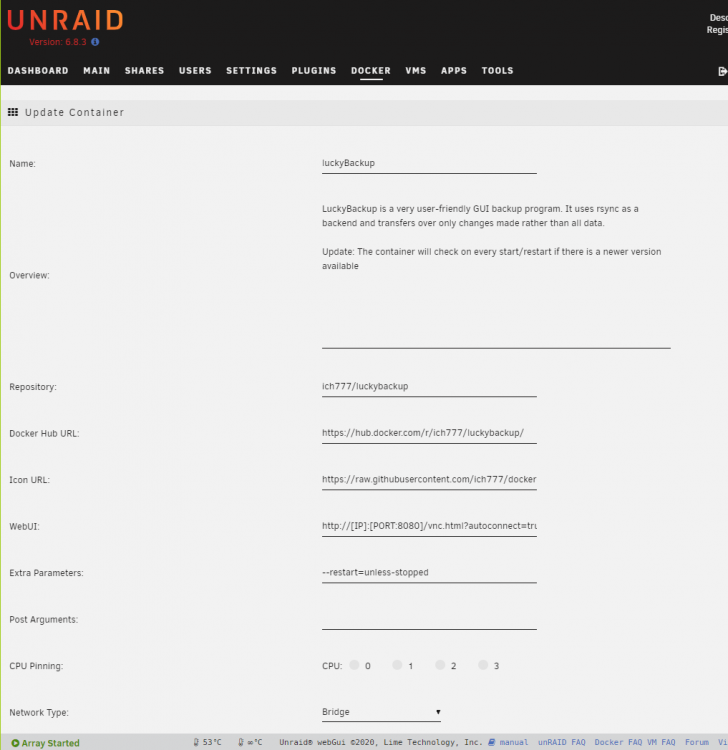
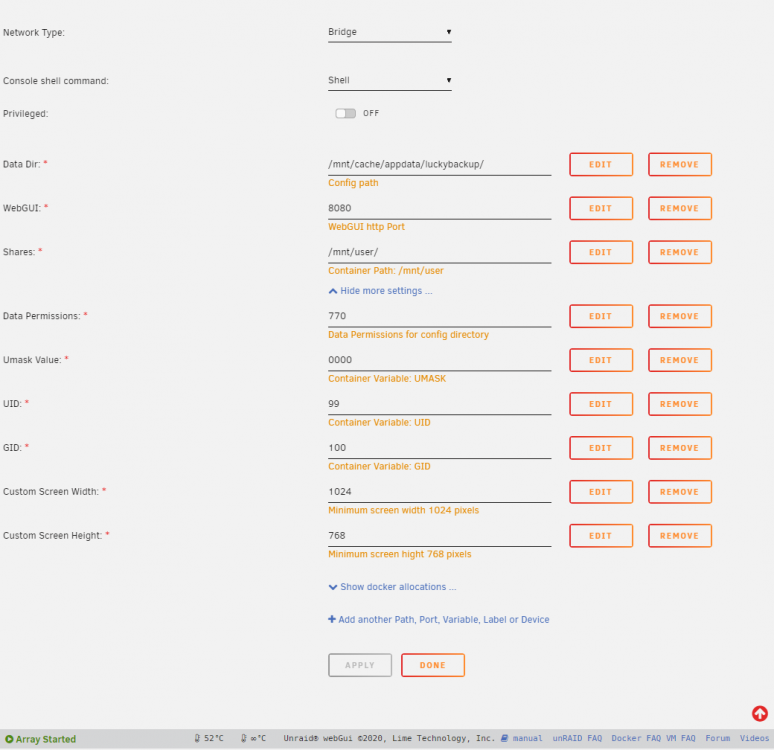
I also get the "failed to connect to server" on my luckyBackup image. Ctrl+Shift+R does no good, neither does opening the URL in an incognito window. Attached the log and screenshots of the template. docker.log