





Unknownkwita
Members
-
Joined
-
Last visited
Everything posted by Unknownkwita
-
Memtest showed over 200 errors within 40min. I have replaced the RAM and done a fresh install of unraid copying just the key, super.dat and pools folder. Thanks again.
-
Updating to 7.1.2 resolved this issue, but my system clearly has other problems. I'm doing a Memtest and then going to do a fresh install of unraid.
-
Thats not going to be fun. Thanks for the help, itll probably be a while before I can get them time to do a clean install.
-
After enabling disk share, the same thing occurs during a large transfer to the disk share.
-
Issue: When coping a large file (like 8GB) from Win 11 to Unraid 7.0.1 via SMB, Unraid freezes. Windows reports this as the network location being unavailable. The unraid webGUI and all dockers stop responding. The CLI seems to still be running because I can "gracefully" shut down the system by pressing the power button on the case. Rebooting doesnt start a parity check, so I assume its shutting down fine. The system wont recover on its own and must be restarted. Any help or ideas would be greatly appreciated. Hardware: AMD 5900x, 64GB DDR5, 2x LSI 9211-8i Things ive tried: Error logs dont show anything at the time of the feeze (Apr 3 10:12 AM in the attached diagnostics) Ive been able to repeat this about 10 times over the last month. After rebooting the file that was copying is present on unraid, but half the file is corrupt. Its freezes up regardless of where the file is being transferred to. Ive tried directly to the array, ive tried using two seperate cache pools. The issue started around the time I moved from win 10 to win 11 and also starting messing around with IPv6 on my network. Not sure if these are related. SMB Settings: Netbios was originally enabled, but I disabled it. No affect. Its not the specific file, ive tried several large files ranging from 8GB to 25GB. Ive checked internal connections to the backplane and they all seem to be fine. I have moved files as big as 50GB within unraid using the webGUI to move them. Things I havent tried yet: Memtest. Could it be a memory Issue Copy from another computer. ditto-diagnostics-20250403-1029.zip
-
Thanks @JorgeB, Im actually in the process of doing this at the moment. But its good to know im on the correct path. Deleting the vdisk has brought docker backup, currently reinstalling all the docker containers. Edit: everything is working fine. thanks for the very quick support. The community is what makes unraid so great.
-
Issue: After updating from 6.12.6 to 6.12.10, docker refuses to start. All shares mount and VMs run fine. Things ive tried: readseveral threads with the same error. Checked the cache (BTRFS) isnt read only. It seems to be working fine. Fix Common problems highlighted that dynamic.cache shouldnt be used any more. Its been uninstalled. docker folder was uninstalled before updating. changed docker custom network type from maclan to ipvlan Booted into safe mode, Docker still fails to start. downgraded unraid back to 6.12.6 (diagnostics and logs are from a clean restart just prior to this.) This didnt fix my issue. I am back on 6.12.10 Next Steps: Run memtest? move cache to zfs? delete docker vdisk? Im hoping to check i havent missed anything obvious before I attempt these more time consuming options. syslog-20240501-1257.zip diagnostics-20240502_0858.zip
-
You good sir are MAGNIFICENT! Replaced the bz* files and it booted straight in. Still confused what caused this issue but thank you so much. 😁
-
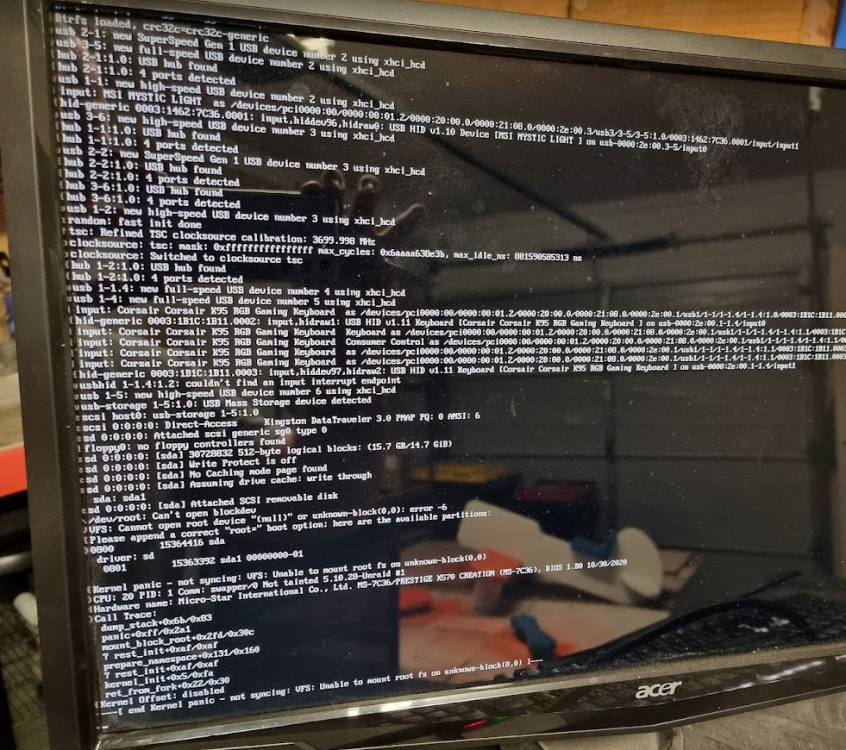
Server Unraid version 6.9.2 since release with Pro license CPU: AMD Ryzen 5900x GPU: Nvidia GTX 1080 Memory: 64GB 3200MHz DDR4 USB Key: Kingston 16gb USB 2.0 2x SilverStone ECS02 LSI 9211-8i SAS/SATA various plugins loaded including dynamix. Problem After restarting my server to troubleshoot my vpn docker container, it failed to boot. It displays the error "Unable to mount root fs on unknown-block..." The full error is in the attached picture. No hardware changes have occured in 6+ months. I havent had an issue rebooting in the past. Diagnostic zip file from immediatly before the error is attached. My last USB backup is 6months old from when I upgraded from 6.9.1 to 6.9.2, so I would prefer not to use that if possible. I have created a backup of the current USB key. Trouble shooting performed Attached a screen, keyboard and mouse and booted in safemode. Same error occurs. Updated bios on my MSI x570 Creation. No change to the error. After reading this thread and this thread which seemed to have a similair issue. I tried adding root=sda and/or root=sda1 to syslinux.cfg. The error persists but changes from "null" to which ever value I entered. All futher testing has these returned to there original state I installed a fresh copy of unraid using the creation tool on a variety of USB including wiping the original usb key. I was not able to get any of these to boot, they dont even get to the unraid boot selection screen, the system just goes straight into the bios. I used the make_bootable.bat, run as admin, enter twice. Doesnt change anything. I dont think its the bios settings. Everything is configured to UEFI. all USB keys were recognized by the bios and selected as the boot location. To test if my system can actually boot anything, I tried a windows 10 install media. It loaded without issue. I copied my backup back onto the original USB key and run make_bootable.bat. The bios recognizes the usb key, boots, shows the unraid boot menu and then shows the original error. I have a second test unraid server I use. I shut it down and inserted the USB key with the unraid that is providing the error. The same error appears. This suggests the issue is related to the USB key or the files on the USB key. I tried booting my USB key from my test server in my main server, it wont boot. same as item 4. So maybe it is the PC hardware? At this point I am not sure what the problem is. I am going to buy a new USB to test with, but not sure why my other USB keys werent booting. Based on some google-fu, it could be the memory? Any thoughts or suggestions? ditto-diagnostics-20211109-1906.zip
-
I Spoke too soon. i am getting this error with a vengence.
-
Incase it is useful for others, this error stopped occuring for me after I: disabled bonding NICs on unraid, mapped the share to windows 10 and Disabled docker Disabled VM disabled the secondary NIC on my windows computer. It was a fresh install of unraid. No issues transferring small files like MP3s, but it didnt like my bluray rips that were ~20GB to 60GB. Error occured using windows file explorer to copy and Free File Sync.


