jb93
Members
-
Joined
-
Last visited
Everything posted by jb93
-
thank you very much and sorry i should have back read some before posting.....
-
hello im woundering how i could update to 7d2d A19 its an alpha build and has to be opted into?
-
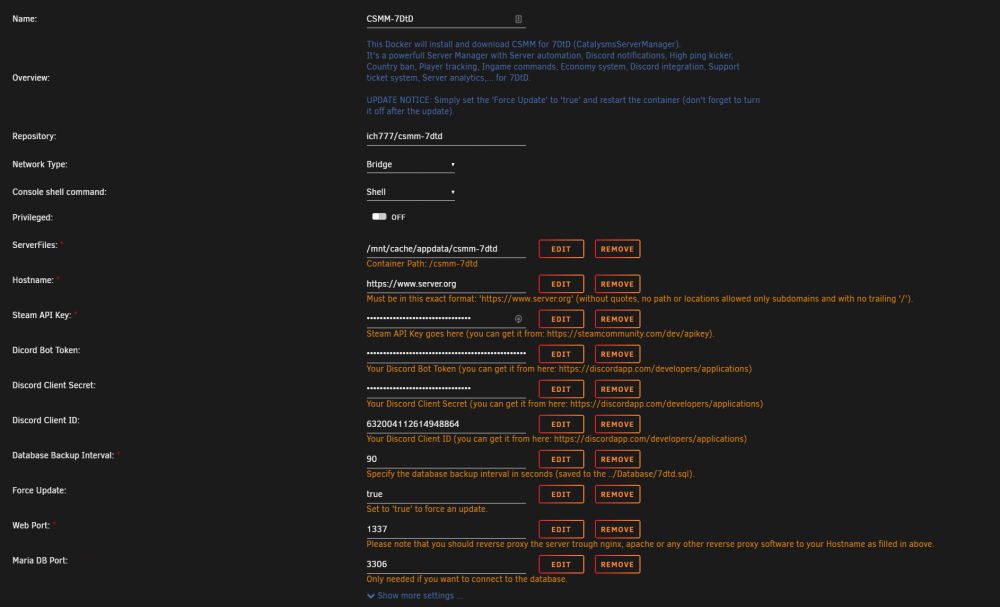
hello im having troubles setting up the csmm-7d2d docker and i have no idea what to set in the domain name area do i need to get my own domain or what do i need to do i have tried to set it to the example. but it aways fails do i need to set up a website for my 7d2d server to use this? sorry im new to both setting up servers and unraid. thanks for all the help and the awesome dockers! ---Checking if UID: 99 matches user--- ---Checking if GID: 100 matches user--- ---Setting umask to 000--- ---Checking for optional scripts--- ---No optional script found, continuing--- ---Starting...--- ---Starting MariaDB...--- ---Starting Redis Server--- ---Checking if CSMM is installed--- ---Force Update activated, installing CSMM--- ---CSMM successfully downloaded, please wait--- > [email protected] install /csmm-7dtd/CSMM/node_modules/uws > node-gyp rebuild > build_log.txt 2>&1 || exit 0 > [email protected] postinstall /csmm-7dtd/CSMM/node_modules/core-js > node -e "try{require('./postinstall')}catch(e){}" [96mThank you for using core-js ([94m https://github.com/zloirock/core-js [96m) for polyfilling JavaScript standard library![0m [96mThe project needs your help! Please consider supporting of core-js on Open Collective or Patreon: [0m [96m>[94m https://opencollective.com/core-js [0m [96m>[94m https://www.patreon.com/zloirock [0m [96mAlso, the author of core-js ([94m https://github.com/zloirock [96m) is looking for a good job -)[0m npm WARN [email protected] No license field. added 1135 packages from 856 contributors and audited 5947 packages in 12.712s 1 package is looking for funding run `npm fund` for details found 481 vulnerabilities (72 low, 6 moderate, 401 high, 2 critical) run `npm audit fix` to fix them, or `npm audit` for details ---Force Update finished, CSMM successfully installed--- ---Prepare Server--- ---Configuring Redis--- OK OK Background saving started ---Checking for old logs--- ---Configuring CSMM--- ---Checking if Databse is present--- ---Database found, injecting, please wait--- ---Start Server--- CSMM version: 1.12.0 debug: Please note: since `sails.config.session.cookie.secure` is set to `true`, the session cookie debug: will _only_ be sent over TLS connections (i.e. secure https:// requests). debug: Requests made via http:// will not include a session cookie! debug: debug: For more help: debug: • https://sailsjs.com/config/session#?the-secure-flag debug: • https://sailsjs.com/config/session#?do-i-need-an-ssl-certificate debug: • https://sailsjs.com/config/sails-config-http#?properties debug: • https://sailsjs.com/support debug: (node:270) [DEP0095] DeprecationWarning: timers.enroll() is deprecated. Please use setTimeout instead. (node:270) [DEP0096] DeprecationWarning: timers.unenroll() is deprecated. Please use clearTimeout instead.