





ZenBuddha
Members
-
Joined
-
Last visited
-
Ended up just hitting the powerswitch. Had to put the USB drive into another computer to scan and fix but didn't find anything. Back up and running again. Attaching diagnostics. Would appreciate any guidance on what might be going on or how I can best troubleshoot it. tower-diagnostics-20240520-0959.zip
-
Web access to the GUI is completely gone with "ERR_CONNECTION_REFUSED." All my dockers are still up and I can access them. All my SMB shares are inaccessible. Can't SSH in. Console shows a long string of: crond [1428]: exit status 1 from user root /usr/local/emhttp/plugins/<insert plugin folder>/scripts/sa1 1 1 &> /dev.null crond [1428]: exit status 1 from user root /usr/local/emhttp/plugins/<insert plugin folder>/scripts/monitor &> /dev.null And for <insert plugin folder> I have the following examples: dynamix dynamix.system.stats recycle.bin parity.check.tuning I can hit escape or enter a couple of times and I'll be presented with the Tower login: prompt but when I type in a username it just shows me the version, IPv4 and IPv6 address and then gives me the Tower login: prompt again. Help please. I've been experiencing this off and on for months now and I've resorted to just a hardware reset. Thanks
-
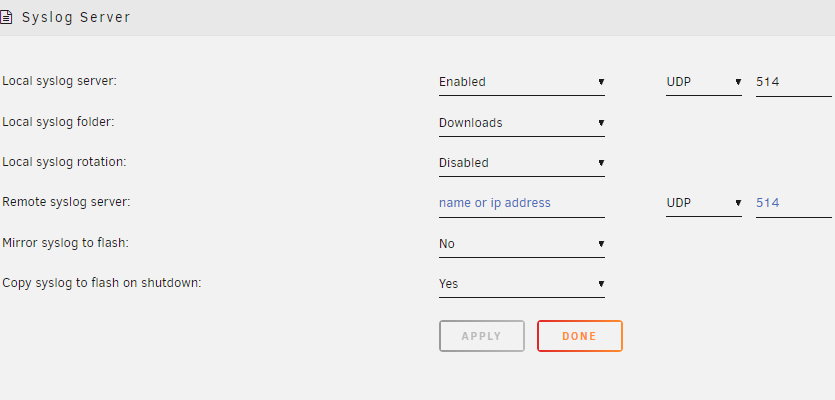
Thanks again for your help. I will do as you suggest and keep an eye on it. It's at 4069 right now so maybe it was just the boot reads. In regards to the syslog server question I was referring to recommendation in the Troubleshooting section of the manual that says you can turn on the syslog server to write to the flash on shutdown: And I was wondering since I recently had a forced shutdown because I couldn't get to the GUI, if there might be some data I could look at.
-
Thank you Frank. Appreciate the help. This is what my boot devices says right now: My current up time is 24 hours. Clearly more than the 200 per day. I don't know how to figure out what is writing to it so yes, if you can give me some guidance there I would be very grateful.

-
Ah. Thank you for clarifying. I saw this quote in the Unraid manual and it didn't mention anything about reputable sellers: " Due to this, at this time, we cannot officially recommend SanDisk USBs due to the issue of generic GUIDs found in knock-off / counterfeit units." Any guidance on how to access the syslog servers on the flash drive? And anything else I can find in the diagnostics to figure out why my USB drives keep failing?
-
My system froze up again. I was able to get in via console and force a shutdown. I'm attaching diagnostics in case anyone can help me figure this out. I had also turned on the syslog server and told it to copy to the flash on shutdown but I'm not clear on how to retrieve them. Would appreciate any guidance. I have seen in the forums that SanDisk USB drives are not recommended and that is what I'm using. I'll work on getting a different one but it doesn't seem like there are a lot of viable 2.0 USB drives available any more. I see a HP one, but not sure I trust that any more than a SanDisk. Would a non 2.0 Samsung be a better solution? Again, appreciate any help. I do have a small feeling that this tends to happen after I use the binhex-krusader docker but that is just a small correlation I have noticed. Thanks!!! tower-diagnostics-20240514-1133.zip
-
I was able to format the original usb drive and restore to it. I did need to download my key and put it in the config folder, but my system is back up! Thank you!!! Now...can you also help me figure out why this has happend with 2 different USB devices in a 6 month period? 😬
-
What does "rewriting it" mean? Just do a restore to the existing USB drive?
-
Back in November, I went to do an update to my system, rebooted and the USB drive would not boot. No big deal, I download my backup and I'm up and running again. In February I do the same thing and the same thing happens. I didn't have time to troubleshoot it and just moved on. I went to install the latest version of Unraid today, and I lost ANOTHER USB drive. Now I can't replace my key because I've apparently done it too many times. I've reached out to support to get a replacement key, however there is clearly something wrong. The only thing I can read on the screen during the failed boots is: Contains a free cluster (2). Assuming EOF. FAT-fs (sda1): error, fat_get_cluster: invalid cluster chain (i_pos 1) FAT-fs (sda1): Filesystem has been set read-only mount: /boot: can't read superblock on /dev/sda1. dmesg(1) may have more information after failed mount system call. cannot mount /dev/sda1 - press ENTER key to reboot .... Attaching diagnostics from the Feb 11 restore point. tower-diagnostics-20240313-0850.zip
-
Thanks for the response. I figured if I'm using the exact same cables with another 18TB seagate drive and it shows up, then it must be a bad drive. Just can't figure out how I got 3 in a row. ordered another one so we'll see if it continues.
-
Thank you for that command. So what showed up was 10.6GiB in /tmp and then inside there was /transcode Seems like for some reason Plex left two 5GiB files in there. Restarted Plex and they went away. Thanks again.
-
I tried running the dianostics and other recommendations on here but I'm having trouble understanding what to do with the info. Attaching diagnostics. Thanks in advance tower-diagnostics-20230514-1936.zip
-
I had a drive start to make some terrible noises so I figured I would use it as an opportunity to get 2 new 18 TBs in my system and replace my 16TB parity drive. Bought 2 on amazon, I'm limited on space in my server so I put one in to preclear, no problem. Once it finished, took it out and put the second one in and it makes terrible sounds and never shows up in unraid. Exchange it for a replacement drive, that one doesn't make any terrible noises, but never shows up in unraid. I plug in the first 18TB drive and it shows up just fine so I try again and nothing. Return that drive and buy another one from Best Buy because, why not, and same exact issue. I'm using the exact same power and data connection that the first 18TB shows up on but I've gone through 3 other ones and none of them are appearing. Even though these are not shucked drives, I've tried the 3.3 volt trick with a molex adapter and also using tape but they never show up. I find it hard to believe I got 3 bad drives in a row but maybe I'm just that unlucky. Attaching diagnostics in case anyone sees something I'm missing. In this diag, both drives are plugged in. Thanks in advance! tower-diagnostics-20230512-1010.zip
-
I'm sure this is answered somewhere and I just don't know how to put the right search terms together, so apologies for a redundant question... What's the proper way to make the gui available behind a reverse proxy? I have swag installed on it's own network so the only way I've figured out how to get to the controller is to enable Host access to custom networks. Otherwise it doesn't work. I would rather not do that as I know it's not that safe. The other thing I tried was to put the unifi-controller network into my custom proxy-net but then it couldn't talk to any of my devices. Kept trying to adopt them over and over. Appreciate any guidance on this one. Thanks
-
Thank you so much for setting this up. I use your dockers for almost everything. I have an outdated docker for overseer that I was hoping I could bring my settings/data over into your docker. Is that possible? And how would I do that if it is? Thanks again.
