






Thief_of_Time
Members
-
Joined
-
Unfortunately, that didn't work. Here, too, the system froze when the SSD was mounted. The SSD seems to have a major defect. Well, now a new SSD is installed and the VMs are reinstalled. Thanks anyway for the quick help!
-
Thanks, the Array is Rebulding atm since a HDD had a Error too. I will try it once the rebuild is done and see if it works
-
Can you explain to me on how i would do that? I have the UD Plugin installed but idk how to mount the drive with the Passphrase as Read-Only.
-
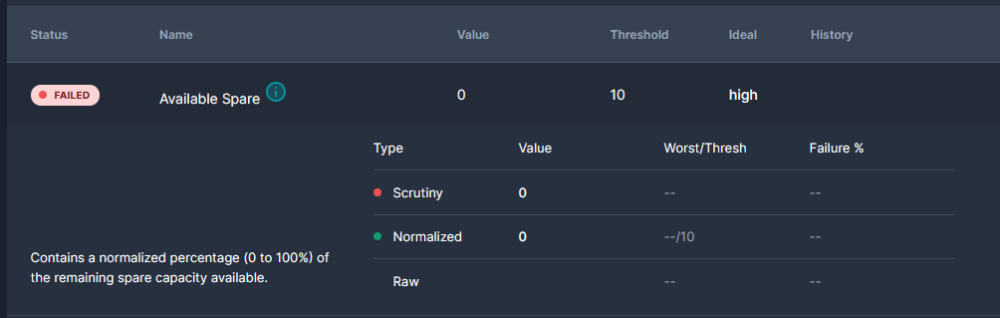
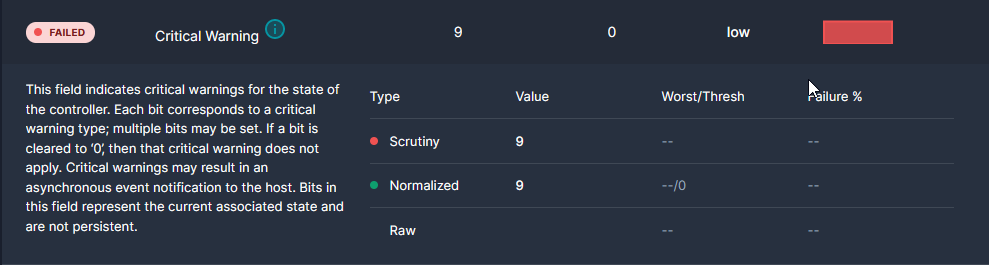
Hi I have been using Unraid for a while with the following configuration: Array: Parity: 8TB HDD Disk 1: 8TB HDD Disk 2: 8TB HDD Pool Devices M2_Cache_1: 1TB M.2 SSD M2_Cache_2: 500 GB M.2 SSD Sata_Cache_1: 500 GB Sata SSD Sata_Cache_2: 2TB Sata SSD I usually run virtual machines on the virtual pooled devices. Now I had access problems with data stored on M2_Cache_1. Unraid always froze during access. After about a minute, the files disappeared and Unraid no longer recognised the hard disk behind M2_Cache_1 (1TB M.2 SSD). I could see this when I stopped the array and the disk behind it disappeared. After a short analysis of the hard disk via CrystalDiskInfo, it turned out that the installed SSD has a defect and is in "ReadOnly" mode, so CrystalDiskInfo said. I also can check the drive with scrutiny and it gives me 2 Failurs (s. Attachment) My question at this point is, is there a way to save existing data from the hard disk? Everything is still displayed in File Explorer. Unraid seems to crash whenever anything would be written to the disk. Is there any way I can mount the disk as read only or save the data in another way? I can only run the disk in Unraid because the disk is mounted encrypted in the system. There are only VMs on the disk, which I could also reinstall. It would just be easier to copy and paste the virtual machines onto another disk. Kind Regards Medi
-
Hello, thanks for the help. The "+" seems to be really the cause of the Problem. I set up a new Share with default permissions. I tryed to save some stuff from my Printer/Scanner and it worked perfectly. I went back to save the Files to the old share and it did not work. Then i used following command: root@OnePiece:~# setfacl -Rbn /mnt/user/02_Transfair/ That removed the "+" from that directory. After that was done I had no Problems saveing my scan files on that share again. Thanks for the help! I also found the "+" on another share. Some tests then showed that the same errors occur here as well. I used the same command as above and that also fixed the problems. I do not assume that the printer has set the "+" to the dictionary and thus caused the problem, because it now works without problems. Anyway, the Problem is solved now. Thanks for the help!
-
root@OnePiece:~# ls -al /mnt/user/02_Transfair/ total 6160 drwxrwxrwx+ 1 nobody users 166 Nov 25 11:48 ./ drwxrwxrwx 1 nobody users 214 Nov 13 02:09 ../ drwxrwxrwx+ 1 nobody users 378 Nov 25 11:42 .Recycle.Bin/ -rw-rw----+ 1 transfair users 542303 Nov 25 11:44 0141_211125204145_001.pdf -rw-rw----+ 1 nobody users 2582906 Nov 25 11:48 IMG_20211125_144215.jpg -rw-rw----+ 1 user2 users 3177905 Nov 25 11:47 IMG_20211125_144329.jpg root@OnePiece:~# The File "0141_211125204145_001.pdf" is created by my Printer(Scanner) with the Unraid Account "transfair" The File "IMG_20211125_144329" is copyied from my Phone with my Unraid Account "user2" The File "IMG_20211125_144215" is copyied from my Phone without any given any credentials/Account From my PC I use the Unraid Account "user2" to Access the Files. The Access only works for the File "IMG_20211125_144329". The Share itself is "Public".
-
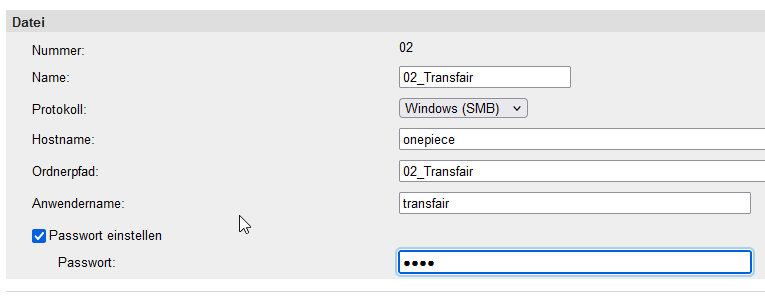
Thanks for the quick reply. I try to answer the open questions as good as I can - The printer is a acuall network printer connected via a cat7 network cable. - The network Share is on my Unraid Server (Version: 6.9.2) Base distro: docker: version 20.10.5 fuse3: version 3.10.2 nginx: version 1.19.9 samba: verson 4.12.14 (CVE-2020-27840 CVE-2020-27840) Since its a Networkprinter it has an option to transfair files direct to a network storage. I can tell him the Protokoll (SMB), the Hostname of my NAS, the Folderpath and a Username + PW to store stuff on there. The printer Stores the Files directly on my Unraid Server. I tryed to Store the Files directly to an USB Drive, that worked fine. Also i made a network Share on my Windows 10 PC. That also worked fine. It only has a Problem, when i try to safe the File on a Share of my Unraid Server. The whole process is like: I go to my Printer, scan and Scan a File. The printer itself has an "Adressbook" for Networkshares which you can see above. I choose that networkshare on my Unraid Server with a given Username + PW. The printer can successfully connect to my Unraid Server and can store the file on my share (if the PW for my Useraccount is wrong or the Server is offline the printer prints an error code). After the file is stored on the Server, i go to my Windows 10 PC and try to open the file. Then i get the access denied massage.
-
Hello, since a few weeks now, I've have the problem that I can no longer access files that my scanner/Printer creates. I hope someone can give me an Advice on how to solve that Problem. How I proceed: - I set up my Networkprinter with the Networkshare + Username - i scan a File - the file gets successfully transfaired to the network share - i nagivate with my Windows10 Client to the Network share and try to open the File - i get a error massage "access deniend" I had the exact same Setup since over a Year now and everything worked fine. But since 1 or 2 month i get the access denied massage. Also when i right click the file it shows me that i dont have any reading rights to see the security settings on that file. When i override the Userrights with the Tool "New Permission" i can access the File and everything is fine. What i tryed: - Delet the share on the Printer and set up everything new --> no success - Use different User Account to write and read the file from the printer --> no success - Use a different Network share -- no success My Setup - I have a Network Printer (Canon MF 446x) - i have a unraid share: SMB Public - I have a user Account with Read/Write Access to that share - I have a few Windows 10 Clients Anyone know the Problem or can help me with my Setup? P.S. The same Probelm seems to appear when i try to make an Backup with Acronis. After i did that i also did not had Access to the backup file. "New Permission" was here also the solution. Thanks for Helping! Kind Regards



