





blacklisted
Members
-
Joined
-
Last visited
Everything posted by blacklisted
-
Plex is suddenly not picking up new content when scanning media folders. When I add content to the folders, the up-arrow icon in the righthand corner begins spinning but nothing is added. When I got to Manage Libraries>Edit Library>Add Folder>Browse for Media Folder, I can find the folder of the newly added content. So Plex apparently sees the new content but isn't adding it. I checked the Plex Log and found the following message: 2024-05-17 16:05:14,517 DEBG 'plexmediaserver' stdout output: The '--scan' operation is deprecated and will be removed in future versions of Plex Media Server. I updated Plex to the latest version in the last day or two. I uninstalled and re-installed Plex but the problem persists. Anyone know of a fix, or having the same problem?
-
Replacing the cable fixed it. Thanks.
-
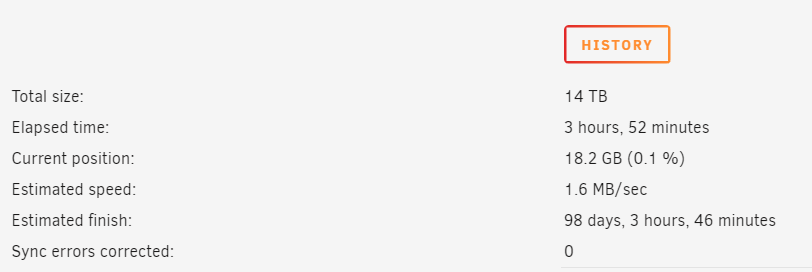
Hi all, I tried transferring data from my cache drive to Disk 6 using Dynamix File Manager today but the transfer was horribly slow, and UNRAID eventually hung. I tried shutting UNRAID down via terminal but it would not shut down. I ended up pulling the plug, rebooting, and starting a parity rebuild. Parity rebuild, however, has been unacceptably slow: 1.6 MB/sec. 98 days to rebuild. I checked my logs and am getting "failed command: READ FPDMA QUEUED." I don't know what this means. Can anyone offer insight and help? ribeye-diagnostics-20230716-2116.zip
-
Thank you so much. I'll check for BIOS update but may just get a new board.
-
I believe they may be on the same controller. I have parity building and don't want to open the case while UnRaid is up and running, just in case there is a faulty connection. Once parity completes, I'll open the case and check to see where the drives are connected. Is there a way to check which drives are connected to which controller via command line or any other place in UnRaid?
-
Checked cables. Attempting to rebuild the parity disk once more....
-
Parity drive SMART Extended Self-Test completed without error.
-
My parity drive suddenly became disabled. I stopped the array, removed the parity drive, started/stopped the array, and re-added the parity drive. I then started parity rebuild. After many hours, rebuild failed and the parity drive became disabled again. I checked the disk log and found BTRFS Errors. System log starts showing: BTRFS error (device sdg1): bdev /dev/sdg1 errs: wr 1, rd 1, flush 0, corrupt 0, gen 0 1) I ran: btrfs scrub status /mnt/cache Scrub started: Sun Jul 11 09:07:33 2021 Status: finished Duration: 0:15:58 Total to scrub: 781.81GiB Rate: 835.66MiB/s Error summary: no errors found 2) I ran: btrfs dev stats /mnt/cache [/dev/sdg1].write_io_errs 0 [/dev/sdg1].read_io_errs 0 [/dev/sdg1].flush_io_errs 0 [/dev/sdg1].corruption_errs 0 [/dev/sdg1].generation_errs 0 [/dev/sdh1].write_io_errs 0 [/dev/sdh1].read_io_errs 0 [/dev/sdh1].flush_io_errs 0 [/dev/sdh1].corruption_errs 0 [/dev/sdh1].generation_errs 0 I removed the parity drive from the array and started running a SMART Extended Test. I've attached Diagnostics from yesterday when the problem occurred. Can someone look at the diagnostics and let me know what the problem may be? It seems the problem starts July 10 at 5:04 How can I stop the errors and rebuild parity? The array is currently without the parity drive. Thanks. ribeye-diagnostics-20210710-0835.zip

