





tippo88
Members
-
Joined
-
Last visited
Everything posted by tippo88
-
Yep still have old disk 6 is still in the system haven't replaced it yet So just to be sure Repair disk 1 replace disk 6 and rebuild then replace disk 8 and rebuild again correct? Very much appreciated!
-
Sorry was a typo in my last message diagnostics after system check on disk one not 8. Sorry being a bit dumb but I assume its disk 8 needs replacing as failed the smart test correct? so I need to replace disks 6 and 8. Do i need to do some file system repair on disk 1 first? I assume I replace 1 disk at a time, first 8 then 6 or doesn't it matter? Thanks again.
-
Here is the smart test on disk 8 and diagnostics after running the file system check on disk 8 thanks! tower-diagnostics-20230505-1837.zip tower-smart-20230505-1732.zip
-
thanks will do
-
Ok so I replaced all the disk cables in my system with better quality locking ones and now the system is behaving more consistently but seem to have problem with disk 6 now. I guess only solution is to replace this? Then still have errors showing on 3 other disks so anything I can do about these? Thanks in advance tower-diagnostics-20230505-1209.zip
-
After shutting down and playing with disk 3 cables every time I start I seem to get different disk errors. Latest time with disk 6 as well as 2 3 and 8. Wondering what the best way forward is? Thanks in advance
-
Ok a bit strange, i had left the office with the rebuild running as above, without doing anything with disk 3. My intention was to stop the rebuild and try and fix disk 3 today, However when I got to the office this morning it seems the rebuild successfully completed which is very strange, So am wondering if all good now and I should shut down and check disk 3 cables or if the rebuild appears to be complete but somehow isn't?? tower-diagnostics-20230504-1151.zip
-
Thanks much appreciated, will give it another go tomorrow Sent from my SM-G985F using Tapatalk
-
Ok thanks should I leave it going as its going fast now or will I inevitably have to start again?
-
Ok so I paused the rebuild, had a look at the server during which I moved it a couple of inches, and then restarted and now saying will be rebuilt in 18 hrs so I I'm guessing cable luckily reseated when the server moved. I did however get a message saying read error on 3 disks, I want to get the server solid, obvioulsy I need to double check the cable on disk 3 but what else to I need to do? Thanks in advance tower-diagnostics-20230503-1743.zip
-
Or do I need to cancel the rebuild as pausing doesn't give me the option to stop the array?
-
Thanks, sorry if dumb question but just to be sure I pause rebuild, stop array, check cable , restart array, no need to reboot is that correct?
-
Thanks and apologies , diagnostics attached tower-diagnostics-20230503-1113.zip
-
Hi, I have a 10 disk array with one parity and disk one ( 2TB) started showing as no disk, I have replaced disk one but the rebuild speed is approx 90 kb/s estimated time 200 days. Looking at the log the problem seems to be constant disk 3 read errors although disk 3 shows as healthy on the main page. Am wondering what possible solutions there are for this? Thanks in advance.
-
Bump, still struggling with this. Any help much appreciated.
-
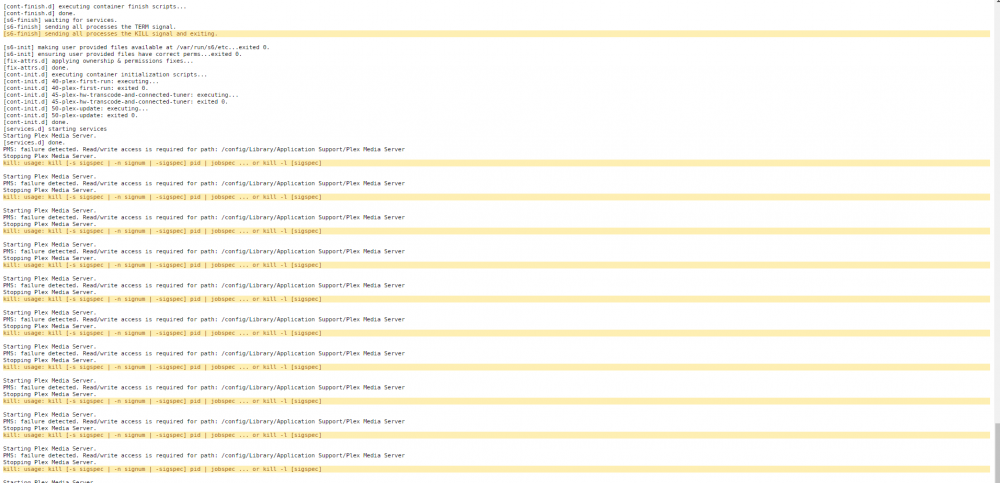
So as I couldn't make any progress I deleted Plex and reinstalled , but very frustrating the new install is giving exactly the same error. TIA.
-
You were correct, just needed to be more patient and command executed ok, unfortunately still getting the same error though.
-
When i run this command , it kind of hangs, get a flashing curser but then nothing happens and doesn't return to the root prompt unless I hit ctrl c. I must be doing something wrong?
-
I did try this command but it just seemed to hang. However my disk 9 finally failed so I have installed a new one and am currently rebuilding the array and will have another go once this is done.
-
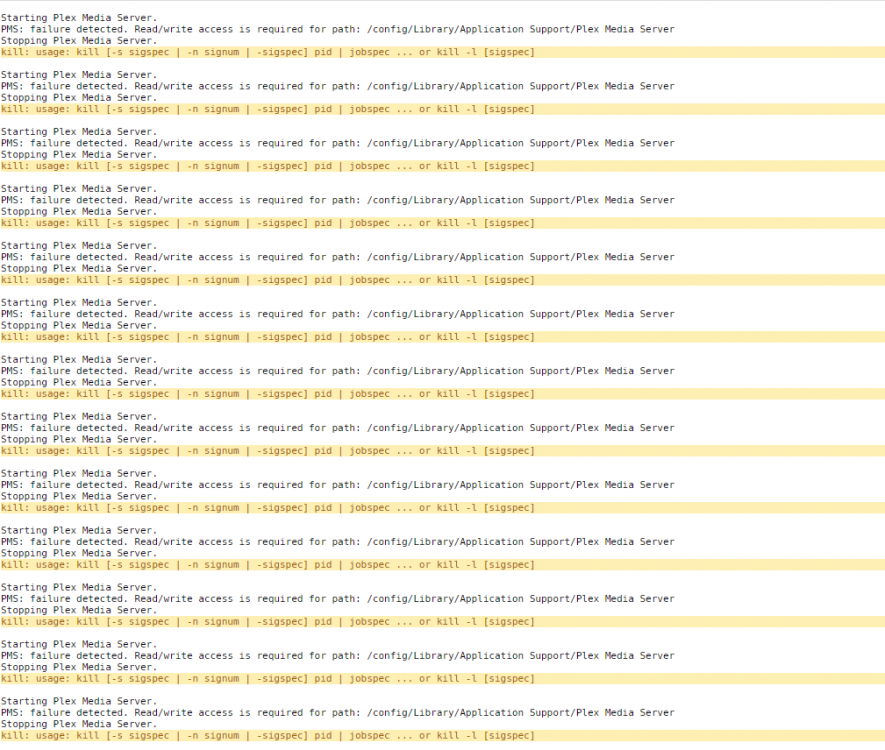
Thanks!!! Here is the log which highlights the problem. Just have to figure out now how to grant read write access.
-
Thanks! Tried restarting and it didn't change anything, need to check into restart parameters as not familiar with that yet.
-
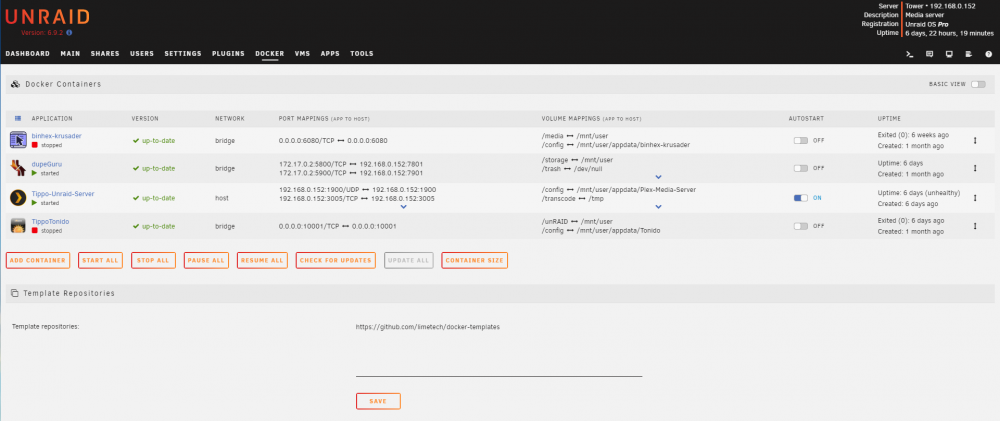
Thanks! On the far right in the Uptime column for Plex it says unhealthy. You're right need to order a new disk for disk 9!
-
Hi, thanks for your help. Screenshot and diagnostic file attached. tower-diagnostics-20210821-1349.zip
-
I set up my Plex server a while ago and all was fine. Now it has stooped working, I cant access the webui and in Docker it shows as unhealthy. I am not 100% sure when this happened, I did recently add a new disk but cant be sure whether Plex stopped working then or at another time. I am not sure how I should troubleshoot this so any help would be much appreciated.


