Crimson Unraider
Members
-
Joined
-
Last visited
Everything posted by Crimson Unraider
-
I have the same issue, everything was great in 6.8.3 but now (6.9.1) when I start my Win 10 VM the CPU maxes out at 100% and stay there until I force stop the VM. I did make a backup before I upgraded so can I just overwrite my flash with the backup files? Should I move all data off the Cache before I revert? It was already formatted btrfs. crimson-diagnostics-20210321-0046.zip
-
xxDeadbolt, thanks for this I have been struggling for awhile now. Under the old PIA server I used the socks user and password. I have been reading this thread and never saw that. I'm up and running now.
-
I installed CMK64GX4M4A2666C16 today and all is good. 64G is showing up now. Thanks again for the help.
-
It is strange that the bios and the Unraid dashboard show 64G. I see now where it says 31.4 usable. I have CMK64GX4M4A2666C16 in my other PC and it says this motherboard will accept 4 dims so I will swap them out tomorrow and see.
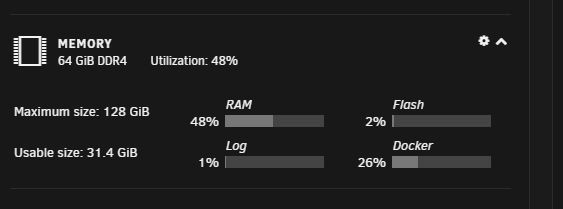
-
Thanks for the info Squid, I have been having a lot of issues with this setup and ram is just the latest. 2133MT/s was the default setting on the bios so I went with it. Next week I will be upgrading to a Gigabyte x399 pro with a Threadripper 2950X, maybe I need to rethink the ram for that motherboard. I will look at that boards QVL list before I buy more.
-
When I run Windows 10 VM (8G) along with Emby and Plex dockers I was using 80% of my RAM so I upgraded from 32G to 64G. All 64G is show on my dashboard but it was still showing that I'm using 80%. I looked at HTOP and TOP, both only show 32G total RAM. I restarted a couple times and no change. Any help would be appreciated. crimson-diagnostics-20200909-1917.zip