Skip to content
View in the app

A better way to browse. Learn more.

Unraid

A full-screen app on your home screen with push notifications, badges and more.

To install this app on iOS and iPadOS
  1. Tap the Share icon in Safari
  2. Scroll the menu and tap Add to Home Screen.
  3. Tap Add in the top-right corner.
To install this app on Android
  1. Tap the 3-dot menu (⋮) in the top-right corner of the browser.
  2. Tap Add to Home screen or Install app.
  3. Confirm by tapping Install.

TDIcelander

Members
  • Joined

  • Last visited

  1. Aight, thank you! Been chewing my nails off panicking over dataloss... old family photos and such on there, can -not- afford to lose em.
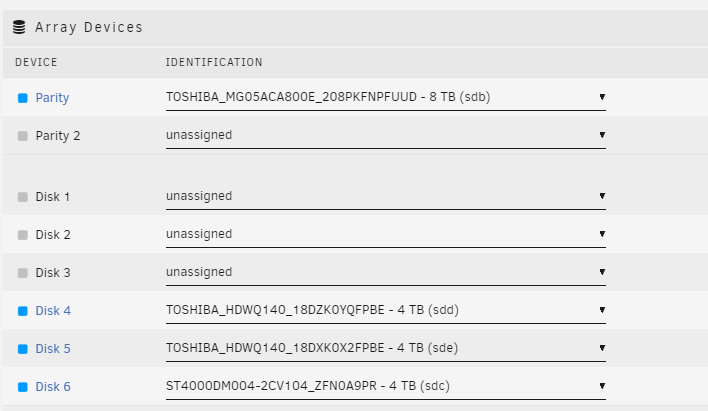
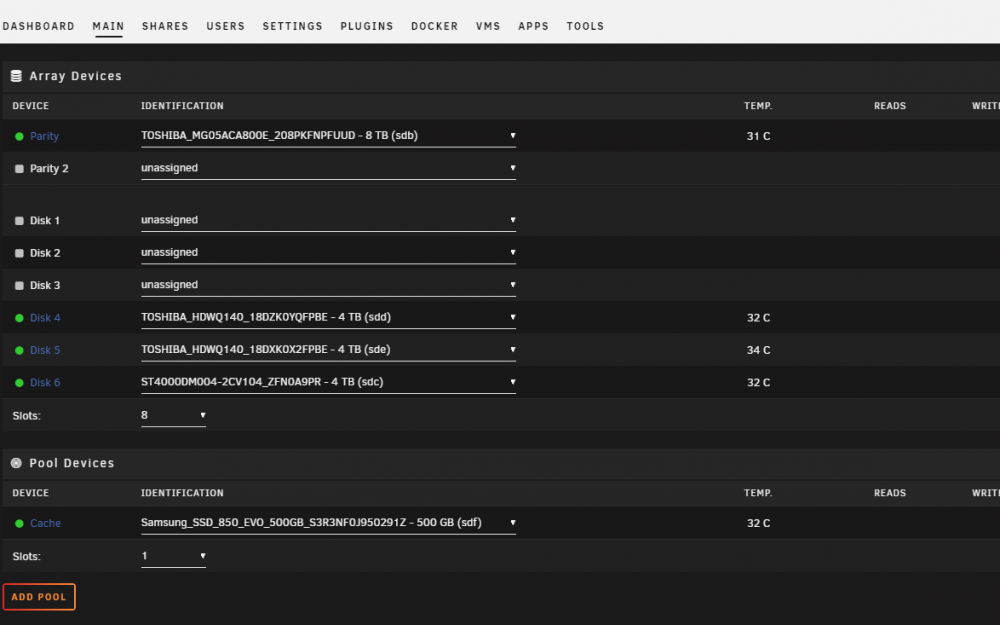
  2. Hey all. This teaches me a lesson in not being lazy and taking a regular copy of my usb... lesson learned. Thankfully i snagged photos of my setup a few days ago in case of FUBAR and i just wanna confirm with you guys here before i do something that will cause me to lose data. If i put all disks back into the right slots then all should be fine and dandy, no data loss... right? Thanks in advance. TDIcelander
  3. Just installed this. Works perfectly. Thanks!!!

Account

Navigation

Search

Search

Configure browser push notifications

Chrome (Android)
  1. Tap the lock icon next to the address bar.
  2. Tap Permissions → Notifications.
  3. Adjust your preference.
Chrome (Desktop)
  1. Click the padlock icon in the address bar.
  2. Select Site settings.
  3. Find Notifications and adjust your preference.