




Skip to content
View in the app

A better way to browse. Learn more.

Unraid

A full-screen app on your home screen with push notifications, badges and more.

To install this app on iOS and iPadOS
  1. Tap the Share icon in Safari
  2. Scroll the menu and tap Add to Home Screen.
  3. Tap Add in the top-right corner.
To install this app on Android
  1. Tap the 3-dot menu (⋮) in the top-right corner of the browser.
  2. Tap Add to Home screen or Install app.
  3. Confirm by tapping Install.

hutch

Members
  • Joined

  • Last visited

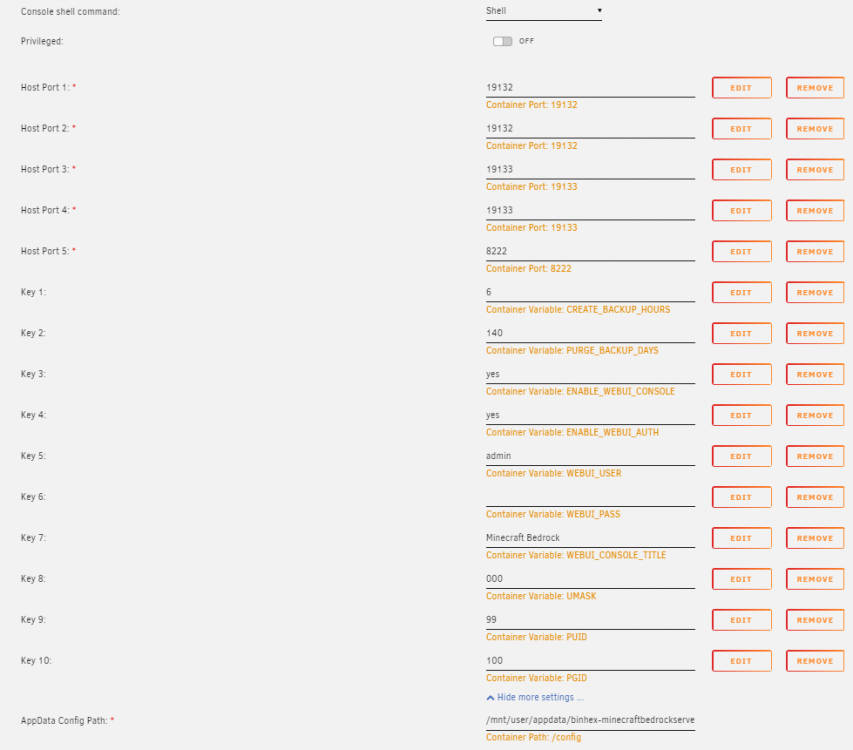
  1. The share setting is set to 'only' so shouldnt be an issue there. Similarly, when i stop the container and copy in the backup contents it ends up rebooting with no change so isnt using the backup. Is there anything else i can try?
  2. /mnt/user/appdata/binhex-minecraftbedrockserver
  3. hutch joined the community
  4. I've been having issues where my worlds are reset whenever there is an update. The worlds generate the same but are back in the state when first generated. Is there a way to prevent this happening going forwards. Additionally, how do i restore the server from a previous auto backup? Any help is appreciated. Thanks in advance

Account

Navigation

Search

Search

Configure browser push notifications

Chrome (Android)
  1. Tap the lock icon next to the address bar.
  2. Tap Permissions → Notifications.
  3. Adjust your preference.
Chrome (Desktop)
  1. Click the padlock icon in the address bar.
  2. Select Site settings.
  3. Find Notifications and adjust your preference.