





ght_unr
Members
-
Joined
-
Last visited
-
Thank you for this, sorry if the scope is beyond unraid, but I see what you mean. I'm able to curl, and unraid's page is being blocked by chrome. Can you share a link for SOP on how to resolve this?
-
for this command: here is the output: * Host tower:443 was resolved. * IPv6: (none) * IPv4: 192.168.1.199 * Trying 192.168.1.199:443... * Connected to tower (192.168.1.199) port 443 * ALPN: curl offers h2,http/1.1 * TLSv1.3 (OUT), TLS handshake, Client hello (1): * TLSv1.3 (IN), TLS handshake, Server hello (2): * TLSv1.3 (OUT), TLS change cipher, Change cipher spec (1): * TLSv1.3 (OUT), TLS handshake, Client hello (1): * TLSv1.3 (IN), TLS handshake, Server hello (2): * TLSv1.3 (IN), TLS handshake, Encrypted Extensions (8): * TLSv1.3 (IN), TLS handshake, Certificate (11): * TLSv1.3 (IN), TLS handshake, CERT verify (15): * TLSv1.3 (IN), TLS handshake, Finished (20): * TLSv1.3 (OUT), TLS handshake, Finished (20): * SSL connection using TLSv1.3 / TLS_AES_256_GCM_SHA384 / secp384r1 / RSASSA-PSS * ALPN: server accepted h2 * Server certificate: * subject: O=Self-signed; OU=unRAID; CN=Tower.local * start date: Oct 12 01:04:52 2019 GMT * expire date: Oct 9 01:04:52 2029 GMT * issuer: O=Self-signed; OU=unRAID; CN=Tower.local * SSL certificate verify result: self-signed certificate (18), continuing anyway. * Certificate level 0: Public key type RSA (2048/112 Bits/secBits), signed using sha512WithRSAEncryption * using HTTP/2 * [HTTP/2] [1] OPENED stream for https://tower/ * [HTTP/2] [1] [:method: HEAD] * [HTTP/2] [1] [:scheme: https] * [HTTP/2] [1] [:authority: tower] * [HTTP/2] [1] [:path: /] * [HTTP/2] [1] [user-agent: curl/8.5.0] * [HTTP/2] [1] [accept: */*] > HEAD / HTTP/2 > Host: tower > User-Agent: curl/8.5.0 > Accept: */* > * TLSv1.3 (IN), TLS handshake, Newsession Ticket (4): * TLSv1.3 (IN), TLS handshake, Newsession Ticket (4): * old SSL session ID is stale, removing < HTTP/2 302 HTTP/2 302 < server: nginx server: nginx < date: Wed, 30 Sep 2026 07:21:11 GMT date: Wed, 30 Sep 2026 07:21:11 GMT from INSIDE the server, ran this command and received output: root@Tower:~# openssl x509 -in /boot/config/ssl/certs/*_unraid_bundle.pem -noout -subject -dates subject=O=Self-signed, OU=unRAID, CN=Tower.local notBefore=Oct 12 01:04:52 2019 GMT notAfter=Oct 9 01:04:52 2029 GMT subject=O=Self-signed, OU=unRAID, CN=Tower.local notBefore=Oct 12 01:04:52 2019 GMT notAfter=Oct 9 01:04:52 2029 GMT -bash: 12: command not found -bash: 9: command not found root@Tower:~# ls /boot/config/ssl/certs/* /boot/config/ssl/certs/Tower_unraid_bundle.pem
-
Something is forcing external connections to use https (which to be honest have not really ever worked) sanity test from inside the server: root@Tower:~# curl -I --max-time 10 http://127.0.0.1/ HTTP/1.1 302 Moved Temporarily Server: nginx Date: Tue, 29 Sep 2026 15:36:24 GMT Content-Type: text/html Content-Length: 138 Connection: keep-alive Location: http://127.0.0.1/Main Content-Security-Policy: frame-ancestors 'self' root@Tower:~# curl -I --max-time 10 http://tower/ HTTP/1.1 302 Moved Temporarily Server: nginx Date: Tue, 29 Sep 2026 15:36:38 GMT Content-Type: text/html Content-Length: 138 Connection: keep-alive Location: http://tower/Main Content-Security-Policy: frame-ancestors 'self' from my terminal on another machine: curl -I --max-time 10 http://192.168.1.199 HTTP/1.1 302 Moved Temporarily Server: nginx Date: Wed, 30 Sep 2026 03:04:35 GMT Content-Type: text/html Content-Length: 138 Connection: keep-alive Location: https://192.168.1.199:443/ Content-Security-Policy: frame-ancestors 'self' curl -I --max-time 10 http://tower HTTP/1.1 302 Moved Temporarily Server: nginx Date: Wed, 30 Sep 2026 03:05:05 GMT Content-Type: text/html Content-Length: 138 Connection: keep-alive Location: https://tower:443/ Content-Security-Policy: frame-ancestors 'self'
-
I have attached the new diagnostics, I do not believe third-party .plg was the issue. tower-diagnostics-20260929-0131.zip
-
@JorgeB Sorry, it works in safe mode, but will not work in conventional mode.
-
First diagnostic was before restarting Second diagnostic was after restarting but not in safe mode Third diagnostic was GUI safe mode, where the web server works only inside its own environment. tower-diagnostics-20260926-0826.zip tower-diagnostics-20260926-2202.zip tower-diagnostics-20260926-2216.zip
-
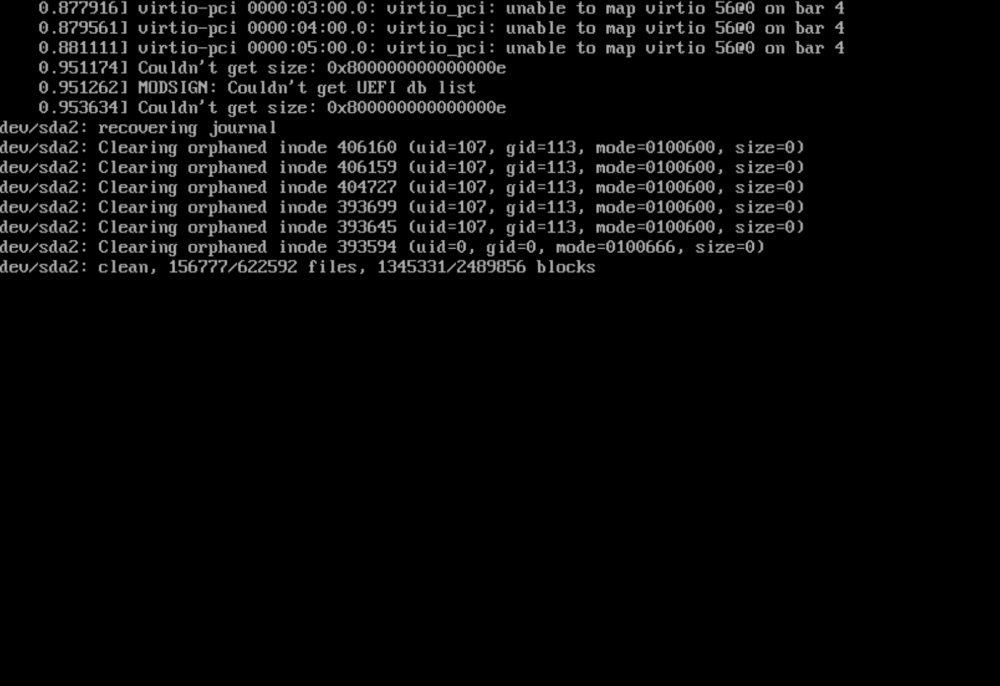
I am able to get this to work on a new vm deployment, but somehow during the upgrade this got messed up. vm console has error: unable to map virtio 56@0 on bar 4 (picture) options tried: br0-virtio-net, virbr0-virtio-net and gets this error: internal error: qemu unexpectedly closed the monitor: 2024-01-16T21:47:26.343642Z qemu-system-x86_64: -device {"driver":"pcie-pci-bridge","id":"pci.7","bus":"pci.1","addr":"0x0"}: Bus 'pci.1' not found full log:
-
For whatever reason, the VM does not see this eth device since I upgraded
-
@Squid@JorgeB Can you help?
-
upgraded from 6.8.3 Important to note: network shares work docker works, can connect to network vms: ubuntu 18.04 - previous was working fine I can only run and vnc, ifconfig only has loopback, no eth0. obviously networking works on the box. The box is a hpe microserver g10 (if that matters) logs: tower-diagnostics-20231204-1843.zip
-
I upgraded from 6.8.3 to 6.12.6. Dockers: Can still be started, gets ip just fine. Able to connect to real world. VMs: I'm using ubuntu, not that it really matters, but I am unable to see a network interface, `ifconfig` only shows the loopback address. network source: br0 network model: virtio boot order: 3 Interestingly, if I try to create a new VM, it is unable to see network interfaces in the setup, which makes me think that there may be a settings issue. Can someone help please? tower-diagnostics-20231204-1843.zip
-
The issue is as follows. I upgraded from 6.8.3 to 6.12.6. The dockers and vms persisted to the new version, but no network access is available on the vms. I noticed that when the vms upgraded: the bus device that the disk was hosted changed to `VirtIO`, and I think it was SATA. `Guest agent not installed` is seen in the interfaces section Tried to remediate the issue by changing disk to SATA, tried changing the networking to `Virt` Diagnostics attached. tower-diagnostics-20231204-1843.zip
-
Hoping I could get some help resolving this issue tower-diagnostics-20231204-1843.zip
