






Zeroeth
Members
-
Joined
-
Last visited
Everything posted by Zeroeth
-
Hi! I'm getting the following issue on printing through RDP connection after upgrading to 1.5.0. If I check on the 1.4.0-3 version, printing works without any issues. Any ideas what this might be related to? ApacheGuacamole Log ------------------------------------------------------------------- guacd[4661]: INFO: User "@1ef25a0a-eeb9-4bb7-98ba-d887a463c0bf" joined connection "$87a093cc-718b-44be-be2f-274a6d743162" (1 users now present) guacd[4661]: INFO: Loading keymap "base" guacd[4661]: INFO: Loading keymap "en-us-qwerty" guacd[4661]: INFO: Connected to RDPDR 1.13 as client 0x0005 guacd[4661]: INFO: Connected to RDPDR 1.13 as client 0x000a guacd[4661]: INFO: RDPDR user logged on guacd[4661]: INFO: Print job created guacd[4661]: INFO: Created PDF filter process PID=4817 guacd[4817]: INFO: Running gs GPL Ghostscript 10.00.0: Unrecoverable error, exit code 1 guacd[4661]: INFO: Print job closed ------------------------------------------------------------------- Also, I have checked this on 1.4.0-3 on another docker instance since if I try to downgrade from 1.5.0 back to 1.4.0-3 then mariaDB won't start. Thanks in advance!
-
Working great. Thankyou!
-
Got it. Will try this first.
-
Thanks trurl! I will be replacing the USB soon as suggested. The guacd segfaults are there on my other Unraid servers (where the Apache Guacamole docker is installed) as well, doubt if that is related. Haven't done a Memtest yet. Can't take the Server offline.
-
:: UPDATE :: Hi! So I have been continuosly monitoring the server logs since the last post. I did not restart the Server or replace the USB as everything was working fine and I wanted to make sure that this was not some random error. Unfortunately, the same happened today - after 18 days (Diagnostics attached). There was disruption in accessing the VMs from the Apache Guacamole docker service and 1 VM just shutdown abruptly (don't know if it's related, but my best guess is that it is related to this issue). I just had to restart the docker and everything was fine again. All this was within 15 minutes :). I was hoping I wouldn't have to replace the USB, but no choice now. I'm still wondering what might be the actual cause for this error message since the USB is working and accesible... Any insights based on the diagnostics would be really helpful. Thanks in advance! azraj-diagnostics-20230217-1741.zip
-
Yes, I have the backup on "My Servers" as of 30/01/2023 3:52:05 PM and have downloaded it just now as well. Yes, I'm aware of this. I use the Cache drive solely for VMs and the 2 shares that are cache only are for the VMs. Yep, I'm using Apache Guacamole and I see this on all the instances I have for this docker on my other servers as well.
-
Hi! I had a strange issue today. All my VMs were suddenly unavailable over LAN (could'nt ping them or access them via Guacamole) but they were accesible via VNC. Dockers were working just fine. On checking the logs I saw the error which is roughly the time when this issue occurred. Unregistered - flash device error (ENOFLASH7) However, everything started working again within an hour. I've also checked the disk log information of the flash (sda) which shows a device_read_smart error. Jan 6 23:47:36 Azraj kernel: sd 0:0:0:0: [sda] 60125184 512-byte logical blocks: (30.8 GB/28.7 GiB) Jan 6 23:47:36 Azraj kernel: sd 0:0:0:0: [sda] Write Protect is off Jan 6 23:47:36 Azraj kernel: sd 0:0:0:0: [sda] Mode Sense: 43 00 00 00 Jan 6 23:47:36 Azraj kernel: sd 0:0:0:0: [sda] Write cache: disabled, read cache: enabled, doesn't support DPO or FUA Jan 6 23:47:36 Azraj kernel: sda: sda1 Jan 6 23:47:36 Azraj kernel: sd 0:0:0:0: [sda] Attached SCSI removable disk Jan 6 23:50:04 Azraj emhttpd: SanDisk_Cruzer_Force_03023305072622175750-0:0 (sda) 512 60125184 Jan 6 23:50:04 Azraj emhttpd: import flash device: sda Jan 6 23:50:04 Azraj emhttpd: read SMART /dev/sda Jan 30 15:01:06 Azraj emhttpd: error: device_read_smart, 8372: Cannot allocate memory (12): device_spinup: stream did not open: sda My immediate concern is that the Flash drive is failing or worse failed already. This Server is barely a month old and I have this same USB brand in another 6-7 servers running Unraid without any problems related to the USB till date whatsoever. I've attached the diagnostics herewith and would really appreciate some insight into this to understand if the USB needs to be replaced or is this random and related to something else? Thanks in advance! azraj-diagnostics-20230130-2232.zip
-
Hi All! I've finally managed to get RC docker working on mongo:5 with all my previous data restored successfully :). Notifications are working now and I can connect to the Rocket.Chat cloud. +--------------------------------------------------+ | SERVER RUNNING | +--------------------------------------------------+ | | | Rocket.Chat Version: 5.2.0 | | NodeJS Version: 14.19.3 - x64 | | MongoDB Version: 5.0.13 | | MongoDB Engine: wiredTiger | | Platform: linux | | Process Port: 3000 | | Site URL: https://my.domain.com | | ReplicaSet OpLog: Enabled | | Commit Hash: 08f03cc9d8 | | Commit Branch: HEAD | | | +--------------------------------------------------+ Posting the steps I followed for anyone who might be facing a similar issue. #1 Stop RC and backup existing data from your current mongodb docker console mongodump --archive --gzip > 2022.10.15_rocketchat_mongo_server.dump.archive.gzip #2 Remove the existing mongodb docker stop the mongodb docker rename the /mnt/appdata/mongodb folder to mongodb-backup remove the mongodb docker. #3 Install mongodb docker (default) with the following changes Repository: mongo:5 (Advanced View) Extra Parameters: --hostname mongodatabase Post Arguments: --bind_ip_all --replSet "rs0" #4 Initialise ReplicaSet in mongodb - open the console and type mongosh then on the prompt test > type rs.initiate( { _id : "rs0", members: [ { _id: 0, host: "<YOUR-SERVER-IP>:27017" }, ] }) - you should see the result as below test> rs.initiate( { ... _id : "rs0", ... members: [ ... { _id: 0, host: "<YOUR-SERVER-IP>:27017" }, ... ] ... }) { ok: 1 } rs0 [direct: other] test> rs0 [direct: primary] test> #5 Restore the backup data to the new mongodb instance copy the backup file from step #1 into the new mongodb appdata folder open the mongodb console and move into the /data/db dir then type mongorestore --archive --gzip < 2022.10.15_rocketchat_mongo_server.dump.archive.gzip You should see something similar to this on a successful restore (this may take a while depending on your backup file size): 2022-10-15T14:54:16.776+0400 159574 document(s) restored successfully. 0 document(s) failed to restore. #6 Edit your RC docker settings as below MONGO_URL mongodb://rocketchat:<Password>@<YOUR-SERVER-IP>:27017/rocketchat?replicaSet=rs0 MONGO_OPLOG_URL mongodb://rocketchat:<Password>@<YOUR-SERVER-IP>:27017/local?replicaSet=rs0 That's it. Start the docker and it should work! Enjoy


-
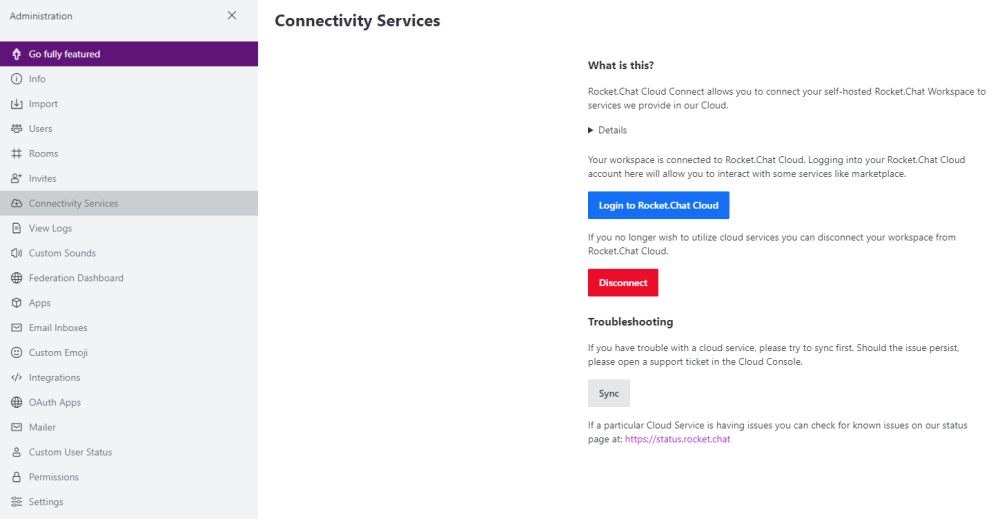
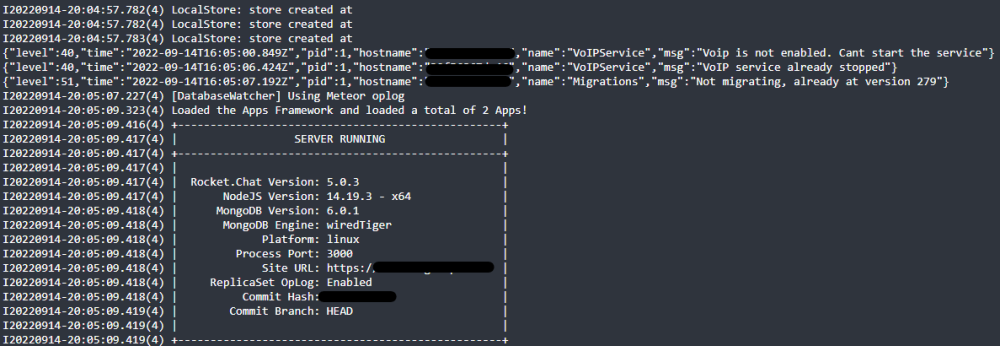
Hi! After the last update for RC and MongoDB, I'm getting the following errors. RC is working, but notifications (both in the browser and app) just don't work anymore. I've tried re-registering RC on the cloud and currently it shows the instance is connected. I'm also able to sync it, at least that's the notification that I get :). but I cannot Login to Rocket.Chat Cloud when I click the Login to Rocket.Chat Cloud button. This is the error message that I get: My RC docker log on start: Would highly appreciate any insights/help to resolve this issue.
-
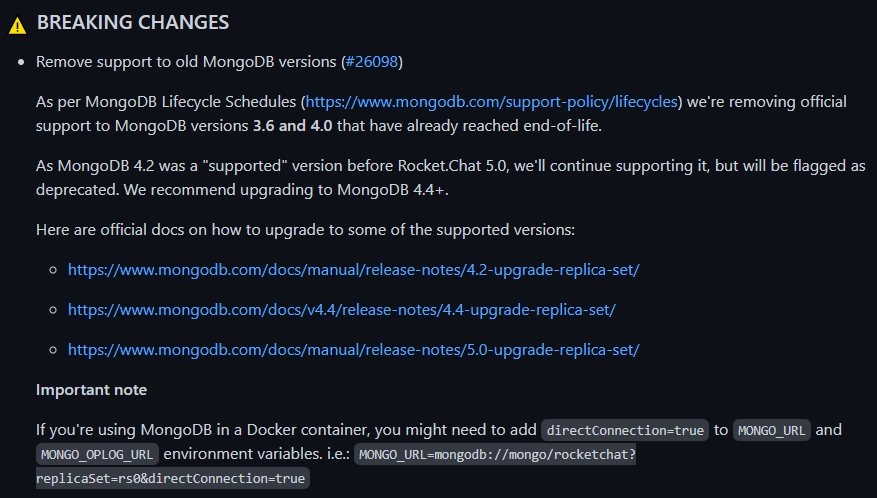
Adding the directConnection=true argument to both the MONGO_URL and MONGO_OPLOG_URL seems to have resolved the issue above. MONGO_URL: mongodb://rocketchat:<password>@<localhost>:27017/rocketchat?directConnection=true MONGO_OPLOG_URL mongodb://rocketchat:<password>@<localhost>:27017/local?authSource=admin&directConnection=true Reference: https://github.com/RocketChat/Rocket.Chat/releases @9BAR Thanks for the update regarding adding the above argument.
-
I've had the exact same problem today, and the above argument seems to have fixed the issue. However, I can see the below error in the logs right after > SERVER RUNNING. Would appreciate any insights on this. +--------------------------------------------------+ | SERVER RUNNING | +--------------------------------------------------+ | | | Rocket.Chat Version: 5.0.1 | | NodeJS Version: 14.19.3 - x64 | | MongoDB Version: 5.0.10 | | MongoDB Engine: unknown | | Platform: linux | | Process Port: 3000 | | Site URL: https://xxx | | ReplicaSet OpLog: Enabled | | Commit Hash: xxx | | Commit Branch: HEAD | | | +--------------------------------------------------+ === UnHandledPromiseRejection === MongoServerSelectionError: getaddrinfo ENOTFOUND mongodatabase at Timeout._onTimeout (/app/bundle/programs/server/npm/node_modules/mongodb/lib/sdam/topology.js:306:38) at listOnTimeout (internal/timers.js:557:17) at processTimers (internal/timers.js:500:7) => awaited here: at Function.Promise.await (/app/bundle/programs/server/npm/node_modules/meteor/promise/node_modules/meteor-promise/promise_server.js:56:12) at server/database/DatabaseWatcher.ts:96:3 at /app/bundle/programs/server/npm/node_modules/meteor/promise/node_modules/meteor-promise/fiber_pool.js:43:40 { reason: TopologyDescription { type: 'ReplicaSetNoPrimary', servers: Map(1) { 'mongodatabase:27017' => [ServerDescription] }, stale: false, compatible: true, heartbeatFrequencyMS: 10000, localThresholdMS: 15, setName: 'rs01', maxSetVersion: 1, maxElectionId: new ObjectId("7fffffff0000000000000034"), commonWireVersion: 13, logicalSessionTimeoutMinutes: undefined }, code: undefined, [Symbol(errorLabels)]: Set(0) {} } --------------------------------- Errors like this can cause oplog processing errors. Setting EXIT_UNHANDLEDPROMISEREJECTION will cause the process to exit allowing your service to automatically restart the process Future node.js versions will automatically exit the process =================================
-
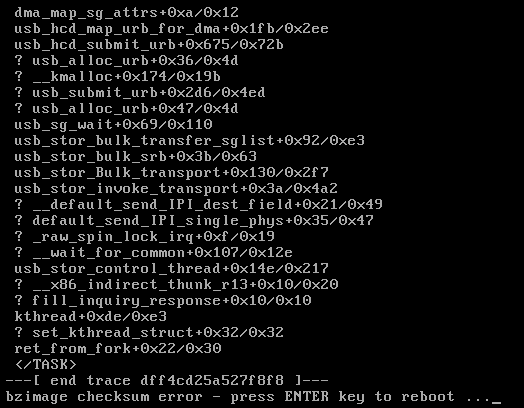
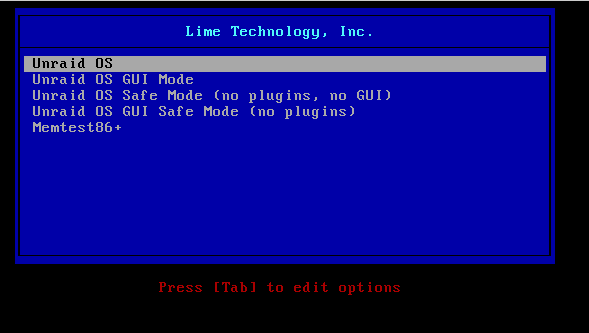
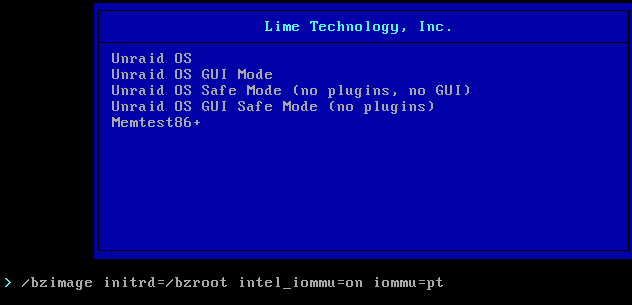
Thankyou very much for sharing this! It worked perfectly 🙂 I just upgraded my R710 server from 6.9.2 to 6.10.0-rc5 and ran into this exact same issue. Server wouldn't boot due to a checksum error. Added the 2 arguments: intel_iommu=on iommu=pt on the boot option by pressing tab to edit the options and the Server is up again!
-
Thankyou for the clarification. Makes sense now as all my VM disks are reflecting in the same way on the GUI. These are the various disk sizes that I have and all reflect a bigger size in the GUI. 61,440 MB on disk (60GB) > 64.4 GB in GUI (Shares) 81,920 MB on disk (80GB) > 85.9 GB in GUI (Shares) 256,000 MB on disk (250GB) > 268 GB in GUI (Shares) 512,000 MB on disk (500GB) > 537 GB in GUI (Shares)
-
Hi All! I have this strange issue where the VM disk image size is bigger in the Unraid GUI (when we see the folder within the Shares) compared to when seen on disk (either with MC or Krusader). The VM is on my SSD drive. Example, as posted below, is of a Windows 10 VM with a disk image size of 60G but its showing as 64.4G on the Unraid GUI (Shares). >> in Unraid GUI (Shares) >> in MC I have multiple VMs running with bigger disk image sizes resulting in Critical Disk Utilization notifications because of this. Anyone else facing such an issue? and is there a way to resolve this so that the image size does not exceed the defined 60G?


-
UPDATE: I changed the Dockers Network Type to Bridge Mode since my last post and all seems well again. Have not seen anymore Call Traces since then. Big Thankyou @trurl once again! Have not had the chance to checkout the new setting on 6.10rc1 as yet.
-
Thanks. Will check this out on another test server as well. 🙂
-
Thankyou so much for highlighting this. I will check out the post and see if changing the docker containers from static IP to host/bridge mode will help.
-
Just added above as well. syslog20210920-1845.zip
-
This is the second time that I've faced this issue on one of my Unraid Servers. The WebUI becomes unresponsive, however the dockers running on the Server seem to be working fine and I can also ssh into the Server. I rebooted the server from the ssh terminal and on restart it's started a Parity Check. The webUI is working now. I've saved the syslog before reboot and saw the following msgs related to: nginx: 2021/09/20 16:00:16 [error] 11889#11889: *2866472 upstream timed out (110: Connection timed out) while reading upstream Sep 20 09:11:11 R620 webGUI: Successful login user root from 192.168.53.208 Sep 20 09:14:32 R620 nginx: 2021/09/20 09:14:32 [error] 11889#11889: *2832343 upstream timed out (110: Connection timed out) while reading upstream, client: 192.168.53.208, server: , request: "GET /Main HTTP/2.0", upstream: "fastcgi://unix:/var/run/php5-fpm.sock:", host: "xx.unraid.net" Sep 20 15:58:16 R620 webGUI: Successful login user root from 192.168.53.208 Sep 20 15:59:35 R620 sshd[2471]: Connection from 192.168.53.208 port 56720 on 192.168.53.114 port 22 rdomain "" Sep 20 15:59:44 R620 sshd[2471]: Postponed keyboard-interactive for root from 192.168.53.208 port 56720 ssh2 [preauth] Sep 20 15:59:49 R620 sshd[2471]: Postponed keyboard-interactive/pam for root from 192.168.53.208 port 56720 ssh2 [preauth] Sep 20 15:59:49 R620 sshd[2471]: Accepted keyboard-interactive/pam for root from 192.168.53.208 port 56720 ssh2 Sep 20 15:59:49 R620 sshd[2471]: pam_unix(sshd:session): session opened for user root(uid=0) by (uid=0) Sep 20 15:59:49 R620 sshd[2471]: Starting session: shell on pts/0 for root from 192.168.53.208 port 56720 id 0 Sep 20 16:00:16 R620 nginx: 2021/09/20 16:00:16 [error] 11889#11889: *2866472 upstream timed out (110: Connection timed out) while reading upstream, client: 192.168.53.208, server: , request: "GET /Main HTTP/2.0", upstream: "fastcgi://unix:/var/run/php5-fpm.sock:", host: "xx.unraid.net", referrer: "https://xx.unraid.net/login" Sep 20 16:00:47 R620 sudo: root : TTY=pts/0 ; PWD=/root ; USER=root ; COMMAND=/bin/su Sep 20 16:00:47 R620 su[2705]: Successful su for root by root Sep 20 16:00:47 R620 su[2705]: + /dev/pts/0 root:root Sep 20 16:00:47 R620 su[2705]: pam_unix(su:session): session opened for user root(uid=0) by root(uid=0) Sep 20 16:03:21 R620 nginx: 2021/09/20 16:03:21 [error] 11889#11889: *2866739 upstream timed out (110: Connection timed out) while reading upstream, client: 192.168.53.208, server: , request: "GET /Main HTTP/2.0", upstream: "fastcgi://unix:/var/run/php5-fpm.sock:", host: "xx.unraid.net", referrer: "https://xx.unraid.net/login" Sep 20 16:20:31 R620 nginx: 2021/09/20 16:20:31 [error] 11889#11889: *2868171 upstream timed out (110: Connection timed out) while reading upstream, client: 192.168.53.208, server: , request: "GET /Main HTTP/2.0", upstream: "fastcgi://unix:/var/run/php5-fpm.sock:", host: "xx.unraid.net" Sep 20 16:27:01 R620 webGUI: Successful login user root from 192.168.53.218 Sep 20 16:29:01 R620 nginx: 2021/09/20 16:29:01 [error] 11889#11889: *2868900 upstream timed out (110: Connection timed out) while reading upstream, client: 192.168.53.218, server: , request: "GET /Main HTTP/2.0", upstream: "fastcgi://unix:/var/run/php5-fpm.sock:", host: "xx.unraid.net", referrer: "https://xx.unraid.net/login" Can anyone please advise what this is regarding and how to avoid this happening again? Diagnostics shared. Thanks in advance! r620-diagnostics-20210920-1950.zip syslog20210920-1845.zip
-
Thank you! This worked perfectly for me on my Server - HP DL380p with p420i RAID card.




