





johnny2678
Members
-
Joined
-
Last visited
-
I had this attitude... until the 6.12 macvlan disaster that took weeks for me to sort. Trying to explain that the lights don't work in the house to my wife and movies aren't available to my kids only to be met with angry glares is not something I'm looking to repeat 😂🧐
-
I'm guessing it's stable enough. Tailscale in containers sounds like it might be my reason to upgrade but everything is running so smoothly now I just can't make myself do it. /torn
-
Thanks for picking this up. Any plans to make it available for 6.12.x users? I can't add any containers to folders using the old version and I can't install this version because I'm not on 7.x 😭
-
oh geez, I'm sorry to waste your time. I thought I read somewhere that it was removed automatically when you upgraded to folder view but I probably confused that with the CA backup plugin or something else. It's working now after I removed the old plugin. thx again. cheers.
-
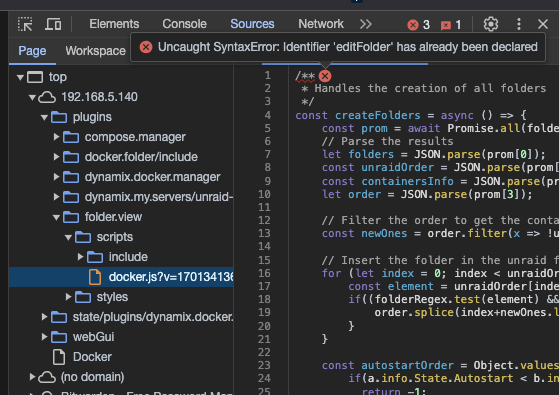
I see it in sources - not sure if the error is relevant?
-
any idea about this console error? I see the folders on the Dashboard tab (imported from json), but on the docker tab I just see dockers, no folders and nothing happens when I click 'Add Folder`, and this error is thrown in the console: Docker:3940 Uncaught ReferenceError: createFolderBtn is not defined at HTMLInputElement.onclick (Docker:3940:2) edit: have tried removing the plugin and adding it again with a fresh config but I get the same error. Happens with a clean install as well as after importing a json.
-
After adding the `APP_KEY` variable, I'm getting conflicting messages in the logs: ✅ An application key exists. AND [2023-11-17 12:59:53] production.ERROR: No application encryption key has been specified. {"exception":"[object] Anyone else? Full log: 🔗 Creating symlinks for config and log files... ✅ Symlinks created. ✅ An application key exists. 💰 Building the cache... ✅ Cache set. 🚛 Migrating the database... ✅ Database migrated. ✅ All set, Speedtest Tracker started. [17-Nov-2023 07:58:38] NOTICE: fpm is running, pid 115 [17-Nov-2023 07:58:38] NOTICE: ready to handle connections [17-Nov-2023 07:58:38] NOTICE: systemd monitor interval set to 10000ms [2023-11-17 12:59:53] production.ERROR: No application encryption key has been specified. {"exception":"[object] (Illuminate\\Encryption\\MissingAppKeyException(code: 0): No application encryption key has been specified. at /var/www/html/vendor/laravel/framework/src/Illuminate/Encryption/EncryptionServiceProvider.php:79) [stacktrace]
-
Any ideas on why the write counts are so lopsided? Any ideas on why tar-ing (or even rsync-ing) plex bundles on the cache pool never finish? Again, thx for the attention. Not your job to fix my stuff. Nice to have someone to bounce ideas off of.
-
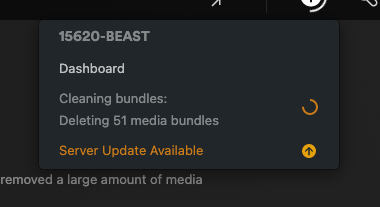
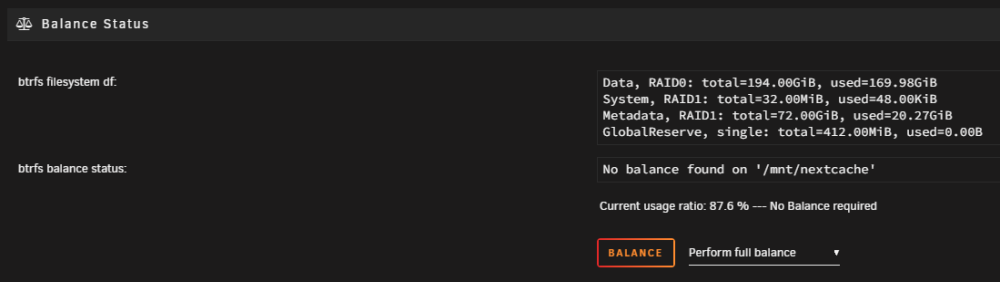
Just going to throw this out there - I run the official plex docker. For a few days now, I've watched as it constantly runs transcode operations on the same show (kids show/~50 short episodes). Runs for hours, then stops, then runs again the next day on the same show - was guessing this was due to the plex maintenance window. I have >20TB of media, but plex stays hyperfocused on this show for some reason. At the same time, I've been having problems with my plex backup script. It keeps getting hung up on the bundles under: config/Library/Application\ Support/Plex\ Media\ Server/Media/localhost/ It never completes. Today, I tried to delete the offending show - never really cared about it anyways. Then I went to Plex Setup -> Troubleshooting -> Clean Bundles... Plex has been "Deleting 51 Media Bundles for over 2 hours now: The underlying disk(s) is an SSD cache pool in Raid0 (sdb & sdc): During this 2+ hour bundle delete operation, the read counter is wildly out of sync on the cache pool between these two devices: Is my BTRFS messed up? Could that be causing my issues? Adding a current diagnostic if it helps. thx again for looking @JorgeB. Would be happy to try any ideas you have to unstick this. 15620-beast-diagnostics-20231026-1022.zip

-
Sorry, you are correct. It's a SSD. I'll check the cable/replace next time I open the box. I haven't moved to 6.12.4 yet but curious if you can tell if the logs are still being spammed with NIC issues? I rebooted hoping they would clear so we could see if there were any other issues that might cause the "no exportable shares" issue. Worried if I move to 6.12.4 I'll just take the existing problems with me. 15620-beast-diagnostics-20231025-0912.zip
-
/dev/sdb? That's an NVME drive
-
@JorgeB just rebooted to see if the NIC errors cleared and noticed this in the logs. Does this say anything to you? Oct 25 08:08:16 15620-BEAST kernel: ata1.00: exception Emask 0x10 SAct 0x4000 SErr 0x280100 action 0x6 frozen Oct 25 08:08:16 15620-BEAST kernel: ata1.00: irq_stat 0x08000000, interface fatal error Oct 25 08:08:16 15620-BEAST kernel: I/O error, dev sdb, sector 520 op 0x0:(READ) flags 0x80700 phys_seg 37 prio class 0 Oct 25 08:08:16 15620-BEAST kernel: ata1.00: exception Emask 0x10 SAct 0x8000 SErr 0x280100 action 0x6 frozen Oct 25 08:08:16 15620-BEAST kernel: ata1.00: irq_stat 0x08000000, interface fatal error Oct 25 08:08:16 15620-BEAST kernel: ata1.00: exception Emask 0x10 SAct 0x8000 SErr 0x280100 action 0x6 frozen Oct 25 08:08:16 15620-BEAST kernel: ata1.00: irq_stat 0x08000000, interface fatal error Oct 25 08:08:16 15620-BEAST kernel: ata1.00: exception Emask 0x0 SAct 0x10000 SErr 0x880000 action 0x6 Oct 25 08:08:16 15620-BEAST kernel: ata1.00: error: { ICRC ABRT }
-
You found my special talent. Somehow finding the loophole and breaking stuff that just works for everyone else 😂 I'm pulling the array down and going back to 6.12.4. Will report back.
-
Thanks @JorgeB, the 6.12.4 macvlan fix didn't work for me. Despite following it to the letter, I would still get frequent lockups that would force a hard restart. That's why I went back to 11.5. I never really needed macvlan (was just the unraid standard when I started on 6.8), so when the system still wasn't stable after reverting to 11.5, I switched to ipvlan. Now I don't have to hard restart, but I'm getting the "no exportable shares" error every so often. Frustrating for a system that used to stay up for months at a time with no issues. I will try 6.12.4 the next time it goes down and report back.
-
I've been running Unraid without issue for 3 years. Then I try to upgrade to 6.12.4 and have had nothing but problems since. Got hit by the macvlan bug, so I went back to 6.11.5 where I thought it was safe. But now all my shares disappear every few days. When I go to the shares tab it says something like "No exportable shares". Data is fine but most dockers/vms stop working and it takes a reboot to get the shares back. My uptime sux now. Can anyone ELI5 what's going on?? TIA 15620-beast-diagnostics-20231024-2042.zip





