Falkinator
Members
-
Joined
-
Last visited
-
You may be running into the same issue I had where the reverse proxy IP get's blocked. I documented the work around with a link to a similar GitHub issue. Essentially the proxy IP get's blocked and you need to remove the blocked IP from the list, and prevent it from getting re-added. Here's the process: You can follow these steps to unblock the IP and prevent it from getting added: Remove the IP from the block list From a console in the container, either obtained from the Unraid docker UI or executing docker exec -it stalwart-mail bash Using the correct PASSWORD run: apt-get update && apt-get -y install curl curl -u 'admin:PASSWORD' \ --header 'Content-Type: application/json' \ --data '[{"type": "clear", "prefix": "server.blocked-ip."}]' \ http://127.0.0.1:8080/api/settings Stop the stalwart-mail docker container. Add the following line to /mnt/user/appdata/stalwart-data/etc/config.toml where ###.###.###.### is the blocked IP your trying to access the console from or the public reverse proxy IP. config.toml server.allowed-ip.###.###.###.### = "" Start the stalwart-mail docker container.
-
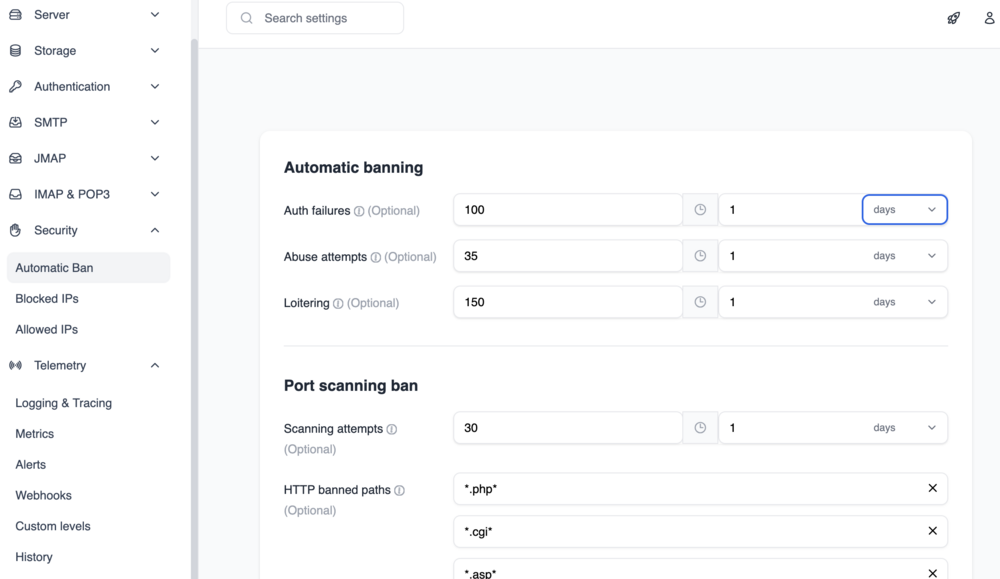
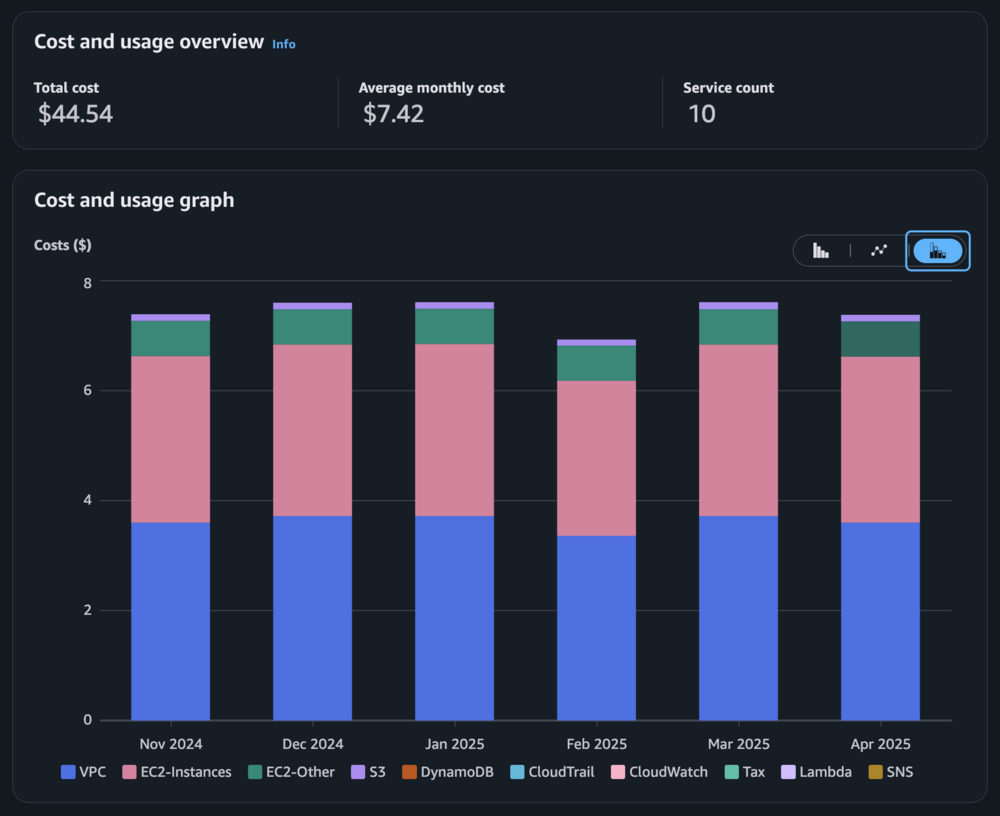
Interesting. You said "outbound packets leave via the server’s primary IP instead of the WireGuard-mapped address". I'm curious what you're doing there. My original plan was to have all in bound and outbound map through the WireGuard containers and transit over the AWS EIP which for sending mail particularly is so important so that the SPF and reverse DNS lookups all come from the same place. Container IssuesI haven't had any issue with my containers shutting down. I've run weeks with them operating and only had them stop when doing server maintenance. I expect that Stalwart is robust enough to handle the Auth probes and other malicious traffic. I know it's not fail2ban, but I do see a number of IPs (4192 at current count) getting blocked by these default rules: Hopefully the docker logs give you some indication of why the containers are crashing. I've had to run BIND in debug mode initially when I was working out the configurations. I've updated my debug section with the note about running it in debug: docker run --rm -it --entrypoint /bin/sh -v /mnt/user/appdata/bind/etc:/etc/bind -v /mnt/user/appdata/bind/cache/bind:/var/cache/bind -v /mnt/user/appdata/bind/lib/bind:/var/lib/bind -v /mnt/user/appdata/bind/var/log:/var/log internetsystemsconsortium/bind9:9.18 /usr/sbin/named -u bind -gAWS CostsIt's been averaging $7.42 a month over the last 6 months. The bulk of the cost is ~$3.80 for the EC2 (t4g.nano) and $3.72 for the VPC which is purely the $0.005 per hour for the IPv4 address. This is still less then my ISP was going to charge for a static IP, which I was doing before I made this switch. Maybe someday we will all move to IPv6 and I can save the money.
-
It looks like your got the TLS working. That's great. I updated my docs and fixed the links for the Stalwart configuration (they changed their doc URLs). It is not WordPress it's a static site generator, incidentally I use the same one Stalwart does, Docusaurus (https://docusaurus.io/) FTW! Site code here.
-
Looks like a matter of bad timing. Stalwart has just had a major release starting with v0.12.0 they've added Collaboration features including Calendars over CalDAV, Contacts over CardDAV and File Storage over WebDAV. This is a breaking change from the v0.11 series and they do have an upgrade path. If you're just getting started you can jump right to v0.12.2, they've also changed the dockerhub location from https://hub.docker.com/r/stalwartlabs/mail-server to https://hub.docker.com/r/stalwartlabs/stalwart I've updated my docker-compose to reference the latest version: image: stalwartlabs/stalwart:v0.12.2It looks like there isn't a safeguard to prevent the v0.11.x releases from updating to an incompatible webadmin release. Webadmin v0.1.26 was just released yesterday and requires the new v0.12.2 server. The other option would be to update the webadmin resource in /mnt/user/appdata/stalwart-data/etc/config.toml to point to the last compatible version webadmin.resource = "https://github.com/stalwartlabs/webadmin/releases/download/v0.1.25/webadmin.zip" documented here https://stalw.art/docs/management/webadmin/update/ I've mentioned this as an issue on their Discord channel and I'll see what they say. For now erasing your /mnt/user/appdata/stalwart-data/ directory and doing a docker compose update with the new image location should recreate everything and give you a new admin password to log in with. Let me know how it goes.
-
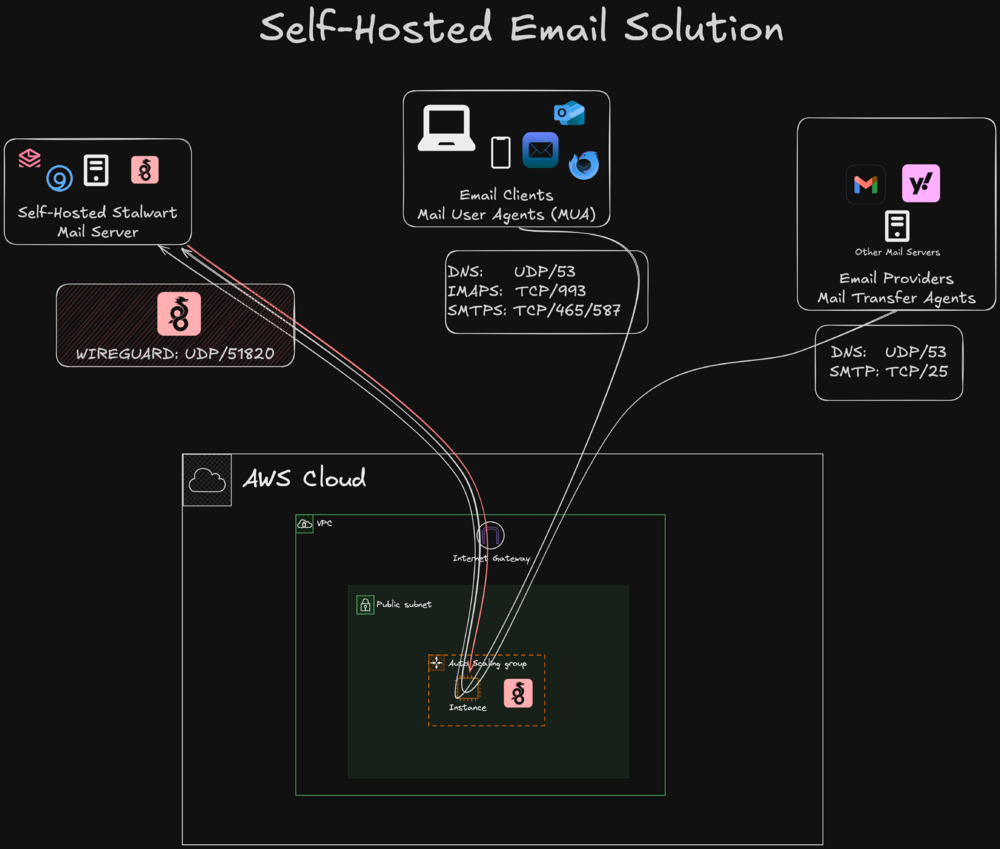
I wrote up some docker compose and terraform to enable self-hosting email using Stalwart, Bind for DNS, and Wireguard to let you host everything on Unraid and only use AWS to provide a static IP and forward traffic to you. Check out https://markfalk.github.io/docs/self-hosting-mail if you're interested. I welcome any feedback or suggestions. 🍻
-
Falkinator changed their profile photo
-
I'm running Version: 6.9.0-beta25 while I wait for the final release. Server is a Dell T340 with 64GB of RAM. On a wired Gigabit connection when transferring data to /tmp I'm seeing an initial burst of data (99MB/s), and then it falls to under 10MB/s after 6 seconds and keeps declining. Transferring the same file to an nvme mounted drive is SOMETIMES FAST, it maintains the 100MB+ speed for the entire transfer. Other times it will have varying rates of transfer. Transferring the same file to a Centos 7 VM running on the unraid server is ALWAYS FAST. It seems that /tmp is ALWAYS SLOW. Steps to replicate: #create 600MB file >dd if=/dev/urandom bs=1024 count=600000 of=/tmp/random.data >scp /tmp/random.data root@unraid-server:/tmp /tmp info: root@Rocinante:/tmp# df -h /tmp Filesystem Size Used Avail Use% Mounted on rootfs 32G 1.4G 30G 5% / Wireshark IO graph attached.
-
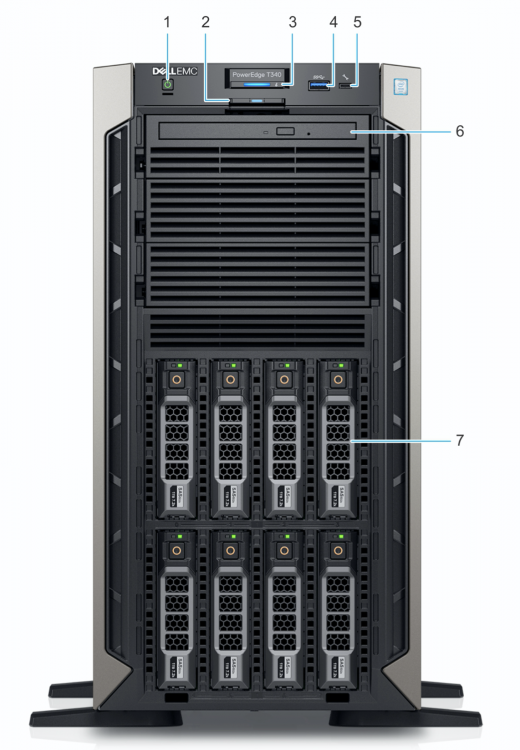
Thank you so much for the community effort. Would love to see my new baby of the house.. the Dell PowerEdge T340