Hugh Jazz
Members
-
Joined
-
Last visited
-
thank you very much for the fast replay! looks like a neat tool! if i choose a keyfile, can i just use any random file i want and store it on a usb stick or something?
-
hi! is it possible to use this tool just to verify my password without changing it? its been a while since i mounted and will have to hunt down my password, which i'm a bit unsure of... 😕
-
Awesome! ❤️ That worked like a charm! 'preferred' didn't work though, but it doesn't matter. i use https when i access from my domain. isn't it secure then?
-
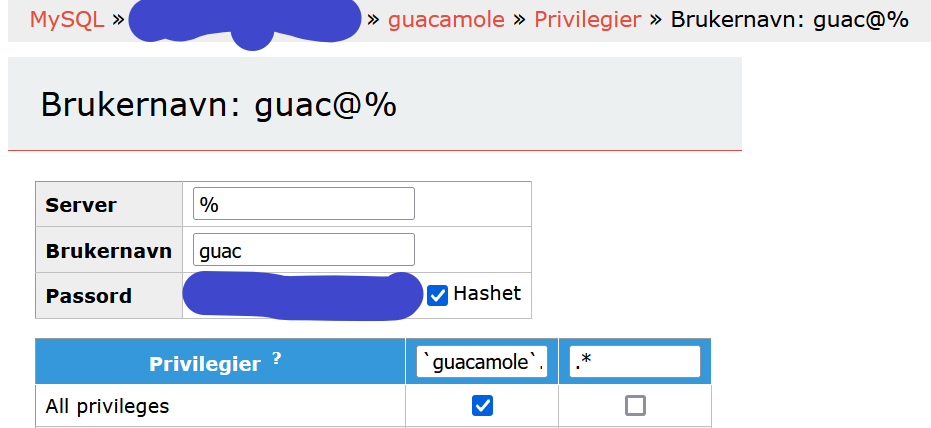
@Taddeusz Tried 1.5.1 again, but same problem. Now those two mysql-connector-files was replaced by mysql-connector-j-8.0.32.jarSorry for the late reply. Been a busy day! I'm not sure which version, but the oldest logs seems to be from october 2021, which sounds abour right. I have these 3 files: mariadb-java-client-2.3.0.jar mysql-connector-java-5.1.46-bin.jar mysql-connector-java-5.1.46.jar I will try it once more and let you know how it goes I'm using MariaDB, specifically the one from Linuxserver repository.No, just regular login. Since jasonbean/guacamole:1.4.0-3 is working for me, you would think the problem was related to the high lighted issue, but I have no clue what could cause it... 😕Before. I never reach the login page. It doesn't seem to create different log files depending on which version i'm on, and I've been jumping back and forth between them. But now I use jasonbean/guacamole:latest-nomariadb repository and tried to access, so maybe the log is updated now? There is also a catalina.2023-04-11.log file. I can send you that as well@Taddeusz When I try to access guacamole, both from WebUI in Unraid or through my domainis there anything in particular you need from the log, or should i just paste the whole thing? it seems to contain username and ip's, which i rather not paste also, jasonbean/guacamole:1.4.0-3 seems to work, but not jasonbean/guacamole:latest-nomariadb or 1.5.1-rc1hi! i'm using ApacheGuacamoleNoMariaDB and when I try to access I get the following message: I dont seem to have any errors in the log though: ---------------------- User UID: 99 User GID: 100 ---------------------- Using existing properties file. Using existing MySQL extension. No permissions changes needed. 2023-04-09 17:36:33,667 INFO Set uid to user 0 succeeded 2023-04-09 17:36:33,670 INFO supervisord started with pid 16 2023-04-09 17:36:34,674 INFO spawned: 'guacd' with pid 17 2023-04-09 17:36:34,677 INFO spawned: 'tomcat' with pid 18 guacd[17]: INFO: Guacamole proxy daemon (guacd) version 1.5.0 started guacd[17]: INFO: Listening on host 0.0.0.0, port 4822 2023-04-09 17:36:35,703 INFO success: guacd entered RUNNING state, process has stayed up for > than 1 seconds (startsecs) 2023-04-09 17:36:35,704 INFO success: tomcat entered RUNNING state, process has stayed up for > than 1 seconds (startsecs) Is it still the MariaDB error highlighted on the front page? If so, what repository should I use when trying to downgrade? I don't seem to use the same one as bombz. I use jasonbean/guacamole:latest-nomariadb Any help is much appreciatedmight be a stupid question, but do i have to use postgres with this tool? or could i use mariadb? (i dont really know the differenct, sorry) and do i have to use your redis? i already have another redis container installed, so dont need two of them edit: this is for gitlab, if it wasn't clear.well that did the trick. got it up and running with rdp now! thanks a lot apprecaitedthat didn't help either i clicked the docker icon --> terminal # cd config # ls guacamole log mysql-schema # cat mysql-schema/*.sql | mysql -u root -p guacamole sh: 3: mysql: not found # is there something wrong with my docker install? should i reinstall, or could there be something in the guacamole.settings? or anything else i've missed?Thanks for the reply. I already tried all that. As you can see from screenshot, I created a database called guacamole and a user guac for it. I added this info to guacamole.properties. When I tried to run the script though, I get: /mnt/user/appdata/ApacheGuacamoleNoMariaDB# cat mysql-schema/*.sql | mysql -u root -p guacamole -bash: mysql: command not found cat: write error: Broken pipe I did this in unraids terminal. I also tried it with the user 'guac'. In the guacamole.properties I tried both localhost and the local ip for mariadb (192.168.0.10). any suggestions? any help is much appreciated!