





Nomad32
Members
-
Joined
-
Last visited
Everything posted by Nomad32
-
Got it! Thank you!
-
Thank you for that!!!! I really do appreciate it. My knowledge of linux is just enough for me to be able to google what I want to do, but I don't have any real knowledge of what's happening in the background. Thank you again!
-
Final update - Magic. I deleted the 2 config files after re-reading your first solution. I was then able to go in and adjust the settings and set things back up. Thank you!
-
Update - I'm looking at the file system within Plex's docker container - it shows a lowercase "videos" under /mnt/user/
-
Thank you - I did the clean-up thing and it said it removed 2 shares. I am looking at /boot/config/shares and I only see Videos.cfg (not an additional videos.cfg) - same thing for the other share (Software.cfg). Is it OK to delete that config file? It won't remove the data will it? I'll look through the settings on the docker images.
-
Sorry about that. tower-diagnostics-20260205-1455.zip
-
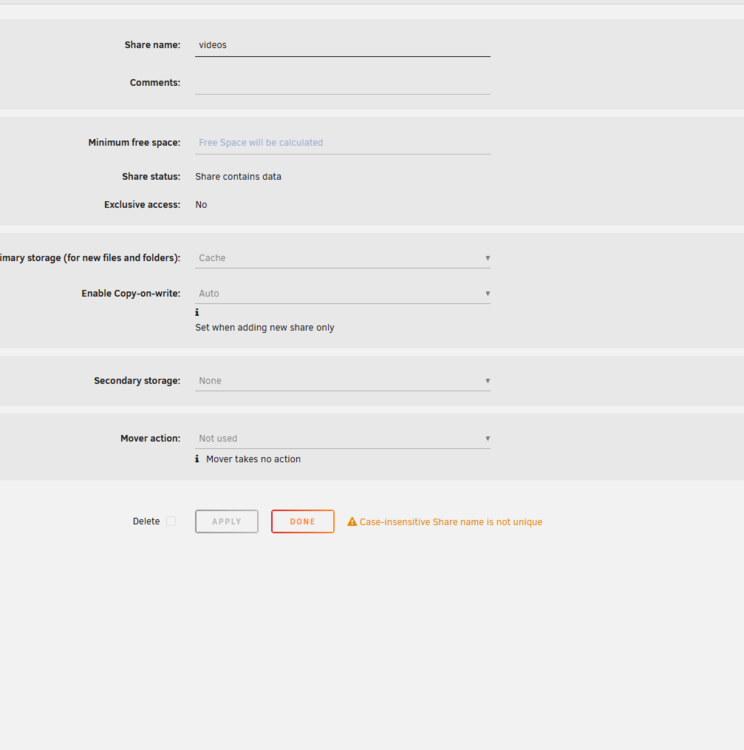
This is a machine that has been up and running for several years now. I've recently updated my server and now I've lost access to a couple of my shares. The share details looks really off, when compared to the other shares that have been up and running for the same length of time. The only thing that jumps out at me is that the 2 affected User Shares are using Cache for storage now (instead of Cache to Array, or most likely I had just set those affected to Array directly). Any thoughts on how to sort getting access to these shares? TIA
-
Understood. And, it copied directly from my other parity drive. I apologize - but, essentially believed (when I typed that), that I was rebuilding parity, by copying it to the new parity drive?
-
I ended up buying 2, new, 14TB drives. I started by removing the dead 12TB parity drive, and replacing it with the 14TB drive. Unraid automagically started to rebuild parity on the new parity disk. Once that completed - I followed the steps on the parity swap procedures page:: https://docs.unraid.net/legacy/FAQ/parity-swap-procedure/ For anyone curious - That process basically works through adding a new drive that is larger than your current parity drive. You remove the data drive you're replacing, change the current parity drive to be the data drive, and then assign the new disk as parity. After rebuilding parity, the system will start up the array and rebuild the new data disk (old parity drive converted to data).
-
OK - thank you. Disk 4 has shown errors for a while now - but, never an issue bad enough to crap out on me. I think I'll pick up a couple of larger drives to replace the parity drives, and then use the good parity drive to replace disk 4. Oh well - thank you so much for letting me know.
-
Sorry - attached is the SMART report and the diagnostics report. tower-smart-20240131-1218.zip tower-diagnostics-20240131-1220.zip
-
I don't check the dashboard everyday - but, I checked a couple of weeks ago and found that one of my parity drives had an error and was disabled. I started an extended self-test and these are the results. I'm looking for advice here on if I should ignore the error - or, try to see if the drive is covered under warranty for replacement? Thanks in advance:: ATA Error Count: 11733 (device log contains only the most recent five errors) CR = Command Register [HEX] FR = Features Register [HEX] SC = Sector Count Register [HEX] SN = Sector Number Register [HEX] CL = Cylinder Low Register [HEX] CH = Cylinder High Register [HEX] DH = Device/Head Register [HEX] DC = Device Command Register [HEX] ER = Error register [HEX] ST = Status register [HEX] Powered_Up_Time is measured from power on, and printed as DDd+hh:mm:SS.sss where DD=days, hh=hours, mm=minutes, SS=sec, and sss=millisec. It "wraps" after 49.710 days. Error 11733 occurred at disk power-on lifetime: 18079 hours (753 days + 7 hours) When the command that caused the error occurred, the device was active or idle. After command completion occurred, registers were: ER ST SC SN CL CH DH -- -- -- -- -- -- -- 40 53 00 ff ff ff 0f Error: UNC at LBA = 0x0fffffff = 268435455 Commands leading to the command that caused the error were: CR FR SC SN CL CH DH DC Powered_Up_Time Command/Feature_Name -- -- -- -- -- -- -- -- ---------------- -------------------- 25 00 50 ff ff ff ef 00 19d+15:20:45.234 READ DMA EXT 25 00 08 ff ff ff ef 00 19d+15:20:45.234 READ DMA EXT 35 00 88 ff ff ff ef 00 19d+15:20:45.231 WRITE DMA EXT 35 00 30 ff ff ff ef 00 19d+15:20:45.229 WRITE DMA EXT 35 00 40 ff ff ff ef 00 19d+15:20:45.227 WRITE DMA EXT Error 11732 occurred at disk power-on lifetime: 18079 hours (753 days + 7 hours) When the command that caused the error occurred, the device was active or idle. After command completion occurred, registers were: ER ST SC SN CL CH DH -- -- -- -- -- -- -- 40 53 00 ff ff ff 0f Error: UNC at LBA = 0x0fffffff = 268435455 Commands leading to the command that caused the error were: CR FR SC SN CL CH DH DC Powered_Up_Time Command/Feature_Name -- -- -- -- -- -- -- -- ---------------- -------------------- 25 00 c8 ff ff ff ef 00 19d+15:18:55.847 READ DMA EXT 35 00 18 ff ff ff ef 00 19d+15:18:55.841 WRITE DMA EXT 35 00 40 ff ff ff ef 00 19d+15:18:55.837 WRITE DMA EXT 35 00 40 ff ff ff ef 00 19d+15:18:55.833 WRITE DMA EXT 35 00 40 ff ff ff ef 00 19d+15:18:55.829 WRITE DMA EXT Error 11731 occurred at disk power-on lifetime: 18059 hours (752 days + 11 hours) When the command that caused the error occurred, the device was active or idle. After command completion occurred, registers were: ER ST SC SN CL CH DH -- -- -- -- -- -- -- 40 53 00 ff ff ff 0f Error: UNC at LBA = 0x0fffffff = 268435455 Commands leading to the command that caused the error were: CR FR SC SN CL CH DH DC Powered_Up_Time Command/Feature_Name -- -- -- -- -- -- -- -- ---------------- -------------------- 25 00 f8 ff ff ff ef 00 18d+19:49:36.163 READ DMA EXT 25 00 88 ff ff ff ef 00 18d+19:49:36.161 READ DMA EXT 25 00 40 ff ff ff ef 00 18d+19:49:36.158 READ DMA EXT 25 00 40 ff ff ff ef 00 18d+19:49:36.140 READ DMA EXT 25 00 80 ff ff ff ef 00 18d+19:49:36.139 READ DMA EXT Error 11730 occurred at disk power-on lifetime: 18059 hours (752 days + 11 hours) When the command that caused the error occurred, the device was active or idle. After command completion occurred, registers were: ER ST SC SN CL CH DH -- -- -- -- -- -- -- 40 53 00 ff ff ff 0f Error: UNC at LBA = 0x0fffffff = 268435455 Commands leading to the command that caused the error were: CR FR SC SN CL CH DH DC Powered_Up_Time Command/Feature_Name -- -- -- -- -- -- -- -- ---------------- -------------------- 25 00 40 ff ff ff ef 00 18d+19:48:32.973 READ DMA EXT 25 00 40 ff ff ff ef 00 18d+19:48:32.970 READ DMA EXT 25 00 40 ff ff ff ef 00 18d+19:48:32.940 READ DMA EXT 35 00 b0 ff ff ff ef 00 18d+19:48:32.939 WRITE DMA EXT ea 00 00 00 00 00 a0 00 18d+19:48:32.873 FLUSH CACHE EXT Error 11729 occurred at disk power-on lifetime: 18059 hours (752 days + 11 hours) When the command that caused the error occurred, the device was active or idle. After command completion occurred, registers were: ER ST SC SN CL CH DH -- -- -- -- -- -- -- 40 53 00 ff ff ff 0f Error: UNC at LBA = 0x0fffffff = 268435455 Commands leading to the command that caused the error were: CR FR SC SN CL CH DH DC Powered_Up_Time Command/Feature_Name -- -- -- -- -- -- -- -- ---------------- -------------------- 25 00 40 ff ff ff ef 00 18d+19:47:56.650 READ DMA EXT ea 00 00 00 00 00 a0 00 18d+19:47:56.636 FLUSH CACHE EXT 35 00 08 ff ff ff ef 00 18d+19:47:56.636 WRITE DMA EXT 25 00 40 ff ff ff ef 00 18d+19:47:56.615 READ DMA EXT 25 00 08 ff ff ff ef 00 18d+19:47:56.614 READ DMA EXT
-
Thank you! When I searched for the installed apps (via community apps) - it would show a different prompt for items already installed. I clicked reinstall and everything fired up. Plex was a bit of a pita - but, I started over with a new plex install.
-
I should have mentioned that I've had all of these docker containers installed for months (if not a year). No changes to settings (once I got it installed).
-
OK - if I move to install again, will it automatically pick up the settings from the installed image?
-
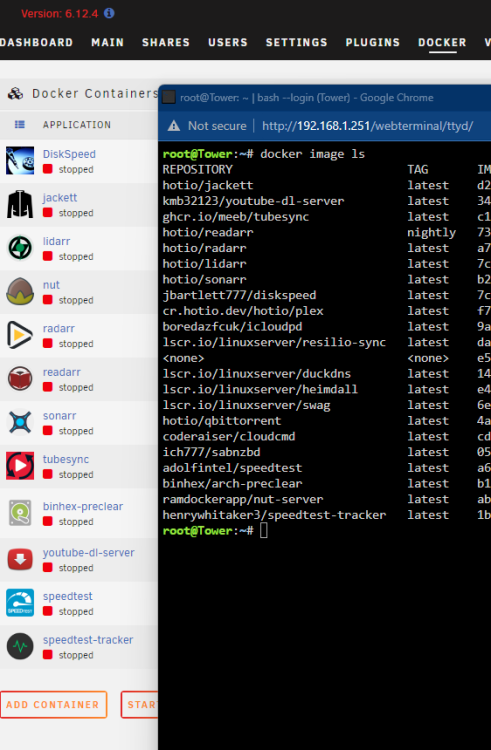
Good morning. My docker list that is showing in the dashboard is incomplete all of a sudden. I've been running unraid for several years now (across 2 servers) - but, it's mostly a set it and forget it. I'm guessing I screwed it up by clicking update all.... I have tried shutting down all the docker images, disabling docker and re-enabling it. Updating plugins (I have community apps, fix common problems, network statistics, rclone, unassigned devices, unassigned devices plus and user scripts installed). I then tried to restart the server. No luck. Is there a command that I can run that will (hopefully) bring them back to the dashboard?
-
Update! I tried the test again, running in Parsec, and it completed just fine!
-
Perfect! Thank you! I was able to install Witcher 3 and play it for 30 seconds. The only video card in the VM is the AMD from the machine pass through (not one embedded in the processor) - so, I can confirm that it looks/plays pretty well. I was getting grainy images in remote desktop, so, I installed Parsec and so far, so good. I'll continue playing - but, thank you for talking me off the edge.
-
I edited the registry to change the setting stated. No change on the test (after a restart). Basically - you're saying that the graphics card should work for most things, but that the test is flawed? I'll go ahead and install a game in the VM and use the monitoring tools to see if it can prove it's working correctly.
-
How will I use RDC to play games that run on the desktop of the virtual machine, if remote desktop breaks Direct3d? I tried killing the RDP connection, while running the test, and it errored out at the same point in the test. Sorry if this is coming across as stupid - but, I'm bummed that I can't sort this in my head?
-
Sorry - yes. I edited the original post to include this: (changed the resolution in RDC app to support fullscreen 3440x1440) and installed Adrenaline 22.4.2
-
Running 6.9.2 -- AMD Ryzen 5900X, 128GB RAM, RX580, many drives. The VM concept is a new one for me, but, I'm excited to see what I can do with it. I've created a new Win 10 Pro VM (XML below). Nutshell, 4 CPUs and the HT cores, 16GB Ram, Q35-5.1, OVMF I started by using the VNC graphics card - everything worked fine (changed the resolution in RDC app to support fullscreen 3440x1440) and installed Adrenaline 22.4.2 . I've enabled passthrough of the RX 580 (and edited the XML to have the audio use the same bus (different function). Everything seems to be working fine, except I'm getting an error in Passmark when I try to run the 3D Mark test. The PassMark DirectX Testing Suite modal box says:: Invalid video mode. The resolution and color depth you have selected do not appear to be valid for hardware acceleration. {more of same} Error code D3DERR_INVALIDCALL. It looks like it's working fine in the VM -- but, this error gives me pause. Thanks in advance. ----- <?xml version='1.0' encoding='UTF-8'?> <domain type='kvm'> <name>Windows 10</name> <uuid>ff717c28-cd8c-2b7f-c50c-ae2da2a2906a</uuid> <description>UnraidWindows</description> <metadata> <vmtemplate xmlns="unraid" name="Windows 10" icon="windows.png" os="windows10"/> </metadata> <memory unit='KiB'>16777216</memory> <currentMemory unit='KiB'>16777216</currentMemory> <memoryBacking> <nosharepages/> </memoryBacking> <vcpu placement='static'>8</vcpu> <cputune> <vcpupin vcpu='0' cpuset='5'/> <vcpupin vcpu='1' cpuset='17'/> <vcpupin vcpu='2' cpuset='7'/> <vcpupin vcpu='3' cpuset='19'/> <vcpupin vcpu='4' cpuset='9'/> <vcpupin vcpu='5' cpuset='21'/> <vcpupin vcpu='6' cpuset='11'/> <vcpupin vcpu='7' cpuset='23'/> </cputune> <os> <type arch='x86_64' machine='pc-q35-5.1'>hvm</type> <loader readonly='yes' type='pflash'>/usr/share/qemu/ovmf-x64/OVMF_CODE-pure-efi.fd</loader> <nvram>/etc/libvirt/qemu/nvram/ff717c28-cd8c-2b7f-c50c-ae2da2a2906a_VARS-pure-efi.fd</nvram> </os> <features> <acpi/> <apic/> <hyperv> <relaxed state='on'/> <vapic state='on'/> <spinlocks state='on' retries='8191'/> <vendor_id state='on' value='none'/> </hyperv> </features> <cpu mode='host-passthrough' check='none' migratable='on'> <topology sockets='1' dies='1' cores='4' threads='2'/> <cache mode='passthrough'/> <feature policy='require' name='topoext'/> </cpu> <clock offset='localtime'> <timer name='hypervclock' present='yes'/> <timer name='hpet' present='no'/> </clock> <on_poweroff>destroy</on_poweroff> <on_reboot>restart</on_reboot> <on_crash>restart</on_crash> <devices> <emulator>/usr/local/sbin/qemu</emulator> <disk type='file' device='disk'> <driver name='qemu' type='raw' cache='writeback'/> <source file='/mnt/user/domains/Windows 10/vdisk1.img'/> <target dev='hdc' bus='virtio'/> <boot order='1'/> <address type='pci' domain='0x0000' bus='0x03' slot='0x00' function='0x0'/> </disk> <disk type='file' device='cdrom'> <driver name='qemu' type='raw'/> <source file='/mnt/user/isos/Windows/Windows 10 x64.iso'/> <target dev='hda' bus='sata'/> <readonly/> <boot order='2'/> <address type='drive' controller='0' bus='0' target='0' unit='0'/> </disk> <disk type='file' device='cdrom'> <driver name='qemu' type='raw'/> <source file='/mnt/user/isos/virtio-win-0.1.217.iso'/> <target dev='hdb' bus='sata'/> <readonly/> <address type='drive' controller='0' bus='0' target='0' unit='1'/> </disk> <controller type='sata' index='0'> <address type='pci' domain='0x0000' bus='0x00' slot='0x1f' function='0x2'/> </controller> <controller type='pci' index='0' model='pcie-root'/> <controller type='pci' index='1' model='pcie-root-port'> <model name='pcie-root-port'/> <target chassis='1' port='0x10'/> <address type='pci' domain='0x0000' bus='0x00' slot='0x02' function='0x0' multifunction='on'/> </controller> <controller type='pci' index='2' model='pcie-root-port'> <model name='pcie-root-port'/> <target chassis='2' port='0x11'/> <address type='pci' domain='0x0000' bus='0x00' slot='0x02' function='0x1'/> </controller> <controller type='pci' index='3' model='pcie-root-port'> <model name='pcie-root-port'/> <target chassis='3' port='0x12'/> <address type='pci' domain='0x0000' bus='0x00' slot='0x02' function='0x2'/> </controller> <controller type='pci' index='4' model='pcie-root-port'> <model name='pcie-root-port'/> <target chassis='4' port='0x13'/> <address type='pci' domain='0x0000' bus='0x00' slot='0x02' function='0x3'/> </controller> <controller type='pci' index='5' model='pcie-root-port'> <model name='pcie-root-port'/> <target chassis='5' port='0x14'/> <address type='pci' domain='0x0000' bus='0x00' slot='0x02' function='0x4'/> </controller> <controller type='virtio-serial' index='0'> <address type='pci' domain='0x0000' bus='0x02' slot='0x00' function='0x0'/> </controller> <controller type='usb' index='0' model='ich9-ehci1'> <address type='pci' domain='0x0000' bus='0x00' slot='0x07' function='0x7'/> </controller> <controller type='usb' index='0' model='ich9-uhci1'> <master startport='0'/> <address type='pci' domain='0x0000' bus='0x00' slot='0x07' function='0x0' multifunction='on'/> </controller> <controller type='usb' index='0' model='ich9-uhci2'> <master startport='2'/> <address type='pci' domain='0x0000' bus='0x00' slot='0x07' function='0x1'/> </controller> <controller type='usb' index='0' model='ich9-uhci3'> <master startport='4'/> <address type='pci' domain='0x0000' bus='0x00' slot='0x07' function='0x2'/> </controller> <interface type='bridge'> <mac address='52:54:00:1c:bf:c9'/> <source bridge='br0'/> <model type='virtio-net'/> <address type='pci' domain='0x0000' bus='0x01' slot='0x00' function='0x0'/> </interface> <serial type='pty'> <target type='isa-serial' port='0'> <model name='isa-serial'/> </target> </serial> <console type='pty'> <target type='serial' port='0'/> </console> <channel type='unix'> <target type='virtio' name='org.qemu.guest_agent.0'/> <address type='virtio-serial' controller='0' bus='0' port='1'/> </channel> <input type='tablet' bus='usb'> <address type='usb' bus='0' port='1'/> </input> <input type='mouse' bus='ps2'/> <input type='keyboard' bus='ps2'/> <hostdev mode='subsystem' type='pci' managed='yes'> <driver name='vfio'/> <source> <address domain='0x0000' bus='0x2b' slot='0x00' function='0x0'/> </source> <address type='pci' domain='0x0000' bus='0x04' slot='0x00' function='0x0' multifunction='on'/> </hostdev> <hostdev mode='subsystem' type='pci' managed='yes'> <driver name='vfio'/> <source> <address domain='0x0000' bus='0x2b' slot='0x00' function='0x1'/> </source> <address type='pci' domain='0x0000' bus='0x04' slot='0x00' function='0x1'/> </hostdev> <memballoon model='none'/> </devices> </domain>

