





BoltActionBacon
Members
-
Joined
-
Last visited
Everything posted by BoltActionBacon
-
Same issue, also can't find a solution.
-
Thanks @PUNGGOKERS for the help! I did however figure it out! Turns out the solution was fairly simple. TLDR: The unverified vBios I got from TechPowerUp must not have been good but booting in CSM (resizable bar off) allowed me to actually finish SIOne's user script. For anyone finding this later: These are the steps I did to fix my issue. I reset my Bios to default, Turned off Resizable Bar (this also forced CSM boot among other things) Verified IOMMU was enabled and SVM was Enabled as well in the bios. Booted, logged in etc and dumped the vBios per SIOne's script VMS>Edit> Point the Graphic ROM Bios to the one that was just created (should be user>isos). Verify that USB & PCI devices are passed through properly etc (standard stuff). Update VM, do NOT try to start it. Go back to Bios and now re-enable resizable bar and UEFI. Log in, start the VM (This is the important bit I think I missed the other times) WAIT a long time! It took about 5 minutes for the screen to actually display but display it did! Im guessing that the vBios is what made the difference for me. TechPowerUp apparently did not have a good copy of my bios and for some reason every other time I tried to dump my own it it would not work. I think I might have had something strange set up in my bios that was keeping Unraid from actually fully seeing/accessing my GPU. Once I dumped the vbios, everything went as advertised. If you are reading this before you bought your GPU, I highly recommend that you just buy Nvidia, Ive had 4 different Nvidia GPUs in this same server/VM and they were all plug and play, no fuss whatsoever; resizable bar just worked.
-
Passing through just the video without the sound counterpart didn't work unfortunately. I did finally get it to work however by turning off SAM/Resizable bar which also turned off UEFI and turned on CSM. Which is not really a solution in my mind as SAM/resizable bar is pretty much essential for a lot of newer games these days. Also, the VM is just generally running like crap, lots of hiccups and even a few hard and total VM failures where its just black screens and turns the VM off. Ive been running the same VM setup for years with 0 issues on a 2080 and now I really regret "upgrading". Anyone know how to get resizable bar running on AMD GPUS? Ive seen online that is doable, but all their solutions are either outdated and not longer applicable to my case, or they just are not working for me. Its an Asrock 7900 xt for reference.
-
I put the Nvidia card back into it; ran out of time to trouble shoot. Hopefully sometime this week I can give that a try. Thanks. I also read of someone who had the same issue as me and fixed it by turning off resizable bar in the bios. Have you heard of that being a common issue on AMD cards?
-
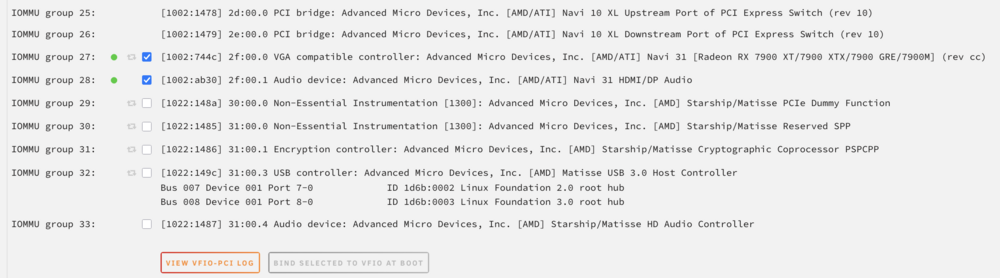
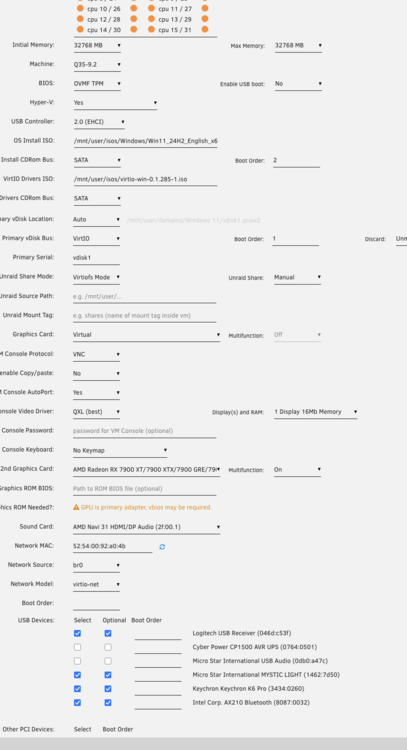
Decided to go from a 2080 to a 7900xt for my VM. I couldnt get it to work, despite every resource telling me how easy it should be. So I nuked the VM and started from scratch just to have the same problem. VNC works great, but the only thing displaying on my monitors is a black screen once I pass through, then the monitor times out and turns off. I thought maybe it needed a graphics RAM bios (even though I never had to do that with any of the 3 Nvidia cards Ive use in this server), but even SpaceInvader's old instructions on how to pull the vbios isnt working. His user script is saying: Um.... somethings gone wrong and I couldn't dump the vbios for some reason Sometimes when this happens all we need to do to fix this is 'stub' or 'bind to the vfio' the gpu and reboot the server This can be done in Unraid 6.8.3 with the use of the vfio config plugin or if you are on Unraid 6.9 or above it can be done directly from the gui in Tools/System Devices .....So please do this and run the script again. Which I did, and its still not working. The vbios for this card (ASRock Phantom Gaming OC Radeon RX 7900 XT 20 GB) on techpowerup is unverified, but i tried it anyway and its not working either. Could It be that Im not binding enough to VFIO at boot? Right now ive tried binding group 27 & 28, as well as 28-33, neither worked? What should be the correct combination ? GPU worked great in my bare metal machine. Doubt very seriously its that.
-
This is a really old post, dont really remember sorry. I will say, since then ive decided to work a little harder and pay for a second stand alone PC. lol. The VMs in unRaid work ok if you dont ask much of them but i was wasting too much time trying to get everything working. Build a quick VM and access it with Chrome remote desktop for simple stuff from another fully working PC would be my recommendation.
-
Thanks for the help, i finally got around to messing with it again and both the wireless keyboard and the demonic sound appear to be fixed. I downloaded the Nvidia drivers for my GPU before running the acceleration fix and im not sure if thats what did it or not but it appears to be working great now. My next tasks are backing up my vdisk, (in the event i screw something up again) then trying to pass through a USB controller, then plex then remote access to my data. Ill probably ask this in a new post but i still cant figure out why it showing me out of storage space. I tried the turbo write option that was mentioned above, while changing all my settings to not use the cache, but it didnt work. I cant copy my vdisk until i figure this out. Ill keep researching before i bother the good people of Unraid or Reddit with another question though. (i wish there was a help hotline i could call....)
-
Thanks for the reply. I'll start tackling your recommendations as soon as I can. My current "off the shelf" solution is a few windows machines with a 2tb Apple Time Capsule and a raspberry pi running Kodi and Retro pi. With a few exceptions (PS1 emulator on retropie has Issues) my current setup took less than a weekend to set up and has been working beautifully for years; I just ran out of storage space. In fairness to Unraid I'm asking a lot more out of it than my current NAS but it's advertised, and heavily reviewed as being able to do almost everything I'm asking which is why I'm so critical. 2)Yes it's the only GPU in the system and I told the motherboard in the bios to boot with the CPU integrated graphics so I could pass through the GPU to the VM (per space invaders). If by isolated you mean in the unRaid web GUI during VM creation yes. I left cpu0 for unraid and have 1,2, & 3 selected for the windows VM. I vaguely remember space invaders further isolating cores for a VM in a different video though. I'll see if I can find that video again. 3) I considered power line adapters but I'm pretty sure the power lines from my room with my router, to the living room are not going to match (they go through the junction box). I bought a router to bridge but it's a pretty terrible one (extremely slow transfer speeds) so Im now looking for a better router to hopefully help me get more than. 1-5mbps.
-
Ive been relying heavily on the space invader videos. I also thought it might be asleep which is why I turned on the VM, then immediately turned on the wireless keyboard then started madly mashing buttons. I also know it wasn't asleep because the backlight was illuminated. I'll attach the diagnostic when I get home from work and add passing the motherboards USB controllers to my ever growing to-do list. I did exactly what you described above. I unticked the wired then ticked the wireless before restarting the VM but that didn't work. Did I need to restart the array first or something? Is there any other way to get those parameters to save? And just to be clear my frustration is not just with this. I've been running into lots of little issue constantly. Too many to post about. Sometimes I will find an older post with the same problems as me but their solution doesn't solve my problem. Not to hijack my own post but here are a few examples. 1) I can't copy data from my external HDD to my array (even though I have 3.4 TB remaining because Krusader sees that my cache disk is almost full and confuses that with my space remaining. The forum said to run the movers. I manually run the movers but my cache disk is still almost full somehow. 2) in the VM, I had demonic sound. I followed space invaders video to the letter but It didn't remove it. It did make it occur less often however. 3) it requires a hard-line Ethernet cable. This is mostly my fault for not looking hard enough before committing to Unraid. But still, I've spent almost as much on networking gear as I have invest in the actual old unraid computer. Almost all free Linux OS systems support wifi, why doesn't a very mature paying OS support it? I don't care that it's less reliable, it should be an option we can choose if like me the benefits outweigh the costs. People have been saying this for years, yet it's still not available. 4) I wrongly made separate shares for all my media (Tv, movies, pictures, etc). Apparently Plex doesn't like this so I just thought I could merge them in windows. Should take 15 seconds max.... Nope, that's not an unraid feature. I need to install Krusader first. 5) I wanted to access my data on a phone or outside my network. I start looking to install btsync. That's what everyone recommends on YouTube and such. Well it's old and now called Resillio or something. The recent reviews for Resillio on Google play are terrible. Apparently the Android Resillio app has been completed abandoned and is no longer usable. At this point I put that idea on the back burner and started focusing on the VM again. I'm not saying all this just to vent, hopefully someone who, like me, isn't a computer wizard and who doesn't have massive amounts of time to commit it research and tweaking will read it and better understand what's involved. If you are time poor but financial rich, i would definitely recommend an off the shelf NAS solution. I'm neither unfortunately. Luckily I decided to tackle this project during a lull at work, otherwise I'd still be trying to find hardware that supports HVM & IOMMU.
-
Backstory: Im rapidly loosing patience with unRaid and really hope that someone can help me. I eventually got a windows 10 VM working relatively well but it was with a wired keyboard. The rig is in my living room and the wire was not long enough to reach my couch so i bought a Logitech K830 which would be perfect with its built in touch pad. When i tried to pass my K830 into the VM through the unRaid GUI and not use my wired keyboard, it would no longer start the VM because the wired keybard was no longer plugged in. I tried to find a solution to this and was unable so i painfully deleted the entire VM so i could start again with the K830 dongle plugged in. I made a new windows 10 VM with just the K830 dongle plugged in and told unRaid to pass it to the VM. The vm will now start but i get to the part where you have to "Press any key to boot" or something like that and the K830 is not being recognized so i can not press any key. Im stuck at that screen. Im betting that the Logitech K830 would work once i can get windows installed (because ive read that it does) but i cant install windows without a working keyboard. I could plug the wired keyboard back in to install windows but then when i unplug it, the VM wont start again. Ill be back to where i started when i deleted my original VM. The even more concerning part is how fragile unraid is with USB connections. I went unRaid and not freenas so that i could have one set of hardware that will be a NAS but also a retro gaming machine. I need to be able to use an xbox controller for my games and that now seems like WAY TOO MUCH to ask, if i cant even get a keyboard to work. Will i just have to make sure i never un plug the xbox controller? I really hope the solution isnt buying a PCIE USB card. My computer is in a custom case (I put it in a gutted AV receiver) and the HDDS are currently hanging where that PCIE card would need to be. i5 7400 1050 TI, which i passed through. Gigabyte GA-Z170X-GAMING 6 ATX LGA1151 Motherboard 3x8gb of corsair 2400 ram (i know, not ideal) VM on 200gb of a 512gb SSD acting also as the cache drive.

