





UndeadStudios
Members
-
Joined
-
Last visited
-
UndeadStudios changed their profile photo
-
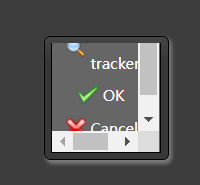
Anyone else having this issue, when I started using the Transmission_VPN docker it all worked fine, a while ago the add tracker window broke and looks like the attached image. It used to have a best tracker button and all tracker button and be the correct size. Any ideas how to fix it?
-
So I removed the 8Tb drive from parity, did a fresh config on the array and all the drives are now able to be assigned. I'll have to add another 16Tb to parity slot 2 for 2 parity drives I guess? That will have to wait until I can buy another one. It's syncing again with all drives present Thanks
-
So both have to be 16Tb or larger? Can I remove the *tb and go back to 1 parity drive at 16Tb?
-
I'm trying to add some new disks to my array, I had Parity as 8TB, 2x8Tb and 4x4Tb data drives working as expected. Tried to add a 16Tb as parity 2 and 2x16Tb as extra data drives and it won't allow me to saying the parity drive is not the biggest. Some searching led me to HPA which is on the flash drive but not any of the HDD's, swapping the larger parity to Parity 1 and doing another sync, will this fix the issue? (still has 25hrs to go) Thanks

