





SamuraiMarv
Members
-
Joined
-
Last visited
Everything posted by SamuraiMarv
-
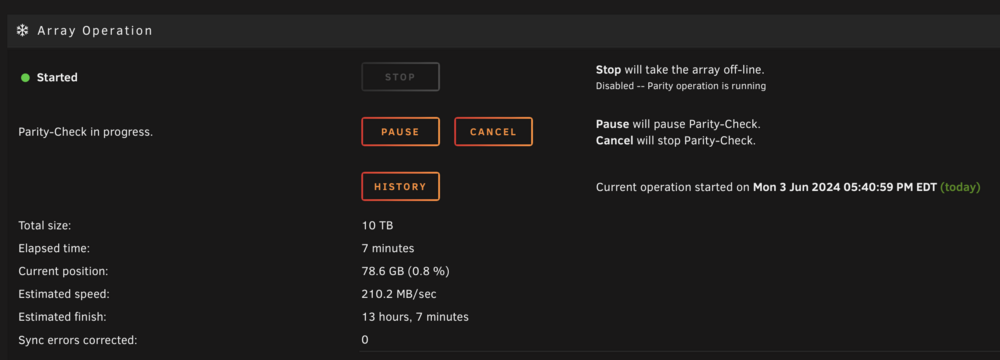
BIOS update did not seem to do anything. I also forgot that bios updates wipe the current bios config so I tried my best to match things up as best I could. I'll need to go back in later and readjust my fan curves again but that's an issue for a later date. I'm still seeing quite a few ACPI warnings and errors in the logs, not sure what I"m missing here. The parity check does seem to be running at its normal speed... for now anyway. edi-diagnostics-20240603-1746.zip
-
I had updated the bios when I swapped everything over to the new hardware but upon checking looks like Asus just released a new bios May 31st. I’ll get that one installed and see if the problems persist.
-
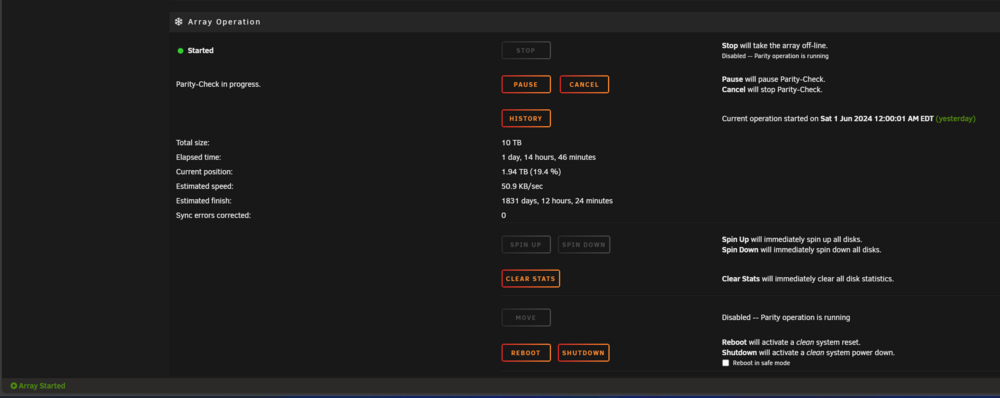
I've tried to both pause and cancel the parity check with no success. My server seems to be a in half way state where it shows the option to pause or stop the parity check but at the bottom it no longer says the parity check is running. I've also attached a new diag that hopefully shows why the parity check didn't pause or cancel. edi-diagnostics-20240602-1448.zip
-
I changed hardware about 2 weeks ago and this is the first parity check since. At around the start of the parity check one of the disks gave a hot disk warning (which never happened on my old hardware). I did get warm disk warnings when I first changed hardware and I adjusted the fan curves in the bios and did not get any warnings since. I didn't think much of these warnings since by the time I woke up the warning was gone. I logged in today and saw the parity check was only at 19% it typically finishes within 24 hours. I took a quick look at the logs and saw a lot of errors that I can't make sense of. Could this be an issue with the new hardware? Or is this all due to the warm disk warning I got when the parity check first started? I'm not sure how to proceed or what my next steps should be, diag attached. Thanks in advance for any help. edi-diagnostics-20240602-1204.zip
-
Sounds good thanks, if I do see any is there anything I can do, or would that be indicative of a different issue?
-
@JorgeB I ran 8 passes of memtest86 over 24 hours after the parity check came back with no errors. Both passes (can only do 4 at a time with the free version of memtest86) came back with zero errors. I feel pretty confident in saying the memory is good, I've made the ipvlan change like you suggested and everything is back up and running. My question is, is there anything I should be looking out for or anyway to predict if this will occur again? If so and there are specific signs is there anything I can do to prevent it? Thanks again for all the help.
-
Ok sounds good thanks, once this parity check is done I'll make those changes and hope for the best after ruling out a memory issue.
-
Thank you @JorgeB for the quick reply. Once the parity check is done I'll reboot into the bios and run a memtest. Luckily, I do have some spare RAM I think if that turns out to be what the issue is. But again the system has been rock solid for over 3 years now so who knows. On the docker network change, the reason its configured with macvlan is to facilitate inter-docker communication with the host. If I remember correctly, I followed one of spaceinvaderone's guide a few years back. Have things changed and should macvlan not be used anymore? Also, will ipvlan still allow for the same type of communication without me having to change my docker settings?
-
Hello All, Over the past few months I've been having strange issues with my Unraid box ever since upgrading to 6.10.3. The issue initially started as suddenly loosing network access to my server. I couldn't get to it via host name or its IP. I could however get to the box directly so the first time it happened I issued a reboot command via the CLI. However, nothing happened so I was forced to hold the power button to get it to come back up. It rebooted and did a parity check with zero issues, I thought it was weird but since I've never had any issues with my Unraid box in the 3 years I've been running it, figured it was a fluke. Then maybe two weeks later the same exact thing happened, this time I had done enough googling to grab the diag which is attached below. I looked through it but have to admit I didn't find anything glaring. I was doing some very light mining on my rig with the 1080ti that's in there and figured maybe that was the culprit even though I had no issues with this for months at this point. Regardless after going through the same reboot process of not being able to get it to reboot through the CLI I had to hard shut it down. It came back up did its parity check and I uninstalled the miner. Today after a little over a full month, my server was completely unresponsive. Even plugging directly into it didn't work like it had before so I was unable to pull a diag file this time. I'm hoping something in the previous diag file can shed some light on the issue. I'm getting worried that if this continues eventually it'll lead to errors on my disks from all the reboots. I hard rebooted again and its currently doing a parity check which I'm hoping comes back with no errors. A brief background, the rack is battery backed up, and is on a dedicated breaker that all of my networking gear is on that is also battery backed up, so I do not believe it is power failure related or anything like that. After the second time it happened, I figured since I couldn't reach it via the network it had something to do with me enabling the Unraid issued certificate, so I disabled that and went back to my original local host setup. I'm not sure what else to look at and I'm hoping someone more savvy than I am can show me the way. Thanks in advance for any help edi-diagnostics-20220722-1610.zip
-
For anyone in the same boat, I figured this out. You can do multiple domains with one tunnel and one docker. Follow the instructions to create your first tunnel, then use that UUID.cfargotunnel.com in all of your domains as the CNAME for the root. From there all you need to do is change your config file to match the example I put together below. tunnel: UUID credentials-file: /home/nonroot/.cloudflared/UUID.json ingress: - hostname: "*.your1stdomain.com" service: https://REVERSEPROXYIP:PORT originRequest: noTLSVerify: true - hostname: "*.your2nddomain.com" service: https://REVERSEPROXYIP:PORT originRequest: noTLSVerify: true - hostname: "*.your3rddomain.com" service: https://REVERSEPROXYIP:PORT originRequest: noTLSVerify: true #You can also do a catch all rule to send everything to NPM/nginx, I prefer the above though # - service: https://REVERSEPROXYIP:PORT #Last rule responds to any HTTP traffic with a 404 disable when getting new SSL Certs via NPM - service: http_status:404 #Enables this only for getting new SSL Certs via NPM # - service: http://REVERSEPROXYIP:PORT
-
This is my current solution, I'm running 4 separate dockers for my 4 main domains that I need the tunneled. Wish there was an easier solution that didn't require running multiple dockers. My steps for anyone thats curious is to follow the GitHub instructions, then once everything is done and working go into the docker and change the name. This allows you to run the GitHub instructions again to get a new link, without this it complains about a cert.pem file already being present.
-
Roger that, thanks for the quick response. I will do some studying on Nginx!
-
Hello all, New to Unraid and new to dockers in general. I am trying to figure out how to get SWAG working with multiple domains. After searching through this topic I've found people asking similar questions and being referred to the GitHub readme. I have looked through the readme and have seen where to add extra domains in the docker settings and have done so. My question is where do I put the actual webpage files for the extra domains, I don't see that covered anywhere in the readme. If I've missed it please point me in the right direction or if anyone knows where I am supposed to put the webpage files for my other domains that would be greatly appreciated as well. Or if SWAG does not support having multiple domains run off of one docker in the sense that I am thinking please let me know. Thanks in advance for any help!


