






Schulmeister
Members
-
Joined
-
Last visited
Everything posted by Schulmeister
-
I have problems with the same config too. The System becomes unresponsive, smb-connection not possible. The VMs run smoothly though. Even cli on the machine itself cannot shut the system down, so hard-reset is the only possibility. After that the server runs a few days without any issues and then it starts again.
-
Hi all, I did setup a new Server from scratch, everything runs very smoothly and I am using Docker, VMs and SMB Shares. I attach my diagnostics that where taken after hard-resetting the server because the first try stopped ther: mkdir -p /boot/logs mkdir -p '/rd6-diagnostics-20230924-2253/system' '/rd6-diagnostics-20230924-2253/config' '/rd6-diagnostics-20230924-2253/logs' '/rd6-diagnostics-20230924-2253/shares' '/rd6-diagnostics-20230924-2253/smart' '/rd6-diagnostics-20230924-2253/qemu' '/rd6-diagnostics-20230924-2253/xml' top -bn1 -o%CPU 2>/dev/null|todos >'/rd6-diagnostics-20230924-2253/system/top.txt' tail /boot/bz*.sha256 >> '/rd6-diagnostics-20230924-2253/unraid-6.12.4.txt' uptime nproc lscpu 2>/dev/null|todos >'/rd6-diagnostics-20230924-2253/system/lscpu.txt' lsscsi -vgl 2>/dev/null|todos >'/rd6-diagnostics-20230924-2253/system/lsscsi.txt' lspci -knn 2>/dev/null|todos >'/rd6-diagnostics-20230924-2253/system/lspci.txt' lsusb 2>/dev/null|todos >'/rd6-diagnostics-20230924-2253/system/lsusb.txt' free -mth 2>/dev/null|todos >'/rd6-diagnostics-20230924-2253/system/memory.txt' ps -auxf --sort=-pcpu 2>/dev/null|todos >'/rd6-diagnostics-20230924-2253/system/ps.txt' lsof -Pni 2>/dev/null|todos >'/rd6-diagnostics-20230924-2253/system/lsof.txt' lsmod|sort 2>/dev/null|todos >'/rd6-diagnostics-20230924-2253/system/lsmod.txt' df -h 2>/dev/null|todos >'/rd6-diagnostics-20230924-2253/system/df.txt' ip -br a|awk '/^(eth|bond)[0-9]+ /{print $1}'|sort dmidecode -qt2|awk -F: '/^ Manufacturer:/{m=$2};/^ Product Name:/{p=$2} END{print m" -"p}' 2>/dev/null|todos >'/rd6-diagnostics-20230924-2253/system/motherboard.txt' dmidecode -qt0 2>/dev/null|todos >>'/rd6-diagnostics-20230924-2253/system/motherboard.txt' cat /proc/meminfo 2>/dev/null|todos >'/rd6-diagnostics-20230924-2253/system/meminfo.txt' dmidecode --type 17 2>/dev/null|todos >>'/rd6-diagnostics-20230924-2253/system/meminfo.txt' ethtool 'eth0' 2>/dev/null|todos >>'/rd6-diagnostics-20230924-2253/system/ethtool.txt' ethtool -i 'eth0' 2>/dev/null|todos >>'/rd6-diagnostics-20230924-2253/system/ethtool.txt' ethtool 'eth1' 2>/dev/null|todos >>'/rd6-diagnostics-20230924-2253/system/ethtool.txt' ethtool -i 'eth1' 2>/dev/null|todos >>'/rd6-diagnostics-20230924-2253/system/ethtool.txt' ethtool 'eth2' 2>/dev/null|todos >>'/rd6-diagnostics-20230924-2253/system/ethtool.txt' ethtool -i 'eth2' 2>/dev/null|todos >>'/rd6-diagnostics-20230924-2253/system/ethtool.txt' ethtool 'eth3' 2>/dev/null|todos >>'/rd6-diagnostics-20230924-2253/system/ethtool.txt' ethtool -i 'eth3' 2>/dev/null|todos >>'/rd6-diagnostics-20230924-2253/system/ethtool.txt' ethtool 'eth4' 2>/dev/null|todos >>'/rd6-diagnostics-20230924-2253/system/ethtool.txt' ethtool -i 'eth4' 2>/dev/null|todos >>'/rd6-diagnostics-20230924-2253/system/ethtool.txt' ethtool 'eth5' 2>/dev/null|todos >>'/rd6-diagnostics-20230924-2253/system/ethtool.txt' ethtool -i 'eth5' 2>/dev/null|todos >>'/rd6-diagnostics-20230924-2253/system/ethtool.txt' ip -br a|todos >'/rd6-diagnostics-20230924-2253/system/ifconfig.txt' sed -ri 's/(["\[ ])(127|10|172\.1[6-9]|172\.2[0-9]|172\.3[0-1]|192\.168)((\.[0-9]{1,3}){2,3}([/" .]|$))/\1@@@\2\3/g; s/(["\[ ][0-9]{1,3}\.)([0-9]{1,3}\.){2}([0-9]{1,3})([/" .]|$)/\1XXX.XXX.\3\4/g; s/@@@//g' '/rd6-diagnostics-20230924-2253/system/ifconfig.txt' 2>/dev/null sed -ri 's/(["\[ ]([0-9a-f]{1,4}:){4})(([0-9a-f]{1,4}:){3}|:)([0-9a-f]{1,4})([/" .]|$)/\1XXXX:XXXX:XXXX:\5\6/g' '/rd6-diagnostics-20230924-2253/system/ifconfig.txt' 2>/dev/null find /sys/kernel/iommu_groups/ -type l 2>/dev/null|sort -V|todos >'/rd6-diagnostics-20230924-2253/system/iommu_groups.txt' todos '/rd6-diagnostics-20230924-2253/system/cmdline.txt' echo -ne ' /boot ' >>'/rd6-diagnostics-20230924-2253/system/folders.txt';ls -l '/boot'|todos >>'/rd6-diagnostics-20230924-2253/system/folders.txt' echo -ne ' /boot/config ' >>'/rd6-diagnostics-20230924-2253/system/folders.txt';ls -l '/boot/config'|todos >>'/rd6-diagnostics-20230924-2253/system/folders.txt' echo -ne ' /boot/config/plugins ' >>'/rd6-diagnostics-20230924-2253/system/folders.txt';ls -l '/boot/config/plugins'|todos >>'/rd6-diagnostics-20230924-2253/system/folders.txt' echo -ne ' /boot/syslinux ' >>'/rd6-diagnostics-20230924-2253/system/folders.txt';ls -l '/boot/syslinux'|todos >>'/rd6-diagnostics-20230924-2253/system/folders.txt' echo -ne ' /var/log ' >>'/rd6-diagnostics-20230924-2253/system/folders.txt';ls -l '/var/log'|todos >>'/rd6-diagnostics-20230924-2253/system/folders.txt' echo -ne ' /var/log/plugins ' >>'/rd6-diagnostics-20230924-2253/system/folders.txt';ls -l '/var/log/plugins'|todos >>'/rd6-diagnostics-20230924-2253/system/folders.txt' echo -ne ' /boot/extra folder does not exist ' >>'/rd6-diagnostics-20230924-2253/system/folders.txt' echo -ne ' /var/log/packages ' >>'/rd6-diagnostics-20230924-2253/system/folders.txt';ls -l '/var/log/packages'|todos >>'/rd6-diagnostics-20230924-2253/system/folders.txt' echo -ne ' /var/lib/pkgtools/packages ' >>'/rd6-diagnostics-20230924-2253/system/folders.txt';ls -l '/var/lib/pkgtools/packages'|todos >>'/rd6-diagnostics-20230924-2253/system/folders.txt' echo -ne ' /tmp ' >>'/rd6-diagnostics-20230924-2253/system/folders.txt';ls -l '/tmp'|todos >>'/rd6-diagnostics-20230924-2253/system/folders.txt' cp /boot/config/*.{cfg,conf,dat} '/rd6-diagnostics-20230924-2253/config' 2>/dev/null cp /boot/config/go '/rd6-diagnostics-20230924-2253/config/go.txt' 2>/dev/null sed -i -e '/password/c ***line removed***' -e '/user/c ***line removed***' -e '/pass/c ***line removed***' '/rd6-diagnostics-20230924-2253/config/go.txt' sed -ri 's/^((disk|flash)(Read|Write)List.*=")[^"]+/\1.../' '/rd6-diagnostics-20230924-2253/config/*.cfg' 2>/dev/null sed -ri 's/(["\[ ])(127|10|172\.1[6-9]|172\.2[0-9]|172\.3[0-1]|192\.168)((\.[0-9]{1,3}){2,3}([/" .]|$))/\1@@@\2\3/g; s/(["\[ ][0-9]{1,3}\.)([0-9]{1,3}\.){2}([0-9]{1,3})([/" .]|$)/\1XXX.XXX.\3\4/g; s/@@@//g' '/rd6-diagnostics-20230924-2253/config/network.cfg' 2>/dev/null sed -ri 's/(["\[ ]([0-9a-f]{1,4}:){4})(([0-9a-f]{1,4}:){3}|:)([0-9a-f]{1,4})([/" .]|$)/\1XXXX:XXXX:XXXX:\5\6/g' '/rd6-diagnostics-20230924-2253/config/network.cfg' 2>/dev/null /usr/local/emhttp/webGui/scripts/show_interfaces ip|tr -d ' '|tr '#' ' '|tr ',' ' ' >'/rd6-diagnostics-20230924-2253/config/listen.txt' /usr/local/emhttp/webGui/scripts/error_interfaces|sed 's///' >>'/rd6-diagnostics-20230924-2253/config/listen.txt' sed -ri 's/(["\[ ])(127|10|172\.1[6-9]|172\.2[0-9]|172\.3[0-1]|192\.168)((\.[0-9]{1,3}){2,3}([/" .]|$))/\1@@@\2\3/g; s/(["\[ ][0-9]{1,3}\.)([0-9]{1,3}\.){2}([0-9]{1,3})([/" .]|$)/\1XXX.XXX.\3\4/g; s/@@@//g' '/rd6-diagnostics-20230924-2253/config/listen.txt' 2>/dev/null sed -ri 's/(["\[ ]([0-9a-f]{1,4}:){4})(([0-9a-f]{1,4}:){3}|:)([0-9a-f]{1,4})([/" .]|$)/\1XXXX:XXXX:XXXX:\5\6/g' '/rd6-diagnostics-20230924-2253/config/listen.txt' 2>/dev/null sed -ri 's/^(share(Comment|ReadList|WriteList)=")[^"]+/\1.../' '/rd6-diagnostics-20230924-2253/shares/appdata.cfg' 2>/dev/null I cannot tell if it is the reason but it happened the first time after updating to 6.12.4. Can you give me any advice on the matter ? Thanks in Advance rd6-diagnostics-20230925-0024.zip
-
First of all: Thank you guys very much - you are the best. I managed to get very large amounts of Data back. sadly the NVME was damaged beyond repair and I lost the Data. Shame on me <- no Backup, no pity. I am still puzzled how that could have happened - I did learn a lot from it, mostly to have at least one Backup of my important Data. I scrapped the servcer because mit trust in that machine is gone and I set up a new unraid-Server from Scratch, the copying of roughly 70TB was a schlepp but eventually everything is up and running. I wanted to wrap this up, again thank you for your help.
-
After a restart it showed that disk1 is again not mountable. Posting diagnostics after starting disk7 rebuild. Fingers crossed everything goes according to plan and my new server will take over soon. Do you have any advice on how to transfer some 60TB to the new server fastest way possible ? I have no trust in the old server whatsoever - he let me down badly hsunraid-diagnostics-20230815-0224.zip
-
I am really looing my nerves - I am at rebuilding disk6 (of 7) and all of the sudden (checking the files in Lost+Found disk 3,4,5) the windows share is gone :-(((( The /mnt/ Folder shows ?disk1 ?user ?user0 addons disk2 disk3 disk4 disk5 disk6 remotes rootshare znvme I am going crazy. Diags after this. I am waiting for disk6 to be rebuilt before I start new ? I am very concerned about this setup - it took me a week to rebuild 6 disks with the 7th waiting. Please help me hsunraid-diagnostics-20230814-2305.zip
-
Hi all, I was facing total destruction but thanks to the magnificent support from you guys I am very slowly recovering. All (7) of may Data disks on the Array where destroyed, the parity drive was intact - so I rebuilt everything one disk at a time (with the disks being 16-18 tb, that is still its time). No to my new problem: The files are all in the lost+found folder and I managed to remember a few shared folders but not all of them. Is there a file, a list - something where I can read or copy all of my shares ? Thanks in advance hsunraid-diagnostics-20230813-1640.zip
-
Oh no - everything is in lost+found Now I need to wait some 20 hrs until I can get to the next disk ?
-
It wanted the -L and corrected the heck out of the imap - hundrets, thousands of corrections. I hope it's going well - I am now stopping the maintenance array and start in normal mode ?
-
Phase 1 - find and verify superblock... bad primary superblock - bad magic number !!! attempting to find secondary superblock... .found candidate secondary superblock... verified secondary superblock... would write modified primary superblock Primary superblock would have been modified. Cannot proceed further in no_modify mode. Exiting now. should I remove the -n ? And what to do after that ??
-
should I stop the rebuild ?
-
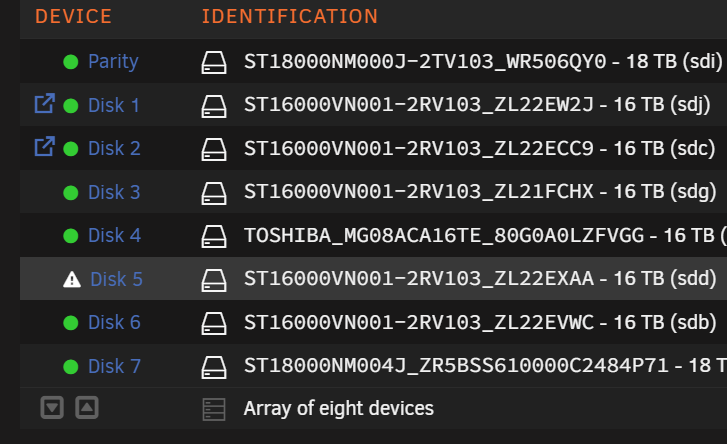
At the moment I am trying disk 5 - it shows that the disk is emulated but that's it - no disk, files or folders.
-
Can I try this with multiple disks at once (eg. disk3, 4, 5) or would you suggest to rebuild one disk at a time ? I tried it with disk 4 (Toshiba) but the emulated disk did not show any data. Now I am trying disk 5 - sadly the same emptyness.
-
Sorry, english is not my first language. From the beginnig: 1. I tryied to rebuild disk1 from parity - worked ! 2. I tryied to rebuild disk2 vie copying the part-table from disk1 - worked ! ----- Jorge wrote this: With array stopped: sfdisk -d /dev/sdX > part_table replace X with disk1 sfdisk /dev/sdY < part_table replace Y with other disk. Then reboot and see if it's back, if yes, do it for the others, except disk7, if not do the rebuild thing. ----- 3. I tryied the same with disks 3-6 ... that did not work. 4. I went back to rebuilding from parity and started with disk 4 (Toshiba) and after 20 hrs it told me rebuild is ready but the disk was still not mountable. So my question is: maybe I should do a clean format of the hdd before rebuilding the disks ? I am very sorry for being such an annoyance but I am desperate and very nervous
-
Can I take the array offline during a rebuild process ? Should I cancel the rebuild or let it run another 18 hrs ?
-
as I mentioned - I tried to copy the table - like you told me on every disk from 3 to 6, with the UD nothing was recoveryble (after hours and hours of trying) Then I went back to recovering the Disks vie emulated via parity - weirdly it seems the Unraid is mistaken these disks (3-6) for disk1 or disk2. Maybe that has s.th. to do with the copied table ?? I have pause the data rebuild on disk5 - because it shows nothing new. Can I resart and try disk6 or is that too risky ?
-
Thanks and good morning hsunraid-diagnostics-20230810-1146.zip
-
Hi Jorge, the trick with unassigned devices only worked on the first HDD (disk2) every other try failed. I unassigned disk4 (my VM-backups are on 4+5) to start the recovery process and waited another day. After the Data-Rebuild was done, I restarted the server and tried to Start the Array but the Toshiba was still shown as non-mountable. Why does this happen after a complete rebuild I don't know if I have to format the disks before rebuild ? But that was never mentioned - maybe the overwriting of the partition table wasn't such a good idea ? The I tried disk5 - I hope I did'nt break things - it looks slightly different then with the first try.
-
Yes it is, but there is a firewall and access is only via vpn
-
Good morning Jorge, sadly the trick with the part_table copying worked on just 2 HDDs - with the others UD shows a partition but is not able to check them - very strange. Any more suggestions on the BTRFS Cachedrive ? Any ideas how the partition tables on all Array-Drives incl. Cache and excluding Parity (lucky me) could have happened ? I am kinda spooked.
-
it worked - So I do this for all the Seagate HDDs of the same size. How about the Toshiba ? Rebuild like the 18 TB HDD ?
-
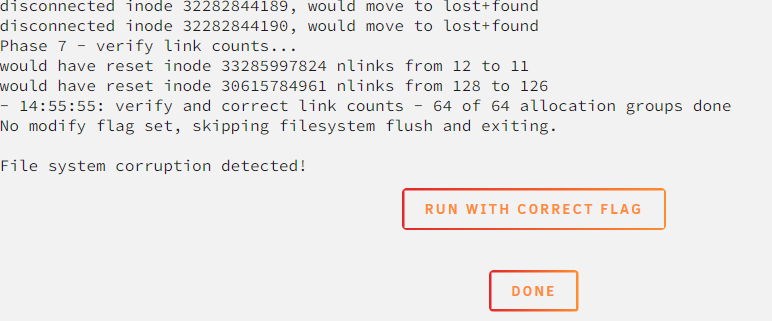
Should I press Run or Done ?
-
I am still absolutely baffled how that could happen ! I have no idea.
-
It is checking - many messages like: imap claims in-use inode 2565432 is free, would correct imap. I am not very hopeful. Let's wait and see
-
I did unassign it but there is no bolt-type Icon - neither near Disk2 or UD section ? I have a mount Button at the UD section - do you mean the gears ?
-
is there a manual regarding UD Plugin and repairing FS ?

