






Schulmeister
Members
-
Joined
-
Last visited
Everything posted by Schulmeister
-
New diags hsunraid-diagnostics-20230807-1406.zip
-
That did not work 😞
-
I tried: root@HSUnraid:/mnt/disk1# btrfs restore -vi /dev/nvme1n1 /mnt/disk1/restore No valid Btrfs found on /dev/nvme1n1 Could not open root, trying backup super No valid Btrfs found on /dev/nvme1n1 Could not open root, trying backup super No valid Btrfs found on /dev/nvme1n1 Could not open root, trying backup super As I mentioned before - I am not really sure if the nvme was btrfs, is there a way to check it - to be certain
-
As you command 🙂 hsunraid-diagnostics-20230807-1322.zip
-
Good morning Jorge, after a reboot the nvme still shows "unsupported or no filesystem" Any ideas ? I am so cunfused right now, I don't know if this was a btrfs or a zfs Disk ? Any way to find out for sure ?
-
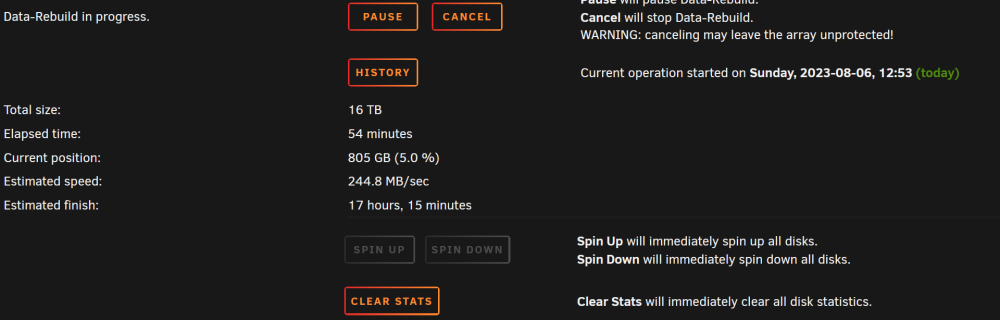
I have rebuild the disk using gdisk. My heart literaly stoped when I pressed w (rite) - well I had a GPT Backup and a Full Disk to Image running before. Now it shows this: My Data-Rebuild on Disk1 is still running, so I am not brave enough to reboot just now. It will take another 10-12 hrs für the first disk - after that I try rebooting the server. Wish me luck
-
I am copying an image right now (takes some 4 hrs). Is gdisk the way to go ? It seems the Backup GPT and Part-Table are OK
-
Regarding the single cachepool NVME, I have read a lot on btrfs and gdisk I startet it with: gdisk /dev/nvme1n1 with this result: - what should I do ??
-
I unassigned Disk1 and got to see the files and folder again. Then I reassigned the Disk again and it showed a warning saying emulated content The Data rebuild takes roughly a day per disk if I do it like this - with seven Disks that means I have a week bevore me.
-
It might work with the array drives - takes a day per disk ! Is there any way to speed this up ?
-
How do recreate them ? I have no Raid or s.th. like it for the nvme 😞 How can that happen
-
Oh boy - I am freaking out. Since yesterday my Unraid shows the following: Alle array Disks (xfs) are unmountable: unsupported partition layout. The single drive Cachepool (btrfs) is unmountable: unsupported or no fs This looks really bad - I am close to a heartattack, pls help me. hsunraid-diagnostics-20230806-1141.zipSame here, I have 4 1TV Samsung 980 nvme in an ASUS Hyper M.2 x16 Gen 4 Card. Massive cooling with fan, so there's no way it could spike to 84°C. I run this set as a btrfs-raid 10 so the likeness that if there's overheating only 1 of the 4 would overheat is very, very low. It must be a software error. I run 6.10rc4 If I switch back to 6.9 no issues. Any suggestions from unraid ?Hi there, first a big thanks for all the hard work and a very happy new year to you all. I try (really hard) to install miab with Big Sur, no luck - after what feels like 20 erases, everything set up from scratch, method 1, method 2, the files are right (there is big sur in both filenames) but the Installation is Catalina - every time. Is that a known mistake ? Thanks in advance

