lepis0
Members
-
Joined
-
Last visited
-
I got the same problem after restoring USB stick
-
If I remember correctly I first backup all data from pool and then stopped array, removed cache pool and created a new one for same disks and this also reformatted it. Then I restored backup data to new pool.
-
I'm backing up data now. How can I reformat the pool? edit. I managed to reformat pool. Thank you JorgeB for help
-
Here are diagnostics attached.unraid-diagnostics-20221018-1942.zip
-
Hi, Nvidia drivers are waiting for reboot of server but I can't reboot yet because I can't stop array Here are output of command: root@unraid:~# btrfs dev del missing /mnt/cache ERROR: unable to start device remove, another exclusive operation 'device remove' in progress
-
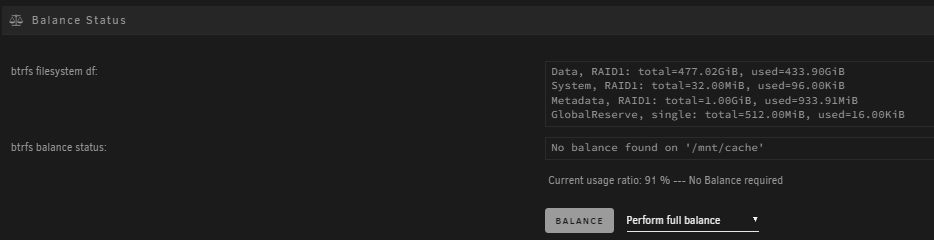
Hi, I changed one of my cache disks to new larger one. Now when I start array I can't stop it because it says disabled BTRFS operation is running. Syslog has thousands of rows unraid kernel: BTRFS info (device sdh1): found 1 extents, stage: update data pointers Cache balance show: Balance button does nothing. Pool also looks normal: I had waited about week now for that BTRFS operation to stop. I took diagnostic zip also and it's attached. What should I do to get my cache to back normal state? unraid-diagnostics-20221017-1449.zip