Flexbomb
Members
-
Joined
-
Last visited
-
I have the same issue. I'm on starlink. When I enter my tailscale DNS name into the Nextcloud-AIO setup wizard I get "DNS config is not set for this domain or the domain is not a valid domain! (It was found to be set to '')"
-
Just re posting this to see if anyone can help?
-
Hi All, I'm running out of ideas. I had to switch my server onto Starlink and as everything is now behind CGNAT all my Port Forwarding seems to have broken. I had Nextcloud running before (not AIO), and everything was working. Now, seeing how I can't access it easily from ouside the network, I'm trying to get a NextCloud AIO / Tailscale solution running locally. Here are the steps I've taken. Installed NextCloud AIO Realized it needs a domain, so I followed a guide saying to use Tailscale Installed Tailscale Plugin Went through SpaceInvader One's Guide for Tailscale, and enabled "Allow Tailscale DNS settings" however when I go to hit my Tailscale IP, it says "connection timed out" I have also tried to ping the same IP and it doesn't return anything. I tried to turn off Redis from the previous configuration as well as my Nginx Proxy Manager. I have no idea anymore. Please Help? Bahamut-tailscale-diag-20250711-100002.zip bahamut-diagnostics-20250711-0926.zip
-
Hi All, I'm running out of ideas. I had to switch my server onto Starlink and as everything is now behind CGNAT all my Port Forwarding seems to have broken. I had Nextcloud running before (not AIO), and everything was working. Now, seeing how I can't access it easily from ouside the network, I'm going to at least try and get my services to run locally within the network locally. I'm trying to get a NextCloud AIO / Tailscale solution running. Here are the steps I've taken. Installed NextCloud AIO Realized it needs a domain, so I followed a guide saying to use Tailscale Installed Tailscale Plugin Went through SpaceInvader One's Guide for Tailscale, and enabled "Allow Tailscale DNS settings" however when I go to hit my Tailscale IP, it says "connection timed out" I have also tried to ping the same IP and it doesn't return anything. I tried to turn off Redis from the previous configuration as well as my Nginx Proxy Manager. I have no idea anymore. Please Help? bahamut-diagnostics-20250711-0926.zip
-
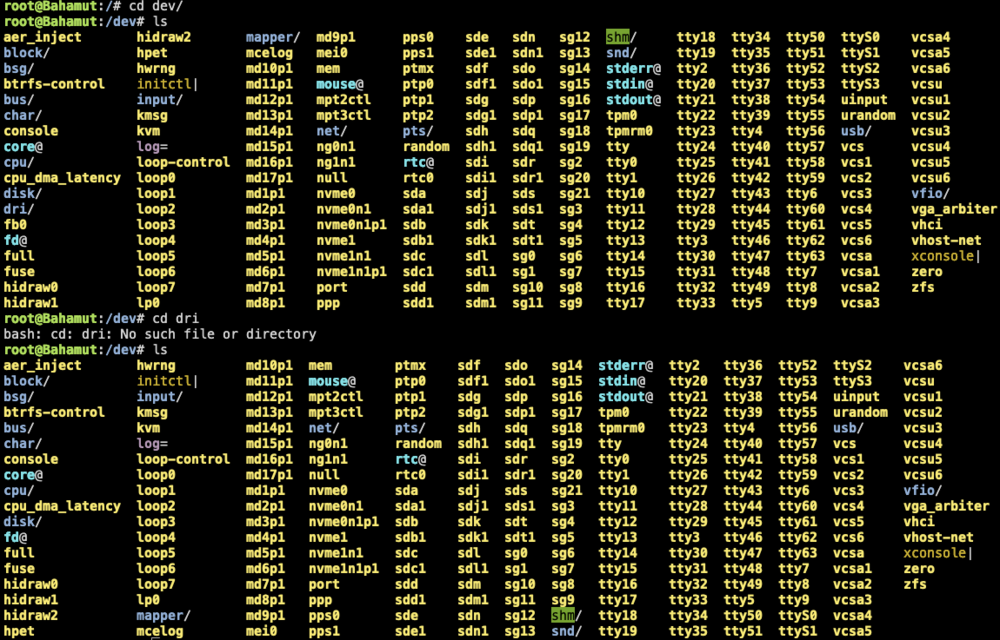
Found out why. On boot, my Home Assistant VM also had "graphics card" as the intel 770 integrated graphics and probably had some sort of overriding collision going on and was deleting/removing /dev/dri and stopping it from being created with the modprobe command. SOLUTION: 1. edit home assistant VM to graphics card = "virtual" 2. run the modprobe i915 command 3. done. /dev/dri appeared again with the /card0 and /renderD128 folders. Sigh...
-
I just upgraded the server to an intel i7 14700 setup and had everything working splendid yesterday with Quicksync transcoding working on Plex. I have quicksync iGPU enabled on bios and Graphics set to "CPU" Motherboard: Asus W680-ACE CPU: i7 14700 Tonight, I have one of my friends say there was a problem about transcoding so I replicated it, rebooted the plex container and it wouldn't boot up because "/dev/dri" was not found. I rebooted the server a couple of times, installed the Intel GPU Top plugin and still for some reason, /dev/dri still doesn't show; even when I type "modprobe i915" in terminal. Weirder still. On one of my reboots, I decided to check quick on terminal to see if it existed, and in the screenshot you can see it's there one second, and gone the next. Any thoughts? Included the diagnostic file. I've turned off transcoding on plex and it's back to "operational" but part of the reason I got the i7 was so I could use quicksync transcoding so this is a real bummer.
-
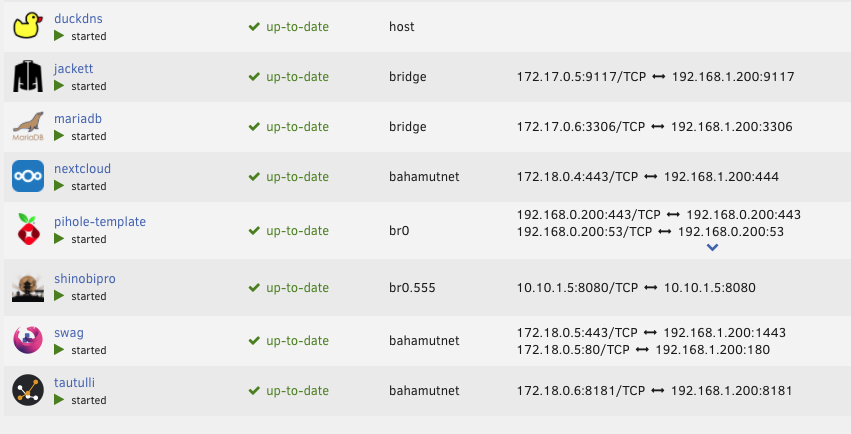
This is an odd one. I recently moved and my providers changed from cable internet to starlink. I now cannot use my reverse proxy through duckdns the same way I did before, so I'm reverting back to local access. It seems that whenever I hit the local address (192.168.1.200:444) it forwards to the duckdns site (which no longer works). I'm sure this is a MariaDB setting or something, but before I nuke this thing, I'm wondering if someone can tell me if it's a simple command that I can reset this thing.
-
Flexbomb changed their profile photo
-
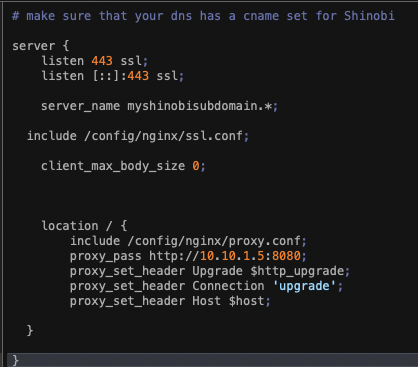
Hi Everyone, I think I have most of the shinobi setup done now. I'm currently using a vlan (555) and also a reverse proxy through Swag. When I'm on the network, everything works fine. I can access everything perfectly. The weirdness happens when I try and access outside of the network. - I'm using the Beta Shinobi app as well, and if I'm on cellular, and using that app to login to myshinobidomain.duckdns.org, I can see my cameras and it works as expected (although i'm using "legacy loading"). - When I try and use safari to login to myshinobidomain.duckdns.org, I can log into shinobi, but I do not see any cameras. Any ideas?