





bucketphobia
Members
-
Joined
-
Last visited
-
Am I correct in understandign that ata3 maps to drive sdn? unique_id3 -> host5 host 5 -> sys/block/sdn
-
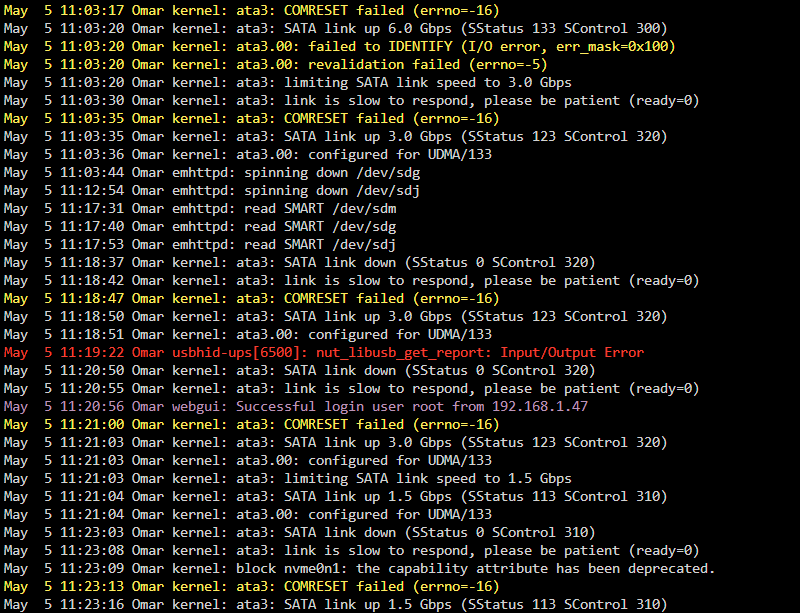
Hi! I've been having an issue over the past day with a SATA error - drive first showed up as disabled and when checking syslog I see a spam error of "SATA link down" Diagnostics attached, would appreciate any help! omar-diagnostics-20250505-1123.zip
-
Yeah sorry, that’s what I meant - Stop array, readd disk, let it do its thing?
-
Booted up array normally (but without adding the drive back in, leaving it emulated) - drive is fine with all content intact it seems! (no lost+found folder either) I assume next step is to just verify that everything is intact, then re-add the drive and rebuild parity? Thanks a ton for all the help btw, super appreciated!!
-
Phase 1 - find and verify superblock... sb root inode value 18446744073709551615 (NULLFSINO) inconsistent with calculated value 128 resetting superblock root inode pointer to 128 sb realtime bitmap inode value 18446744073709551615 (NULLFSINO) inconsistent with calculated value 129 resetting superblock realtime bitmap inode pointer to 129 sb realtime summary inode value 18446744073709551615 (NULLFSINO) inconsistent with calculated value 130 resetting superblock realtime summary inode pointer to 130 Phase 2 - using internal log - zero log... ALERT: The filesystem has valuable metadata changes in a log which is being destroyed because the -L option was used. - scan filesystem freespace and inode maps... clearing needsrepair flag and regenerating metadata sb_icount 0, counted 25472 sb_ifree 0, counted 14336 sb_fdblocks 3417569701, counted 2424849617 - found root inode chunk Phase 3 - for each AG... - scan and clear agi unlinked lists... - process known inodes and perform inode discovery... - agno = 0 - agno = 1 - agno = 2 - agno = 3 - agno = 4 - agno = 5 - agno = 6 - agno = 7 - agno = 8 - agno = 9 - agno = 10 - agno = 11 - agno = 12 - process newly discovered inodes... Phase 4 - check for duplicate blocks... - setting up duplicate extent list... - check for inodes claiming duplicate blocks... - agno = 0 - agno = 2 - agno = 7 - agno = 10 - agno = 1 - agno = 12 - agno = 8 - agno = 9 - agno = 6 - agno = 3 - agno = 4 - agno = 11 - agno = 5 Phase 5 - rebuild AG headers and trees... - reset superblock... Phase 6 - check inode connectivity... - resetting contents of realtime bitmap and summary inodes - traversing filesystem ... - traversal finished ... - moving disconnected inodes to lost+found ... Phase 7 - verify and correct link counts... Maximum metadata LSN (1:399930) is ahead of log (1:2). Format log to cycle 4. done Ran check afterwards, says "no filesystem corruption detected"
-
Phase 1 - find and verify superblock... bad primary superblock - bad CRC in superblock !!! attempting to find secondary superblock... .found candidate secondary superblock... verified secondary superblock... writing modified primary superblock sb root inode value 18446744073709551615 (NULLFSINO) inconsistent with calculated value 128 resetting superblock root inode pointer to 128 sb realtime bitmap inode value 18446744073709551615 (NULLFSINO) inconsistent with calculated value 129 resetting superblock realtime bitmap inode pointer to 129 sb realtime summary inode value 18446744073709551615 (NULLFSINO) inconsistent with calculated value 130 resetting superblock realtime summary inode pointer to 130 Phase 2 - using internal log - zero log... ERROR: The filesystem has valuable metadata changes in a log which needs to be replayed. Mount the filesystem to replay the log, and unmount it before re-running xfs_repair. If you are unable to mount the filesystem, then use the -L option to destroy the log and attempt a repair. Note that destroying the log may cause corruption -- please attempt a mount of the filesystem before doing this.
-
Started in maintenance mode, went to the disk and checked filesystem status, this is what pops up - should I continue with Fix? Phase 1 - find and verify superblock... bad primary superblock - bad CRC in superblock !!! attempting to find secondary superblock... .found candidate secondary superblock... verified secondary superblock... would write modified primary superblock Primary superblock would have been modified. Cannot proceed further in no_modify mode. Exiting now.
-
Attached, thank you! omar-diagnostics-20250313-0121.zip
-
having an issue with a drive showing up as unmountable I removed it from array and started it - hoping it would get emulated, but unfortunately shows up as "Not installed" and data is still not available. I tried to use Unassigned devices to mount it, but it gets an error saying Mar 13 00:15:41 Omar root: Cannot use device /dev/sdc1 which is in use (already mapped or mounted). Mar 13 00:15:41 Omar root: Warning: keyslot operation could fail as it requires more than available memory. Mar 13 00:15:41 Omar emhttpd: shcmd (2030): exit status: 5 Mar 13 00:15:41 Omar emhttpd: read SMART /dev/sdc Mar 13 00:15:41 Omar unassigned.devices: luksOpen result: Error: Passphrase or Key File not found. I tried to add a keyfile to unassigned devices, but can only seem to insert a passphrase, not a keyfile Would appreciate any help, thank you!
-
Yeah, exactly. I had /mnt/*pool*/ for certain dockers like PLEX, but not all of them.
-
For anyone who may stumble on the post in the future, I have confirmed that the fix for this specific error is to enable "Exclusive Shares" option in Unraid 6.12 and to verify that it is "Yes" on your appdata share. I have brought back the dockers I had disabled/changed, and everything runs as expected. If that option is turned off, the same iowait issue comes back nearly instantaneously.
-
If it says no - you likely need to (1): disable secondary storage; (2): make sure that nothing on the share is on other drives
-
Hey @DrSpaldo, I was having a very similar issue, but slightly different - the cause of mine was a dockerd log process. The solution to mine was to ensure that "Permit exclusive shares" is on, and that "Exclusive Access" is indeed active on my cache pool. Hope this helps.
-
So as an update, I did three things as of the last post - and it appears one of them has worked, as I have ~84 hours of uptime so far with no signs of the issue happening again so far. Fingers crossed one of these is the long-term solution: 1) Updated BIOS to the latest version (in my case, I have a i7-4790K and was running on quite an old BIOS compared to the latest available 2) Enabled the "Exclusive Shares" option introduced in Unraid 6.12.4 (I had it manually done for certain heavy dockers previously like Plex, but it seems like it has helped.) 3) Disabled the KASM container (I am honestly not so sure how much this could potentially affect the outcome, but this time around I have had it stopped. I will attempt to use KASM again in the future and see if the issue is replicated) Thanks for all the help Jorge, appreciated.
-
I've been doing some additional research, and found a few threads that I believe may be the same issue I've been experiencing. I updated BIOS as suggested there, and enabled exclusive shares. Will see how it affects the problem.

