





Rysz
Community Developer
-
Joined
Everything posted by Rysz
-
Don't post in duplicate threads in the future please, there's a support topic for the plugin.
-
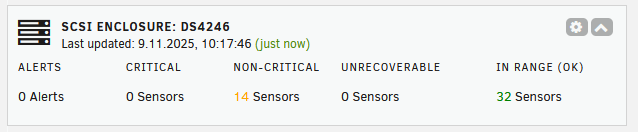
SCSI Enclosure Monitor https://github.com/desertwitch/sesmon https://github.com/desertwitch/sesmon-unRAID Monitors SES-capable SCSI enclosures (such as disk shelves) Tested to work with the popular NetApp IOMs (specifically IOM6 in DS4246) Installable via Community Applications

-
You need to set the UPS Name to the UniFi NUT server ID and disable authentication on the UniFi NUT server.
-
Any chance you could post a log with "UPS Driver Debug Level" set to 6? Just to see if it's doing what we want it to do...
-
Perfect, thanks for reporting back. I'll get the changes baked into the next update and will let you know. 😁
-
It seems it's cycling between regular polling and fallback mode, I'll have to see what could cause this. Usually it goes into fallback mode only if the device does not respond to a regular variable dump query, odd. Sorry that's not possible as far as I know, I think only the other direction is possible (bridge a apcupsd UPS into to NUT).
-
Well it seems you got "UPS Name" in Unraid configured to "Tower" but to "UPS-Tower" within UniFi. Also you should try disabling "Login Credential" as other people had problems with that (see above). If that doesn't work, try changing as follows: Name to "unifi" (without quotes, in UniFi settings) ID to "unifi" (without quotes, in UniFi settings) "Login Credential" to disabled (in UniFi settings) UPS Name to "unifi" (without quotes, in Unraid settings)
-
Are you sure this is not some firewall rule blocking the connection? Please show a screenshot of the NUT server configuration on the UniFi side.
-
Glad to hear, can you also take a screenshot of the variable table that's in NUT Settings now? You can blank out the serial number, I just want to check which variables get exposed now.
-
Well, glad it works for you now, some UPS also like to take a bit of time to get recognised... But Eaton is generally the best (supported) choice for NUT (and UPS too in my personal opinion)... Feel free to report back if you run into any problems later down the line... 😊
-
The UPS is working...? I haven't changed anything in that regard, so maybe just a lucky coincidence. If the UPS drops or doesn't get recognised in the future, it may be the hardware combination with that kernel version. Some users had luck getting a cheap USB hub and seeing if that plays better than direct connection of the UPS to the motherboard.
-
Can you try updating to the latest NUT plugin (2025.11.01a) and try generating a debug package in NUT settings for me now? With the UPS connected please, I hope the generation works for you now (it may take up to 2 minutes, so be patient... 😉)
-
Can you try on another USB port (2.0 ones usually work better), anything else in logs when you plug in/out the USB cable? Did you try with another USB cable perhaps?
-
It doesn't seem to see your UPS at all, what happens when you click here:
-
Can you try raising the UPS Driver (not NUT Monitor!) Debug Level to 6 and post the syslog output?
-
The latest update allows adding the port to the IP address in GUI settings, please try and report back if it works. I've added a UniFi workaround in the latest update, please try and report back if it works. If using a custom port - the latest update allows adding the port to the IP address in GUI settings (if not the default of 3493).
-
Unfortunately not, I also like it better on the left but plugin developers were asked to put it on the right (the other plugin you're having probably wasn't updated for the new OS version yet).
-
I'm working on a client side mitigation of the UniFi protocol problems, hopefully I'll have good news with the next update to get these UPS functional for you all.
-
We'll have to see if more reports surface with users updating to 7.2. NUT code paths haven't changed and are all relative, so no assumptions about protocol/port are made. What's more is, it works for me on 7.2. over HTTP also... so perhaps something on your end (browser, proxy...)?
-
I just saw this is a UniFi UPS, these currently seem to have a non-compliant implementation of the NUT protocol. It seems to work for some users without authentication enabled on the NUT server side, so maybe you can try that... Windows NUT works because it queries a few individual variables, as opposed to our full variable dump. A compliant NUT server must implement both individual variable queries and full dump queries, theirs doesn't seem to. Unfortunately this is a problem on the vendor side, so nothing I can do from my point of view. https://forums.unraid.net/topic/60217-plugin-nut-v2-network-ups-tools/page/78/#findComment-1585510 https://community.ui.com/releases/UniFi-UPS-1-4-13/fdd23b70-1191-4bc1-8485-d85c41a3a510 https://forums.unraid.net/topic/60217-plugin-nut-v2-network-ups-tools/page/78/#findComment-1585683 https://community.ui.com/questions/UniFi-UPS-sends-incorrect-responses-in-NUT-protocol/7f862573-eda4-4180-a987-0aca1233ee8a#answer/a857cb90-866a-4db0-9f8a-9e1dab1af14a
-
Is the server running on a specific port?
-
The plugin uses relative paths, and I'm also accessing over HTTP (as I'm sure many others do), so I think this is maybe your browser enforcing SSL on these (sub-)requests?
-
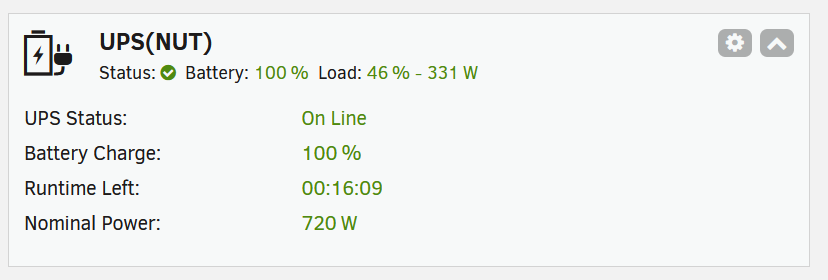
It works for me: Please check in your browser console and the PHP Settings (Tools => PHP Settings => View Log) if there's any issues.
-
Let's all get back to being nice to each other and respecting our forum rules, thanks.
-
Thanks for the information, I think I traced this issue to a specific GUI settings problem. I'll add a custom "Port" setting, as part of the next update to NUT, which should resolve the issue. The problem is that the GUI assumes the default NUT port at the moment, which the user should be able to change.




