wiloh95
Members
-
Joined
-
Last visited
-
Solved it, apparently I didn't have enough space on my system directory since it only used my cache instead of array. Everything seems to be working now
-
I deleted the file, restarted and it still doesn't work, but I did get a different log.
-
That is what my logs say, seems like I have issues with Conda or simply not having it. EDIT: found some more in the logs now. https://pastebin.com/Lt61J9WA Guess my permissions are incorrect?
-
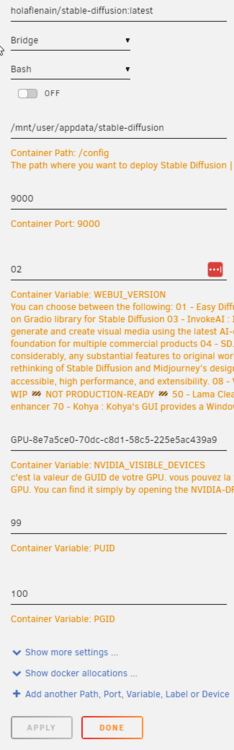
Hello, I'm very much a beginner and hasn't used unraid in years, but I wanted to try setting up SD for it but I can't access the WebUI since I most likely have incorrect PUID and PGID. I don't run rootless containers by podman so I tried finding out the PUID and PGID of the user I have created. using the "id -u" or "id -g" only returned 0 since I'm logged in as root. however running "id 'my username')" gave me this: "uid=1000(my username) gid=100(users) groups=100(users)" So I tried entering PUID = 1000 and PGID = 100, but to no success. So I'm wondering how to find out the PGID and PUID of my user (in case I did it wrong). And in case I did it right I'd curious why I still can't connect to the web UI. *In the pic I use PUID 99 as I wanted to try the default value.*