





Erik M
Members
-
Joined
-
Last visited
Everything posted by Erik M
-
It appears I need a bigger PSU. With seperating the power connectors so none of them were on splitters, it sucessfuly completed the parity check. Lots of errors written back to the parity drive but I suspect that is due to all of the previous attempts at running a check and the power connectors failing. Bigger PSU is on it's way. Thank you to everyone who helped me get this back on track! Also time to scale back and remove a couple of drives. tower-diagnostics-20260801-1246.zip
-
Ok, I'll have to use what I have for now and will look at other PSU's that have more connections. I have another modular style in a computer that I don't use. Maybe that will have more connectors. I can also, for now, put a second power supply next to the server to power up a few of the drives. If the parity check makes it through with no more power issues, I will get a new PSU that has more wattage and more than 3 SATA connectors
-
Yes there are. 2 of them that split into 5. The power supply I have is the Thermaltake Smart Series 600W (Model: PS-SPD-0600NPCWUS-W) and with needing 10 connections, I use splitters. I do have 2 new splitters that were delivered today that I planned on swapping out the old ones. It was October 2023 when I last replaced them. I assume that since right now, the parity check automatically paused. I Should cancel it, shut down, replace the power cables and reboot so it will start performing the parity check again.
-
Rebuild was going quickly until at 11.8% a new error occured. Disk 3 (which I never had issues with previously) is in an error state and was automaticly disabled. I can't begin to think of a reason for these failures. Should I stop the array and do a file system check on Disk 3 now and then start over? tower-diagnostics-20260731-0758.zip
-
Yes, I could mount and view all files in Unassigned Devices. I left it unassigned, started the array and did a diagnostic with Disk 5 is still unassigned but mounted. Once that was done, When I put Disk 5 back in the array, it warns that all data will be over written. I'm assuming that this is due to it being rebuilt by the parity. If this is what we are looking for then I'll start the parity check before I go to work in the morning. tower-diagnostics-20260731-0232.zip
-
I just thought of some added information in regards to losing any writes to Disk 5. There are 2 shares that are on that drive. I have notwritten any new files to those shares in a few weeks so I don't think I'd lose anything and it's not the end of the world if I lose a few of those files in the shares. I'd prefer not to but am not going to be heartbroken as long as a good amount of the files are recovered. Adding to the question of checking the unassigned devices, currently there are no devices listed in the Unassigned Devices hence me asking if I need to unassign it from the array and then restart the array.
-
To move Disk 5 to an unassigned device, is the proper way to stop the array, use the drop down menu to unassign it then restart the array? I understand the logic of rebuilding before I move files around I was just trying to save a couple of days as the parity checks normally take 2.5 days.
-
I replaced the power cables with older ones that I had laying around. Disk 6 is now back online and I ran a diag attached to this post. After the diag, I went in and disk the Check Filesystem Status on Disk 5. It reported a dirty log. I zero'd the log (results attached) and restarted the array. Still has the red X but it did allow me to check and verify that the data was still on the drive. I believe that in order to get rid of the red x, I need to do a new config and set it to preserve everything and when I start the array set to parity to valid so it does not try and rebuild parity. Once that is done, I need to fire up Unbalanced and move everything off of Drive 5 to Drive 7. There is now a folder on Disk 5 called lost+found. Do I need to move that to Disk 7 as well or can I skip it? After the days of it moving everything over, (I'm not sure how to do this part) zero out disk 5 and then rebuild parity. By zeroing Drive 5, I'm hoping that will remove any garbage that could cause it to have file system failures. Is my thinking correct? tower-diagnostics-20260730-1844.zip Disk 5 XFS Repair Log.zip

-
Will do when I get home from work tonight. I ordered new power cables that will be here tomorrow just incase.
-
Stopping the array did not give me the maintainence option. running root@Tower:~# fdisk -l /dev/sdl fdisk: cannot open /dev/sdl: No such file or directory running root@Tower:~# fdisk -l /dev/sdj Disk /dev/sdj: 7.28 TiB, 8001563222016 bytes, 15628053168 sectors Disk model: HGST HUH728080AL Units: sectors of 1 * 512 = 512 bytes Sector size (logical/physical): 512 bytes / 4096 bytes I/O size (minimum/optimal): 4096 bytes / 16773120 bytes Disklabel type: gpt Disk identifier: A203B7E7-5C05-4BB1-8522-89E093D27450 Device Start End Sectors Size Type /dev/sdj1 64 15628053134 15628053071 7.3T Linux filesystem Also, because I stopped the array, it will now not let me restart it. I'll attach a new diag, (diag 1) reboot and attach another one. Interesting. I ran the new diag before I rebooted and now Disk 6 has returned to sdj and it will let me choose maintenance mode. After restarting the array in maintence mode, I selected disk 6 and the check file system status gives me this Phase 1 - find and verify superblock... superblock read failed, offset 0, size 524288, ag 0, rval -1 fatal error -- Input/output errorand it moved it to the unassigned devices again as sdl. I can mount it as sdl and all of the files are there. (diag 2) Reboot and (diag 3). Issue has not been fixed. diag 2.zip diag 1.zip diag 3.zip

-
Up until today, I had my server limpng along (previous udma crc errors). I removed my SATA expansion card SY-PEX40167JMicron chipsets (JMB582/JMB575) thinking it was failing. I replaced it with a Supermicro AOC-S3008L-L8E (LSI 9300-8i clone). Once I was able to get the card to work through BIOS settings, I rebooted the server with errors. I was going to try and go into maintenance mode and do the xfs repair however there is no option to go into maintenance mode. Is there another way I can get Disk 6 back running so I can then deal with Disk 5? My plan is to use unbalance to move all data from disk 5 to disk 7 and pull it out of the array and zero it out. Any help is greatly appreciated. tower-diagnostics-20260729-2024.zip

-
Wonderful! Downgrading solved the issue. I will have to look around for a motherboard that has more SATA ports before I upgrade to a newer version of Unraid.
-
I did the downgrade this morning before work and it appears to be rebuilding much better. 4½ hours in and it has rebuilt 5.7%. Much better than 53 hours at 0.3%! Thank You!!!! I will mark this answered once things finish and return to normal.
-
I did do a new config, keeping all the same and chose valid pairity before I replaced the pairity drive. That is when the emulation ended. I was thinking it may be the controler. The motherboard does not have enough SATA connections so I used a controler. I will try to downgrade to 7.2.4 and see if that changed things before I replace the controler. Thank you for the infomation!
-
I was doing a every other month parity check and drive 6 (sde) started showing that it was being emulated. I stopped the paityy check, shut down and pulled all of the SATA cables out and reinstalled them. When I restarted, the drive was no longer being emulated so I take that as the issue was resolved due to a bad connection. I restarted the parity check and when it reached 12gb the parity drive started showing UDMA CRC errors and froze the check. I installed a new parity drive due to the old one having sync errors being reported and now during the parity rebuild, it has been extremely slow and is now at 0.3% and has not changed in at least 10 hours. Here is a screen grab of the Array Devices And here is the Array Operation While typing this up, the array is now showing read errors on drive 4 so I have attached the diagnostics from just before I started typing this post and another one from just now after the read error was reported. I do still have the old parity drive that I have not touched and I have a spare 4TB drive in the unassigned disks if I need to connect either one of those for testing. The only thing I use the server for is as a video server (Jellyfin & Emby) and a few backup documents. My end goal is to get things back to normal and then offload the videos to a stack of bluray discs incase this happens again. And shrink the array to maybe only 12 - 16tb saving the other discs as emergency replacements. tower-diagnostics-20260714-1917.zip tower-diagnostics-20260714-1956.zip
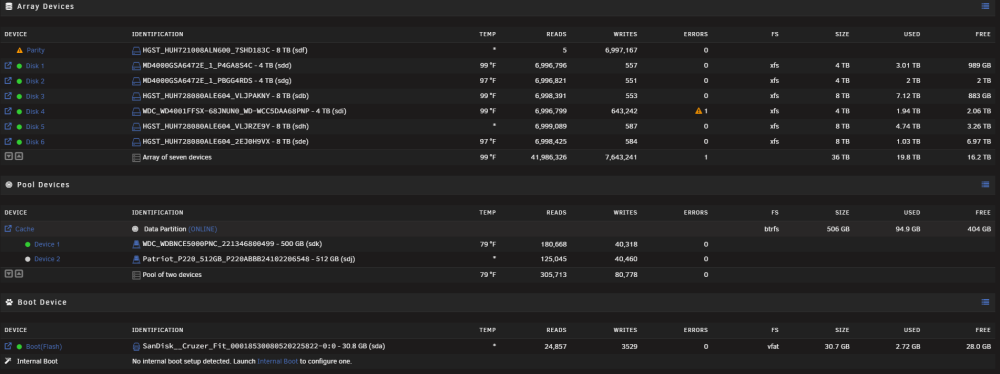
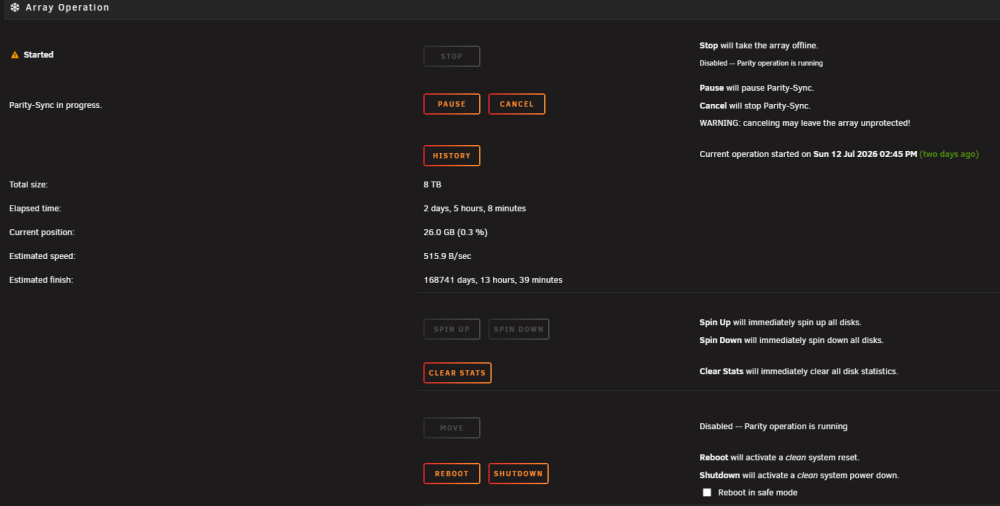
-
Thanks again for walking me through this mess!
-
Thank you again! I have set it about rebuilding the parity. It should finish Sunday afternoon then I'll see what happens. After all of this is settled, I'll look at moving the SSD in the array a pool like you mentioned before. The only thing I use that drive for is holding files for Tdarr to transcode. When they are finished transcoding, I move them to the array. I believe after reading Cache Pools that a single ssd pool will be enough for my requirements. I'm also toying with the idea of making the new 8TB drive I have into a 2nd Parity drive instead of a data drive. I have 8TB of space free on the array. That will take me a while to fill. No real need for a larger data pool other than I see low free space. My idiot brain starts thinking anything under 50% free space is unacceptable even though I know that as far down as 30% free if just fine.
-
Everything copied over with krusader. Should my next step be to put an empty drive into Drive 4 slot and have the array rebuild? Or, should I move the drive I just copied the files to into that slot and do a new config preserving all?
-
I did redo all of the cables on the drives and they are secure. I managed to figure out krusader and am copying the files from the bad Drive 4 to a new WD Red 4TB drive. There were only 2 shares on it and the smaller one copied over easily. The other share is 1.4TB of media. That may take a little time so I will let it run in the background and grab a little sleep.
-
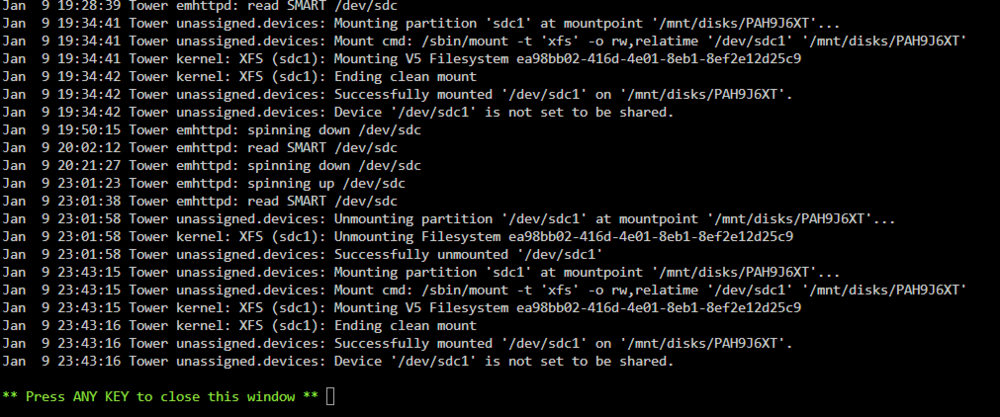
Ok, I may be doing it wrong. If I run the file system check on the empty slot, it's an endless loop. If I go down to the little checkmark in the Unassigned Devices area (it only works when it is unmounted), it completes quickly and this is the result: FS: xfs Executing file system check/sbin/xfs_repair -n '/dev/sdc1' 2>&1 Phase 1 - find and verify superblock... Phase 2 - using internal log - zero log... - scan filesystem freespace and inode maps... - found root inode chunk Phase 3 - for each AG... - scan (but don't clear) agi unlinked lists... - process known inodes and perform inode discovery... - agno = 0 - agno = 1 - agno = 2 - agno = 3 - process newly discovered inodes... Phase 4 - check for duplicate blocks... - setting up duplicate extent list... - check for inodes claiming duplicate blocks... - agno = 0 - agno = 1 - agno = 2 - agno = 3 No modify flag set, skipping phase 5 Phase 6 - check inode connectivity... - traversing filesystem ... - traversal finished ... - moving disconnected inodes to lost+found ... Phase 7 - verify link counts... No modify flag set, skipping filesystem flush and exiting. No file system corruption detected! If I mount the drive, the check file system is grey and can't run. Clicking on the Disk Log Information on the mounted drive, the screenshots are the result. While we wait for any additional instructions, I am going to shutdown the server and go through all of the drive connections and reseat the memory just incase it is a bad connection causing the errors. I did run into that when I had the drives in a cage outside of the case. That was before I got a Node 804 that can house all of my drives.
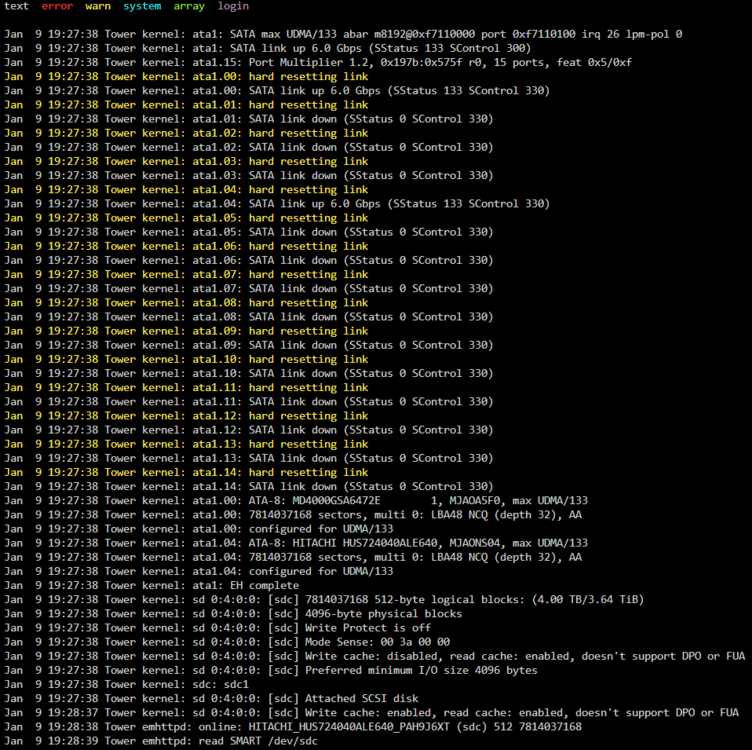
-
I am running the check file system now and will let it run until it stops on it's own but what I'm seeinf is the same as I posted before with an endless loop. If I check the Disk 4 in the unassigned devices, I can see the contents are there. I plugged in an external drive that is empty thinking I could copy the contents over to it but unbalance does not see the unassigned drives and I can't find out how to navigate there in krusader either. If we do build an array with a different drive, I can use that one. There's approx 2TB of data to move.
-
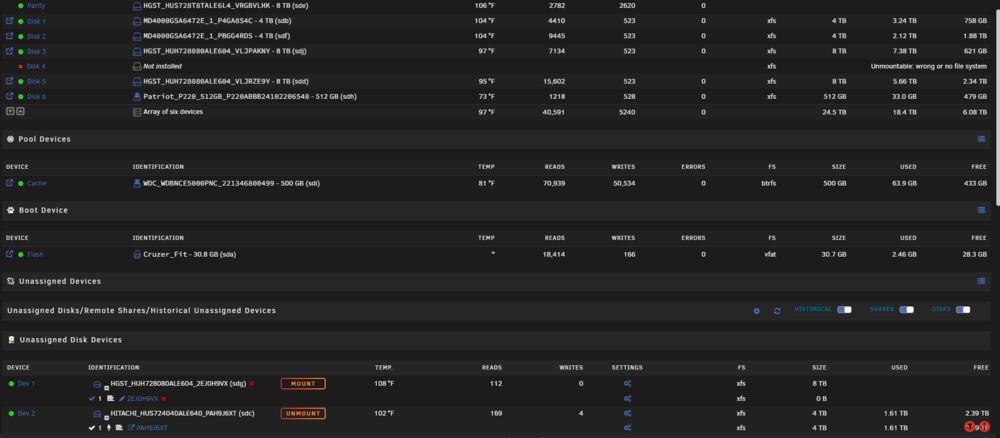
Ok, I rebooted and now it came up allowing me to start the array.
-
I had started it in maintence mode and went to Disk 4 Check Filesystem Status and thats where it was in the endless loop. Then I mounted the drive from slot 4 in the unassigned devices area
-
It will not allow me to start the array though
-
I was able to mount it as an Unassigned Device



