





Erik M
Members
-
Joined
-
Last visited
Everything posted by Erik M
-
It is not emulating Disk 4 and is in an endless loop Should I put it back into slot 4 and then start the array and check the file syatem again. Phase 1 - find and verify superblock... error reading superblock 4 -- seek to offset 4000786989056 failed couldn't verify primary superblock - attempted to perform I/O beyond EOF !!! attempting to find secondary superblock... .found candidate secondary superblock... error reading superblock 4 -- seek to offset 4000786989056 failed unable to verify superblock, continuing...
-
Here is the diagnostic after disableing Disk 4 PAH9J6XT is the 4TB but in the unassigned pool 2EJ0H9VX is the new 8TB in the unassigned pool - Future replacement for the bad Drive 4 tower-diagnostics-20260109-1842.zip
-
Honestly I can't remember but if I did it was very little and I am ok with losing whatever that was. I don't think anyone did write to it though. As soon as I noticed the errors building up on Disk 4, I pulled the array offline.
-
I'm sorry, yes Serial Number: P4GA8S4C is the original Disk 1. While doing the rebuild, it only got to just under 3% if that makes any difference.
-
I do not. If I reassign that to it's original Drive 1 slot and remove the new 8tb, do I need to rebuild it? Or can I just go ahead and after reassigning it, replace the drive 4 and then start a rebuild from there? Over the next few months, my objective is to replace the 4TB drives 1 at a time as they are aging out. I think its been 4 to 5 years on a couple of them. By the way, I really appreciate the help. I'm in over my head on this one for sure.
-
New diagnostic tower-diagnostics-20260109-1741.zip
-
I was looking for a log file to post but was unsure how. Attached is the diagnostics file. tower-diagnostics-20260109-1713.zip
-
I have a 6 drive array. The other day I noticed drive 1 was failing with sync errors. I upgraded it to an 8TB drive. As it was rebuilding the array, drive 4 started having massive sync failures. Parity 8TB Drive 1 (old 4TB new 8TB) Drive 2 4TB Drive 3 8TB Drive 4 4TB (I have a new 4TB to replace it) Drive 5 8TB Drive 6 512GB (I use this for temp files while I decide where their final home wil be) The other day I noticed drive 1 was failing with sync errors. I upgraded it to an 8TB drive. As it was rebuilding the array, drive 4 started having massive sync failures. (Drive 4) Seek_Error_Rate FLAGS ( PO-R--) VALUE (062) WORST (062) THRESH (067) FAIL (NOW) RAW_VALUE (8126568) I stopped the rebuild as it said it was going to take a month to complete the rebuild. I still have the Drive 1 that I took out but the reason I was doing the upgrade was that it had some of the same errors hapening. Should I replace Drive 4 with a new drive and let that rebuild, then replace drive 1 with the new one and rebuild again? I am trying to avoid a rebuild taking a month. Typically when I do a parity check, it takes 1½ to 2 days.
-
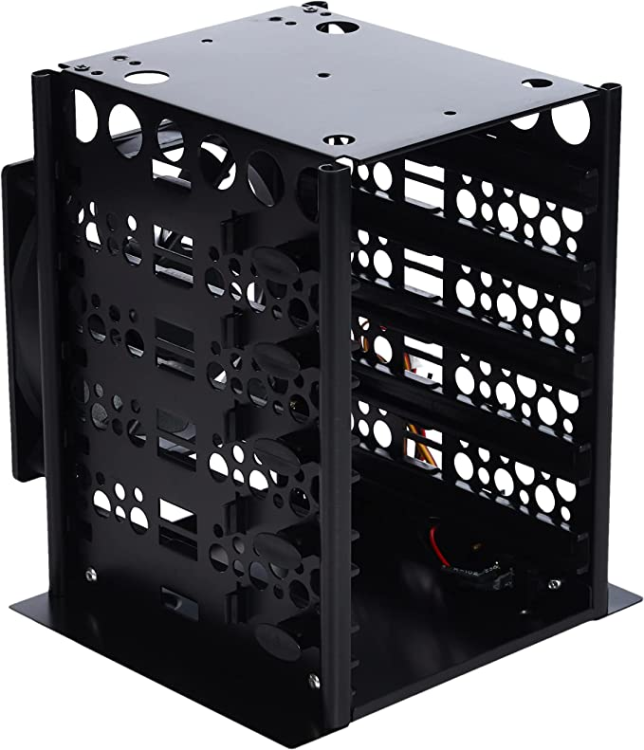
I am running an old HP 6300 SFF for my server. I have the cache drive installed in the case and currently 6 4TB & 1 8TB(parity drive) HDD in 2 of these cages HDD Cage. These run on old salvged 240w Dell power supply. I understand that I must switch them on before I fire up the server and if I shutdown the server then I need to kill the power to these manually. My question is, is this a good practice? It is working for me but I do not want to leave myself open to issues cown the road. The cages have a connector for the power supply which is controlled by a switch. Then I use a 5 way SATA Power breakout for each one
-
I received the better cable and it still will not recognize the drives. I'm going to chalk it up to a bad card as I bought it on Ebay for cheap. I ended up going with a different card IO CREST 10 Port (SY-PEX40167) and some SATA cables like these Multi SATA cable and so far it works fine.
-
I was able to get into the card's BIOS and it does not recognize any drives. I tried it with both cables that I have. I ordered a better quality cable but it will not arrive untill Tuesday. I will try that cable just incase it was that the cheaper cables were just that. Cheap.
-
The drives are spun up but that could be because they have a dedicated power supply. I may need to rethink that.... I did flash the bios as well. If I remember correctly, I should be able to hit CRTL-C to open that up but will need to see when I get home soon.
-
Could anyone point me to a solution for an issue I am having with the LSI 9200-8e? Currently I have my Unraid server working using a 4 port SATA card SI-PEX40064 https://smile.amazon.com/gp/product/B00AZ9T3OU/ref=ppx_yo_dt_b_asin_title_o06_s01?ie=UTF8&psc=1 with 4 long sata cables attached and 1 attached to a motherboard SATA port. All of the cables are running through an empty slot in the back to my stack of 5 4TB drives. It all works fine. What I want to do is put an LSI 9200-8e HBA in to eliminate the nest of SATA cables and just have the 2 running from the back of the card. I managed to flash the card to the P20 firmware and confirmed that it did flash correctly, but after I hook everything up and reboot, only the parity and Drive 4 show up in Unraid. I believe I am using the proper cables as they state they are Host to SATA https://smile.amazon.com/dp/B08NGGPPCY?psc=1&ref=ppx_yo2ov_dt_b_product_details Am I missing something? Oh, the motherboard specs are here https://support.hp.com/us-en/document/c03387773 I have the card in the 16x slot. Thanks for any input, I'm at my wits end here.
-
Thank you for this Docker! I was wondering if it is normal to have connections from unknown IP's? From my log... 2-09-26 11:43:09: IPv4 connection closed: 184.74.82.xx:xxx 2022-09-26 22:56:36: IPv4 connection accepted: 111.7.96.xx:xxx 2022-09-26 22:56:38: IPv4 connection closed: 111.7.96.xx:xxx 2022-09-26 22:56:38: IPv4 connection accepted: 111.7.96.xx:xxx. 2022-09-26 22:56:38: IPv4 connection closed: 111.7.96.xx:xxx. I recognize the 184.72... but not the 111.7.96.. Should I be concerned and try and block all IP's except the one I recognize?
-
Wonderful! Thank you for your assistance. I'm sure about the drive as I labeled them wih their serial # and the order. Glad I did that!
-
I tried to copy the config file but the usb drive is corrupt and it would only copy 30 of 146 files in the config folder. I did look at the physical HDD's in the array and I had labeled them as 1, 2, 3, 4 & Parity. Given that, I should be able to rebuild with out Unraid preclearing. Correct? Update: I did manage to reinstall Unraid and updated the registration successfully. I have assigned the drives to the array as they were but the Parity drive has this message next to it. All existing data on this device will be OVERWRITTEN when array is Started. I haven't started the array yet. If my thinking is correct, this just means that the parity drive is going to go through the 4 data drives and set itself up without clearing the data drives. Am I correct? I am paranoid, that I do know! I did just see a little checkbox next to the start array button that if checked says parity is already valid. If I check that will it not have to clear the parity drive and just start working normal?
-
This morning I assume bricked the USB drive that Unraid is on as it will not boot. I know I can install Unraid on a new drive. I unfortunately do not have a backup to restore (Lesson learned, I will have monthly backups after this is fixed) I would like to do this with out losing any data. The array was (5) 4TB HDD's. (1) Parity and (4) Data. I did have (2 docker containers installed, Krusader and Plex Media Server. I'm at work right now so I cant look but I'm 90% sure I marked which drive was the Parity and I do know which drive is assigned as #2 in the array as I just replaced that a week ago. I believe that after installing Unraid on the new USB, I need to go into the config file and turn off the Autostart Array feature before I try and boot the server. After that, I'm lost. From what I've read, I need to set up the new array assigning the disks exactly as they are now. Assuming I do know which drive is the Parity, I can assign that as such and Drive 2 as well. For the remaining 3 data drives, how can I determine which is drive 1, 3 and 4? And I assume I'll have to redo the shares which I think I can handle and then reinstall Plex and redo that whole mess. Can anyone provide me some guidance on how to do this without losing any data? Thanks in advance.
