





chrisgo
Members
-
Joined
-
Last visited
Everything posted by chrisgo
-
Same here, did you solve your problem?
-
ich habe es so gelöst: BINARY_STAPLER = "/usr/local/bin/stapler" einfach das in das config file dazuschreiben, hat auf anhieb funktioniert.
-
Hi, konntest du das problem lösen? Bis vor kurzem hat der Importer bei mir funktioniert und nun nach einem update werden die pdfs nicht verarbeitet.
-
problem solved, forgot to define Key Values anyway, thanks for your help
-
yes ... that was the problem. now it works. Thank you very much
-
Sorry, my bad root@localhost:# /usr/local/emhttp/plugins/dynamix.docker.manager/scripts/docker run -d --name='papermerge' --net='bridge' -e TZ="Europe/Berlin" -e HOST_OS="Unraid" -e 'PUID'='99' -e 'PGID'='100' -p '8080:8000/tcp' -v '/mnt/user/appdata/papermerge/':'/data':'rw' -v '/mnt/user/appdata/papermerge':'/config':'rw' -v '/mnt/user/Papermerge/media/':'/media':'rw' -v '/mnt/user/Transfer/Papermerge/':'/Input':'rw' 'linuxserver/papermerge'
-
I tried to install this mod but for some reasons i cant get it running. I think the variables are set correctly but if i start the docker, this variables are not shown in the command line.
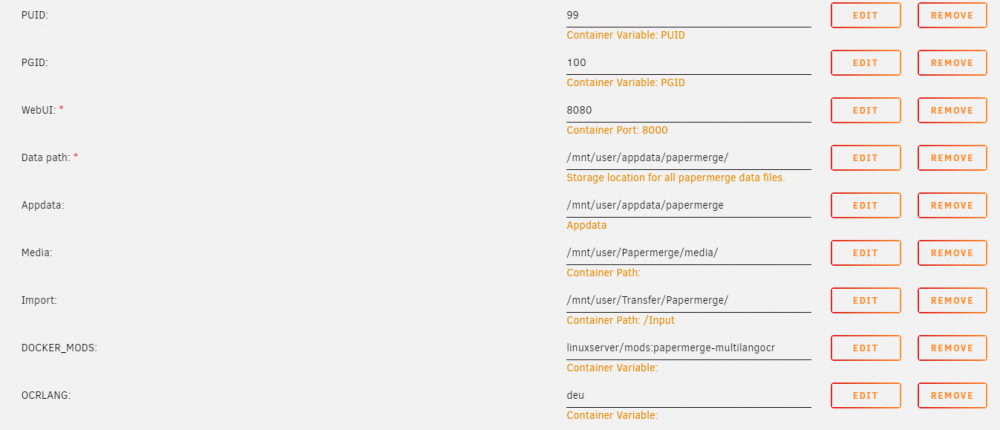

-
Is it normal that I have to install these languages every time the docker gets an update? Or is there maybe a way to let the docker install this languages after it gets started?
-
sorry, my bad. Cache = Yes. Write to cache and then mover transfer to array.
-
I have found a solution for this problem: Set all volume mountings for this docker to the appdata share. Then just move the media folder to another share which has cache prefer and change it in the config. The docker needs this share also mapped. Now the media is on the array and the discs spin down correctly.
-
Hi, im also new here but i managed to get it running on my server 1. Yes 2. I did first the share and then set the paths 3. You can set a path for the importer to /mnt/user/scan. I think queue is not the right folder. Change the papermerge.conf in your appdata folder and add this line: IMPORTER_DIR = "your/path/for/the/scan/input" But i have a question: Dp you have the importer path on cache or the pool? I have the problem that my disc doesnt spin down if the docker is running. Is maybe the importer the reason for this? regards, Chris


