





Warren Crusenberry
Members
-
Joined
-
Last visited
Everything posted by Warren Crusenberry
-
Well the port forward is working. Not really finding much on WHERE it needs to be located though. Is this considered the same as a linux server? Sorry if that is a dumb question...
-
Thank you for your assistance!
-
I will do that. DO I just copy it into the root?
-
Where is the actual config file? i see templates, but not the actual file
-
[09:49:33] [DEBUG_MAPGEN] Sequence of procedural level generation completed. [09:49:34] Incoming connections will be no longer delayed. [09:49:34] Idle mode is now available. [09:49:34] Waiting for players... [09:50:04] Server has entered the idle mode. [09:55:29] Refreshed public key of central server - key hash not changed. So it looks like it spun up! LOL, I am just not sure what to do now. I know I need to open my firewall and port forward, but other than that I have no clue.
-
This is literally the first thing installing on here. I just wiped the full config, formatted drives and starting scratch. The container is pulling now and yes, cache is in thee appdata path now
-
My SSD originally was set for Cache. But now seems at it was moved to 22 and no Cache. I am fixing that right now. Then I will set to Only or Prefer if available
-
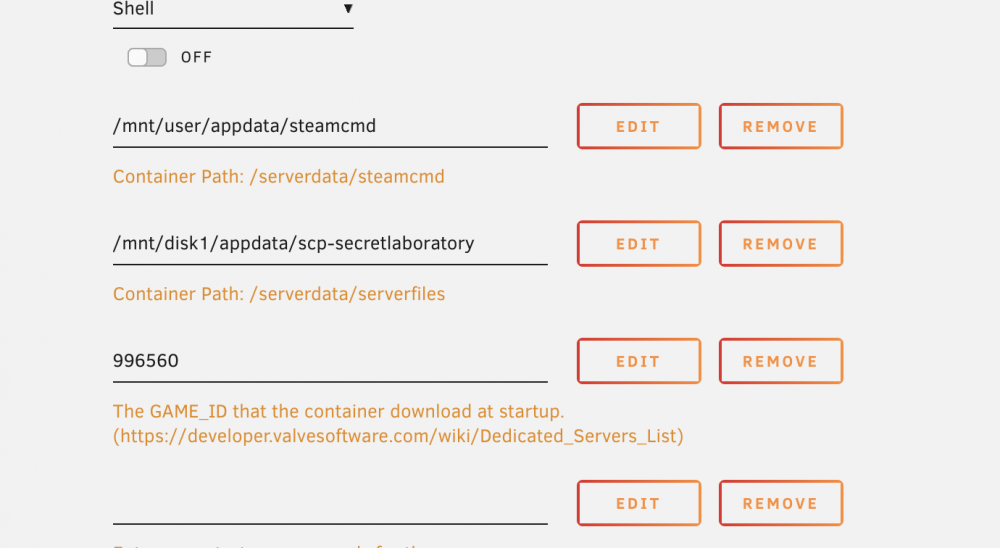
Hmmmm... It is currently set to NO, but it is also greyed out so I cannot change it. I did make a change to only use Disk 1 though just now also.
-
I do have a Cache drive set up. 512 SSD. I have not altered the template at all. Like I said, I am VERY new to this. I have left EVERYTHNG default minus my steam creds.
-
Thank you! Just trying to help my son out and learning along the way!
-
Yeh... This goes back to me not having a CLUE what I am doing here. The container says it is up and running. Here is the log ---Checking if UID: 99 matches user--- ---Checking if GID: 100 matches user--- ---Setting umask to 000--- ---Checking for optional scripts--- ---No optional script found, continuing--- ---Starting...--- ---Update SteamCMD--- Redirecting stderr to '/serverdata/serverfiles/Steam/logs/stderr.txt' [ 0%] Checking for available updates... [----] Verifying installation... Steam Console Client (c) Valve Corporation -- type 'quit' to exit -- Loading Steam API...OK. Logging in user 'etherbunny337' to Steam Public ... Logged in OK Waiting for user info...OK ---Update Server--- ---Validating installation--- Redirecting stderr to '/serverdata/serverfiles/Steam/logs/stderr.txt' [ 0%] Checking for available updates... [----] Verifying installation... Steam Console Client (c) Valve Corporation -- type 'quit' to exit -- Loading Steam API...OK. Logging in user 'etherbunny337' to Steam Public ... Logged in OK Waiting for user info...OK ERROR! Failed to install app '996560' (No subscription) ---Installing MultiAdmin--- ---MultiAdmin sucessfully verified--- ---Installing ServerMod--- ---ServerMod sucessfully verified--- ---Prepare Server--- ---Checking for old logs--- ---Server ready--- ---Start Server--- [17:29:15] Using global config "/serverdata/serverfiles/scp_multiadmin.cfg"... [17:29:15] Can't find game executable "SCPSL.x86_64", the working directory must be the game directory [17:29:15] Startup failed! Waiting for 10000 ms before retrying... My son has the game but I do not. I am just trying to install a server for him. Would I need to put his creds in?
-
I admit it... I am an absolute beginner here... I am trying to install SCP Secret Laboratory for my son and I am just completely LOST! I open console and run 'docker exec -u steam -ti SCP-SecretLaboratory screen -xS SCP' and I am seeing the error: Can't find game executable "SCPSL.x86_64", the working directory must be the game directory I have no clue what I am doing here or where to even START to get this going for him. Is there a tutorial or a walkthrough, or a video or ANYTHING to help?

