





Ezrael
Community Developer
-
Joined
-
Last visited
-
Ezrael changed their profile photo
-
Yes. 6.9.2 works perfect... The problem is upgrade in order to test it if its work and downgrade on a different computer...
-
Here another R510, 24GB of RAM. Same bzroot cheksum error. I'd try the USB on 2 more servers/computers and with no problem on they. But unable to run it on that R510 server. In my case 6.10.0 RC2. Any solution or idea?
-
Hi, I decided to do a new config for my pools, deleting all the pools and generating new ones (saving before the info of those hard drives, doing a format of them and restoring it later the data). That seems to solve the problem. Everything is still at the same place but with the right behavior. Thank you!
-
Hi! Sure. Here you have my diagnostic. Anwering you, for example the google disk is empty. No docker/vm is using it. Just rclone has a "virtual mount (with no cache active) on it, so that disk should be always spin down. "Cloud" pool is my own Nextcloud. But just the storage. And just for me (connected to my mobile). I did the test not uploading anything from my smartphone, any kind of content. Same result. Hard drives are awake. And "Backups" pool are just where I do the Backups with "Backup/Restore Appdata" plugin, just on Sundays at 5:00 am. So, the rest of the days that disks should be down too. And now are awake all the day. All "appdata" folders from my Dockers goes to cache drive, not to the pool's hard drives. The most baffling part is that all hard drives are connected to the same SAS card, so if ones can be off, why the others (just the pool's hard drives) can't? Thank you!! kratos-diagnostics-20211214-2221.zip
-
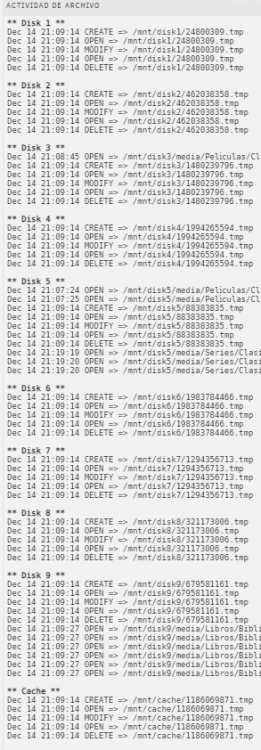
With the FileActivity plugin I can see activity on Array's hard drives, but nothing on pool's hard drives: With no activity on those disks and without anything waking they up... That's really annoying T_T
-
Yes! I had the value "by default", taking the same config for all the hard drives. Right now I have 15 minutes on each hard drive manually. Same result.
-
Thank you! ^^
-
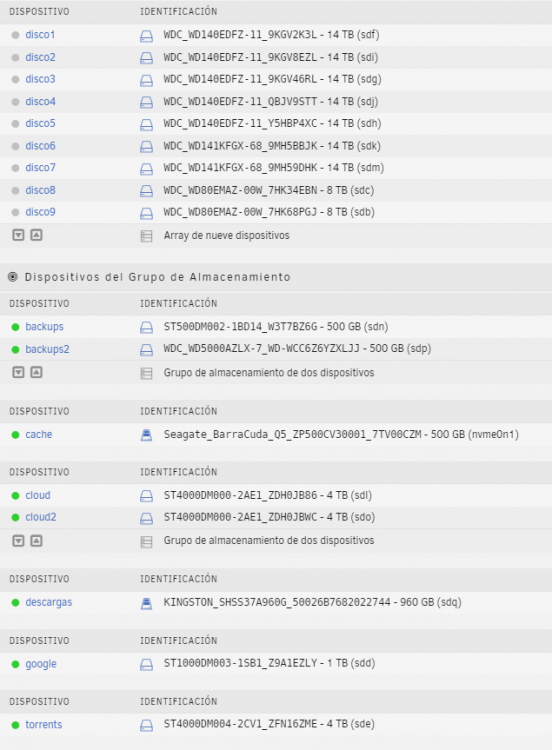
Hi, Since I decided to change my SATA PCI card to a HP P822 SAS card, for some reason, spin down function just work for the Array's hard drives, but not for the pools drives as you can see on next screenshot (I know that the interface is in Spanish, but is just to show grey/green lights): The thing is that all the hard drives are connected to the same SAS card (HP P822), so I can't understand why that difference between Array's hard drives and pools hard drives. I forced them to spin down but nothing happened. That issue is with 6.9.2 and 6.10-rc2. My spin down configuration: Any one has any idea?? Thank you in advance!

-
I just have one question (right now): What is the elasticsearch repo? It's longer than the text box and I can't copy it. I can't see that repo on Github/Docker either... Thank you!


