





ProLoader
Members
-
Joined
-
Last visited
-
Hey @Eurotimmy, I finally managed to get it working. After playing around a bit, I tried to make the odoo user inside the docker the owner of the mounted paths. chown -R odoo:101 /etc/odoo chown -R odoo:101 /mnt/extra-addons This fixed it for me. If I can help you in any way with any tests, I'd be happy to help. Thanks for your help!
-
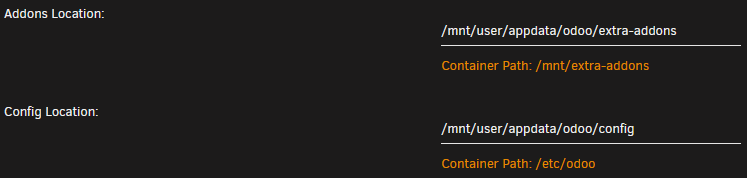
Thanks for your fast Reply. I hope that the information below is the info you need. I have tested the connection configuration to the postgresql DB externally and it works so far. Template: CLI: root@Unraid:~# cd /mnt/user/appdata/odoo/ root@Unraid:/mnt/user/appdata/odoo# ls config/ data/ extra-addons/ root@Unraid:/mnt/user/appdata/odoo# cd config/ root@Unraid:/mnt/user/appdata/odoo/config# ls odoo.conf root@Unraid:/mnt/user/appdata/odoo/config# ls -la -rw-rw-rw- 1 root root 954 Jan 12 11:30 odoo.conf odoo.conf: [options] addons_path = /mnt/extra-addons data_dir = /var/lib/odoo admin_passwd = censoredmypw db_host = 192.168.2.254 db_port = 5433 db_user = odoo db_password = censoredmypw db_name = odoo ; csv_internal_sep = , ; db_maxconn = 64 ; db_name = False ; db_template = template1 ; dbfilter = .* ; debug_mode = False ; email_from = False ; limit_memory_hard = 2684354560 ; limit_memory_soft = 2147483648 ; limit_request = 8192 ; limit_time_cpu = 60 ; limit_time_real = 120 ; list_db = True ; log_db = False ; log_handler = [':INFO'] ; log_level = info ; logfile = None ; longpolling_port = 8072 ; max_cron_threads = 2 ; osv_memory_age_limit = 1.0 ; osv_memory_count_limit = False ; smtp_password = False ; smtp_port = 25 ; smtp_server = localhost ; smtp_ssl = False ; smtp_user = False ; workers = 0 ; xmlrpc = True ; xmlrpc_interface = ; xmlrpc_port = 8069 Thanks in advance!
-
Hey @Eurotimmy, first of all thank you for your efforts for creating a working Odoo17 container for Unraid! I am still encountering a problem, there is something wrong with the permissions within the container. I suspect that the Odoo user has an incorrect UID/GID. I'm an unraid/docker noob, but in other templates the UID is set to 99 (nobody) and the GID is set to 100 in most cases (unraid-side default?). The /etc/odoo directory is assigned 99:users, but the odoo user has 101:101 and there is no users group. My configuration file is set in /etc/odoo/odoo.conf with your template as described in your readme. Since the docker crashes a few seconds after startup, I could not check the directory permissions in more detail. Log: grep: /etc/odoo/odoo.conf: Permission denied grep: /etc/odoo/odoo.conf: Permission denied grep: /etc/odoo/odoo.conf: Permission denied grep: /etc/odoo/odoo.conf: Permission denied /etc/passwd: root:x:0:0:root:/root:/bin/bash daemon:x:1:1:daemon:/usr/sbin:/usr/sbin/nologin bin:x:2:2:bin:/bin:/usr/sbin/nologin sys:x:3:3:sys:/dev:/usr/sbin/nologin sync:x:4:65534:sync:/bin:/bin/sync games:x:5:60:games:/usr/games:/usr/sbin/nologin man:x:6:12:man:/var/cache/man:/usr/sbin/nologin lp:x:7:7:lp:/var/spool/lpd:/usr/sbin/nologin mail:x:8:8:mail:/var/mail:/usr/sbin/nologin news:x:9:9:news:/var/spool/news:/usr/sbin/nologin uucp:x:10:10:uucp:/var/spool/uucp:/usr/sbin/nologin proxy:x:13:13:proxy:/bin:/usr/sbin/nologin www-data:x:33:33:www-data:/var/www:/usr/sbin/nologin backup:x:34:34:backup:/var/backups:/usr/sbin/nologin list:x:38:38:Mailing List Manager:/var/list:/usr/sbin/nologin irc:x:39:39:ircd:/run/ircd:/usr/sbin/nologin gnats:x:41:41:Gnats Bug-Reporting System (admin):/var/lib/gnats:/usr/sbin/nologin nobody:x:65534:65534:nobody:/nonexistent:/usr/sbin/nologin _apt:x:100:65534::/nonexistent:/usr/sbin/nologin odoo:x:101:101::/var/lib/odoo:/usr/sbin/nologin ls -la /etc: $ ls -la /etc total 324 drwxr-xr-x 1 root root 1654 Jan 12 11:44 . drwxr-xr-x 1 root root 200 Jan 12 11:44 .. -rw------- 1 root root 0 Dec 11 15:04 .pwd.lock drwxr-xr-x 1 root root 162 Dec 16 10:31 X11 -rw-r--r-- 1 root root 3028 Dec 11 15:04 adduser.conf drwxr-xr-x 1 root root 7630 Jan 4 22:06 alternatives drwxr-xr-x 1 root root 162 Dec 11 15:04 apt -rw-r--r-- 1 root root 2319 Jan 6 2022 bash.bashrc -rw-r--r-- 1 root root 367 Dec 16 2020 bindresvport.blacklist drwxr-xr-x 1 root root 16 Dec 16 10:31 ca-certificates -rw-r--r-- 1 root root 5892 Dec 16 10:31 ca-certificates.conf drwxr-xr-x 1 root root 20 Dec 11 15:08 cloud drwxr-xr-x 1 root root 22 Dec 11 15:07 cron.d drwxr-xr-x 1 root root 28 Dec 11 15:07 cron.daily -rw-r--r-- 1 root root 2969 Feb 20 2022 debconf.conf -rw-r--r-- 1 root root 13 Aug 22 2021 debian_version drwxr-xr-x 1 root root 14 Dec 11 15:07 default -rw-r--r-- 1 root root 604 Sep 16 2018 deluser.conf drwxr-xr-x 1 root root 50 Dec 11 15:07 dpkg -rw-r--r-- 1 root root 685 Jan 8 2022 e2scrub.conf -rw-r--r-- 1 root root 106 Dec 11 15:04 environment -rw-r--r-- 1 root root 1816 Dec 27 2019 ethertypes drwxr-xr-x 1 root root 52 Dec 16 10:31 fonts -rw-r--r-- 1 root root 37 Dec 11 15:04 fstab -rw-r--r-- 1 root root 2584 Feb 3 2022 gai.conf drwxr-xr-x 1 root root 18 Jan 4 22:06 ghostscript -rw-r--r-- 1 root root 458 Jan 4 22:07 group -rw-r--r-- 1 root root 446 Dec 11 15:04 group- -rw-r----- 1 root shadow 383 Jan 4 22:07 gshadow -rw-r----- 1 root shadow 374 Dec 11 15:04 gshadow- drwxr-xr-x 1 root root 12 Feb 21 2022 gss -rw-r--r-- 1 root root 92 Oct 15 2021 host.conf -rw-r--r-- 1 root root 13 Jan 12 12:01 hostname -rw-r--r-- 1 root root 175 Jan 12 12:01 hosts drwxr-xr-x 1 root root 60 Jan 4 22:07 init.d -rw-r--r-- 1 root root 1748 Jan 6 2022 inputrc -rw-r--r-- 1 root root 26 Aug 2 15:14 issue -rw-r--r-- 1 root root 19 Aug 2 15:14 issue.net drwxr-xr-x 1 root root 20 Dec 11 15:04 kernel -rw-r--r-- 1 root root 11999 Jan 4 22:07 ld.so.cache -rw-r--r-- 1 root root 34 Dec 16 2020 ld.so.conf drwxr-xr-x 1 root root 60 Dec 11 15:07 ld.so.conf.d -rw-r--r-- 1 root root 267 Oct 15 2021 legal -rw-r--r-- 1 root root 191 Mar 17 2022 libaudit.conf lrwxrwxrwx 1 root root 27 Dec 16 10:31 localtime -> /usr/share/zoneinfo/Etc/UTC drwxr-xr-x 1 root root 30 Dec 16 10:31 logcheck -rw-r--r-- 1 root root 10734 Nov 11 2021 login.defs drwxr-xr-x 1 root root 46 Jan 4 22:07 logrotate.d -rw-r--r-- 1 root root 104 Aug 2 15:13 lsb-release -rw-r--r-- 1 root root 0 Dec 11 15:08 machine-id -rw-r--r-- 1 root root 111 Sep 11 19:59 magic -rw-r--r-- 1 root root 111 Sep 11 19:59 magic.mime -rw-r--r-- 1 root root 1598 Dec 16 10:31 mailcap -rw-r--r-- 1 root root 449 Dec 11 2021 mailcap.order -rw-r--r-- 1 root root 72029 Mar 21 2022 mime.types -rw-r--r-- 1 root root 744 Jan 8 2022 mke2fs.conf lrwxrwxrwx 1 root root 12 Jan 12 11:44 mtab -> /proc/mounts -rw-r--r-- 1 root root 767 Mar 24 2022 netconfig -rw-r--r-- 1 root root 91 Oct 15 2021 networks -rw-r--r-- 1 root root 494 Dec 16 2020 nsswitch.conf drwxrwx--- 1 99 users 18 Jan 12 11:26 odoo drwxr-xr-x 1 root root 0 Dec 11 15:04 opt lrwxrwxrwx 1 root root 21 Aug 2 15:14 os-release -> ../usr/lib/os-release -rw-r--r-- 1 root root 552 Aug 12 2020 pam.conf drwxr-xr-x 1 root root 290 Dec 11 15:07 pam.d -rw-r--r-- 1 root root 970 Jan 4 22:07 passwd -rw-r--r-- 1 root root 970 Jan 4 22:07 passwd- drwxr-xr-x 1 root root 6 Dec 16 10:31 perl drwxr-xr-x 1 root root 62 Dec 16 10:32 postgresql-common -rw-r--r-- 1 root root 582 Oct 15 2021 profile drwxr-xr-x 1 root root 32 Dec 11 15:07 profile.d -rw-r--r-- 1 root root 2932 Apr 1 2013 protocols drwxr-xr-x 1 root root 26 Dec 16 10:31 python3 drwxr-xr-x 1 root root 32 Dec 16 10:31 python3.10 drwxr-xr-x 1 root root 14 Jan 4 22:07 rc0.d drwxr-xr-x 1 root root 14 Jan 4 22:07 rc1.d drwxr-xr-x 1 root root 14 Jan 4 22:07 rc2.d drwxr-xr-x 1 root root 14 Jan 4 22:07 rc3.d drwxr-xr-x 1 root root 14 Jan 4 22:07 rc4.d drwxr-xr-x 1 root root 14 Jan 4 22:07 rc5.d drwxr-xr-x 1 root root 14 Jan 4 22:07 rc6.d drwxr-xr-x 1 root root 44 Dec 16 10:31 rcS.d -rw-r--r-- 1 root root 85 Jan 12 12:01 resolv.conf lrwxrwxrwx 1 root root 13 Dec 5 06:15 rmt -> /usr/sbin/rmt -rw-r--r-- 1 root root 887 Apr 1 2013 rpc drwxr-xr-x 1 root root 266 Dec 11 15:07 security drwxr-xr-x 1 root root 26 Dec 11 15:06 selinux -rw-r--r-- 1 root root 12813 Mar 27 2021 services drwxr-xr-x 1 root root 76 Jan 4 22:07 sgml -rw-r----- 1 root shadow 527 Jan 4 22:07 shadow -rw-r----- 1 root shadow 527 Jan 4 22:07 shadow- -rw-r--r-- 1 root root 128 Dec 11 15:05 shells drwxr-xr-x 1 root root 54 Dec 11 15:04 skel drwxr-xr-x 1 root root 46 Dec 16 10:31 ssl -rw-r--r-- 1 root root 0 Dec 11 15:04 subgid -rw-r--r-- 1 root root 0 Dec 11 15:04 subuid -rw-r--r-- 1 root root 2355 Feb 25 2022 sysctl.conf drwxr-xr-x 1 root root 308 Dec 11 15:07 sysctl.d drwxr-xr-x 1 root root 20 Feb 15 2022 systemd drwxr-xr-x 1 root root 12 Dec 11 15:07 terminfo -rw-r--r-- 1 root root 8 Dec 16 10:31 timezone -rw-r--r-- 1 root root 1260 Jun 16 2020 ucf.conf drwxr-xr-x 1 root root 92 Dec 11 15:07 update-motd.d -rw-r--r-- 1 root root 681 Mar 23 2022 xattr.conf drwxr-xr-x 1 root root 176 Jan 4 22:07 xml
-
I'm using an opnsense VM inside unraid, is there also a possibility without Internet connection on boot?
