





hugenbdd
Community Developer
-
Joined
-
Last visited
Everything posted by hugenbdd
-
Saw a few posts on Reddit with cache dealing with locked files, or downloaders getting slowed down during move. Would it be helpful if I added two new sections to the tuner? - Script to run before mover starts - Script to run when mover ends I'm thinking this would allow people to shut down dockers or pause downloaders. This will probably run before checking any of the "bounds". i.e. if a pool cache % used is hit or not. Thoughts?
-
New Release ###2021.04.15 - Changed text for field description of "Force move of files on a schedule:" to "Force move of all files on a schedule:" - No log entry for this, only an email with the output will be sent, like most cron jobs. Basically I put it back to how it used to work. The cron entry in the configs now calls unraids original mover file. None of the plug-in settings will be read (other than the time/s specified in the cron text field).
-
I think mtime is still the "time" type we should be searching on. From google: Unix keeps 3 timestamps for each file: mtime, ctime, and atime. Most people seem to understand atime (access time), it is when the file was last read. There does seem to be some confusion between mtime and ctime though. ctime is the inode change time while mtime is the file modification time. Maybe it could be an option in the settings....
-
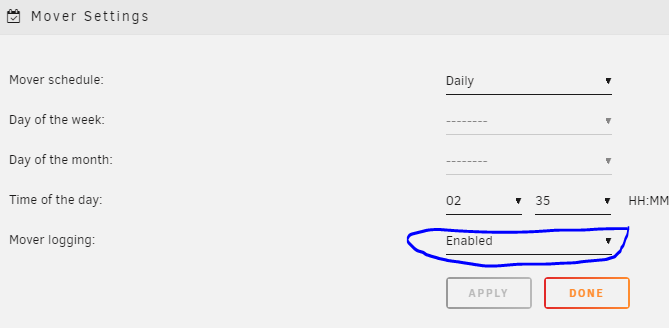
New release to enable logging based on the standard Mover Setting. 2021.04.14 Logs now based off of standard "Mover Settings" for "Mover Logging:" of enabled or disabled. (Very detailed logs) Changed text for field description of "Force move of All files on a schedule:" to "Force move of files on a schedule:"
-
Not sure what in the plug-in could be causing this. There is a "Find" command, but that is based on the cache path. Also, it checks the percentage of disk used on the cache pool.
-
Actually had instructions in a past release.... - age_mover bash script now check for global threshold percent or a manual entry in the ca.mover.tuning.cfg file. (example: /boot/config/plugins/ca.mover.tuning/ca.mover.tuning.cfg - Entry of cachetv="65") - "cachetv" being the name of the pool. - if using single digits leading zero required. (i.e. cachetv="01" for 1 percent) This will over-ride the "global" percentage selected in the GUI for the cache pool (or pools) entered in the config file.
-
Hi You can copy the file I posted a while back to enable the echo/log statements, or wait a week till I update to handle the logs better. Not much I can troubleshoot at the moment without the log statements. Once I have the log statements, we can test the "find" command that it creates from the console to see why it may not be working as expected.
-
Yup, that should be moving when it hits 70%. You can either install the file I linked to a while back that put's all the "echo" statements back in the logs, so I can see what's happening, or wait a week. I plan to update how log statements are made with the plug-in.
-
If you can give me an example in a find command, I can incorporate it. We went over the "access date" about a year ago. (Way back in this thread). I believe we can't use that as the share's don't use atime, I can't remember exactly, but it wasn't possible. You may want to add a "touch" to the files you extract to set the current time on them. This should keep the issue from happening for you. Some applications allow custom script/commands once a file is extracted.
-
Looks like maybe you haven't set any config items? Set the days old to 1, save, and then try and see if it moves files that older than a day. (Original Manual Mover is now in the bottom right. i.e. it calls the standard unraid mover.)
-
Few things. 1.) Make sure you have some settings in the config. i.e 10% cache used. 2.) Change the time slightly and hit apply. 3.) If changing your configs don't move anything, re-install, and then update the file found in my post from a week or so ago. (This will allow us to see logs better. and set some of the config settings. (link embedded below) Or, try the "manual mover, caution moves everything button in the lower right of the config section, this calls the original mover code.
-
Yes, this is already built in. It looks for a custom config item in each pool. However...... I'm on vacation for the week and I can't remember the exact details while away. If you look at the code you can find it, or I will post the details early next week.
-
Problem is I have to know when to stop. And ordering, checking how much space is left, etc... is a lot more code. I'm not quite ready to add that feature. I have found with a large enough cache (1TB) that if you set the date at a reasonable amount (15-20 days) for me... it works very similar to FIFO.
-
No. The age just set's an "mtime" value for the find command. So it will look for everything greater than 0 days old.
-
LOL, you are not going crazy. You are correct. Now, 6.9, do to share pools, it works different. The move now invokes the plug-in configs. That's why I added the new button (latest release) to the bottom right. So functionality was there again. (Original Mover)
-
I haven't tested this. It's left over from the original script. My best guess before looking at the code is that it calls the new mover, so would follow the config settings. (i.e. cache %) I will review this piece of code and see if needs to be updated. If you must move all files, I would suggest using the User Scripts plug-in and referencing the "mover.old" file. (I think this was discussed a few weeks back).
-
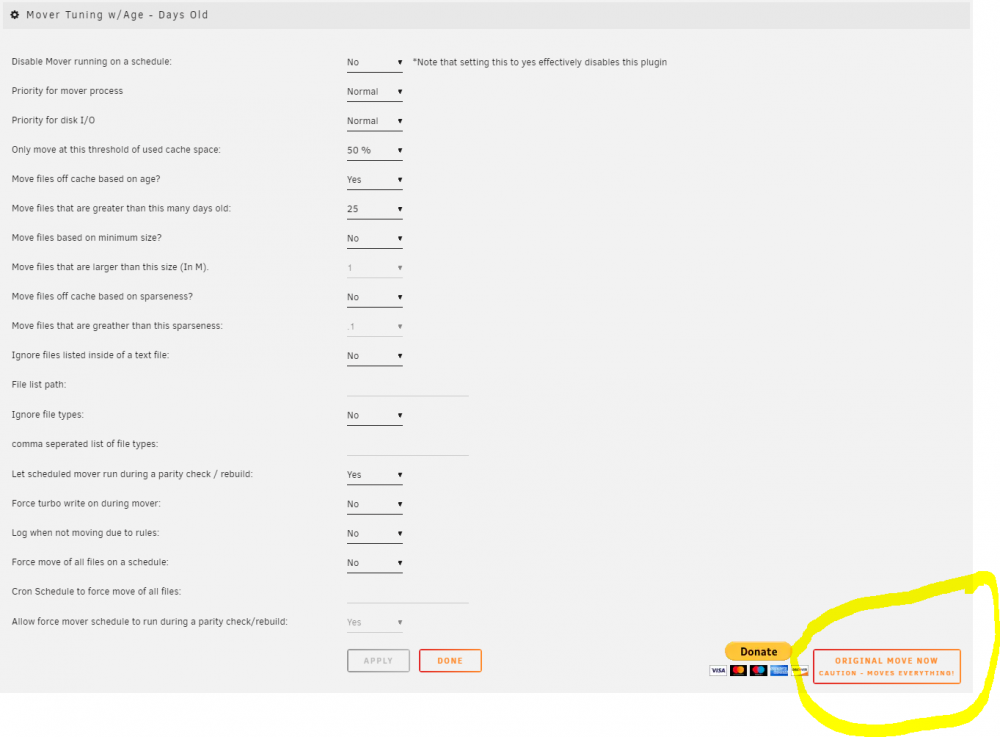
okay, this helps alot! This looks normal. The "Move Now" under the "Mover Settings" in Scheduler, calls the plug-in. This is a change from 6.8 version. Your cache pool is never getting above the 65% limit to initiate a move. So it doesn't move anything. If you want to run the original mover. I added a button in the bottom right of the "Mover Tuning w/Age - Days old" area. Bottom right. This will just call the original mover script that came with unRAID.
-
Attached is a new "age_mover" which has the echo/log statements in it to help trouble shoot. Please replace the age_mover with this file if you have trouble. make a backup of the age_mover file cd /usr/local/emhttp/plugins/ca.mover.tuning/ cp age_mover age_mover_original copy the new file attached to this post to same location /usr/local/emhttp/plugins/ca.mover.tuning/ age_mover
-
hmm. I'm a bit busy this evening. However, I will try to get a new file with echo log statements to help track this down into the forum.
-
If you decide to re-install it, please verify that the plugin config file exists. ls -ltr /boot/config/plugins/ca.mover.tuning/ca.mover.tuning.cfg You may have to select some setting in the scheduler (Lower Section) for this file to be created/updated. (i.e. move at 50% usage)
-
What version were you running? Also, the Line 181 error, should have been fixed in the latest version. But it's possible there is an error somewhere. The Share config file does not get updated with the cache pool during an upgrade unless you change the cache pool name in the share GUI screen. The latest release assumes your cache pool name is cache if it is not found in the config file.
-
I probably would need to update the plug-in. It all depends on where they make the change. There are two main sections to mover. The shell script "mover.old" and the binary "mover". The shell script, does some basic house keeping, and sends a "find" command of the cache piped to the binary mover. So the binary mover file/code doesn't know everything that's coming in. Just one file at a time.
-
no, the opposite. Scheduler and mover tuning w/age section are followed. If you setup a cron job with user scripts plug-in, for the original mover, it will not follow any settings, and move files off the cache. The script to call is below. (Original mover) /usr/local/sbin/mover.old Link to user script plug-in. (With basic instructions)
-
1.) Should be nothing wrong with that. The only possible issue you may run into, is that if your hourly move is not done when the nightly move kicks off. The nightly move will see the PID for mover, and will just exit. Therefore not moving your "nightly everything" request. 2.) This can still be done, but you have to kick off the script in cron with the renamed "original Mover" mover.old This will mean that you are running the original "unraid" mover script. Basically, no filters on the "find" command that my plugin creates.
-
Not sure how the "mover is running" is supposed to work. I do know a PID is setup, if you run mover again while it's still moving it checks for the PID, and will exit if it finds it. That still takes place, as the PID is setup in the actual mover binary from Limetech. I just filter what gets to the mover in the find commands. This is the problem when I remove all the echo's. It becomes really hard to find out what's going on and why a file isn't moving. If you want to edit the age_mover file and "uncomment" some lines it would be helpful (remove the six #). But you will have emails again.... /usr/local/emhttp/plugins/ca.mover.tuning/age_mover Example below will give us the command that is being sent to the mover. #Add Mover to find string. FINDSTR+=" | /usr/local/sbin/move -d $LOGLEVEL" ######echo "Complete Mover Command: $FINDSTR" eval "$FINDSTR"


