





betaman
Members
-
Joined
-
Last visited
Everything posted by betaman
-
Is support for nzbgetvpn dead? Is there another alternative for vpn with an nzb downloader? Edit: I just deleted, reinstalled and reconfigured docker and it's working. No idea what changed.
-
Damn...was hoping it wasn’t just me. Just curious if yours was working and then stopped suddenly? And in theory, why couldn’t these two containers use different VPN servers?
-
My nzbgetvpn stopped working with vpn enabled. I’m using PIA and latest docker release. Anyone else experience this and have a solution? DelugeVPN still working correctly as usually if it is a PIA issue they break together.
-
Did you add this to the latest container or do I need to create the variable first? I don’t see it currently. Thanks.
-
Ok, thanks. What server did you specify for PIA? I found US-Midwest to be the fastest one for my connection.
-
Not a lot of activity here but will ask anyway. Is anyone using NZBgetVPN with PIA and getting download speeds above 10MB/sec (assuming you have a faster internet and news host connection) since the change to PIA's port forwarding capabilities? If so, which server are you specifying? I can only get faster speeds now by disabling VPN service. Thanks.
-
I have the 4096 cert file presumably because strong certs was enabled. I don't remember why I enabled this in the first place so dropping back to the 2048 version shouldn't be an issue? It doesn't look like my strong cert files are being updated when I pull a new version of the docker (i.e. files are from 2017). EDIT: I was able to get this docker working again by doing a clean install and then copying the correct cert files in the openvpn directory.
-
Thanks, this worked for me as well. I agree it doesn’t make sense that reverting to an older version fixes the problem.
-
Can you please screenshot your /config/openvpn/ directory? I tried Switzerland as well to no avail.
-
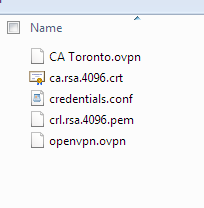
I tried option 1 but it didn't work for me. I also didn't see a variable for STRICT_PORT_FORWARD in my settings. Is this because I have an outdated template? EDIT: I also noticed more than one file in the /config/openvpn/ directory. Is this an issue? I tried removing the openvpn.ovpn file but no change.
-
in short its always better to try and isolate permission resets to a specific docker container if possible. Understood. Thanks for the detail. Ok, so this probably isn't a DelugeVPN issue but hoping you might be able to help. I've discovered that my /downloads directory ownership and permissions is getting changed from nobody:users drwxrwxrwx to root:root rwxr-xr-x. Based on the time stamp of the changed directory and once a week occurrence, it appears to be linked to when CA Backup/Restore is backing up my appdata folder. I have CA Backup/Restore set to exclude my /downloads directory. Any thoughts on why this might be happening? It's definitely a new issue within past couple weeks and I haven't changed any configuration files (just updating plugins and dockers). The backup module does not touch or modify any permissions on the source at all (and the destination permissions will always match the source) (I actually just tested this after I saw your cross-post) Best guess is that Deluge itself is modifying the permissions at its startup. Set the backup under advanced settings to NOT stop any of the installed containers and you'll probably see that no permissions were changed. Ok, thanks for the feedback. I'll make those changes and report back if I still have an issue.
-
Sorry for the cross-post but I was having an issue with Deluge and NZBget being able to write files to my download directory and posted in the DelugeVPN docker thread. As I was typing that post, I realized the permissions change was very close to the same time that CA Backup/Restore does my weekly Appdata Backup. Is there any reason directory permissions might be changed during a Backup? In this case, the directory in question is on the exclude list. Original post here: http://lime-technology.com/forum/index.php?topic=45812.msg533171#new
-
in short its always better to try and isolate permission resets to a specific docker container if possible. Understood. Thanks for the detail. Ok, so this probably isn't a DelugeVPN issue but hoping you might be able to help. I've discovered that my /downloads directory ownership and permissions is getting changed from nobody:users drwxrwxrwx to root:root rwxr-xr-x. Based on the time stamp of the changed directory and once a week occurrence, it appears to be linked to when CA Backup/Restore is backing up my appdata folder. I have CA Backup/Restore set to exclude my /downloads directory. Any thoughts on why this might be happening? It's definitely a new issue within past couple weeks and I haven't changed any configuration files (just updating plugins and dockers).
-
in short its always better to try and isolate permission resets to a specific docker container if possible. Understood. Thanks for the detail.
-
I wouldn't recommend running the new permissions tool against your cache drive, instead delete the file /config/perms.txt and restart the docker container, it will be faster and safer. Sent from my SM-G900F using Tapatalk Thanks for info. In my particular case, I think the permissions issue was with the directory where I store my downloads and that same directory is also shared with NZBgetVPN on my cache drive in my appdata folder. I'm not sure how it happened, but I think the permissions of this directory were changed and neither docker could write to it. Rather than doing a chmod at the command line, I just ran the script - not knowing this could be unsafe. Would you mind expanding on this part? Because I use a Windows VM and sometimes create directories in Windows Explorer and transfer files with Windows, I notice the permissions are not always correct and in the past I've run the new permissions tool to fix it. Thanks.
-
Been using this docker with PIA for quite a while with no issue. All of the sudden my torrents won't connect to peers and Deluge reports negative peer numbers?! Even when it shows I'm connected to seeders, the ratio available is less than 1?? Not really sure where to start troublehsooting since Deluge appears to be connecting fine. Attached is a screenshot of a torrent status where it shows seed connections, negative peers and ratio less than 1. EDIT: Seems to have been a permissions error with my download directory. I ran the permissions script on my cache drive and it seems to have resolved the issue.

-
yeah, I was surprised to see there was a container update since I was on the latest stable release already?!
-
Ok, that was my next thing to try. However, I noticed the container id was a lot longer than what I was trying to use to kill the container so when I used the full id, it finally worked!
-
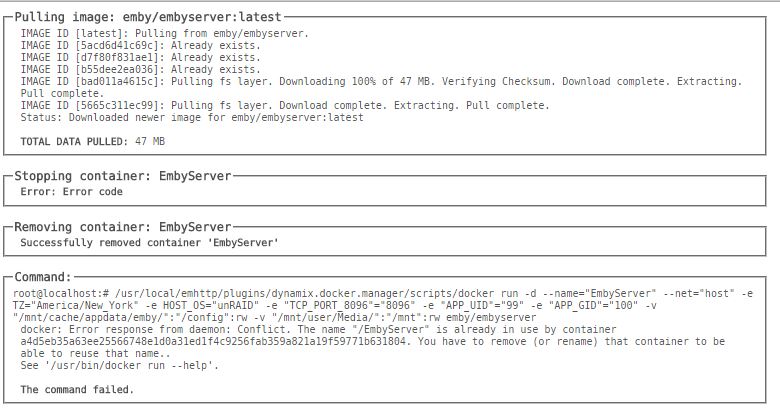
I've tried the stop, kill and remove container commands from command line to no avail. Stop and kill just hang and remove says it removed image. Force update fails as shown in attached jpeg from previous post.
-
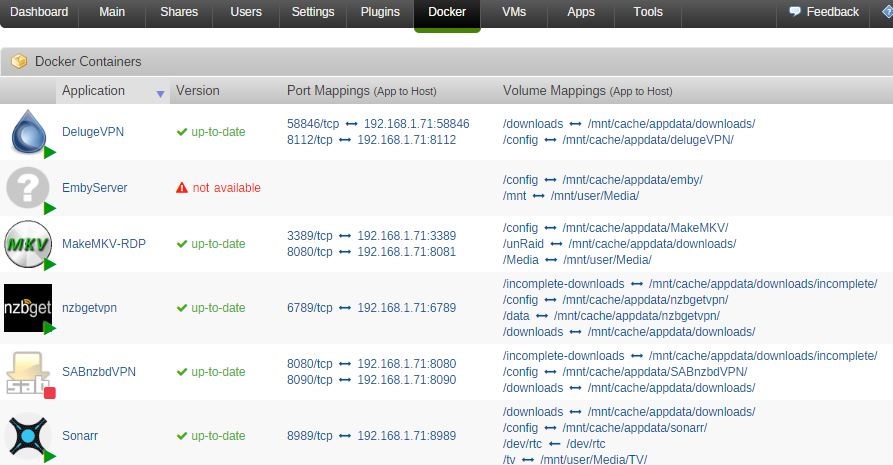
So I had a notification for an update but the update failed and now I think the docker service thinks the emby docker is running but it doesn't seem to be since the stop and kill commands (even from command line) do nothing. Now the webui shows the docker is running but doesn't know which version (see attached). I probably need to reboot the server but I'm in the middle of a preclear and would like to get my emby server running again before the long weekend is over (and my preclear)!
-
This was an issue with experimental branch, but the master branch should be ok. Can you make sure you're on the newest image? If you're on the newest image, can you post the rest of your configuration so I can replicate? You can leave out the username/password. FWIW, I had a similar issue but it could've just been the VPN_Protocol env variable was missing. I think binhex defaults to nl.privateinternetaccess.com with his vpn dockers so I just switched to it with nzbgetvpn as well.
-
Can't help with the issue, but I'm genuinely curious if switching to nzbget would fix the problem? I'm still using SAB, so if nzbget doesn't suffer from the same problem, it may be another reason to switch. Yeah, good question. Let me know if it works for you! Haha, seriously though, if I get some free time then I'll try installing nzbget and will report back. Ok, so I had some time and configured nzbgetvpn. It uses a function call Par_rename to handle obfuscated titles. As luck would have it, I haven't come across any yet but I can see in the log file where it checks for the rename.par file. So far so good. Only issue I need to figure out is cleanup of the tmp download directory. Edit: Cleanup issue was from SAB pulling same nzb file before I switched off docker and download client in Sonarr. Seems to be working very well thus far with less manual intervention required.
-
Well, I've never installed an instance of nzbget so the default template was missing the VPN_PROTOCOL env variable and the typo was part of the template. I just figured you never updated the default template for the docker? Maybe try deleting the docker and the template and doing a fresh pull?
-
Indeed! Bungy are you able to do this? Thanks, and so far I have been loving the NZBGETVPN Docker you've provided. I put a bit of time into it, but didn't get very far. I ran into a self-signed cert issue, and I ran out of time to work on it. I'm a bit swamped with work at the moment, so I can't quite do this right now, but maybe over the weekend. I want to switch to binhex's baseimage and use his awesome openvpn setup, but I'll have to postpone until things calm down a bit. Totally understand, and I'll look forward to when you can. Thank you sir! I was able to update the docker to use binhex's openvpn as the baseimage. You'll need to update your docker to include these environmental variables VPN_ENABLED=yes VPN_PORT=1198 (if using PIA) LAN_NETWORK=192.168.1.0/24 (or whatever your home lan network is) VPN_PROTOCOL=udp (if using PIA, may be tcp for other providers) Let me know if you have any issues. The build should be done in a couple of minutes. Thanks Bungy for this vpn version of nzbget. Just an FYI that this docker is still missing the VPN_PROTOCOL env variable. Also, VPN_ENABLED has a typo (VPN_ENABED).
-
Can't help with the issue, but I'm genuinely curious if switching to nzbget would fix the problem? I'm still using SAB, so if nzbget doesn't suffer from the same problem, it may be another reason to switch. Yeah, good question. Let me know if it works for you! Haha, seriously though, if I get some free time then I'll try installing nzbget and will report back.
