





betaman
Members
-
Joined
-
Last visited
Everything posted by betaman
-
Thank you, that did the trick, I'll have to remember that! Had a similar issue with server version 3.0.8300.0 and the update to 3.0.8400.0. Anyway, just a couple of points for anyone upgrading via command line. Docker must be running and the update takes significantly longer than you'd expect if comparing it to an update via the gui. Worked well though...just be patient. Thanks.
-
to modify the startup settings for sonarr , exec into the container docker exec -it <container-name> bash and modify the file /etc/service/sonarr/run Ok, I am completely new to messing around with mono and editing stuff in Docker containers so bear with me. This is what is in the run file: XDG_CONFIG_HOME="/config/xdg" exec /sbin/setuser abc mono /opt/NzbDrone/NzbDrone.exe -nobrowser -data=/config so would I just append the debug switch here? XDG_CONFIG_HOME="/config/xdg" exec /sbin/setuser abc mono --debug /opt/NzbDrone/NzbDrone.exe -nobrowser -data=/config Or just put it at the end of the line? XDG_CONFIG_HOME="/config/xdg" exec /sbin/setuser abc mono /opt/NzbDrone/NzbDrone.exe -nobrowser -data=/config --debug Is it possible to get a little more detail on adding the --debug to mono? I've never used docker exec so I'm looking for some detailed steps on how to enable and disable this option. Something broke when I updated the docker to v2.0.0.4374 of Sonarr. I did reach out for help in the Sonarr forum as well which is why I'm trying to figure out debug mode for mono. Thanks! EDIT: Still interested in how to add the --debug attribute to mono but I did resolve my issue. Somehow my media share got set to cache only and wouldn't allow Sonarr to move the files.
-
Yeah, just noticed that. Would it make sense to use different ports as defaults for each docker?
-
The Host Ports on my binhex VPN dockers match yours (the first two ports) but neither is using 8118. Is it mapped as an additional port? Maybe try deleting your config and pulling the latest docker. Just take a screenshot or something of the advanced view tab for each.
-
Looks like you have port 8118 defined in both dockers? Did you try changing one of them? I think you only need the first two for each anyway.
-
I know this is an SABnzbd issue but I was hoping someone here could help. There seems to be an issue with obfuscated filenames not being renamed because of how SABnzdbd handles par files. I've seen quite a few nzb's lately where a separate par file called rename.par plus an obfuscated file are left in the download directory. I'm using Sonarr for post processing and it will fail on these files because the obfuscated file name isn't the right format. From here there's two options, manually execute the rename.par file or manually rename the file so Sonarr picks it up and processes correctly. From what I gather, the folks running SABnzbd don't really want to change how it handles par files (i.e. It only uses par files to repair damaged files, not rename them), so other Linux build users have written custom scripts to manage a workaround. I'm wondering how to implement such a solution with my current setup of SABnzbd and Sonarr? Does anyone else have an "automated" solution to this problem? EDIT: Here's a link to a detailed description of the issue.
-
Is this plugin working in 6.2.2? I can't get past the MakeMKV drop down screen?! EDIT: Restarted the docker and it seems to be working now.
-
Thanks...that post explains a lot!
-
So then you have your family members use the unRAID login credentials on the Windows machine to connect to your server? I was thinking of doing this for my FireTV's and Popcorn Hour units so I can control access better. I've also been reading up on ransomware and this has me a bit paranoid as well (i.e. using the same login with r/w permissions to my server).
-
Thanks...was just about to ask if that would work (plus get the address)! EDIT: Didn't work for me EDIT 2: Now it's working...
-
Which gateway? The nl seems to work for most people. Having issues connecting to the Webui. I just noticed this in my supervisord.log: 2016-10-21 15:28:07,490 DEBG 'start-script' stdout output: Fri Oct 21 15:28:07 2016 RESOLVE: Cannot resolve host address: nl.privateinternetaccess.com: Name or service not known All I did was update the container. Same issue with SABnzbdVPN from binhex after a container update?!
-
Check out this thread: https://lime-technology.com/forum/index.php?topic=49104.0
-
Have you experienced any issues or are you just preparing for possible issues? I have upgraded to latest version and everything seems to be running just fine. I'm running latest without any major issues as well. The only thing I note is the Safari browser isn't matching titles with coverart correctly but I think this is a "known" bug?!
-
Its use is in the description. RTFM (At least it is in DelugeVPN, I don't use SABnzbdVPN but I assume he reused most of the same text.) Ah ok, it's used for privoxy.
-
More of a dockerMan issue than binhex's. Never really noticed, but 6.2 may stop you from duplicating ports (it at least shows you which host ports are already in use). Regardless of which version you're running, the docker run command would have pointed out the same error through the GUI at the bottom when adding / reinstalling / editing. Is the additional port "needed" for the VPN dockers? I get what 8080 and 8090 are for but no idea for 8118. it does = had the same problem once, removed the port on one of the vpn dockers Myk
-
More of a dockerMan issue than binhex's. Never really noticed, but 6.2 may stop you from duplicating ports (it at least shows you which host ports are already in use). Regardless of which version you're running, the docker run command would have pointed out the same error through the GUI at the bottom when adding / reinstalling / editing. Yeah, I would've thought the GUI should flag the same error. Perhaps I just missed it in the pop up window during the docker install? The weird thing is it said it installed successfully.
-
Ok, I think we made some progress! It says: Error response from daemon: Cannot start container 6edb439f57e061a37224d5dc8e45a658c75a3a36198e0fd06768bad090bb3beb: Bind for 0.0.0.0:8118 failed: port is already allocated I just noticed that DelugeVPN is also using port 8118?! right, yes indeed that will cause you an issue, either change the host side port number to something else that isnt used or simply remove the port. LOL...that did it! Since I was using the defaults in both dockers maybe it's a good idea to change them in the templates to not be the same? Anyway, thanks for all of the help!
-
Ok, I think we made some progress! It says: Error response from daemon: Cannot start container 6edb439f57e061a37224d5dc8e45a658c75a3a36198e0fd06768bad090bb3beb: Bind for 0.0.0.0:8118 failed: port is already allocated I just noticed that DelugeVPN is also using port 8118?!
-
when the docker container has started and sabnzbd is running it will auto create files/folders as part of its initialisation of the app, creating sqlite db, config.ini etc, the odd thing with your situation is that it doesnt start at all, and by that i mean it doesnt even get to the first echo command, it literally is doing nothing, other than creating the /config folder. one idea i thought might be fun is to get old school on it and execute it this via a good old docker run command and see it is gives you a hint as to what it going on, examples of using docker run are shown on the docker hub (see post 1 for a link to it) if your feeling up to this. I reviewed the docker hub page. Would i just issue a command like this: docker run -d binhex-sabnzbdvpn Well...kinda, with all the other parameters too of course :-) Sent from my SM-G900F using Tapatalk Ok, I'm kinda of linux syntax n00b so something like this: docker run -d --cap-add=NET_ADMIN -p 8080:8080 -p 8090:8090 -p 8118:8118 --name=binhex-sabnzbdvpn -v /mnt/cache/appdata/SABnzbdVPN/:/data -v /mnt/cache/appdata/downloads/:/config Where the attributes are separated by spaces and <variable> is replaced by the actual name (e.g. replace <container_name> with binhex-sabnzbdvpn or should it be <binhex-sabnzbdvpn>)?
-
when the docker container has started and sabnzbd is running it will auto create files/folders as part of its initialisation of the app, creating sqlite db, config.ini etc, the odd thing with your situation is that it doesnt start at all, and by that i mean it doesnt even get to the first echo command, it literally is doing nothing, other than creating the /config folder. one idea i thought might be fun is to get old school on it and execute it this via a good old docker run command and see it is gives you a hint as to what it going on, examples of using docker run are shown on the docker hub (see post 1 for a link to it) if your feeling up to this. I reviewed the docker hub page. Would i just issue a command like this: docker run -d binhex-sabnzbdvpn
-
Thanks for the suggestion. I tried it with no change in behavior. One question I have is does the docker need to start for the /config directory to be populated with files? I just tried a different /config directory and it still won't write any files to this directory. I let the docker create the new directory as well.
-
Ok, so I just added /data as an env variable and gave it the same path as /downloads. Pulled the image and still the same issue. Docker just refuses to start and no files are in the /config directory. Thanks for trying. I'm in the process of replacing my cache drive with an SSD so I'll just do everything at once. I'll report back if deleting the docker.img file helped. ok its got me stumped, re-create docker.img is the last thing i can think of, i would be surprised if that fixed it, but hey its possible i guess. all i can say is this docker does work, i have several people using it, if i pull it down from a clean state (no config present) then it starts fine, its an odd issue thats for sure!.
-
Ok, so I just added /data as an env variable and gave it the same path as /downloads. Pulled the image and still the same issue. Docker just refuses to start and no files are in the /config directory.
-
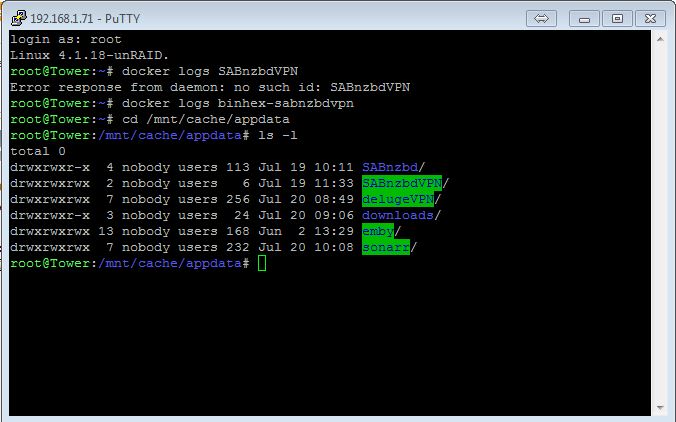
Attached is the output of my /mnt/cache/appdata/ directory. I used the dropdowns in the docker config to avoid any typos.
-
LOL...sorry. I forgot I left the default name to reduce variables. Now it is the exact same output. ok now that is really wierd, so the container looks to do a big fat nothing, hmmm, ok cane you delete the container AND the image, then use the my templates again to select the config details you had earlier to repull it down. one quick question, are you running anything on port 8080 or 8090 on your unraid host?, unmenu for instance?. I did that exact procedure the last 3 times (hence the change to the docker name). It's as if the docker isn't really installing because the /config directory never populates with any files. The only thing running on ports 8080 and 8090 is SABnzbd. I completely removed the non-VPN version to avoid any possible conflict but the same result. The only think I haven't tried is blowing away my image file completely and reinstalling all dockers. I was thinking of upgrading to 6.2 RC2 if I go that far though.
