





betaman
Members
-
Joined
-
Last visited
Everything posted by betaman
-
LOL...sorry. I forgot I left the default name to reduce variables. Now it is the exact same output.
-
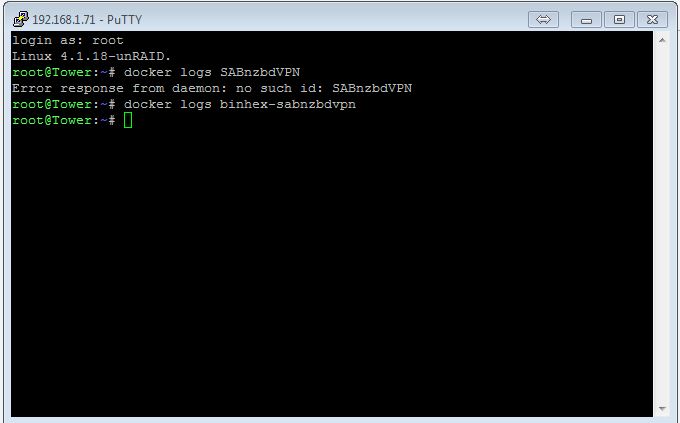
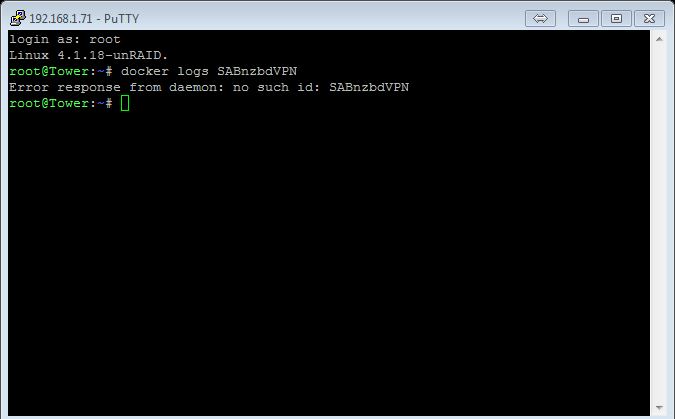
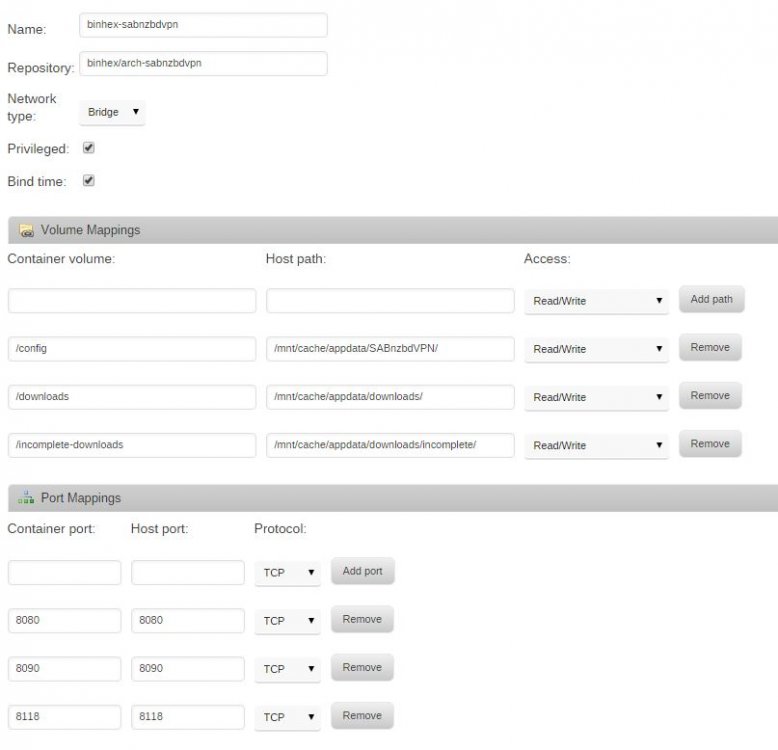
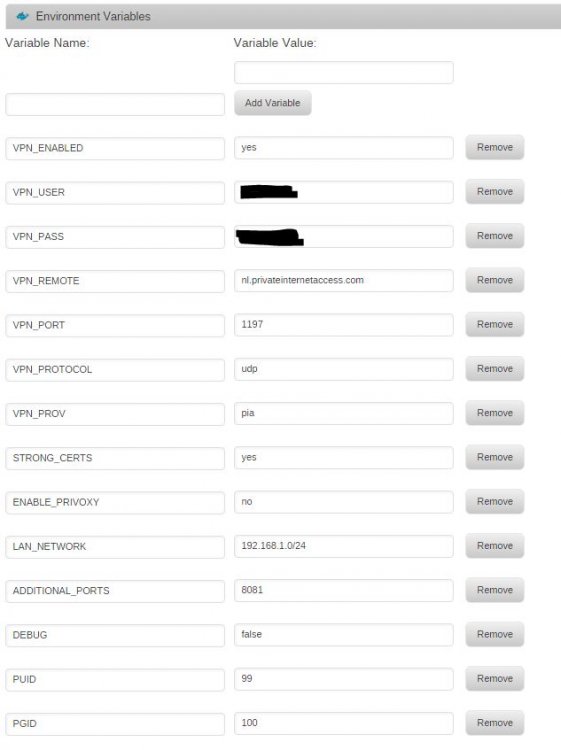
Which is exactly how the non-VPN SABnzbd folder looks (of course minus the VPN stuff). Where can I tell if the docker installed correctly or not? The syslog is not helpful and per my pic, the docker shows installed but stopped on my docker page. When I try to start it, nothing happens. I stopped the other SABnzbd docker (binhex version as well and works perfectly) to avoid a port conflict. ok can you please ssh into unraid and run this command, it should give us a clue as to what is going on:- docker logs <name of your sabnzbd container> please paste the output here i know youve stated above that the logs dont contain anything useful, but the above command should give us something. also if you can screenshot your settings for the container, make sure to select the advanced view option so we can see all defined values, obviously hiding your username and password. It's pretty much the same as before: http://lime-technology.com/forum/index.php?topic=45822.msg482984#msg482984 Except now I get the notification there's no such container. If you review the pic I posted above, you can see the container is installed but not running. Log output works for SABnzbd and DelugeVPN (both are your dockers). See attached.
-
Which is exactly how the non-VPN SABnzbd folder looks (of course minus the VPN stuff). Where can I tell if the docker installed correctly or not? The syslog is not helpful and per my pic, the docker shows installed but stopped on my docker page. When I try to start it, nothing happens. I stopped the other SABnzbd docker (binhex version as well and works perfectly) to avoid a port conflict.
-
Hmmm...can't find it. I tried both views. The log link is for syslog and the other logs are docker dependent with this one being blank?! Maybe a screenshot? First one in on regular view, second one is advanced view. In advanced view you can see then the log did get created, how long is has been for the last change/edit. Just click there I have marked with red. We were talking about the same thing. Mine says "none" which makes sense because my /config directory where the log is stored is completely empty.

-
Hmmm...can't find it. I tried both views. The log link is for syslog and the other logs are docker dependent with this one being blank?! Maybe a screenshot?
-
What about the docker log? See above. The log is stored in the /config directory (/mnt/cache/appdata/SABnzbdVPN/) and nothing is currently being written to this directory during docker install. I think this is the root cause of my problem but I can't seem to figure out how to fix it.
-
Ok, I've successfully got strong encryption running on your DelugeVPN docker but I still can't get this docker to start. One thing I noticed is that nothing is written to the /config folder (in my case, /mnt/cache/appdata/SABnzbdVPN/). The directory is however created successfully when pull down the image. Here's the folder permissions of my /mnt/cache/appdata directory: drwxrwxr-x 4 nobody users 113 Jul 19 10:11 SABnzbd/ drwxrwxrwx 2 nobody users 6 Jul 19 11:33 SABnzbdVPN/ drwxrwxrwx 7 nobody users 256 Jul 19 10:58 delugeVPN/ drwxrwxr-x 3 nobody users 24 Jul 19 11:19 downloads/ drwxrwxrwx 13 nobody users 168 Jun 2 13:29 emby/ drwxrwxrwx 7 nobody users 232 Jul 19 13:04 sonarr/ All other dockers are working correctly and the non-VPN verison of your SABnzbd docker is also working correctly?! Still stumped...just thought I'd check back on whether there's any other info I can provide? No SABnzbdVPN log is generated since no files are being written to the /config directory and the UnRAID log is useless.
-
I have some interest if I can ever get this docker to start! Seriously though, I'd like it and in particular with deluge. Thanks.
-
yep thats normal, the existing layers are from the base image which is common to all my docker images, as well as the openvpn image, which again is common to all the vpn dockers, the 13MB your seeing is the actual size of the difference, the unique layers. the docker will attempt to start even with badly configured vpn info, yes, but it wont get too far as it will attempt to create the tunnel and fail, at that point its game over and you will never get passed that point until the issue is resolved (by design). but for some reason your having issues much earlier on, just cant work out what it is. can you double check you def do not have anything else running on port 8080 or 8090 (not running unmenu are you?) one last question, and im hoping this isnt the issue, what version of unraid are you running?. Ok, I started troubleshooting using your basic template. On first install, docker won't run. If I uncheck Privileged then it runs. If I add my /config and /data folders (with Privileged unchecked) it again won't run. All other variables are left as-is with your default template. I deleted my /config directory and the docker appears to recreate it without issue (although it's empty). My /data directory is used by several other dockers so I can't see it being an issue but I could be wrong. I'm using UnRAID 6.1.9. I did have linuxserver.io's SABnzbd docker running on those ports but I've since deleted that docker and rebooted the server prior to posting my issue today. No unmenu running. ok im stumped for now, i will have to rack my brain for any ideas, just to double check i did a clean install here and it started with no issues Thanks for checking the clean install. Are you running 6.1.9 or the 6.2 RC? The only other thing I've been playing with is the ADVANCED_DISABLEUPDATES ENV variable. I couldn't get the linuxserver.io docker to load and in that support thread I read about something being broken. Once I added this variable, the docker would load fine. I tried the same with your docker but no dice. im running 6.1.9, the ADVANCED_DISABLEUPDATES env var is specific to linuxserver.io docker images, as they auto update on restart, mine dont. FWIW, I was able to configure your regular SABnzbd docker and get it to start. Something with the VPN version isn't allowing me to configure it correctly.
-
yep thats normal, the existing layers are from the base image which is common to all my docker images, as well as the openvpn image, which again is common to all the vpn dockers, the 13MB your seeing is the actual size of the difference, the unique layers. the docker will attempt to start even with badly configured vpn info, yes, but it wont get too far as it will attempt to create the tunnel and fail, at that point its game over and you will never get passed that point until the issue is resolved (by design). but for some reason your having issues much earlier on, just cant work out what it is. can you double check you def do not have anything else running on port 8080 or 8090 (not running unmenu are you?) one last question, and im hoping this isnt the issue, what version of unraid are you running?. Ok, I started troubleshooting using your basic template. On first install, docker won't run. If I uncheck Privileged then it runs. If I add my /config and /data folders (with Privileged unchecked) it again won't run. All other variables are left as-is with your default template. I deleted my /config directory and the docker appears to recreate it without issue (although it's empty). My /data directory is used by several other dockers so I can't see it being an issue but I could be wrong. I'm using UnRAID 6.1.9. I did have linuxserver.io's SABnzbd docker running on those ports but I've since deleted that docker and rebooted the server prior to posting my issue today. No unmenu running. ok im stumped for now, i will have to rack my brain for any ideas, just to double check i did a clean install here and it started with no issues Thanks for checking the clean install. Are you running 6.1.9 or the 6.2 RC? The only other thing I've been playing with is the ADVANCED_DISABLEUPDATES ENV variable. I couldn't get the linuxserver.io docker to load and in that support thread I read about something being broken. Once I added this variable, the docker would load fine. I tried the same with your docker but no dice.
-
yep thats normal, the existing layers are from the base image which is common to all my docker images, as well as the openvpn image, which again is common to all the vpn dockers, the 13MB your seeing is the actual size of the difference, the unique layers. the docker will attempt to start even with badly configured vpn info, yes, but it wont get too far as it will attempt to create the tunnel and fail, at that point its game over and you will never get passed that point until the issue is resolved (by design). but for some reason your having issues much earlier on, just cant work out what it is. can you double check you def do not have anything else running on port 8080 or 8090 (not running unmenu are you?) one last question, and im hoping this isnt the issue, what version of unraid are you running?. Ok, I started troubleshooting using your basic template. On first install, docker won't run. If I uncheck Privileged then it runs. If I add my /config and /data folders (with Privileged unchecked) it again won't run. All other variables are left as-is with your default template. I deleted my /config directory and the docker appears to recreate it without issue (although it's empty). My /data directory is used by several other dockers so I can't see it being an issue but I could be wrong. I'm using UnRAID 6.1.9. I did have linuxserver.io's SABnzbd docker running on those ports but I've since deleted that docker and rebooted the server prior to posting my issue today. No unmenu running.
-
I changed the name of the docker to SABnzbdVPN and when I type "docker logs SABnzbdVPN" it just brings back the prompt. Just to confirm the command was working, I tried delugeVPN and got a response. hmm ok screenshots is all we have then, can you please left click the icon, select edit and then toggle the advanced view option on then take a screenshot (you might want to temporarily remove username and password from the vpn section). Ok, before I do that, I noticed a configuration difference between your SABnzbd docker and linuxserver.io's. The Privileged checkbox in the advanced view was ticked with the default settings. If I uncheck this box then the docker starts. I need to configure all of my variables to see if the gui will start but is this an issue if it solves my problem? you will need to have the privileged checkbox ticked for this docker to run, it creates a vpn tunnel adapter which wont happen unless you have that checked, there are a LOT of differences between this one and the linux io one, as this includes a vpn which needs to be configured (see advanced settings). Ok, the only way I could get the docker to start was to load your default and uncheck Privileged. Once I updated directories, and ENV variable information, the docker would no longer start with the attached settings. ok two things, firstly are you sure the defined LAN_NETWORK is correct?, as in is your lan network 192.168.1.x ?, secondly check the permissions on the unraid side for /config and /data, your using user nobody group users (99 and 100), which is the standard permissions for unraid, if you have it set to something else then you will need to change the PUID and PGID values. oh and lastly, make sure you have ALL sabnzbd docker containers stopped, otherwise you will get a port clash I just went through all of this setting up PIA with your delugeVPN docker and it's working fine with the same settings. I figured this would be a breeze to setup having gone through a couple issues there (mostly related to updating the dynamix webgui). Anyway, permissions on both directories is the default (plus I re-ran the permissions tool on my cache drive just to be sure). One other thing I noticed is that even when I delete the docker plus container iso, when I reinstall, it just pulls 13MB as it thinks the image already exists?! Finally, just to be clear, I thought the docker would start successfully even if the VPN info wasn't correct and only the webgui would be affected?
-
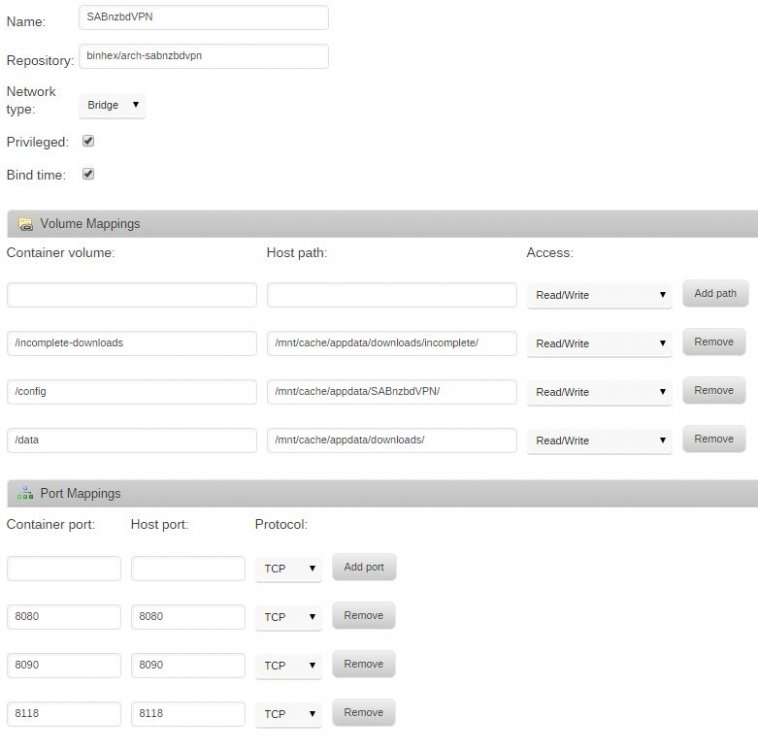
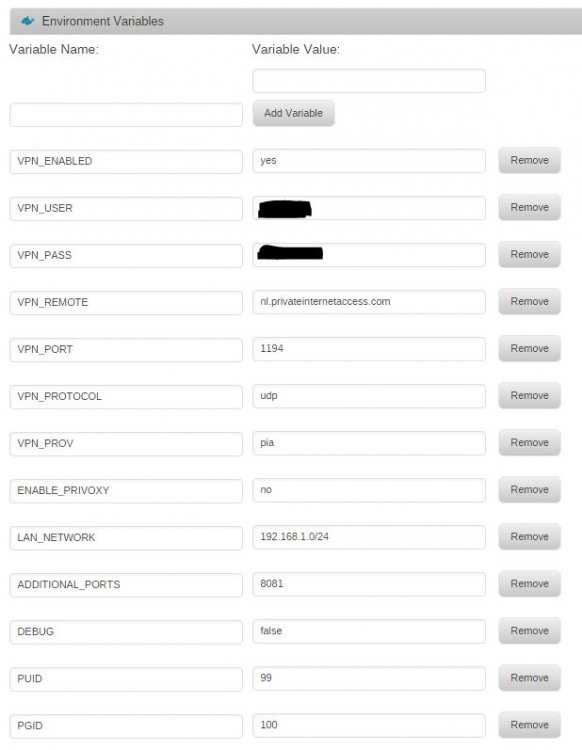
I changed the name of the docker to SABnzbdVPN and when I type "docker logs SABnzbdVPN" it just brings back the prompt. Just to confirm the command was working, I tried delugeVPN and got a response. hmm ok screenshots is all we have then, can you please left click the icon, select edit and then toggle the advanced view option on then take a screenshot (you might want to temporarily remove username and password from the vpn section). Ok, before I do that, I noticed a configuration difference between your SABnzbd docker and linuxserver.io's. The Privileged checkbox in the advanced view was ticked with the default settings. If I uncheck this box then the docker starts. I need to configure all of my variables to see if the gui will start but is this an issue if it solves my problem? you will need to have the privileged checkbox ticked for this docker to run, it creates a vpn tunnel adapter which wont happen unless you have that checked, there are a LOT of differences between this one and the linux io one, as this includes a vpn which needs to be configured (see advanced settings). Ok, the only way I could get the docker to start was to load your default and uncheck Privileged. Once I updated directories, and ENV variable information, the docker would no longer start with the attached settings.
-
I changed the name of the docker to SABnzbdVPN and when I type "docker logs SABnzbdVPN" it just brings back the prompt. Just to confirm the command was working, I tried delugeVPN and got a response. hmm ok screenshots is all we have then, can you please left click the icon, select edit and then toggle the advanced view option on then take a screenshot (you might want to temporarily remove username and password from the vpn section). Ok, before I do that, I noticed a configuration difference between your SABnzbd docker and linuxserver.io's. The Privileged checkbox in the advanced view was ticked with the default settings. If I uncheck this box then the docker starts. I need to configure all of my variables to see if the gui will start but is this an issue if it solves my problem?
-
I changed the name of the docker to SABnzbdVPN and when I type "docker logs SABnzbdVPN" it just brings back the prompt. Just to confirm the command was working, I tried delugeVPN and got a response.
-
Yeah, that's just it. My /config directory (/mnt/cache/appdata/SABnzbVPN/) is empty but it shows the docker installed on my docker page?!
-
I'm still not seeing an update available... how did you update? Sent from my HTC6535LVW using Tapatalk I didn't actually "update". I'm coming over from linuxserver.io's docker because I wanted the VPN. I noticed the update issue with my current version so I added the ENV variable ADVANCED_DISABLEUPDATES and it loaded. When I installed this docker, I tried with and without this variable but still couldn't get it to load. This is an unraid bug, left click icon in unraid webui, select edit, change nothing and click save to pull the latest down Sent from my SM-G900F using Tapatalk I still can't get the docker to start. Here's my UnRAID log from when I initiate the "start" of the docker: Jul 11 09:22:43 Tower php: /usr/local/emhttp/plugins/dynamix.docker.manager/scripts/docker 'start' 'SABnzbdVPN' Jul 11 09:22:43 Tower kernel: device veth44766e5 entered promiscuous mode Jul 11 09:22:43 Tower kernel: docker0: port 3(veth44766e5) entered forwarding state Jul 11 09:22:43 Tower kernel: docker0: port 3(veth44766e5) entered forwarding state Jul 11 09:22:43 Tower kernel: docker0: port 3(veth44766e5) entered disabled state Jul 11 09:22:43 Tower avahi-daemon[13940]: Withdrawing workstation service for vethd8970f6. Jul 11 09:22:43 Tower avahi-daemon[13940]: Withdrawing workstation service for veth44766e5. Jul 11 09:22:43 Tower kernel: device veth44766e5 left promiscuous mode Jul 11 09:22:43 Tower kernel: docker0: port 3(veth44766e5) entered disabled state
-
I'm still not seeing an update available... how did you update? Sent from my HTC6535LVW using Tapatalk I didn't actually "update". I'm coming over from linuxserver.io's docker because I wanted the VPN. I noticed the update issue with my current version so I added the ENV variable ADVANCED_DISABLEUPDATES and it loaded. When I installed this docker, I tried with and without this variable but still couldn't get it to load.
-
I can't seem to get this version to run. Docker installs but won't start. I know there's an issue with the PPA and the auto update but does this affect a first time install? Does this image need to be rolled back to the previous SABnzbd version? SabnzbdVPN log is blank and UnRAID log doesn't show any errors.
-
Thanks! Once I updated the webui plugin it installed correctly. Pretty sure those missing ENV's were my issue since I came from the non-VPN version of Deluge my existing template didn't have those defined and I just added the ones I read about in the thread. Just checked my torrent IP and I'm all set!
-
So I thought the above was my issue but I still can't seem to get PIA to connect to DelugeVPN. I've set all the ENV variables and still my supervisord.log just looks like this: 2016-07-07 17:05:05,337 CRIT Set uid to user 0 2016-07-07 17:05:05,337 INFO Included extra file "/etc/supervisor/conf.d/deluge.conf" during parsing 2016-07-07 17:05:05,340 INFO supervisord started with pid 12 2016-07-07 17:05:06,342 INFO spawned: 'deluged' with pid 15 2016-07-07 17:05:06,343 INFO spawned: 'deluge-web' with pid 16 2016-07-07 17:05:07,344 INFO success: deluged entered RUNNING state, process has stayed up for > than 1 seconds (startsecs) 2016-07-07 17:05:07,344 INFO success: deluge-web entered RUNNING state, process has stayed up for > than 1 seconds (startsecs) When I use checkmytorrentip it just returns the IP provided by my ISP?! I have the following ENV variables defined: LAN_NETWORK 192.168.1.0/24 (Server ip is 192.168.1.71, using DHCP Reservation and 255.255.255.0) VPN_PROV pia VPN_USER "PIA Username" VPN_PASS "PIA Password" VPN_ENABLED yes Same volume & port mappings as others have posted. I tried deleting my docker image as well as my config directory to reinstall the delugevpn docker. I noticed the default template has more ENV variables defined so I'm guessing this might be my issue (e.g. VPN_REMOTE, VPN_PORT, VPN_PROTOCOL); however, I can't seem to get the docker installed correctly now?! root@localhost:# /usr/local/emhttp/plugins/dynamix.docker.manager/scripts/docker run -d --name="binhex-delugevpn" --net="bridge" --privileged="true" -e VPN_ENABLED="yes" -e VPN_USER="********" -e VPN_PASS="**********" -e VPN_REMOTE="nl.privateinternetaccess.com" -e VPN_PORT="1194" -e VPN_PROTOCOL="udp" -e VPN_PROV="pia" -e ENABLE_PRIVOXY="no" -e LAN_NETWORK="192.168.1.0/24" -e DEBUG="false" -e PUID="99" -e PGID="100" -e TZ="America/New_York" -p 8112:8112/tcp -p 58846:58846/tcp -p 8118:8118/tcp -v "/mnt/cache/appdata/DelugeVPN/":"/config":rw -v "/mnt/cache/appdata/downloads/incomplete/":"/data":rw binhex/arch-delugevpn sh: airvpn: command not found sh: custom: command not found docker: "run" requires a minimum of 1 argument. See '/usr/bin/docker run --help'. Usage: docker run [OPTIONS] IMAGE [COMMAND] [ARG...] Run a command in a new container The command finished successfully! When I check my docker page, the delugeVPN doesn't show up in basic view. When I switch views, it shows an orphaned docker. I tried deleting and reinstalling but no luck.
-
So I thought the above was my issue but I still can't seem to get PIA to connect to DelugeVPN. I've set all the ENV variables and still my supervisord.log just looks like this: 2016-07-07 17:05:05,337 CRIT Set uid to user 0 2016-07-07 17:05:05,337 INFO Included extra file "/etc/supervisor/conf.d/deluge.conf" during parsing 2016-07-07 17:05:05,340 INFO supervisord started with pid 12 2016-07-07 17:05:06,342 INFO spawned: 'deluged' with pid 15 2016-07-07 17:05:06,343 INFO spawned: 'deluge-web' with pid 16 2016-07-07 17:05:07,344 INFO success: deluged entered RUNNING state, process has stayed up for > than 1 seconds (startsecs) 2016-07-07 17:05:07,344 INFO success: deluge-web entered RUNNING state, process has stayed up for > than 1 seconds (startsecs) When I use checkmytorrentip it just returns the IP provided by my ISP?! I have the following ENV variables defined: LAN_NETWORK 192.168.1.0/24 (Server ip is 192.168.1.71, using DHCP Reservation and 255.255.255.0) VPN_PROV pia VPN_USER "PIA Username" VPN_PASS "PIA Password" VPN_ENABLED yes Same volume & port mappings as others have posted.
-
So I'm having an issue trying to flash my RS2WC080 to IT FW. I thought I saw an error after executing the 3.bat command but not positive. Anyway, when I tried to execute 5IT.bat, I got an error saying chip was in reset state mode (is this from 3.bat?). Not sure how to proceed? Should I try to execute 3.bat again? C:\LSIMEGA\SAS2FLSH.EXE -l Flashlog.txt -o -f 2118it.bin -b mptsas2.rom Advanced Mode Set Adapter Selected is a LSI SAS: SAS2008(B2) Executing Operation: Flash Firmware Image Firmware Image has a Valid Checksum. Firmware Image compatible with Controller. Valid NVDATA Image found. NVDATA Device ID and Chip Revision match verified. Valid Initialization Image verified. Valid BootLoader Image verified. Chip is in RESET state. Attempting Host Boot... ERROR: Firmware Host Boot Failed ! Due to error remaining commands will not be executed. Unable to Process Commands. Exiting SAS2Flash. Edit: Ok, so for some reason I needed to reboot between steps 2 and 3 as well as 3 and 5. Both cards flashed without any further issues. Thanks for the step by step guide!
-
2GB as well
-
Thanks for the response. I probably should've noted that the script is running and advancing like normal. I just thought I should report the errors just in case they were more serious than I suspected. Just saw this thread: http://lime-technology.com/forum/index.php?topic=11501.0


