




Skip to content
View in the app

A better way to browse. Learn more.

Unraid

A full-screen app on your home screen with push notifications, badges and more.

To install this app on iOS and iPadOS
  1. Tap the Share icon in Safari
  2. Scroll the menu and tap Add to Home Screen.
  3. Tap Add in the top-right corner.
To install this app on Android
  1. Tap the 3-dot menu (⋮) in the top-right corner of the browser.
  2. Tap Add to Home screen or Install app.
  3. Confirm by tapping Install.

stevemobs

Members
  • Joined

  • Last visited

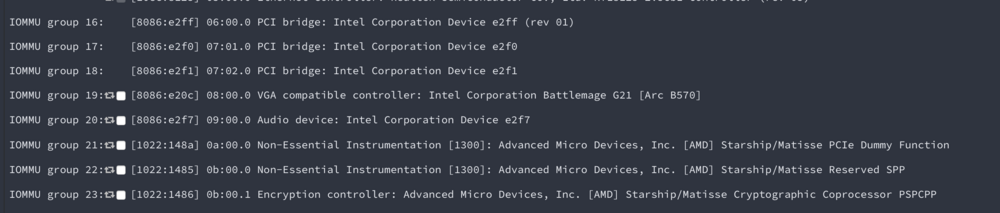
  1. Has anyone gotten an intel Arc B570/B580 Battlemage GPU working yet? I am on the latest unraid beta 7.1.0-beta.2. The GPU stats plugin shows the unit id for dashboard as this in the drop down menu "08:00.0: Battlemage G21 [Arc B570] - 0000:08:00.0". I have the Intel gpu top installed and have rebooted several times. Looks like the GPU is showing up in a IOMMMU group. But I cant added it to a docker container and just says "ls: cannot access '/dev/dri': No such file or directory" Any help is appreciated sorry I am a scrub when it comes to this stuff. Thanks
  2. Looking to get into the Unifi game will this docker work with a brand new Gateway Max UXG-Max? I am pretty good with unraid and dockers.

Account

Navigation

Search

Search

Configure browser push notifications

Chrome (Android)
  1. Tap the lock icon next to the address bar.
  2. Tap Permissions → Notifications.
  3. Adjust your preference.
Chrome (Desktop)
  1. Click the padlock icon in the address bar.
  2. Select Site settings.
  3. Find Notifications and adjust your preference.