





Vatoe
Members
-
Joined
-
Last visited
-
Okay that took a minute for me to reply, as while I was waiting for your last reply, I did try the new config option and the issue did re occurred with cache pool - unmountable. On this occasion however, the SSD was fine, being mountable. I then re-installed a backup copy of the flash drive (forgetting to get the diagnostics) and re did all the processes remove pool etc so as to get the a fresh copy of the diag's when the issue occurred again. However, this time I stopped the docker service before I restarted the array (essentially to save time if I was constantly starting a stopping the array) before restarting the array and to my supprise the cache pool came back online! I then stopped and restarted the array, restarting the the docker service in between and once again the cache pool came back online. Weirdly never had an issue with the SSD being unmountable, like I did yesterday, it was fine all occasions. So if this happens to anyone else and is reading this in the future, you may want to try stopping the docker service prior to restarting the array, get the cache pool online first, stop the array, restart the array and should be up and running. I don't think it was a co-incidence as I stated I did the have the unmountable issue on the previous try with the docker service being stopped. Jorge, thanks for all your help!
-
I just did strictly per your instructions, therefore, I didn't use the new config option. Just removed the pool, re added it using 'auot', and the restarted the array. the cache came back up without issue. Attached are the diagnostics.darkmatter-diagnostics-20250602-1811.zip
-
so I get this straight, im not doing the new config option?
-
Hi Jorge Managed to get the diagnostics done before I got to sleep. See attached. thanks. edit: added another btrfs output in the 'problem' state: Label: none uuid: 30cbac5e-f6ea-4a4e-b4ee-56052fe17fe5 Total devices 1 FS bytes used 376.00KiB devid 1 size 80.00GiB used 2.02GiB path /dev/loop2 Label: none uuid: 589c7630-502c-46d4-a101-7387c3f0a5ed Total devices 1 FS bytes used 416.00KiB devid 1 size 1.00GiB used 126.38MiB path /dev/loop3 Label: none uuid: dfa0320b-54f7-4176-9467-964c81fc02ad Total devices 2 FS bytes used 219.52GiB devid 1 size 931.51GiB used 248.03GiB path /dev/nvme0n1p1 devid 2 size 931.51GiB used 248.03GiB path /dev/nvme1n1p1 Label: none uuid: 1646dab7-c65f-4eb4-bfc5-043899e19337 Total devices 1 FS bytes used 118.48GiB devid 1 size 931.51GiB used 126.02GiB path /dev/sdh1 darkmatter-diagnostics-20250601-2252.zip
-
Yes okay thanks, I will do it in the morning or later tonight if my streamers get off before I sleep.
-
Thanks for the reply. This is the output from btrfs fi show: Label: none uuid: dfa0320b-54f7-4176-9467-964c81fc02ad Total devices 2 FS bytes used 219.47GiB devid 1 size 931.51GiB used 247.03GiB path /dev/nvme0n1p1 devid 2 size 931.51GiB used 247.03GiB path /dev/nvme1n1p1 Label: none uuid: 1646dab7-c65f-4eb4-bfc5-043899e19337 Total devices 1 FS bytes used 118.48GiB devid 1 size 931.51GiB used 124.02GiB path /dev/sdh1 Label: none uuid: d7706b04-ab94-4c77-b6cb-74870f06a749 Total devices 1 FS bytes used 37.60GiB devid 1 size 80.00GiB used 66.07GiB path /dev/loop2 Label: none uuid: 064a4352-64bc-4aca-b600-41264734d038 Total devices 1 FS bytes used 1.08MiB devid 1 size 1.00GiB used 126.38MiB path /dev/loop3 With the diagnostics, I'm assuming you need to see this when the error occurs? That is, I need to attempt the shrink array procedure again? If so, its evening where I am and the server is being used (streaming) still have to do it tomorrow morning my time.
-
Hi all. I have 11 HDD's. I want to shrink my array to 8 HDD's. I am attempting to remove 3 x 4 TB HDD from the array using the procedure as set out in the Unraid docs here: https://docs.unraid.net/legacy/FAQ/shrink-array/ All goes well until I restart the array, this is where my 2 x NVME cache disks and 1 x SSD pool disk get marked as unmountable unrecognized file system - the file system being also being marked as 'auto' when they were originally BTRFS. I can cure the SSD issue by setting back it to BTRFS and it comes back fine. The cache disks (2 x 1TB NVMe's) however, to do not come back online when I set them back to BTRFS + raid 1? They still are marked unmountable with unrecognized file system. I have reinstalled a backup of my flash drive, so I am back up and running with the original system, but would like to know if there is anyway I can shrink the array by overcoming the cache pool disk issue as described above? Im sure I have shrunk my array in the distant past and not had the cache pool disk issue. Any thoughts or help would be appreciated.
-
I have answered my own question, and will leave the process here in case anyone needs to accomplish something similar in the future. In essence, I shut down the server (after moving the data of the disks I was removing via unbalance), remove the disks, replaced two with the new ones (18TB's) and restarted. I then did the 'new config process' (found in tools tab) on the array part only. I checked to save my pool devices. Then back to main tab and reallocated the data disks (included the new one 18tb) to their slots. I left the parity for the moment as I knew I had to format the new data disk. Started the formatting of the new data disk by starting the array. Once formatted, shut down the array and added the (new 18TB) parity disk, which kicked of parity process on restarting the array. The data on remaining disks were untouched. Once the parity is complete, I plan to move some data onto the new data drive using unbalance.
-
Current server setup in terms of the array is 1 x 8TB as parity, 4 x 8TB data disks and 1 x 4 TB data disk. I have two new 18TB disks coming and looking for the most 'efficient' way to incorporate the disks with parity rebuilding etc. One of the new disks will replace my parity drive (8TB). The other new disk will replace a data drive (which via unbalance can be data free) which is 8TB. There will be two remaining 8 TB data disks as part of the original array which will still have data on them. I also want to shrink the array my removing the 4TB drive. Can I stop the array, unassign the disks (1 x parity, 2 x data (1x 8TB and 1x 4TB)), shut down, replace and remove the drives as described above? Restart the server, assign the new 18TB disks and restart the array for parity rebuild to begin? Aim I missing something? Or do I need to do this some other way? I do have another unraid server with a backup of all the array data. I appreciate any input.
-
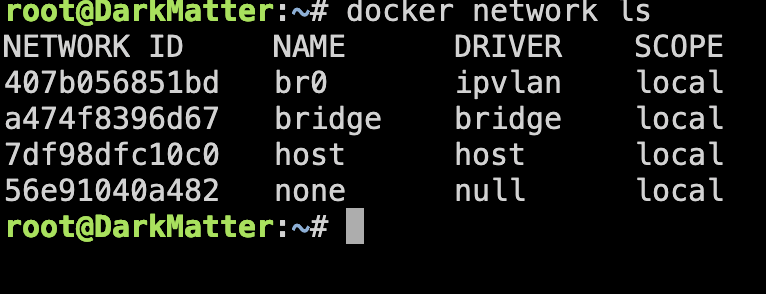
Okay, I have managed to fix this issue. Anyone who has this issue this should help. 1. Make a current backup of your flash drive (for the just in case scenario) 2. In unraid console remove the docker network database : rm /var/lib/docker/network/files/local-kv.db 3. Then restart the docker network: /etc/rc.d/rc.docker restart After the restart br0 should now point to ipvlan. I am once again able to use a fixed ip address on br0 network for docker containers. Thanks to bmartino1 for chimming in. edit: you will need to re-create any custom networks and get your docker containers pointing to the relevant recreated networks. Some of my docker containers didnt restart so I had to reinstall the container with the 'newly' recreated network.
-
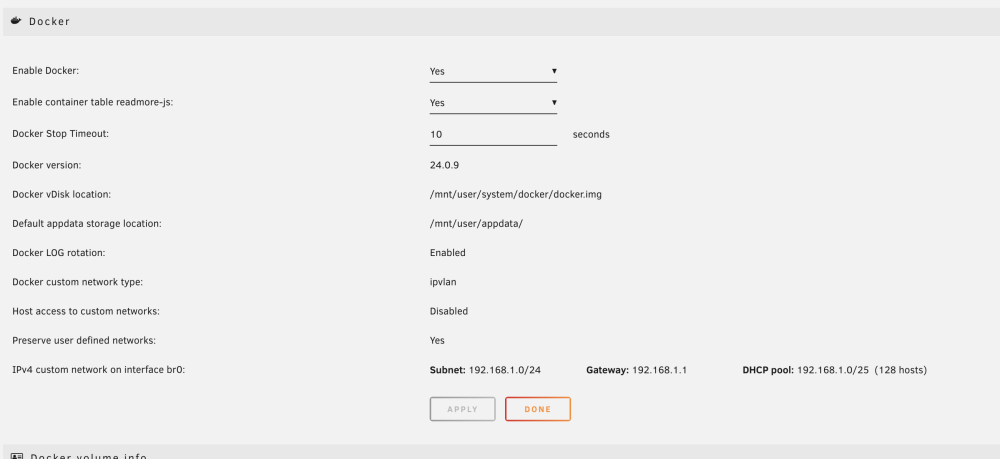
Good catch didn't notice that. I have unchecked the DHCP pool, and allowed custom network access, but the network still points to bridge (after server restart) unfortuntely. I check with the relevant docker container still the same error. I though there would have been some command line that could force or remap br0 to ipvlan. No luck on googling this point/issue so far.
-
I 'll watch the video when I get a chance, but to answer your question:
-
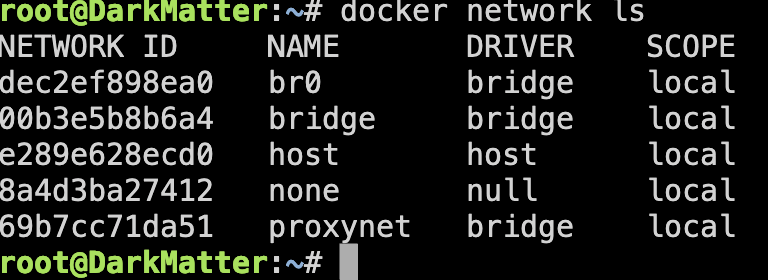
Long story short made changes to the cache drives on one of my unraid boxes. After the upgrade something happened and my br0 network and it now points to bridge rather than ipvlan. I have tried restarting the docker service etc, but it persists to pointing to this network. As a result there are 2 docker containers (the only two that require static ip, nearly everything else is on proxynet) I cannot set a static IP for via the Br0 as I get "Error response from daemon: Invalid address 192.168.1.17: It does not belong to any of this network's subnets." This used to work without issue. I have checked my other box and br0 does indeed point to ipvlan. Also while trying to research this issue, all the screenshots seem to point to the ipvlan for br0. Any help would be appreciated.
-
Still helping to this date with the fix! Still helping to this day. Thanks!
-
You're not alone. After working flawlessIy for months, I started get this error from time to time - there appears to be no rhyme or reason to it popping up. When it does appear it appears to hang around for weeks (the on battery message) - where I finally end up pulling out the cable. I have tried removing and reinstalling NUT drivers etc. Just this morning I popped the USB cable back in, and it now states that I'm 'online' rather than 'on battery'. I did try ignoring the on battery message, but my server randomly shut down (gracefully) a few times so I suspect the it was initiated as result of this on battery message.


