Beardown27
Members
-
Joined
-
Last visited
-
I am getting app crashes whenever I try to edit, add, or delete a local destination within the GUI. I can send logs, but I am not sure which one would be relevant in this situation. Anyone have similar issue?
-
Hi everyone, After 5 years with a Dell R510, I'm ready to move on due to high power bills. I'm looking for a setup that includes a modern Intel i3/i5 processor and a 10Gb LAN port. I'm considering two options: Buying a motherboard with an integrated 10Gb LAN port, which costs around $340. Opting for a regular motherboard priced at about $140 and adding a separate 10Gb NIC for an additional $50. I've read that some NICs can cause compatibility issues with motherboards, potentially affecting power-saving states like lower C states. I'd appreciate any insights or recommendations on whether to go for an integrated solution or a separate NIC, especially in terms of power efficiency and compatibility. Thanks in advance for your help!
-
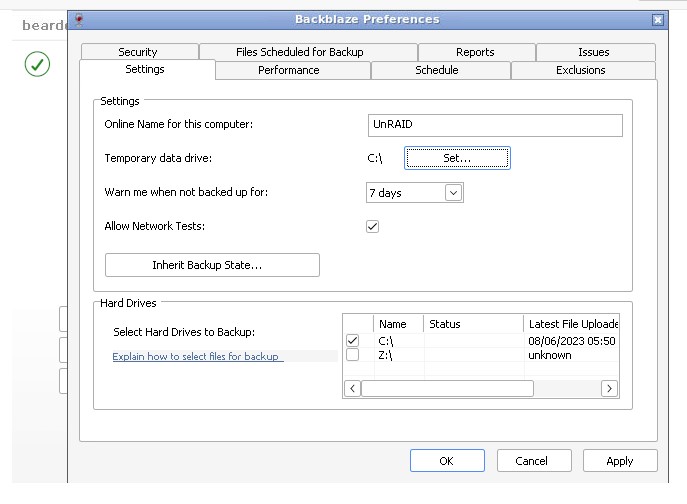
Hello, I installed the Backblaze docker from tessypowder and I cannot see my shares or drives inside Backblaze. Am I supposed to map my shares somewhere in the settings? When I try to check the Z drive on the attached screenshot, I get "Backblaze could not create a read-writable '.bzvol' directory on that drive." I'm at a loss on how to backup my media storage on the array. Any thoughts?