





colev14
Members
-
Joined
-
Last visited
-
Not really. I went from running plex directly on the server to running it on another machine and having the other machine connect to the media share on unraid via nfs. That reduced the frequency, but I will still occasionally get buffering. For me locally it is only on 4K high bitrate movies. I did just hear from my brother who lives on the other side of the country that he has buffering, but only on Survivor. I only share 1080p content and I have 250mbps upload. He is 3 timezones away so nobody else is awake and watching stuff. He is the only one. It makes no sense. One of my friends mentioned that they had weird nfs issues with unraid and moved to Truenas. The issue hasn't occurred frequently enough for me to explore doing that. Hoping an update might fix the issue down the line.
-
It was the cpu. I swapped an old ryzen 1600AF into the same machine and it's been running perfectly for the last year. I've got about 90 days of uptime on the server right now.
-
Yes, nothing else reading or writing to the array.
-
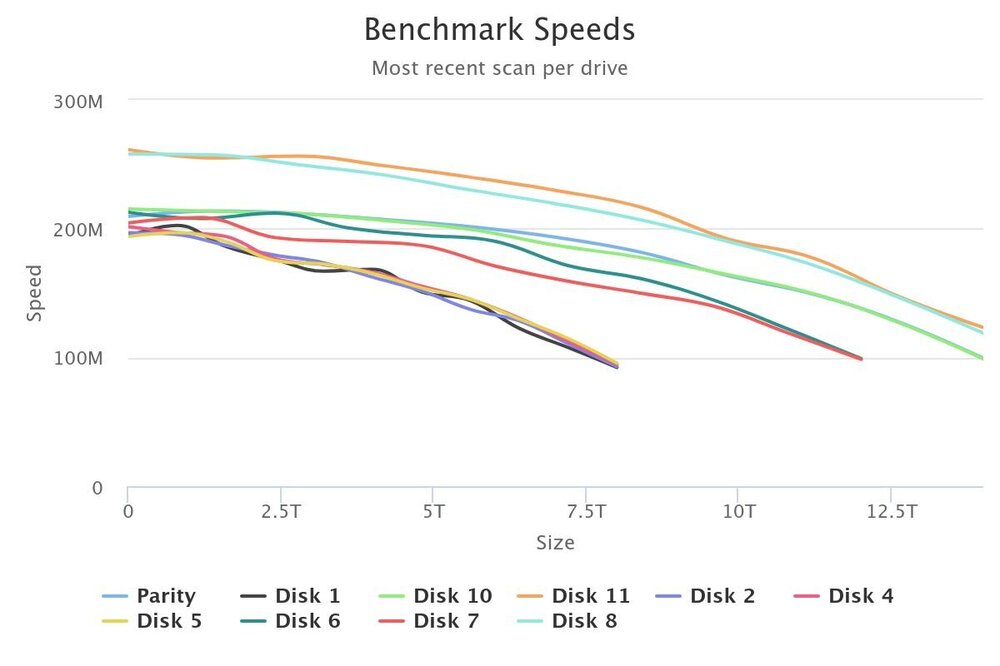
Hello, I'm having an issue watching movies from my Unraid server streaming to Plex, Jellyfin, and even Kodi over SMB. I've done a ton of troubleshooting and it seems to be specifically high bit rate movies from the array start stuttering every few minutes. I'm not sure if there's something I can do to fix the issue. I have never had it in the past. I have my Unraid Server with a 2.5G NIC and the Shield has a gigabit ethernet. I've run an iperf test and gotten 800Mb between both devices. I exported it and attached it below. I have benchmarked my drives and attached an image below. I've also attached my diagnostics. The test file I have been using is a 58GB 4K DV Remux of Barbie. The file is on Disk 8 of the Array and buffers constantly when playing on Plex, Jellyfin, and Kodi. I copied the file to my nvme cache drive and it plays back fine with no stuttering on Kodi, so it seems like a read speed issue. But based on the benchmarks, I have plenty of speed I think? There is nobody else watching anything on the server. I'm kind of lost on what to do. I have not had this issue until recently. iperf_2024-06-09_12-29-04.txt unraid-diagnostics-20240609-1217.zip
-
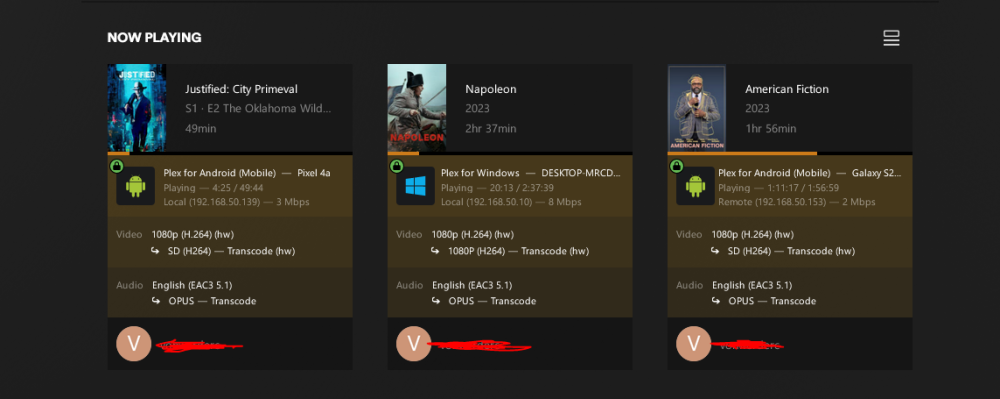
I had C states disabled before, I changed the top slot to pcie gen 3, I enabled 4G decoding. I don't think the 1600af supports resizeable bar. It didn't show up in my bios settings and I my bios is updated. I was getting the same issues. Then I decided to try it on my phone and it works. So I tried it on another phone and the windows client and it works. It seems like the problem is with the plex web client. I don't think anybody on my server uses that, so I think I am good to go now. Thanks!
-
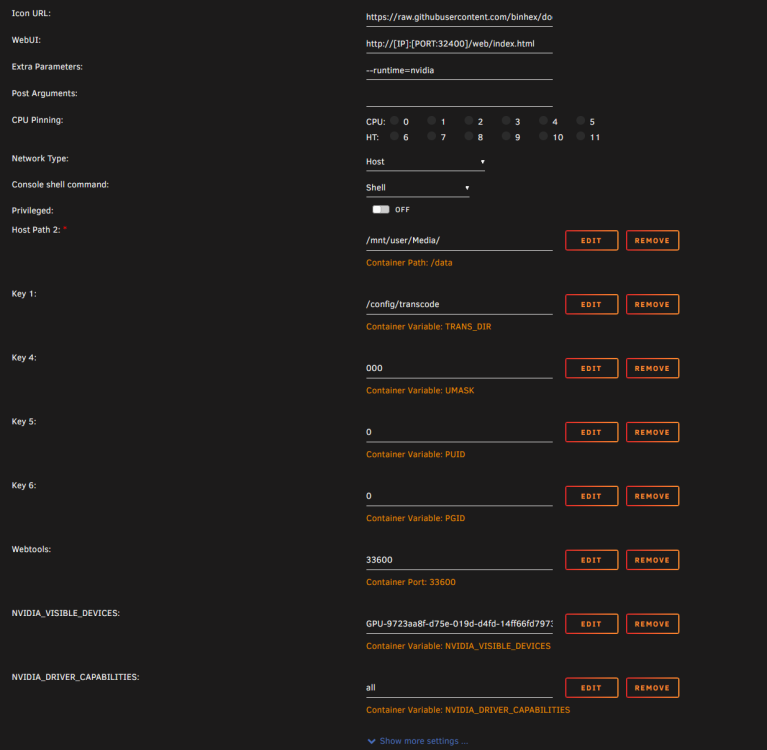
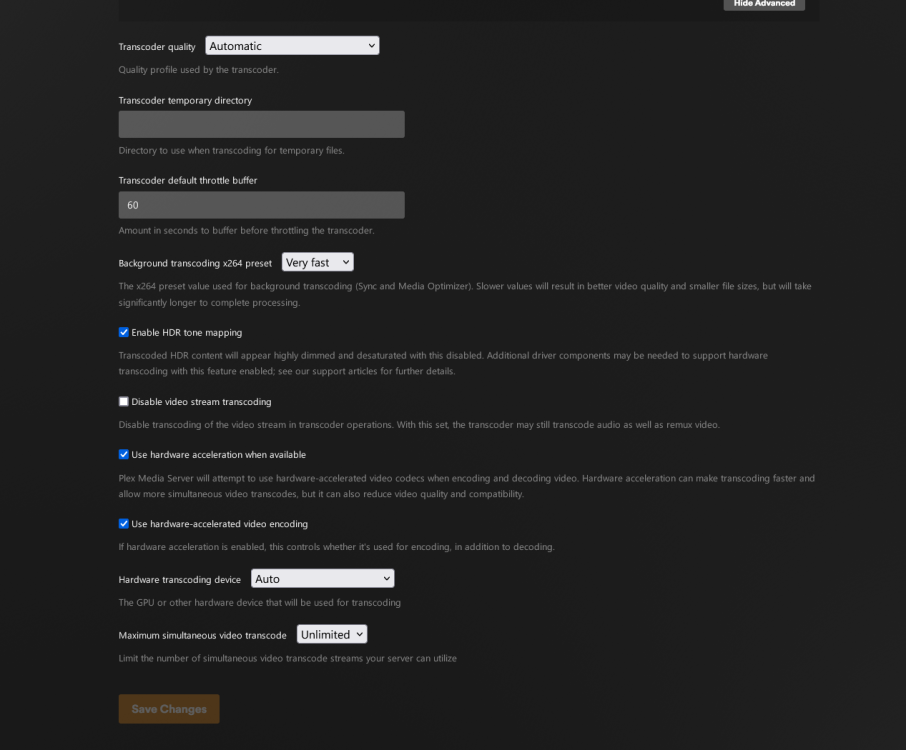
Just installed a P400 Quadro to help out my old ryzen 1600 af with Plex transcoding. I set it up per the instructions, but every time I try to go into the nvidia-driver plugin settings, my entire server gui locks up and never recovers. I can't open the settings or get any other pages to load. I have to ssh in and reboot. I've attached my diagnostics. Any ideas what could be causing this issue? Plex docker settings: Transcoding settings inside plex: unraid-diagnostics-20240307-1746.zip
-
I swapped out my motherboard/cpu/ram to a backup PC I have. I switched from my x570, 3900x to an itx mobo and 3400G with a different ram kit. The server ran perfect for 2 weeks. I use that second system for backups though. I figured the issue might be the motherboard. I bought a new B550 board and put my old cpu and ram back in it. The server locked up again after 3 days. I am going to try swapping the ram from the backup system into this one and see if that does anything. This ram is new from January 2023 and was working fine previously. I don't really understand why that would be the issue. I'm thinking maybe it's the cpu? I had been using the 3900X in my gaming PC for 2 years with no issues. I upgraded to the 5900X and swapped the 3900X into my server. So I don't really think that's the issue. At think point, I'm not sure what to think. Swapping the ram and if that doesn't work, I'll swap my old Ryzen 1600AF into the system and see if that does anything. My only other thought is it could be the GPU. But I have an old amd rx540 that is in there right now and I have an old nvidia gpu. I don't remember what model. Super old, basically just useful for display out. And the server crashes with both of them. So I don't think it's the GPU.
-
I purchased the molex to sata connectors and that seems to have solved the problem. Thank you!
-
Awesome, thank you. They'll be here tomorrow and I'll give them a shot.
-
I ordered these 4to1 sata cables. In have a define 7 XL so the extra length helps reach the drives furthest away from the psu. https://a.co/d/gthadWF Is there another one you would recommended?
-
Yes, I have 2 sata power splitters because I don't have enough cables for my PSU. I only have 1 splitter per full size cable though. I guess I can try replacing those. The ones I have now are pretty old from amazon.
-
I just recently reseated all the sata cables to troubleshoot another issue. Could this be an issue with the hba card or power supply?
-
Getting an ata error I haven't encountered before in my syslog. I think I narrowed it down to disk 7, and in the logs for that disk I see this in red: Unraid kernel: ata6.00: exception Emask 0x50 SAct 0x3f8 SErr 0xb0802 action 0xe frozen With a bunch of other yellow warnings as well: Feb 1 20:05:19 Unraid kernel: ata6.00: exception Emask 0x50 SAct 0x3f8 SErr 0xb0802 action 0xe frozen Feb 1 20:05:19 Unraid kernel: ata6.00: irq_stat 0x00400000, PHY RDY changed Feb 1 20:05:19 Unraid kernel: ata6: SError: { RecovComm HostInt PHYRdyChg PHYInt 10B8B } Feb 1 20:05:19 Unraid kernel: ata6.00: failed command: READ FPDMA QUEUED Feb 1 20:05:19 Unraid kernel: ata6.00: cmd 60/08:18:c8:b0:82/04:00:76:04:00/40 tag 3 ncq dma 528384 in Feb 1 20:05:19 Unraid kernel: ata6.00: status: { DRDY } Feb 1 20:05:19 Unraid kernel: ata6.00: failed command: READ FPDMA QUEUED Feb 1 20:05:19 Unraid kernel: ata6.00: cmd 60/00:20:d0:b4:82/04:00:76:04:00/40 tag 4 ncq dma 524288 in Feb 1 20:05:19 Unraid kernel: ata6.00: status: { DRDY } Feb 1 20:05:19 Unraid kernel: ata6.00: failed command: READ FPDMA QUEUED Feb 1 20:05:19 Unraid kernel: ata6.00: cmd 60/08:28:d0:b8:82/00:00:76:04:00/40 tag 5 ncq dma 4096 in Feb 1 20:05:19 Unraid kernel: ata6.00: status: { DRDY } Feb 1 20:05:19 Unraid kernel: ata6.00: failed command: READ FPDMA QUEUED Feb 1 20:05:19 Unraid kernel: ata6.00: cmd 60/c8:30:d8:b8:82/03:00:76:04:00/40 tag 6 ncq dma 495616 in Feb 1 20:05:19 Unraid kernel: ata6.00: status: { DRDY } Feb 1 20:05:19 Unraid kernel: ata6.00: failed command: READ FPDMA QUEUED Feb 1 20:05:19 Unraid kernel: ata6.00: cmd 60/08:38:a0:bc:82/04:00:76:04:00/40 tag 7 ncq dma 528384 in Feb 1 20:05:19 Unraid kernel: ata6.00: status: { DRDY } Feb 1 20:05:19 Unraid kernel: ata6.00: failed command: READ FPDMA QUEUED Feb 1 20:05:19 Unraid kernel: ata6.00: cmd 60/00:40:a8:c0:82/04:00:76:04:00/40 tag 8 ncq dma 524288 in Feb 1 20:05:19 Unraid kernel: ata6.00: status: { DRDY } Feb 1 20:05:19 Unraid kernel: ata6.00: failed command: READ FPDMA QUEUED Feb 1 20:05:19 Unraid kernel: ata6.00: cmd 60/08:48:a8:c4:82/00:00:76:04:00/40 tag 9 ncq dma 4096 in Feb 1 20:05:19 Unraid kernel: ata6.00: status: { DRDY } Feb 1 20:05:19 Unraid kernel: ata6: hard resetting link Feb 1 20:05:25 Unraid kernel: ata6: found unknown device (class 0) Feb 1 20:05:29 Unraid kernel: ata6: softreset failed (device not ready) Feb 1 20:05:29 Unraid kernel: ata6: hard resetting link Feb 1 20:05:35 Unraid kernel: ata6: SATA link up 6.0 Gbps (SStatus 133 SControl 300) Feb 1 20:05:35 Unraid kernel: ata6.00: configured for UDMA/133 Feb 1 20:05:35 Unraid kernel: ata6: EH complete unraid-diagnostics-20240202-1727.zip
-
I was able to have the server work for a week straight before it locked up again, followed by another week of uptime before locking up, and now it locked up after 3 days. Is there anything in these logs that show anything? I know I keep asking the same thing, I'm just not sure what else to do. I am now back in safe mode with only plex running. I moved everything else over to another proxmox server. My last resort after this will be to move plex to proxmox and just use the unraid server as an nfs server. Edit: decided to downgrade to 6.12.4 and take it out of safe mode and see if that does anything. If it locks up again, I'll go back to safe mode with only Plex running, then safe mode with nothing running again. unraid_server_logs.log
-
I was able to get the server to run for 8 days without locking up running it in safe mode with docker disabled. I started up plex for 3 days and it worked fine, so I started up all the Arrs along with cloudflared docker and after 2 days it locked up again. Is there anything in the syslog that points to one of the docker containers being the issue? I'm thinking about running the Arrs/Plex on a 2nd PC in proxmox and mounting my unraid server as an NFS share and using it that way in safe mode. unraid_server_logs.log


