xjumper84
Members
-
Joined
-
Last visited
Everything posted by xjumper84
-
So either way I just pull the 4TB drive, put the 10tb drive in it's spot and rebuild the data onto the 10tb drive. Also, while I do that, I can't be running a docker container that will be writing data to the array. Is that correct?
-
Hi, I looked around and didn't find a thread on this but here goes. I'm interested in adding the drive without an array rebuild as I have dockers that I need to run (think security camera's) that will be writing data to the array while this is being performed. I had a drive fail a year ago and I tried writing data to the array during a rebuild and I lost data. I'm running unraid 6.12.6 I'm following this: https://docs.unraid.net/legacy/FAQ/replacing-multiple-data-drives/#safer-method I've already installed physically the new larger drives in my system. I want to swap out 2x 4TB drives with 2x 10TB drives. The 4TB drives are already included in the array. The 10TB drives have been pre-cleared with Unassaigned Devices plugin. Good to go there. I made an xfs file system on the 10TB drives and I have already rsync -avX one of the 4TB drives to one of the 10TB drives. What is the correct method to go about doing the drive upgrade that won't cause unraid to rebuild parity?
-
I checked the thread you linked, I'm using ddr-3200 ram for a Ryzen 4600g. It's set to xmp profile 1. Bios is one version out of date, but it was the latest when this server was put together and ran totally fine for almost 2 years. The board was rock stable until I disabled c-states like the thread mentions to solve issues with USB powering down and causing coral USB tpu to fail in frigate, except it didn't help solve that issue. So I put those settings back and now these issues seem to come up every 20 or so hours. Thanks for the info @JorgeB.
-
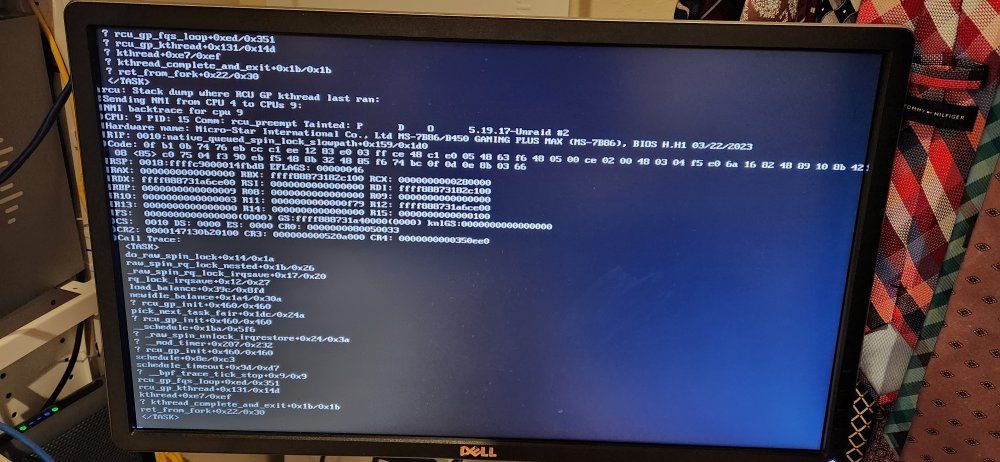
Last night while transferring files to another machine on the network, Unraid became unaccessible and this was the error on the screen. It keeps referencing CPU cores as being unavailable. I was also running 3 Dockers at the same time (Plex, xmrig, frigate). Frigate uses a Google coral which has been causing problems on the USB side. Diagnostics are attached, I had to reboot to get back into Unraid, these diagnostics are from that first reboot. I'm just interested in learning what causes this. While not related, I'm already swapping to new motherboard/CPU/ram hardware this weekend. Any insight would be appreciated. nas-diagnostics-20240203-0810.zip
-
Yes you summary is accurate. I will check out Dynamix File Manager. I'm finding Disk5 to be very loud when accessing files and it keeps switching between 3gb/s and 6gb/s sata 3.1 link speed. I suspect its the controller card its connected to, but thats for another day. I also need to plan out upgrading the server to 6.12.x. I'm finding hardware limitations with my current build that would warrant a hardware refresh. Thank you for your help. I hope the next drive I replace goes better.
-
New diagnostics. I spun up the failing 4tb drive (sdi) in unassigned devices because its RAW READ ERROR RATE has risen. nas-diagnostics-20240121-0918.zip
-
Done. How should I proceed now? Parity check the file system before I reset up shares and copy files back? Also, @trurl the drive that was failing now has a RAW READ ERROR RATE of 182, up from 177. So replacing the drive appears to have been totally eminent.
-
Ok. Data is transferred. @trurl or @itimpi - how should I format the 10tb drive and get a good parity rebuild going? I'll copy the data back later.
-
updated. Copying data off original disk4 now.
-
If this is the way to do that, then yes.
-
Could I copy the data off the original 4tb drive currently in Unassigned Devices to my desktop, just to have a good copy of the data, then erase the rebuilt data on disk 4. Then parity check to ensure parity is good. Then copy the data back to Disk 4?
-
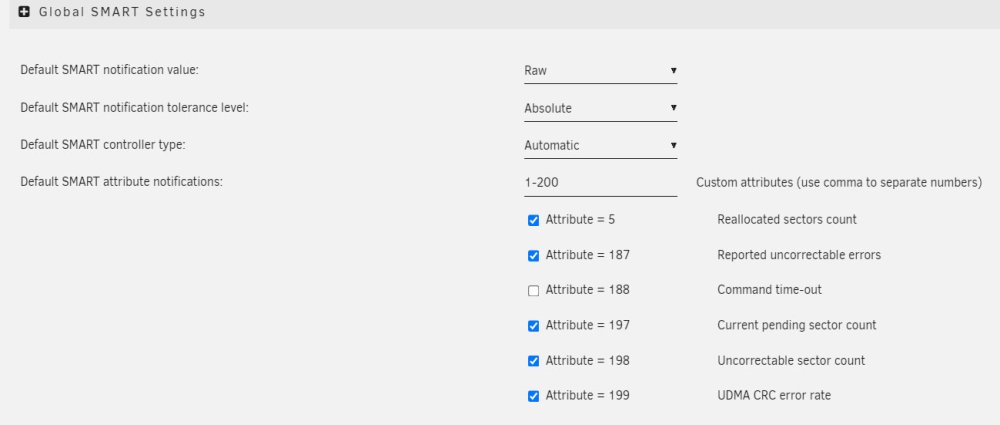
I checked the other WD disks, they are all zero's on ID1, 197 and 200. Docker and VM's are set to no.
-
Ok - So I should: go to settings set enable docker to no - this will keep the docker containers I have though right? go to settings, set enable VM's to no - this will also keep the VM files I already have. Then: stop the array switch the 10tb out add the 4tb in start the array with no parity check go to tools -> new config then rebuild parity, wait. don't let any docker run, don't copy anything in or out until it finishes. Is that correct?
-
New diagnostics attached nas-diagnostics-20240120-0951.zip
-
Ok. I re-added the original disk4 back, it showed up in Unassigned Devices. I mounted it and all my files are there. What is the proper step to proceed? I would think (and please let me know if this is correct) - unmount the drive from Unassigned Devices. Stop the array, change the 10tb drive to the original 4tb drive and then restart the array. Check the files to make sure all good, then do a parity check, ensure we're good there. Then once we are, in unassigned devices - format the 10tb drive to xfs, copy the 4tb drive to the 10tb drive, unmount the 10tb. stop the array, change the 4tb drive to the 10tb drive, setup the 4tb drive in unassigned devices and restart the array?
-
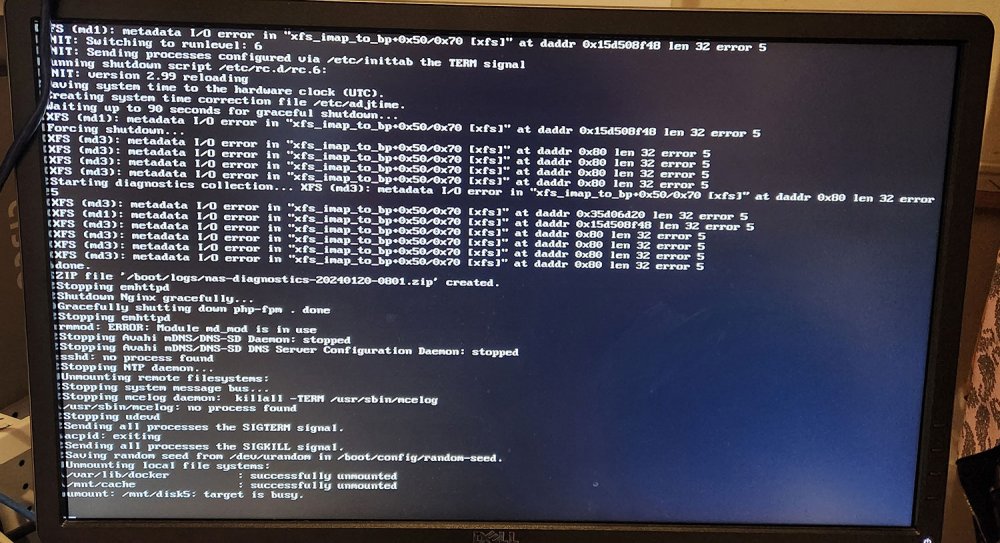
Understood. edit: the errors showed on md1, md2 and md3 (same as shown in the picture before the last reboot) to read something similar to: "metadata i/o error in "xfs_imap_to_bp+0x50/0x70 [xfs]" ... len 32 error 5 So i'll power off the machine, connect the drive and startup. Please refresh my memory, with the new drive added, the array won't start? and then I'll be able to add the original 4tb drive into Unassigned Devices?
-
The billion errors were on disks 1-3. The rebuild went onto the 10TB drive (which is disk4).
-
Yes, I'll need to power off to physically install it. Should I do that now? Or attempt the xfs_repair first?
-
Output in the text file attached. xfs_repair -n disk4.txt
-
New diagnostics attached. nas-diagnostics-20240120-0846.zip
-
I'm now seeing a lot of errors on the disk I just rebuilt - should I stop parity check, unmount the drive and run xfs_repair? Jan 20 08:18:58 NAS kernel: XFS (md4): Metadata corruption detected at xfs_buf_ioend+0xac/0x386 [xfs], xfs_inode block 0x15c3e0ef0 xfs_inode_buf_verify Jan 20 08:18:58 NAS kernel: XFS (md4): Unmount and run xfs_repair Jan 20 08:18:58 NAS kernel: XFS (md4): First 128 bytes of corrupted metadata buffer: Jan 20 08:18:58 NAS kernel: 00000000: 00 00 00 00 00 00 00 00 00 00 00 00 00 00 00 00 ................ Jan 20 08:18:58 NAS kernel: 00000010: 00 00 00 00 00 00 00 00 00 00 00 00 00 00 00 00 ................ Jan 20 08:18:58 NAS kernel: 00000020: 00 00 00 00 00 00 00 00 00 00 00 00 00 00 00 00 ................ Jan 20 08:18:58 NAS kernel: 00000030: 00 00 00 00 00 00 00 00 00 00 00 00 00 00 00 00 ................ Jan 20 08:18:58 NAS kernel: 00000040: 00 00 00 00 00 00 00 00 00 00 00 00 00 00 00 00 ................ Jan 20 08:18:58 NAS kernel: 00000050: 00 00 00 00 00 00 00 00 00 00 00 00 00 00 00 00 ................ Jan 20 08:18:58 NAS kernel: 00000060: 00 00 00 00 00 00 00 00 00 00 00 00 00 00 00 00 ................ Jan 20 08:18:58 NAS kernel: 00000070: 00 00 00 00 00 00 00 00 00 00 00 00 00 00 00 00 ................ Jan 20 08:18:58 NAS kernel: XFS (md4): metadata I/O error in "xfs_imap_to_bp+0x50/0x70 [xfs]" at daddr 0x15c3e0ef0 len 32 error 117 Jan 20 08:18:58 NAS kernel: XFS (md4): Metadata corruption detected at xfs_buf_ioend+0xac/0x386 [xfs], xfs_inode block 0x15c3e0ef0 xfs_inode_buf_verify Jan 20 08:18:58 NAS kernel: XFS (md4): Unmount and run xfs_repair Jan 20 08:18:58 NAS kernel: XFS (md4): First 128 bytes of corrupted metadata buffer: Jan 20 08:18:58 NAS kernel: 00000000: 00 00 00 00 00 00 00 00 00 00 00 00 00 00 00 00 ................ Jan 20 08:18:58 NAS kernel: 00000010: 00 00 00 00 00 00 00 00 00 00 00 00 00 00 00 00 ................ Jan 20 08:18:58 NAS kernel: 00000020: 00 00 00 00 00 00 00 00 00 00 00 00 00 00 00 00 ................ Jan 20 08:18:58 NAS kernel: 00000030: 00 00 00 00 00 00 00 00 00 00 00 00 00 00 00 00 ................ Jan 20 08:18:58 NAS kernel: 00000040: 00 00 00 00 00 00 00 00 00 00 00 00 00 00 00 00 ................ Jan 20 08:18:58 NAS kernel: 00000050: 00 00 00 00 00 00 00 00 00 00 00 00 00 00 00 00 ................ Jan 20 08:18:58 NAS kernel: 00000060: 00 00 00 00 00 00 00 00 00 00 00 00 00 00 00 00 ................ Jan 20 08:18:58 NAS kernel: 00000070: 00 00 00 00 00 00 00 00 00 00 00 00 00 00 00 00 ................ Jan 20 08:18:58 NAS kernel: XFS (md4): metadata I/O error in "xfs_imap_to_bp+0x50/0x70 [xfs]" at daddr 0x15c3e0ef0 len 32 error 117 Jan 20 08:19:11 NAS kernel: XFS (md4): Metadata corruption detected at xfs_buf_ioend+0xac/0x386 [xfs], xfs_inode block 0x173f2aae8 xfs_inode_buf_verify Jan 20 08:19:11 NAS kernel: XFS (md4): Unmount and run xfs_repair Jan 20 08:19:11 NAS kernel: XFS (md4): First 128 bytes of corrupted metadata buffer: Jan 20 08:19:11 NAS kernel: 00000000: 00 00 00 00 00 00 00 00 00 00 00 00 00 00 00 00 ................ Jan 20 08:19:11 NAS kernel: 00000010: 00 00 00 00 00 00 00 00 00 00 00 00 00 00 00 00 ................ Jan 20 08:19:11 NAS kernel: 00000020: 00 00 00 00 00 00 00 00 00 00 00 00 00 00 00 00 ................ Jan 20 08:19:11 NAS kernel: 00000030: 00 00 00 00 00 00 00 00 00 00 00 00 00 00 00 00 ................ Jan 20 08:19:11 NAS kernel: 00000040: 00 00 00 00 00 00 00 00 00 00 00 00 00 00 00 00 ................ Jan 20 08:19:11 NAS kernel: 00000050: 00 00 00 00 00 00 00 00 00 00 00 00 00 00 00 00 ................ Jan 20 08:19:11 NAS kernel: 00000060: 00 00 00 00 00 00 00 00 00 00 00 00 00 00 00 00 ................ Jan 20 08:19:11 NAS kernel: 00000070: 00 00 00 00 00 00 00 00 00 00 00 00 00 00 00 00 ................ Jan 20 08:19:11 NAS kernel: XFS (md4): metadata I/O error in "xfs_imap_to_bp+0x50/0x70 [xfs]" at daddr 0x173f2aae8 len 32 error 117 Jan 20 08:19:11 NAS kernel: XFS (md4): Metadata corruption detected at xfs_buf_ioend+0xac/0x386 [xfs], xfs_inode block 0x174129f48 xfs_inode_buf_verify Jan 20 08:19:11 NAS kernel: XFS (md4): Unmount and run xfs_repair Jan 20 08:19:11 NAS kernel: XFS (md4): First 128 bytes of corrupted metadata buffer: Jan 20 08:19:11 NAS kernel: 00000000: 00 00 00 00 00 00 00 00 00 00 00 00 00 00 00 00 ................ Jan 20 08:19:11 NAS kernel: 00000010: 00 00 00 00 00 00 00 00 00 00 00 00 00 00 00 00 ................ Jan 20 08:19:11 NAS kernel: 00000020: 00 00 00 00 00 00 00 00 00 00 00 00 00 00 00 00 ................ Jan 20 08:19:11 NAS kernel: 00000030: 00 00 00 00 00 00 00 00 00 00 00 00 00 00 00 00 ................ Jan 20 08:19:11 NAS kernel: 00000040: 00 00 00 00 00 00 00 00 00 00 00 00 00 00 00 00 ................ Jan 20 08:19:11 NAS kernel: 00000050: 00 00 00 00 00 00 00 00 00 00 00 00 00 00 00 00 ................ Jan 20 08:19:11 NAS kernel: 00000060: 00 00 00 00 00 00 00 00 00 00 00 00 00 00 00 00 ................ Jan 20 08:19:11 NAS kernel: 00000070: 00 00 00 00 00 00 00 00 00 00 00 00 00 00 00 00 ................ Jan 20 08:19:11 NAS kernel: XFS (md4): metadata I/O error in "xfs_imap_to_bp+0x50/0x70 [xfs]" at daddr 0x174129f48 len 32 error 117 Jan 20 08:19:11 NAS kernel: XFS (md4): Metadata corruption detected at xfs_buf_ioend+0xac/0x386 [xfs], xfs_inode block 0x18141b988 xfs_inode_buf_verify Jan 20 08:19:11 NAS kernel: XFS (md4): Unmount and run xfs_repair Jan 20 08:19:11 NAS kernel: XFS (md4): First 128 bytes of corrupted metadata buffer: Jan 20 08:19:11 NAS kernel: 00000000: 00 00 00 00 00 00 00 00 00 00 00 00 00 00 00 00 ................ Jan 20 08:19:11 NAS kernel: 00000010: 00 00 00 00 00 00 00 00 00 00 00 00 00 00 00 00 ................ Jan 20 08:19:11 NAS kernel: 00000020: 00 00 00 00 00 00 00 00 00 00 00 00 00 00 00 00 ................ Jan 20 08:19:11 NAS kernel: 00000030: 00 00 00 00 00 00 00 00 00 00 00 00 00 00 00 00 ................ Jan 20 08:19:11 NAS kernel: 00000040: 00 00 00 00 00 00 00 00 00 00 00 00 00 00 00 00 ................ Jan 20 08:19:11 NAS kernel: 00000050: 00 00 00 00 00 00 00 00 00 00 00 00 00 00 00 00 ................ Jan 20 08:19:11 NAS kernel: 00000060: 00 00 00 00 00 00 00 00 00 00 00 00 00 00 00 00 ................ Jan 20 08:19:11 NAS kernel: 00000070: 00 00 00 00 00 00 00 00 00 00 00 00 00 00 00 00 ................ Jan 20 08:19:11 NAS kernel: XFS (md4): metadata I/O error in "xfs_imap_to_bp+0x50/0x70 [xfs]" at daddr 0x18141b988 len 32 error 117 Jan 20 08:19:11 NAS kernel: XFS (md4): Metadata corruption detected at xfs_buf_ioend+0xac/0x386 [xfs], xfs_inode block 0x15c3e0ef0 xfs_inode_buf_verify Jan 20 08:19:11 NAS kernel: XFS (md4): Unmount and run xfs_repair Jan 20 08:19:11 NAS kernel: XFS (md4): First 128 bytes of corrupted metadata buffer: Jan 20 08:19:11 NAS kernel: 00000000: 00 00 00 00 00 00 00 00 00 00 00 00 00 00 00 00 ................ Jan 20 08:19:11 NAS kernel: 00000010: 00 00 00 00 00 00 00 00 00 00 00 00 00 00 00 00 ................ Jan 20 08:19:11 NAS kernel: 00000020: 00 00 00 00 00 00 00 00 00 00 00 00 00 00 00 00 ................ Jan 20 08:19:11 NAS kernel: 00000030: 00 00 00 00 00 00 00 00 00 00 00 00 00 00 00 00 ................ Jan 20 08:19:11 NAS kernel: 00000040: 00 00 00 00 00 00 00 00 00 00 00 00 00 00 00 00 ................ Jan 20 08:19:11 NAS kernel: 00000050: 00 00 00 00 00 00 00 00 00 00 00 00 00 00 00 00 ................ Jan 20 08:19:11 NAS kernel: 00000060: 00 00 00 00 00 00 00 00 00 00 00 00 00 00 00 00 ................ Jan 20 08:19:11 NAS kernel: 00000070: 00 00 00 00 00 00 00 00 00 00 00 00 00 00 00 00 ................ Jan 20 08:19:11 NAS kernel: XFS (md4): metadata I/O error in "xfs_imap_to_bp+0x50/0x70 [xfs]" at daddr 0x15c3e0ef0 len 32 error 117 Jan 20 08:19:11 NAS kernel: XFS (md4): Metadata corruption detected at xfs_buf_ioend+0xac/0x386 [xfs], xfs_inode block 0x18bb364e8 xfs_inode_buf_verify Jan 20 08:19:11 NAS kernel: XFS (md4): Unmount and run xfs_repair Jan 20 08:19:11 NAS kernel: XFS (md4): First 128 bytes of corrupted metadata buffer: Jan 20 08:19:11 NAS kernel: 00000000: 00 00 00 00 00 00 00 00 00 00 00 00 00 00 00 00 ................ Jan 20 08:19:11 NAS kernel: 00000010: 00 00 00 00 00 00 00 00 00 00 00 00 00 00 00 00 ................ Jan 20 08:19:11 NAS kernel: 00000020: 00 00 00 00 00 00 00 00 00 00 00 00 00 00 00 00 ................ Jan 20 08:19:11 NAS kernel: 00000030: 00 00 00 00 00 00 00 00 00 00 00 00 00 00 00 00 ................ Jan 20 08:19:11 NAS kernel: 00000040: 00 00 00 00 00 00 00 00 00 00 00 00 00 00 00 00 ................ Jan 20 08:19:11 NAS kernel: 00000050: 00 00 00 00 00 00 00 00 00 00 00 00 00 00 00 00 ................ Jan 20 08:19:11 NAS kernel: 00000060: 00 00 00 00 00 00 00 00 00 00 00 00 00 00 00 00 ................ Jan 20 08:19:11 NAS kernel: 00000070: 00 00 00 00 00 00 00 00 00 00 00 00 00 00 00 00 ................ Jan 20 08:19:11 NAS kernel: XFS (md4): metadata I/O error in "xfs_imap_to_bp+0x50/0x70 [xfs]" at daddr 0x18bb364e8 len 32 error 117 Jan 20 08:19:17 NAS kernel: XFS (md4): Metadata corruption detected at xfs_buf_ioend+0xac/0x386 [xfs], xfs_inode block 0x16ffeca48 xfs_inode_buf_verify Jan 20 08:19:17 NAS kernel: XFS (md4): Unmount and run xfs_repair Jan 20 08:19:17 NAS kernel: XFS (md4): First 128 bytes of corrupted metadata buffer: Jan 20 08:19:17 NAS kernel: 00000000: 00 00 00 00 00 00 00 00 00 00 00 00 00 00 00 00 ................ Jan 20 08:19:17 NAS kernel: 00000010: 00 00 00 00 00 00 00 00 00 00 00 00 00 00 00 00 ................ Jan 20 08:19:17 NAS kernel: 00000020: 00 00 00 00 00 00 00 00 00 00 00 00 00 00 00 00 ................ Jan 20 08:19:17 NAS kernel: 00000030: 00 00 00 00 00 00 00 00 00 00 00 00 00 00 00 00 ................ Jan 20 08:19:17 NAS kernel: 00000040: 00 00 00 00 00 00 00 00 00 00 00 00 00 00 00 00 ................ Jan 20 08:19:17 NAS kernel: 00000050: 00 00 00 00 00 00 00 00 00 00 00 00 00 00 00 00 ................ Jan 20 08:19:17 NAS kernel: 00000060: 00 00 00 00 00 00 00 00 00 00 00 00 00 00 00 00 ................ Jan 20 08:19:17 NAS kernel: 00000070: 00 00 00 00 00 00 00 00 00 00 00 00 00 00 00 00 ................ Jan 20 08:19:17 NAS kernel: XFS (md4): metadata I/O error in "xfs_imap_to_bp+0x50/0x70 [xfs]" at daddr 0x16ffeca48 len 32 error 117 Jan 20 08:19:17 NAS kernel: XFS (md4): Metadata corruption detected at xfs_buf_ioend+0xac/0x386 [xfs], xfs_inode block 0x16ffeca48 xfs_inode_buf_verify Jan 20 08:19:17 NAS kernel: XFS (md4): Unmount and run xfs_repair Jan 20 08:19:17 NAS kernel: XFS (md4): First 128 bytes of corrupted metadata buffer: Jan 20 08:19:17 NAS kernel: 00000000: 00 00 00 00 00 00 00 00 00 00 00 00 00 00 00 00 ................ Jan 20 08:19:17 NAS kernel: 00000010: 00 00 00 00 00 00 00 00 00 00 00 00 00 00 00 00 ................ Jan 20 08:19:17 NAS kernel: 00000020: 00 00 00 00 00 00 00 00 00 00 00 00 00 00 00 00 ................ Jan 20 08:19:17 NAS kernel: 00000030: 00 00 00 00 00 00 00 00 00 00 00 00 00 00 00 00 ................ Jan 20 08:19:17 NAS kernel: 00000040: 00 00 00 00 00 00 00 00 00 00 00 00 00 00 00 00 ................ Jan 20 08:19:17 NAS kernel: 00000050: 00 00 00 00 00 00 00 00 00 00 00 00 00 00 00 00 ................ Jan 20 08:19:17 NAS kernel: 00000060: 00 00 00 00 00 00 00 00 00 00 00 00 00 00 00 00 ................ Jan 20 08:19:17 NAS kernel: 00000070: 00 00 00 00 00 00 00 00 00 00 00 00 00 00 00 00 ................ Jan 20 08:19:17 NAS kernel: XFS (md4): metadata I/O error in "xfs_imap_to_bp+0x50/0x70 [xfs]" at daddr 0x16ffeca48 len 32 error 117 Jan 20 08:19:37 NAS kernel: ata9: SATA link up 6.0 Gbps (SStatus 133 SControl 300) Jan 20 08:19:37 NAS kernel: ata9.00: configured for UDMA/133 Jan 20 08:19:39 NAS kernel: XFS (md4): Metadata corruption detected at xfs_buf_ioend+0xac/0x386 [xfs], xfs_inode block 0x15c3e0ef0 xfs_inode_buf_verify Jan 20 08:19:39 NAS kernel: XFS (md4): Unmount and run xfs_repair Jan 20 08:19:39 NAS kernel: XFS (md4): First 128 bytes of corrupted metadata buffer: Jan 20 08:19:39 NAS kernel: 00000000: 00 00 00 00 00 00 00 00 00 00 00 00 00 00 00 00 ................ Jan 20 08:19:39 NAS kernel: 00000010: 00 00 00 00 00 00 00 00 00 00 00 00 00 00 00 00 ................ Jan 20 08:19:39 NAS kernel: 00000020: 00 00 00 00 00 00 00 00 00 00 00 00 00 00 00 00 ................ Jan 20 08:19:39 NAS kernel: 00000030: 00 00 00 00 00 00 00 00 00 00 00 00 00 00 00 00 ................ Jan 20 08:19:39 NAS kernel: 00000040: 00 00 00 00 00 00 00 00 00 00 00 00 00 00 00 00 ................ Jan 20 08:19:39 NAS kernel: 00000050: 00 00 00 00 00 00 00 00 00 00 00 00 00 00 00 00 ................ Jan 20 08:19:39 NAS kernel: 00000060: 00 00 00 00 00 00 00 00 00 00 00 00 00 00 00 00 ................ Jan 20 08:19:39 NAS kernel: 00000070: 00 00 00 00 00 00 00 00 00 00 00 00 00 00 00 00 ................ Jan 20 08:19:39 NAS kernel: XFS (md4): metadata I/O error in "xfs_imap_to_bp+0x50/0x70 [xfs]" at daddr 0x15c3e0ef0 len 32 error 117 Jan 20 08:21:25 NAS kernel: XFS (md4): Metadata corruption detected at xfs_buf_ioend+0xac/0x386 [xfs], xfs_inode block 0x15c3e0ef0 xfs_inode_buf_verify Jan 20 08:21:25 NAS kernel: XFS (md4): Unmount and run xfs_repair Jan 20 08:21:25 NAS kernel: XFS (md4): First 128 bytes of corrupted metadata buffer: Jan 20 08:21:25 NAS kernel: 00000000: 00 00 00 00 00 00 00 00 00 00 00 00 00 00 00 00 ................ Jan 20 08:21:25 NAS kernel: 00000010: 00 00 00 00 00 00 00 00 00 00 00 00 00 00 00 00 ................ Jan 20 08:21:25 NAS kernel: 00000020: 00 00 00 00 00 00 00 00 00 00 00 00 00 00 00 00 ................ Jan 20 08:21:25 NAS kernel: 00000030: 00 00 00 00 00 00 00 00 00 00 00 00 00 00 00 00 ................ Jan 20 08:21:25 NAS kernel: 00000040: 00 00 00 00 00 00 00 00 00 00 00 00 00 00 00 00 ................ Jan 20 08:21:25 NAS kernel: 00000050: 00 00 00 00 00 00 00 00 00 00 00 00 00 00 00 00 ................ Jan 20 08:21:25 NAS kernel: 00000060: 00 00 00 00 00 00 00 00 00 00 00 00 00 00 00 00 ................ Jan 20 08:21:25 NAS kernel: 00000070: 00 00 00 00 00 00 00 00 00 00 00 00 00 00 00 00 ................ Jan 20 08:21:25 NAS kernel: XFS (md4): metadata I/O error in "xfs_imap_to_bp+0x50/0x70 [xfs]" at daddr 0x15c3e0ef0 len 32 error 117 Jan 20 08:21:48 NAS ntpd[1447]: kernel reports TIME_ERROR: 0x41: Clock Unsynchronized Jan 20 08:23:15 NAS kernel: ata10: SATA link up 6.0 Gbps (SStatus 133 SControl 300) Jan 20 08:23:15 NAS kernel: ata10.00: configured for UDMA/133 Jan 20 08:23:15 NAS kernel: XFS (md4): Metadata corruption detected at xfs_buf_ioend+0xac/0x386 [xfs], xfs_inode block 0x15c3e0ef0 xfs_inode_buf_verify Jan 20 08:23:15 NAS kernel: XFS (md4): Unmount and run xfs_repair Jan 20 08:23:15 NAS kernel: XFS (md4): First 128 bytes of corrupted metadata buffer: Jan 20 08:23:15 NAS kernel: 00000000: 00 00 00 00 00 00 00 00 00 00 00 00 00 00 00 00 ................ Jan 20 08:23:15 NAS kernel: 00000010: 00 00 00 00 00 00 00 00 00 00 00 00 00 00 00 00 ................ Jan 20 08:23:15 NAS kernel: 00000020: 00 00 00 00 00 00 00 00 00 00 00 00 00 00 00 00 ................ Jan 20 08:23:15 NAS kernel: 00000030: 00 00 00 00 00 00 00 00 00 00 00 00 00 00 00 00 ................ Jan 20 08:23:15 NAS kernel: 00000040: 00 00 00 00 00 00 00 00 00 00 00 00 00 00 00 00 ................ Jan 20 08:23:15 NAS kernel: 00000050: 00 00 00 00 00 00 00 00 00 00 00 00 00 00 00 00 ................ Jan 20 08:23:15 NAS kernel: 00000060: 00 00 00 00 00 00 00 00 00 00 00 00 00 00 00 00 ................ Jan 20 08:23:15 NAS kernel: 00000070: 00 00 00 00 00 00 00 00 00 00 00 00 00 00 00 00 ................ Jan 20 08:23:15 NAS kernel: XFS (md4): metadata I/O error in "xfs_imap_to_bp+0x50/0x70 [xfs]" at daddr 0x15c3e0ef0 len 32 error 117 Jan 20 08:23:15 NAS kernel: XFS (md4): Metadata corruption detected at xfs_buf_ioend+0xac/0x386 [xfs], xfs_inode block 0x15c3e0ef0 xfs_inode_buf_verify Jan 20 08:23:15 NAS kernel: XFS (md4): Unmount and run xfs_repair Jan 20 08:23:15 NAS kernel: XFS (md4): First 128 bytes of corrupted metadata buffer: Jan 20 08:23:15 NAS kernel: 00000000: 00 00 00 00 00 00 00 00 00 00 00 00 00 00 00 00 ................ Jan 20 08:23:15 NAS kernel: 00000010: 00 00 00 00 00 00 00 00 00 00 00 00 00 00 00 00 ................ Jan 20 08:23:15 NAS kernel: 00000020: 00 00 00 00 00 00 00 00 00 00 00 00 00 00 00 00 ................ Jan 20 08:23:15 NAS kernel: 00000030: 00 00 00 00 00 00 00 00 00 00 00 00 00 00 00 00 ................ Jan 20 08:23:15 NAS kernel: 00000040: 00 00 00 00 00 00 00 00 00 00 00 00 00 00 00 00 ................ Jan 20 08:23:15 NAS kernel: 00000050: 00 00 00 00 00 00 00 00 00 00 00 00 00 00 00 00 ................ Jan 20 08:23:15 NAS kernel: 00000060: 00 00 00 00 00 00 00 00 00 00 00 00 00 00 00 00 ................ Jan 20 08:23:15 NAS kernel: 00000070: 00 00 00 00 00 00 00 00 00 00 00 00 00 00 00 00 ................ Jan 20 08:23:15 NAS kernel: XFS (md4): metadata I/O error in "xfs_imap_to_bp+0x50/0x70 [xfs]" at daddr 0x15c3e0ef0 len 32 error 117
-
Its been trying to reboot for almost 10 minutes. Its stuck on disk5 as it says 'target is busy'. I did a hard power off, checked the sata ports to be connected to the drives and motherboard. Reboot came up fine, array wants to do a parity check - i paused it to create the diagnostics file - attached. Question - if frigate was running while the drive was attempting to rebuild, would that have caused issues with parity, because Frigate was saving camera files to other disks? nas-diagnostics-20240120-0817.zip
-
I use this box for Frigate and Plex in dockers. A week ago I did a parity check. Everything was good. I had a 4TB drive start to show a ton of errors so I took it out and replaced it with a 10tb drive - rebuilt the array. after rebuild it doesn't show any shares, but all the files are physically on the drives. When I look up the disks in terminal it says "structure needs cleaning" on all the drive I rebuilt. I also get "cannot access 'folder name': Input/Output error on the other drives. I had a billion errors during the rebuild. I still have the drive I took out. Diagnostics attached. Any help would be appreciated. Thank you nas-diagnostics-20240119-1721.zip
-
A follow-up for others that come across the same issues. There was my fix: First - unplug the unraid box from the internet and re-setup on another router with ZERO internet access. Whatever this machine was trying to phone home to couldn't without an internet connection. This part was KEY. Copy all want-to-be-saved data to a drive not in the unraid machine - for me that meant buying a large enough HDD that could backup the entire array. This took about a week to copy all the data. Then, back up USB drive, re-format. Download new unraid server bits and copy over key file. Re-boot unraid server. pre-clear all drives. Basically dump the array, force a format on all drives, clear out all plugins/apps/dockers/etc. Re-create a new server on your original hardware. Re-setup the machine. While doing this, run a virus scan on all the data you copied over. This took a few days. In the mean time I noticed the version on my router was 5 years out of date. Did an update here and re-setup the router. Upon further investigation it warranted buying a new router and using the old router as a wifi extender on another side of the property. This helped greatly with network security and ease of use around the house in general. Move the machine back to the internet network. And re-setup your shares (this became a great time to re-do all the share's i had setup as over 12 years of data was a mess). Reinstall vital plugins and monitor logs for strange activity. I added ClamAV and let it run for about a week. The weirdness has gone, the server acts like new. I don't know what caused it, but it was a pricey fix. Also, its worth having your key backed-up. Things I learned: You can wipe your USB drive with an intact array and the USB stick will read all your shares. Reddit.com/unraid is your friend Use google search for your error messages or things out of place Keep you firmware on your most cared about devices up to date
-
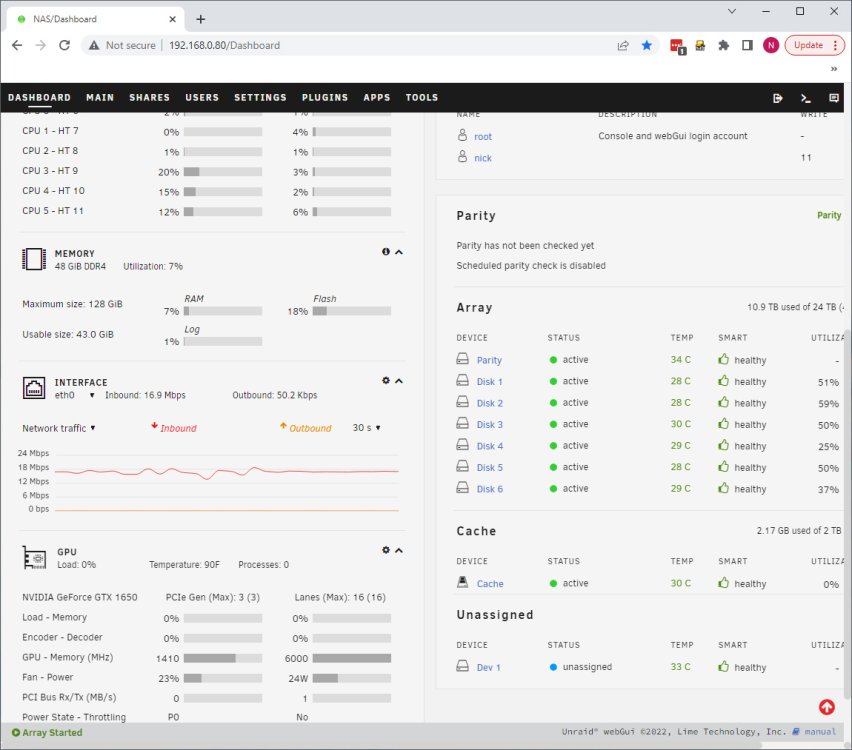
So the weird continues... ssh and sftp are disabled. as are dockers and vm's For the life of me I can't get Community Apps to load as it says there is no internet on the machine. But when I go into terminal I can ping github.com, google and everything responds as normal. While on the dashboard it shows my network traffic to the machine is a consistent 17.4mbps, netstat doesn't provide any helpful data (it only lists my desktop as being connected to it), the network traffic on my windows 10 desktop is nothing and its definitely not sending it any data. I added unassigned.devices to clear the nvme drive earlier. Now it says its mounting remote shares, but in the webgui i see nothing. Lastly, the time on the machine is fine, it shows correctly in the bios. Any help would be good. This is the latest system log: Apr 25 16:18:56 NAS avahi-dnsconfd[4059]: Successfully connected to Avahi daemon. Apr 25 16:18:56 NAS emhttpd: nothing to sync Apr 25 16:18:56 NAS unassigned.devices: Mounting 'Auto Mount' Remote Shares... Apr 25 16:18:57 NAS avahi-daemon[4050]: Server startup complete. Host name is NAS.local. Local service cookie is 2735995368. Apr 25 16:18:58 NAS avahi-daemon[4050]: Service "NAS" (/services/ssh.service) successfully established. Apr 25 16:18:58 NAS avahi-daemon[4050]: Service "NAS" (/services/smb.service) successfully established. Apr 25 16:18:58 NAS avahi-daemon[4050]: Service "NAS" (/services/sftp-ssh.service) successfully established. Apr 25 16:19:01 NAS unassigned.devices: Using Gateway '192.168.0.1' to Ping Remote Shares. Apr 25 16:21:48 NAS nginx: 2023/04/25 16:21:48 [error] 3540#3540: nchan: A message from the past has just been published. Unless the system time has been adjusted, this should never happen. Apr 25 16:24:18 NAS kernel: kvm_arch_init: 2 callbacks suppressed Apr 25 16:24:18 NAS kernel: kvm: support for 'kvm_amd' disabled by bios Apr 25 16:27:42 NAS ntpd[1396]: kernel reports TIME_ERROR: 0x41: Clock Unsynchronized Apr 25 16:28:00 NAS root: Fix Common Problems Version 2023.03.22 Apr 25 16:30:00 NAS root: Fix Common Problems: Error: Unable to communicate with GitHub.com Apr 25 16:30:00 NAS root: Fix Common Problems: Other Warning: Could not check for blacklisted plugins Apr 25 16:30:02 NAS root: Fix Common Problems: Other Warning: Could not perform unknown plugins installed checks nas-diagnostics-20230425-1626.zip