





TheJalster
Members
-
Joined
-
Last visited
Everything posted by TheJalster
-
right, so I left it on "prefer" and checked all the files. They were all in the correct location on the cache drive. I went ahead and deleted the docker, backed up my config and save files and deleted all files regarding the forest and steamCMD. pulling it fresh from the community center seems to have worked. I modified the config file to double check and it all seems to be working again. thanks for the help. its a really strange one. dont really know what caused it since I deleted the forest folder yesterday and redownloaded it from the community center, but I didnt delete the steamCMD folder. however, this time it worked.
-
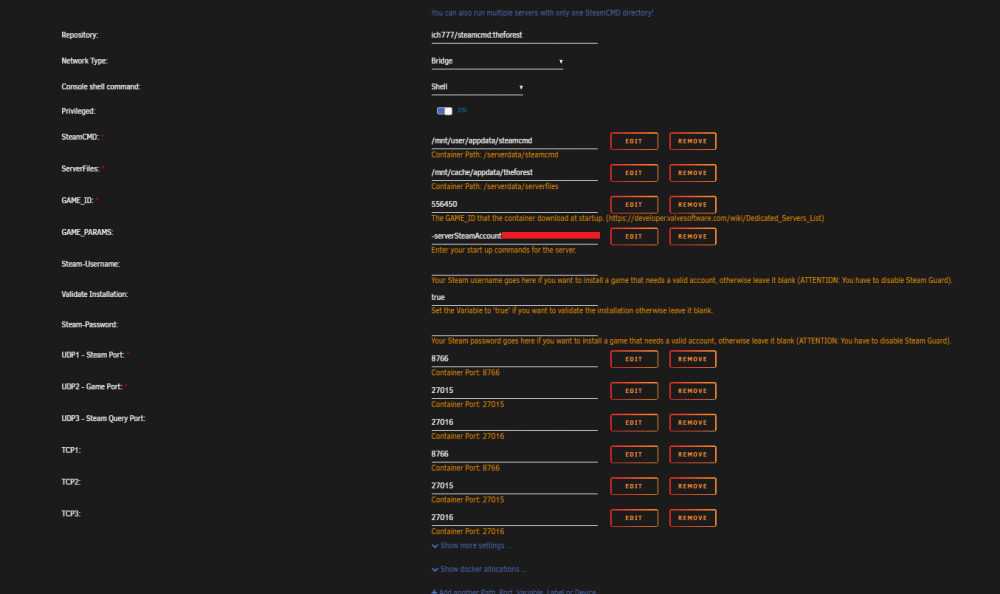
the cache settings are set to "prefer" could that be it? its moved the files off the cache and onto the main stoage. attached are the template and the error. I can try changing the settings from "Prefer" to "Only" see if that solves it.
-
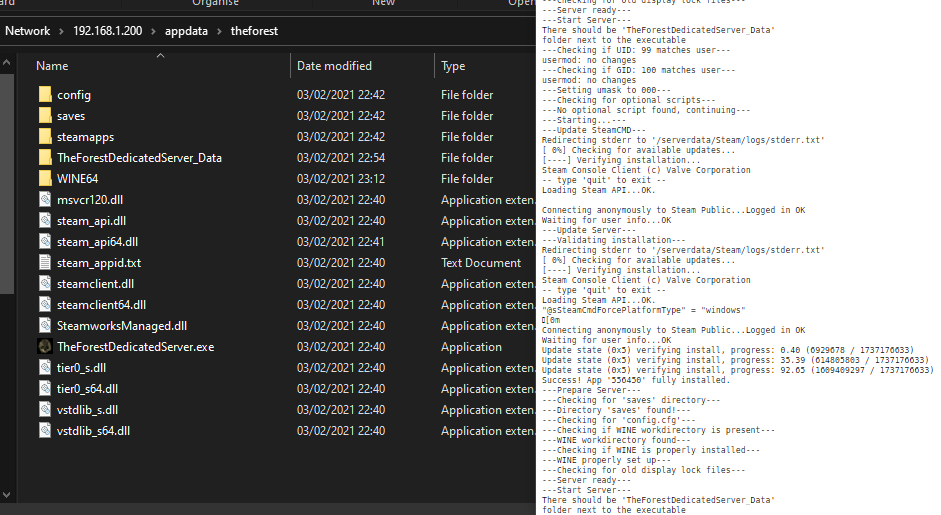
Regarding the template, Nothing was changed. the game ID is the same as what was on the template. the logs are below. the --Start Server-- isnt the issue, its the line after it: There should be 'TheForestDedicatedServer_Data' folder next to the executable you can see it at the bottom of the log. thanks for the help ---Checking if UID: 99 matches user--- ---Checking if GID: 100 matches user--- ---Setting umask to 000--- ---Checking for optional scripts--- ---No optional script found, continuing--- ---Starting...--- ---Update SteamCMD--- Redirecting stderr to '/serverdata/Steam/logs/stderr.txt' [ 0%] Checking for available updates... [----] Verifying installation... Steam Console Client (c) Valve Corporation -- type 'quit' to exit -- Loading Steam API...OK. Connecting anonymously to Steam Public...Logged in OK Waiting for user info...OK ---Update Server--- ---Validating installation--- Redirecting stderr to '/serverdata/Steam/logs/stderr.txt' [ 0%] Checking for available updates... [----] Verifying installation... Steam Console Client (c) Valve Corporation -- type 'quit' to exit -- Loading Steam API...OK. "@sSteamCmdForcePlatformType" = "windows" [0m Connecting anonymously to Steam Public...Logged in OK Waiting for user info...OK Update state (0x3) reconfiguring, progress: 0.00 (0 / 0) Update state (0x3) reconfiguring, progress: 0.00 (0 / 0) Update state (0x5) verifying install, progress: 49.47 (859392254 / 1737176633) Success! App '556450' fully installed. ---Prepare Server--- ---Checking for 'saves' directory--- ---Directory 'saves' found!--- ---Checking for 'config.cfg'--- ---Checking if WINE workdirectory is present--- ---WINE workdirectory found--- ---Checking if WINE is properly installed--- ---WINE properly set up--- ---Checking for old display lock files--- ---Server ready--- ---Start Server--- There should be 'TheForestDedicatedServer_Data' folder next to the executable ---Checking if UID: 99 matches user--- usermod: no changes ---Checking if GID: 100 matches user--- usermod: no changes ---Setting umask to 000--- ---Checking for optional scripts--- ---No optional script found, continuing--- ---Starting...--- ---Update SteamCMD--- Redirecting stderr to '/serverdata/Steam/logs/stderr.txt' [ 0%] Checking for available updates... [----] Verifying installation... Steam Console Client (c) Valve Corporation -- type 'quit' to exit -- Loading Steam API...OK. Connecting anonymously to Steam Public...Logged in OK Waiting for user info...OK ---Update Server--- ---Validating installation--- Redirecting stderr to '/serverdata/Steam/logs/stderr.txt' [ 0%] Checking for available updates... [----] Verifying installation... Steam Console Client (c) Valve Corporation -- type 'quit' to exit -- Loading Steam API...OK. "@sSteamCmdForcePlatformType" = "windows" [0m Connecting anonymously to Steam Public...Logged in OK Waiting for user info...OK Update state (0x5) verifying install, progress: 0.36 (6291456 / 1737176633) Update state (0x5) verifying install, progress: 28.87 (501553703 / 1737176633) Update state (0x5) verifying install, progress: 87.11 (1513221497 / 1737176633) Success! App '556450' fully installed. ---Prepare Server--- ---Checking for 'saves' directory--- ---Directory 'saves' found!--- ---Checking for 'config.cfg'--- ---Checking if WINE workdirectory is present--- ---WINE workdirectory found--- ---Checking if WINE is properly installed--- ---WINE properly set up--- ---Checking for old display lock files--- ---Server ready--- ---Start Server--- There should be 'TheForestDedicatedServer_Data' folder next to the executable ---Checking if UID: 99 matches user--- usermod: no changes ---Checking if GID: 100 matches user--- usermod: no changes ---Setting umask to 000--- ---Checking for optional scripts--- ---No optional script found, continuing--- ---Starting...--- ---Update SteamCMD--- Redirecting stderr to '/serverdata/Steam/logs/stderr.txt' [ 0%] Checking for available updates... [----] Verifying installation... Steam Console Client (c) Valve Corporation -- type 'quit' to exit -- Loading Steam API...OK. Connecting anonymously to Steam Public...Logged in OK Waiting for user info...OK ---Update Server--- ---Validating installation--- Redirecting stderr to '/serverdata/Steam/logs/stderr.txt' [ 0%] Checking for available updates... [----] Verifying installation... Steam Console Client (c) Valve Corporation -- type 'quit' to exit -- Loading Steam API...OK. "@sSteamCmdForcePlatformType" = "windows" [0m Connecting anonymously to Steam Public...Logged in OK Waiting for user info...OK Update state (0x5) verifying install, progress: 0.40 (6929678 / 1737176633) Update state (0x5) verifying install, progress: 35.39 (614805803 / 1737176633) Update state (0x5) verifying install, progress: 92.65 (1609409297 / 1737176633) Success! App '556450' fully installed. ---Prepare Server--- ---Checking for 'saves' directory--- ---Directory 'saves' found!--- ---Checking for 'config.cfg'--- ---Checking if WINE workdirectory is present--- ---WINE workdirectory found--- ---Checking if WINE is properly installed--- ---WINE properly set up--- ---Checking for old display lock files--- ---Server ready--- ---Start Server--- There should be 'TheForestDedicatedServer_Data' folder next to the executable
-
Hi there, Hopefully you can help me out with this one, ive looked everywhere but struggling. the error is below. I got the forest docker, made sure the IDs were correct from the pervious messages, added my token into the docker config. the server downloaded no problems, however, when I restarted this was the following error: ---Start Server--- There should be 'TheForestDedicatedServer_Data' folder next to the executable Ive checked in the appdata folder, and appdata\theforest\TheForestDedicatedServer_Data exists and is populated with all the files, im confused as to why it doesnt recognise the folder in the same location as the exe. any ideas? thanks.

